Freedom251 › Online whiteboards
OnlineWhiteboard.org
What OnlineWhiteboard.org is
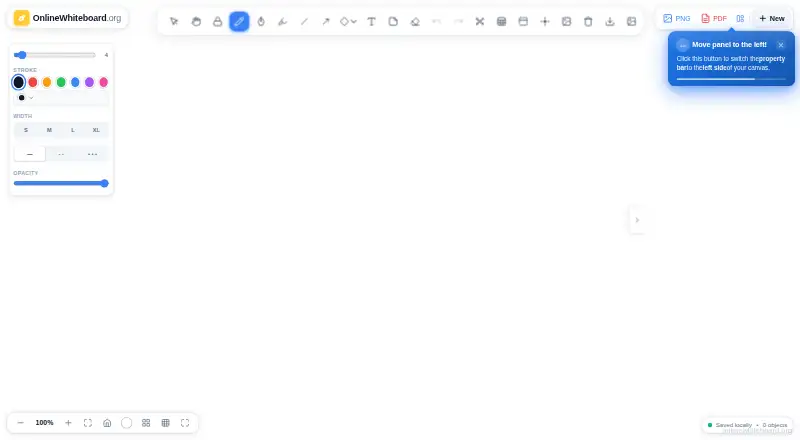
OnlineWhiteboard.org is a free browser-based whiteboard for drawing, diagrams, notes, image annotation, and visual brainstorming. Its tools include pens, a highlighter, shapes, text, sticky notes, arrows, and connectors, along with presentation mode. Users can create several boards and switch among them during one session. Boards can be exported as PNG or PDF, or saved as editable JSON project files; exports have no watermark. The site describes using the board during Zoom or Google Meet lessons, and says exported files can be shared through email, Google Classroom, Teams, Slack, or other platforms. It lists web, Android, iOS, macOS, and Windows support, plus browsers including Chrome, Firefox, Safari, Edge, Brave, and Opera, as well as Chromebook. Board content is processed in the browser and is not sent to or stored on the service's servers during normal use. The privacy policy says hosting infrastructure may collect standard server logs, and makes no claim of compliance with a specific data-protection regulation. Save work before refreshing or closing the tab: session data is cleared when the tab closes. The free plan costs nothing, with no subscription or account required.
Who it suits
The site names teachers, students, remote teams, designers, creators, project managers, and personal users as audiences. It can suit lesson activities, visual planning, or individual brainstorming where saving work before closing the tab is practical.
What it does well
- Includes drawing, diagramming, and annotation tools.
- Boards can be exported as PNG or PDF.
- Exports have no watermark.
- No account or subscription is required.
- Board content stays in the browser during normal use.
What to know first
- Session data clears when the browser tab closes.
- Save work before refreshing or closing the tab.
- The privacy policy makes no specific regulatory compliance claim.
- Hosting infrastructure may collect standard server logs.
Limits
The free session clears its data when the browser tab closes, so work must be saved before leaving. Guest collaboration is unavailable.
Plans
| Plan | Billed and limits | Price |
|---|---|---|
| Free | No subscription · No account required · No watermark on exports | Free |
As onlinewhiteboard.org lists them, read 11 Oct 2026. The maker's own page has the final word.
Getting started
- Open https://onlinewhiteboard.org/ in a supported browser
- Create a board and use the drawing, diagram, note, or annotation tools
- Switch between multiple boards during the session
- Save work before refreshing or closing the tab
- Export the board as PNG, PDF, or editable JSON
Verdict
OnlineWhiteboard.org offers a broad set of whiteboard tools and several export options at no charge. Its key limitation is session persistence: save your work before closing or refreshing the tab.
Questions
How much does OnlineWhiteboard.org cost?
The Free plan costs nothing. It has no subscription and requires no account.
Which devices and browsers are supported?
It supports web, Android, iOS, macOS, and Windows. Listed browsers include Chrome, Firefox, Safari, Edge, Brave, and Opera, plus Chromebook and iPad/iOS support.
Can boards be exported?
Yes. Boards can be exported as PNG or PDF, or saved as editable JSON project files. Exports have no watermark.
Is board content stored on the service?
During normal use, board content is processed in the browser and is not transmitted to or stored on service servers. Hosting infrastructure may collect standard server logs.
Can I collaborate with guests?
No. Guest collaboration is not available.
Facts from OnlineWhiteboard.org's own pages
- Browser and device support
- The site lists Chrome, Firefox, Safari, Edge, Brave, Opera, iPad/iOS, Android, and Chromebook, and says it also works on Windows and Mac. · onlinewhiteboard.org, 11 Oct 2026
- Compliance
- The privacy policy makes no representation that the service complies with any specific data-protection regulation, including GDPR, CCPA, COPPA, or PIPEDA. · onlinewhiteboard.org, 11 Oct 2026
- Data collection
- The privacy policy says hosting infrastructure may collect standard server logs, including IP address, browser details, access time, and requested pages. · onlinewhiteboard.org, 11 Oct 2026
- Drawing tools
- The toolkit includes pens, a highlighter, shapes, text, sticky notes, arrows, and connectors. · onlinewhiteboard.org, 11 Oct 2026
- Exports
- Boards can be exported as PNG or PDF, and saved as an editable JSON project file. · onlinewhiteboard.org, 11 Oct 2026
- Multiple boards
- Users can create and switch between multiple boards in one session. · onlinewhiteboard.org, 11 Oct 2026
- Other integrations
- The export guide says PNG or PDF files can be shared through email, Google Classroom, Teams, Slack, or other platforms. · onlinewhiteboard.org, 11 Oct 2026
- Privacy
- The privacy policy says board content is processed in the browser and is not transmitted to or stored on the service’s servers during normal use. · onlinewhiteboard.org, 11 Oct 2026
- Saving limitation
- The export guide advises saving work before refreshing or closing the tab and says session data is cleared when the browser tab closes. · onlinewhiteboard.org, 11 Oct 2026
- Teaching use
- The site describes using the board during Zoom or Google Meet lessons and sharing exported PDFs through Google Classroom. · onlinewhiteboard.org, 11 Oct 2026
- What it does
- It is a browser-based whiteboard for drawing, diagrams, notes, image annotation, and visual brainstorming. · onlinewhiteboard.org, 11 Oct 2026
- Who it is for
- The site names teachers, students, remote teams, designers, creators, project managers, and personal users as audiences. · onlinewhiteboard.org, 11 Oct 2026
Where OnlineWhiteboard.org stands on Freedom251
- Online whiteboards#17 of 58
- Online Whiteboard Tools#22 of 56