Freedom251 › Invoice Approval Software
Onivo AP
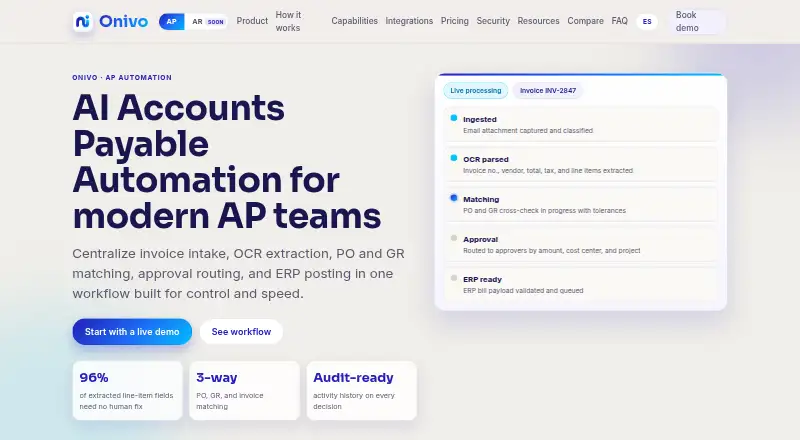
What Onivo AP is
Onivo AP is a web-based accounts payable service that brings invoice intake, extraction, matching, approvals, and ERP posting into one workflow. Invoices can be emailed to a dedicated mailbox or uploaded as PDF, image, or HEIC files from a desktop or phone. Vendor-aware OCR extracts details and scores confidence so low-confidence fields can be reviewed. Two-way and three-way matching support customer-set price, quantity, and amount tolerances. Approval routing can use amount, cost center, or project, with role-based action queues and required explanations for overrides. Onivo says it catches duplicate and reissued invoices before payment. Cloud accounting platforms connect through live APIs; desktop and on-premise ERPs use export files. Full bill posting is live over cloud API connections, with additional coverage rolling out. Pricing is quoted on a short call and tiered by monthly invoice volume and number of companies; every tier includes the full workflow. The service is hosted on Google Cloud in us-central1. Onivo says invoice data is not used to train third-party foundation models, but its document-review step sends invoice content to Anthropic’s API and can be disabled per deployment. Onivo is not SOC 2 certified today.
Who it suits
Onivo AP is intended for accounts payable teams, including those at food distributors, property-management firms, and clinic back offices. It may suit teams needing invoice matching, approval routing, and connections to cloud or desktop accounting systems.
What it does well
- Accepts PDF, image, and HEIC invoices.
- Supports two-way and three-way matching.
- Approvals can route by amount, cost center, or project.
- Includes an approval audit trail.
- Every tier includes the full workflow.
What to know first
- Pricing is quoted and tiered by volume and company count.
- Not SOC 2 certified today.
- Document review sends invoice content to Anthropic’s API unless disabled.
- Full bill posting is live over cloud API connections; more coverage is rolling out.
Limits
The subscription is tiered by monthly invoice volume and number of companies, and its price is quoted on a short call. Full bill posting is live over cloud API connections, with more coverage rolling out.
Plans
| Plan | Billed and limits | Price |
|---|---|---|
| Onivo AP subscription | Per company; quote based on monthly invoice volume and number of companies · Full workflow in every tier · invoice capture/OCR · line coding · 2-way and 3-way matching · approval routing · ERP sync · audit trail · duplicate protection · multi-invoice PDF splitting | On request |
As onivo.ai lists them, read 21 Oct 2026. The maker's own page has the final word.
Getting started
- Visit the Onivo AP website.
- Contact Onivo for a short pricing call.
- Set up the cloud accounting connection or ERP export route.
- Import data by CSV and configure matching tolerances and approval rules.
Verdict
Onivo AP covers invoice capture, review, matching, approvals, and ERP connections, with tiering based on invoice volume and company count. Teams should consider its current ERP posting coverage, SOC 2 status, and document-review data handling before adopting it.
Questions
How is Onivo AP priced?
The subscription price is quoted on a short call. Tiers depend on monthly invoice volume and number of companies, and each tier includes the full workflow.
Which platforms does Onivo AP support?
Onivo AP is web-based.
How does it connect to ERPs?
Cloud accounting platforms connect through live APIs. Desktop and on-premise ERPs use accountant-ready export files; full bill posting is live over cloud API connections.
Can invoice data be used to train third-party AI models?
Onivo states invoice data is not used to train third-party foundation models. The document-review step sends invoice content to Anthropic's API and can be disabled per deployment.
Is Onivo AP SOC 2 certified?
Onivo states that it is not SOC 2 certified today.
How long does implementation take?
For cloud-accounting shops, implementation typically takes days to a couple of weeks and includes CSV imports, ERP connection, and setting tolerances and approval rules.
Facts from Onivo AP's own pages
- Access controls
- Platform administrators must use MFA, new-device sign-ins trigger alerts, and customer users receive per-screen role permissions. · onivo.ai, 21 Oct 2026
- AI data use
- Onivo states invoice data is not used to train third-party foundation models; its document-review step sends invoice content to Anthropic's API and can be disabled per deployment. · onivo.ai, 4 Oct 2026
- AI training policy
- Onivo says customer invoice data is not used to train third-party foundation models; vendor-specific learning uses the customer's corrections. · onivo.ai, 21 Oct 2026
- Anthropic processing
- The AI document-review step sends invoice content to Anthropic's API, but Onivo says that step can be disabled per deployment. · onivo.ai, 21 Oct 2026
- Approval overrides
- Override controls require a mandatory justification. · onivo.ai, 21 Oct 2026
- Approval routing
- Approval chains can route by amount, cost center, and project, with role-based action queues. · onivo.ai, 21 Oct 2026
- Approvals
- Approval routing can use amount, cost center, and project, with role-based action queues and mandatory justification for overrides. · onivo.ai, 4 Oct 2026
- AR availability
- Onivo AR, covering cash application, collections, dunning, disputes, and a customer portal, is described as early access or launching soon. · onivo.ai, 21 Oct 2026
- Audit trail
- Invoice edits, extraction corrections, match results, overrides, approvals, and exports are recorded in a tamper-evident hash-chained log. · onivo.ai, 21 Oct 2026
- Compliance
- Onivo states it is not SOC 2 certified today. · onivo.ai, 4 Oct 2026
- Duplicate prevention
- Duplicate and reissued invoices are detected and held before they can be paid twice. · onivo.ai, 21 Oct 2026
- Duplicate protection
- Onivo says it catches duplicate and reissued invoices before they are paid twice. · onivo.ai, 4 Oct 2026
- Encryption
- Data uses TLS in transit and encryption at rest; ERP credentials and vendor bank details receive additional application-layer encryption with a dedicated key. · onivo.ai, 21 Oct 2026
- ERP connections
- Cloud accounting systems connect through OAuth or token-based live APIs, while desktop and on-premise systems use structured export files. · onivo.ai, 21 Oct 2026
- ERP integrations
- Cloud accounting platforms connect through live APIs, while desktop and on-premise ERPs use accountant-ready export files; the page says full bill posting is live over cloud API connections, with more coverage rolling out. · onivo.ai, 4 Oct 2026
- ERP mapping
- Vendor records, GL accounts, and supported dimensions such as classes, locations, departments, and projects are synchronized and mapped. · onivo.ai, 21 Oct 2026
- ERP sync safeguards
- Before creating a bill, Onivo queries the ERP to avoid duplicates; failed posts are retried and sync status is logged. · onivo.ai, 21 Oct 2026
- Exception handling
- Invoices that fail a tolerance are held as exceptions with the conflicting values shown for a person to decide. · onivo.ai, 21 Oct 2026
- Hosting
- Onivo AP runs on Google Cloud in the us-central1 region, and OCR uses Google Document AI in Onivo's project. · onivo.ai, 21 Oct 2026
- Implementation
- For cloud-accounting shops, implementation typically takes days to a couple of weeks and includes CSV imports, ERP connection, and setting tolerances and approval rules. · onivo.ai, 4 Oct 2026
- Implementation time
- For cloud-accounting customers, implementation is typically described as taking days to a couple of weeks using CSV imports, ERP connection, and rule setup. · onivo.ai, 21 Oct 2026
- Intended users
- The maker describes workflows for AP teams such as food distributors, property-management firms, and clinic back offices. · onivo.ai, 4 Oct 2026
- Invoice capture
- Invoices can arrive through a dedicated mailbox or upload, with PDF, image, and HEIC files supported from desktop or phone. · onivo.ai, 4 Oct 2026
- Invoice intake
- Invoices can enter through a dedicated mailbox or manual upload as PDF, image, or HEIC files. · onivo.ai, 21 Oct 2026
Where Onivo AP stands on Freedom251
- Invoice Approval Software#34 of 37