Freedom251 › Synthetic Monitoring

OneUptime
What OneUptime is
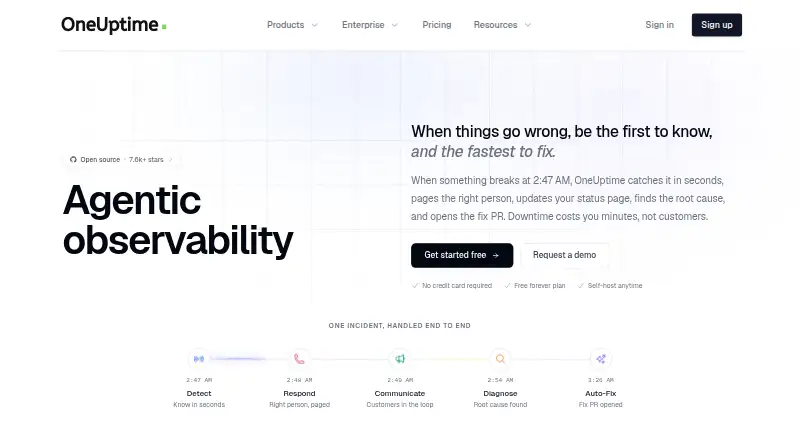
OneUptime combines monitoring, observability, and incident response in one platform. Incident tools include incident management, on-call rotations, alerts, and status pages; observability covers logs, metrics, traces, error tracking, and application performance monitoring. Monitoring checks can run as often as every 10 seconds, and synthetic tests simulate user flows. OneUptime says its AI investigates incidents, suggests resolutions, and can create fix pull requests for review. The pricing page lists 5,000+ integrations, including examples such as Slack, Teams, and Jira. The core platform is open source under Apache 2.0 and can be inspected, modified, or self-hosted. Self-hosted deployments can run on Kubernetes or Docker Compose, including in air-gapped environments. The Free plan includes one status page, 100 subscribers, unlimited manual monitors, and email support with a five-business-day support SLA; it has no uptime SLA, and active monitors cost $1 per month each. Growth is listed at $22 a month, with unlimited status pages and subscribers, API access, and a 99.9% uptime target.
Who it suits
OneUptime suits teams that need monitoring, observability, and incident response together, including teams considering self-hosting. Its self-hosted deployments are described as covering regulated environments and production use cases.
What it does well
- Incident management includes on-call rotations and alerts
- Synthetic tests simulate user flows
- Core platform is open source under Apache 2.0
- Self-hosting supports Kubernetes or Docker Compose
What to know first
- Free plan has no uptime SLA
- Free plan includes one status page and 100 subscribers
- Active monitors cost $1 per month each
- Free-plan email support has a five-business-day SLA
Limits
The Free plan allows one status page and 100 subscribers, has no uptime SLA, and charges $1 per active monitor per month. Free support is by email with a five-business-day support SLA.
Plans
| Plan | Billed and limits | Price |
|---|---|---|
| Free | Free · 1 status page · 100 subscribers · unlimited manual monitors · active monitors $1/month · 5 business day email support · no uptime SLA (best effort) | Free |
| AI LLM Token Usage | Per 1,000 tokens · Incident analysis · root cause suggestions · automated runbook generation · log analysis and anomaly detection | $0.02, paid once |
| Telemetry: Logs, Traces and Metrics | Per GB ingested; 15 day retention · Logs, traces and metrics ingestion · custom retention · native OpenTelemetry support | $0.10 a month |
| SMS Notifications | Per SMS sent · SMS alerts; pricing may vary for high-risk regions | $0.10, paid once |
| WhatsApp Notifications | Per message sent · WhatsApp alerts | $0.10, paid once |
| Phone Call Notifications | Per minute per call · Voice call alerts; pricing may vary for high-risk regions | $0.10 a month |
| Active Monitoring | Per monitor per month · Monitoring from multiple locations · checks every minute · 90 day log storage · discounts available above 100 monitors | $1 a month |
| Growth | Monthly or Yearly · Unlimited status pages and subscribers · 5,000+ integrations · API access · 500 workflow runs/month · 1 business day email support · 99.9% uptime target | $22 a month |
The first 8 of 10 plans, as oneuptime.com lists them, read 7 Oct 2026. The maker's own page has the final word. Every plan
Getting started
- Visit https://oneuptime.com/.
- Choose the hosted service or review the open-source core for self-hosting.
- For self-hosting, use Kubernetes or Docker Compose.
- Start with the Free plan or the 14-day trial.
- Add active monitors as needed; they cost $1 per month each on the Free plan.
OneUptime is a broad monitoring and incident-response platform for teams that want telemetry, alerting, on-call coordination, and status communication in one place. It is especially suited to organizations that need self-hosting or regulated-environment deployment, while smaller teams should assess its usage-based charges and plan limits carefully.
Overview
OneUptime covers monitoring, observability, and incident response rather than a single operational task. Incident management includes on-call rotations, escalation policies, alerts, status pages, stakeholder updates, and post-incident reviews. That unified scope can replace several disconnected tools, but it may be excessive for a team seeking only synthetic checks or application profiling.
The core platform is open source under Apache 2.0. Teams can inspect and modify it, then deploy on Kubernetes or Docker Compose, including air-gapped environments. Hosted use is available alongside self-hosting, giving regulated organizations more control over where the system runs. The Trust Center reports SOC 2 Type II attestation, ISO/IEC 27001 certification, and GDPR compliance. HIPAA compliance is available for covered entities with a Business Associate Agreement.
Key features
Observability includes logs, metrics, traces, error tracking, and application performance monitoring. Monitoring checks can run every 10 seconds, and synthetic tests model user flows instead of checking only a single endpoint. More than 5,000 integrations are listed, with Slack, Teams, and Jira named as examples, which helps connect alerts to established collaboration and ticketing workflows.
OneUptime’s AI investigates incidents, proposes resolutions, analyzes logs and anomalies, generates runbooks, and can create fix pull requests for review. That may shorten diagnosis and response, while the review step remains important before accepting generated changes.
Pricing
The Free plan costs nothing. It includes one status page, 100 subscribers, unlimited manual monitors, and email support with a 5 business day support SLA. Active monitors cost $1 per monitor per month, and the plan has no uptime SLA beyond best effort. It suits evaluation and small, low-criticality deployments, but recurring monitor charges mean it is not entirely cost-free for active checking.
Growth costs $22 a month, billed monthly or yearly. It adds unlimited status pages and subscribers, 5,000+ integrations, API access, 500 workflow runs per month, one-business-day email support, and a 99.9% uptime target. It is the practical hosted starting point for teams that outgrow the Free caps.
Scale costs $99 a month, billed monthly or yearly. SSO, unlimited teams, advanced access control, 2,000 workflow runs per month, and email and chat support with a 6 hour support SLA target larger or more structured organizations. Enterprise uses custom annual pricing and adds custom features, a dedicated engineer, one-hour phone support, custom data residency and retention, and private cloud or SaaS deployment.
Additional services are metered. AI LLM usage is $0.02 per 1,000 tokens; WhatsApp and SMS notifications are $0.10 per message, with high-risk-region variation for SMS; phone calls are $0.10 per minute, also with regional variation. Logs, traces, and metrics ingestion costs $0.10 per GB per month with 15 day retention, while Active Monitoring costs $1 per monitor per month for checks from multiple locations, one-minute intervals, and 90 day log storage. Discounts are available above 100 monitors. A 14-day trial is offered.
Platforms
OneUptime supports web, API, Linux, and self-hosted deployments. Kubernetes and Docker Compose options, including air-gapped operation, make it a stronger fit for controlled infrastructure than hosted-only services.
Who it's for
Choose OneUptime when your team wants monitoring, telemetry, incident response, and on-call operations connected in one system, particularly where open-source inspection or self-hosting matters. It is less compelling for buyers who need a narrowly focused monitor with simple, predictable pricing, since active checks, telemetry, notifications, and AI usage can add separate charges.
Pros and cons
Pros
- Broad operational coverage: monitoring, observability, incident management, on-call, and status communication share one platform.
- Deployment control: Apache 2.0 code and Kubernetes, Docker Compose, and air-gapped self-hosting support regulated or restricted environments.
- Deep integration and automation scope: 5,000+ integrations, synthetic user-flow tests, and AI-assisted investigation connect detection with response.
- Clear higher-tier targets: Growth and Scale include a 99.9% uptime target, with stronger support commitments at Scale.
Cons
- Free usage is constrained: one status page, 100 subscribers, no uptime SLA, and $1-per-active-monitor billing limit the supposedly free entry point.
- Metered add-ons complicate forecasting: telemetry, notifications, calls, AI tokens, and active monitors are charged separately.
- Scale is a substantial step up: the $99 monthly tier is needed for SSO, advanced access control, and unlimited teams.
Alternatives
For synthetic checks as the primary need, consider Synthetic Monitoring tools. Teams focused on code-level performance analysis can compare Continuous Profiling Tools. For a dedicated incident workflow, see IT Incident Management Software or On-Call Management Software. Container-focused operations may prefer Container Monitoring.
Dotcom-Monitor offers a free plan for up to 25 targets, five-minute checks, two locations, and email alerts, making it a simpler small-monitoring choice. Dynatrace Kubernetes Monitoring suits buyers wanting Kubernetes monitoring billed at $0.002 per pod-hour. Grafana Cloud Application Observability is an alternative for teams preferring Grafana’s host-hour model, including 2,232 free host hours.
New Relic Kubernetes Monitoring fits teams seeking a Kubernetes observability service with 100 GB of free data ingest on its annual Pro plan. ManageEngine Applications Manager is suited to smaller application or server estates, with a free allowance of five apps or servers. Checkly is a focused API and browser-check option with a Hobby plan offering 10 uptime monitors and separate browser and API run quotas.
GoPinger is a lightweight choice for five monitors, five-minute checks, email and webhook alerts, and one status page. HostTracker suits very small setups starting with two monitors and 30-minute checks.
Verdict
OneUptime is a strong choice for teams that want one open-source-capable platform spanning monitoring, observability, incident response, and on-call work, especially when self-hosting or air-gapped deployment is important. Look elsewhere if you need only a narrow monitoring function or a fully predictable bill without per-monitor and per-usage charges.
Verdict
OneUptime brings service monitoring and incident response together, with both hosted plans and self-hosted deployment options. The free tier has a limited status-page allowance, no uptime SLA, and separate charges for active monitors.
Questions
Is OneUptime free?
Yes. The Free plan costs nothing and includes one status page, 100 subscribers, and unlimited manual monitors. Active monitors cost $1 per month each.
How much do paid plans cost?
Paid pricing starts at $22/user/mo. Growth is $22 a month, Scale is $99 a month, and Enterprise has custom annual pricing.
Is there a free trial?
Yes. OneUptime lists a 14-day trial.
What platforms does OneUptime support?
It is available through the web and API, on Linux, and as a self-hosted deployment. Self-hosted installations can run on Kubernetes or Docker Compose.
Is OneUptime open source?
Its core platform is open source under Apache 2.0 and can be inspected, modified, and self-hosted.
What integrations does it offer?
The pricing page lists 5,000+ integrations. Examples named on the homepage are Slack, Teams, and Jira.
Facts from OneUptime's own pages
- AI
- OneUptime says its AI investigates incidents, suggests resolutions, and can create fix pull requests for review. · oneuptime.com, 7 Oct 2026
- Free plan limits
- The Free plan includes one status page and 100 subscribers, with no uptime SLA and active monitors charged at $1 per month each. · oneuptime.com, 7 Oct 2026
- HIPAA
- The Trust Center says HIPAA compliance is available with a Business Associate Agreement for covered entities. · oneuptime.com, 7 Oct 2026
- Incident response
- The platform provides incident management, on-call rotations, alerts, and status pages. · oneuptime.com, 7 Oct 2026
- Integrations
- The pricing page lists 5,000+ integrations, and the homepage names Slack, Teams, and Jira as examples. · oneuptime.com, 7 Oct 2026
- Intended users
- The About page says the open-source platform is for teams of all sizes, while self-hosted deployment covers regulated environments and production use cases. · oneuptime.com, 7 Oct 2026
- Monitoring
- Monitoring supports checks as often as every 10 seconds and synthetic tests that simulate user flows. · oneuptime.com, 7 Oct 2026
- Observability
- OneUptime includes logs, metrics, traces, error tracking, and application performance monitoring. · oneuptime.com, 7 Oct 2026
- Open source
- The About page says the core platform is open source under Apache 2.0 and can be inspected, modified, and self-hosted. · oneuptime.com, 7 Oct 2026
- Product
- OneUptime combines monitoring, observability, and incident response on one platform. · oneuptime.com, 7 Oct 2026
- Security
- The Trust Center lists SOC 2 Type II as attested, ISO/IEC 27001 as certified, and GDPR as compliant, with reports available under NDA on request. · oneuptime.com, 7 Oct 2026
- Self-hosting
- The self-hosted edition can run on Kubernetes or Docker Compose, including in air-gapped environments. · oneuptime.com, 7 Oct 2026
- Support
- The Free plan includes email support with a 5 business day support SLA, while Scale lists email and chat support with a 6 hour support SLA. · oneuptime.com, 7 Oct 2026
Where OneUptime stands on Freedom251
- Synthetic Monitoring#6 of 43
- Site Reliability Engineering Platforms#2 of 13
- Continuous Profiling Tools#9 of 30
- On-Call Management Software#9 of 30
- Container Monitoring#21 of 49
- IT Incident Management Software#14 of 31