Freedom251 › Gaming Peripheral Software

Nacon Revolution X App
What Nacon Revolution X App is
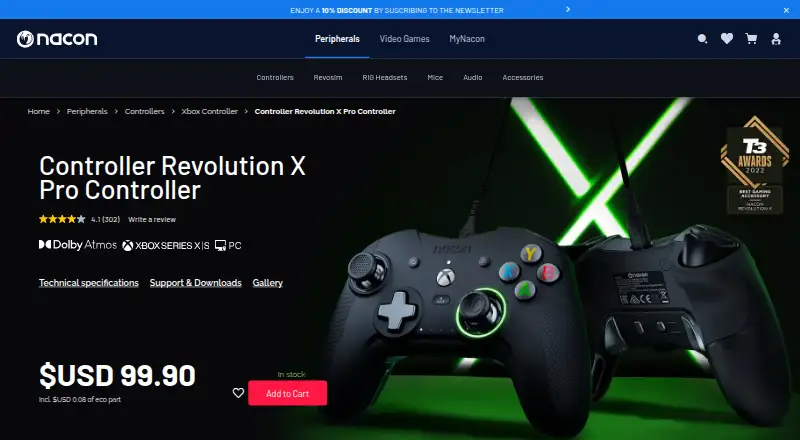
Nacon Revolution X App is a free companion app for configuring the Revolution X Pro Controller for Xbox and Windows PC. It lets players create and save up to four profiles on the controller, with settings for button mapping, stick and trigger response curves, D-pad directions, vibration, and audio. The controller also has four shortcut buttons, which can be configured in the app or directly in standard mode.
The app is available through the Microsoft Store for PC and Xbox consoles. Nacon says it is not compatible with Mac. The wired controller is designed for Xbox Series X|S, Xbox One, and Windows 10 PC, and connects with a detachable 3-meter USB-C cable; it has no wireless connection. Dolby Atmos for Headphones access is included, and Dolby Access must be installed to use the feature. Macro support is not available; Nacon says macros are incompatible with esports regulations.
The app costs nothing plan, which supports up to four profiles stored on the controller. Nacon describes the controller as designed for competitive players seeking performance and comfort during long gaming sessions. Nacon lists US warranty support by email and phone on weekdays, 9 a.m. to 6 p.m. Eastern Time, excluding French public holidays.
Who it suits
This app suits Revolution X Pro Controller owners who want to adjust button mapping, response curves, vibration, audio, or shortcut buttons. Nacon describes the controller as designed for competitive players seeking performance and comfort during long gaming sessions.
What it does well
- Free app available from the Microsoft Store for PC and Xbox consoles.
- Save up to four profiles on the controller.
- Profiles can adjust button mapping and stick and trigger response curves.
- Four shortcut buttons can be configured.
- Dolby Atmos for Headphones access is included.
What to know first
- The app is not compatible with Mac.
- The controller has no wireless connection.
- Macro support is not available.
Limits
The free app supports up to four profiles stored on the controller. The controller does not support macros and has no wireless connection.
Plans
| Plan | Billed and limits | Price |
|---|---|---|
| Revolution X app | Microsoft Store app for PC and Xbox consoles · up to 4 profiles stored on controller | Free |
As nacongaming.com lists them, read 7 Oct 2026. The maker's own page has the final word.
Getting started
- Get the Revolution X app from the Microsoft Store for PC or Xbox.
- Connect a compatible Revolution X Pro Controller.
- Create a profile and adjust its available settings.
- Save up to four profiles on the controller.
- Install Dolby Access to use Dolby Atmos for Headphones.
Verdict
Choose the app if you use a Revolution X Pro Controller and want to customize its profiles and shortcut buttons at no cost. Look elsewhere if you need Mac compatibility, wireless controller connectivity, or macros.
Questions
Is Nacon Revolution X App free?
Yes. Its listed plan costs nothing.
Which platforms can run the app?
It is available from the Microsoft Store for PC and Xbox consoles. Nacon says it is not compatible with Mac.
Which controller does the app customize?
It customizes the wired Revolution X Pro Controller, designed for Xbox Series X|S, Xbox One, and Windows 10 PC.
How many profiles can I save?
Up to four profiles can be saved on the controller.
Can I use Dolby Atmos for Headphones?
Access is included, but Dolby Access must be installed to use the feature.
Does the controller support macros or wireless use?
No. Macro support is not available, and the controller has no wireless connection.
Facts from Nacon Revolution X App's own pages
- Audio
- Dolby Atmos for Headphones access is included, and Dolby Access must be installed to use the feature. · nacongaming.com, 7 Oct 2026
- Company
- Nacon’s corporate site says it is a Bigben group company founded in 2019. · corporate.nacongaming.com, 7 Oct 2026
- Connectivity
- The Revolution X Pro Controller uses a detachable 3-meter USB-C cable and has no wireless connection. · nacongaming.com, 7 Oct 2026
- Controller compatibility
- The wired controller is designed for Xbox Series X|S, Xbox One, and Windows 10 PC. · nacongaming.com, 7 Oct 2026
- Customization
- Profiles can adjust button mapping, stick and trigger response curves, D-pad directions, vibration, and audio settings. · nacongaming.com, 7 Oct 2026
- Founded
- 2019 · nacongaming.com, 28 Sept 2026
- Headquarters
- Fretin, France · nacongaming.com, 28 Sept 2026
- Intended users
- Nacon describes the controller as designed for competitive players seeking performance and comfort during long gaming sessions. · nacongaming.com, 7 Oct 2026
- Notable limitation
- The controller does not support macros because Nacon says they are incompatible with esports regulations. · nacongaming.com, 7 Oct 2026
- Platform availability
- The app is available from the Microsoft Store for PC and Xbox consoles; Nacon says it is not compatible with Mac. · nacongaming.com, 7 Oct 2026
- Profiles
- The app can create and save up to four profiles on the controller. · nacongaming.com, 7 Oct 2026
- Purpose
- The Revolution X app customizes the Revolution X Pro Controller for Xbox and Windows PC. · nacongaming.com, 7 Oct 2026
- Security and compliance
- The product page links to a safety document and a certificate of conformity; it makes no software security or compliance claims. · nacongaming.com, 7 Oct 2026
- Shortcuts
- The controller has four shortcut buttons that can be configured in the app or directly in standard mode. · media.nacongaming.com, 7 Oct 2026
- Support
- Nacon lists US warranty support at [email protected] and 1-833-NACONUS, Monday to Friday, 9 a.m. to 6 p.m. Eastern Time, excluding French public holidays. · nacongaming.com, 7 Oct 2026
Where Nacon Revolution X App stands on Freedom251
- Gaming Peripheral Software#21 of 39