Freedom251 › Keyboard and Mouse Customization Software

NZXT CAM
by NZXT CAM
What NZXT CAM is
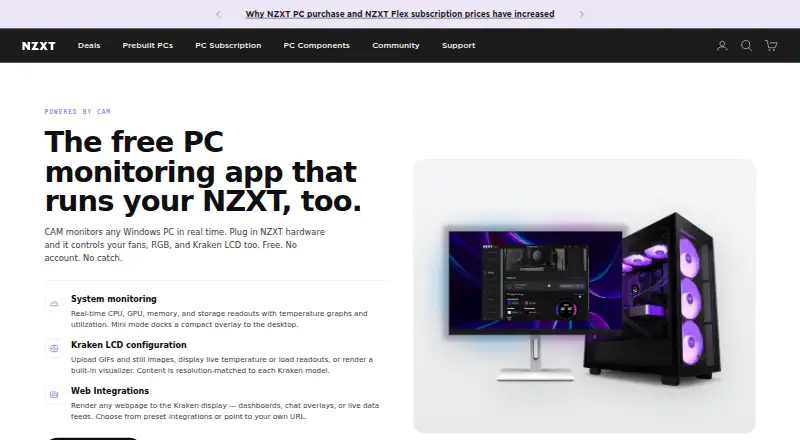
NZXT CAM is free Windows software for monitoring PCs and controlling compatible NZXT hardware. It displays live CPU, GPU, memory, and storage readings, along with temperature graphs and utilization. Mini mode docks a compact monitoring overlay on the desktop. For Kraken LCDs, CAM can show uploaded GIFs and images, temperature or load readouts, a visualizer, and preset or user-provided webpages. Developers can create Kraken web integrations using HTML, CSS, or JavaScript and access CAM monitoring data through its API. Depending on the device, the software can control NZXT fans, RGB lighting, Kraken LCDs, and other supported NZXT products. System monitoring works without NZXT hardware, but fan-speed changes require an NZXT fan controller. CAM supports Windows 10 and 11; Windows 7 and 8.1 are no longer supported. NZXT says it has no plans for macOS or Linux versions. When online, CAM sends anonymized usage and performance data, which users can disable in settings. An account is not required.
Who it suits
CAM suits Windows PC users who want component monitoring, with additional controls for people using compatible NZXT hardware. Fan-speed changes require an NZXT fan controller.
What it does well
- Monitors CPU, GPU, memory, and storage in real time.
- Mini mode provides a compact desktop overlay.
- Works for system monitoring without NZXT hardware.
- Free to use, with no account required.
What to know first
- Available only for Windows.
- Windows 7 and 8.1 are no longer supported.
- Fan-speed control requires an NZXT fan controller.
- Online use sends anonymized usage and performance data by default.
Limits
The free plan provides Windows PC monitoring without an account, and monitoring works without NZXT hardware. Fan-speed control requires an NZXT fan controller; CAM does not control RAM or GPU RGB.
Plans
| Plan | Billed and limits | Price |
|---|---|---|
| Free | Windows PC · no account required · system monitoring works without NZXT hardware | Free |
As nzxt.com lists them, read 4 Oct 2026. The maker's own page has the final word.
Getting started
- Visit the NZXT CAM website.
- Use a Windows 10 or Windows 11 PC.
- Start with system monitoring; it works without NZXT hardware or an account.
- Use compatible NZXT hardware for the device controls available to that product.
- Turn off anonymized usage and performance data in CAM Settings if you prefer.
NZXT CAM is a free Windows utility for monitoring PC components and managing compatible NZXT hardware. It is strongest for NZXT-equipped builders, though any supported Windows PC can use its monitoring dashboard without extra hardware. The main limitation is its Windows-only reach and the narrower controls available outside NZXT’s ecosystem.
Overview
CAM displays live CPU, GPU, memory and storage readings, with temperature graphs and utilization figures. Monitoring works without NZXT hardware, so it can serve as a straightforward, no-cost status panel for a Windows machine. Mini mode adds a compact desktop overlay, keeping key readings visible without leaving a full application window open.
Kraken LCD owners get the most distinctive experience. CAM can place uploaded images or GIFs on the display, show live temperature or load values, and run a built-in visualizer. It can also render preset or user-supplied webpages, including community integrations. Those display features are a compelling reason to use CAM with a compatible Kraken, but do not matter to users seeking only general monitoring.
Key features
Monitoring and device control
Depending on the connected product, CAM controls NZXT fans, RGB lighting, Kraken LCDs and other supported NZXT devices. Fan-speed adjustment has an important hardware requirement: an NZXT fan controller is necessary. Without one, CAM still reports system data but cannot change fan speeds.
Lighting control is similarly specific. CAM manages lighting on NZXT devices and standard RGB accessories connected to an NZXT motherboard, but it does not control RAM or GPU RGB directly. That makes it a sensible controller for an NZXT-centered build, not a universal solution for every illuminated component.
Kraken web integrations
Webpage rendering makes Kraken displays more flexible than a fixed set of gauges. NZXT says developers can create integrations with HTML, CSS and JavaScript and use CAM monitoring data through its API. This suits technically minded owners who want custom display content; it is unnecessary complexity if you only need temperatures or a static image.
Data and support
When online, CAM sends anonymized usage and performance data, with an option to disable this in CAM Settings. NZXT’s privacy policy says the app may also collect system configuration, component details, installed games and applications, and software-usage metrics. Users needing assistance are directed to NZXT’s Support Center and request form.
Pricing
CAM is free: the Free plan costs nothing and runs on a Windows PC. No account is required, and system monitoring works without NZXT hardware. There is no free trial because the product itself is free. The plan includes both addressable RGB control and cross-device sync, plus lighting profiles, but no game lighting effects.
Because there are no paid tiers, there is no subscription renewal or seat quota to manage. The trade-off is functional rather than financial: richer controls depend on owning compatible NZXT equipment, and fan adjustment requires an NZXT controller.
Platforms
CAM supports Windows 10 and Windows 11. Windows 7 and 8.1 are no longer supported, and NZXT has no plans for macOS or Linux versions. It is therefore a poor fit for households that need one monitoring tool across multiple desktop operating systems.
Who it's for
Choose CAM if you have an NZXT fan controller, lighting, motherboard accessories or Kraken LCD and want those devices managed alongside live component readings. It also works for a Windows user who wants a free monitoring overlay without buying NZXT hardware. Look elsewhere if you need RAM or GPU RGB control, fan control without NZXT hardware, or a macOS/Linux client.
Pros and cons
- Pros: free monitoring works without an account or NZXT hardware; live readings, graphs and a compact overlay cover everyday status checks; Kraken displays support media, live metrics, visualizers and webpages; HTML, CSS and JavaScript integrations can use CAM monitoring data.
- Cons: Windows 10/11 only, with no macOS or Linux version; fan-speed changes require an NZXT fan controller; RAM and GPU RGB are outside its direct control; online use can send system and software information unless data sharing is disabled.
Alternatives
For broader lighting coverage, compare RGB Lighting Software. If your priority is configuring input devices, see Keyboard and Mouse Customization Software; for a wider accessory focus, browse Gaming Peripheral Software.
Nexus is a free option spanning Android, iOS, Linux, macOS, web and Windows, making it the better direction when cross-platform access matters. GALAX Xtreme Tuner Plus is aimed at GALAX graphics-card owners and requires Xtreme Tuner PC software. OpenRGB is free, open source and supports Windows, macOS and Linux, so it is worth considering for a broader, non-NZXT lighting setup. Razer Chroma App targets Razer hardware on Windows and macOS. G.SKILL Trident Z Lighting Control is a Windows utility for compatible Trident Z lighting. Logitech G HUB is the natural choice for Logitech G devices, with LIGHTSYNC customization, device configuration and game profiles. SignalRGB offers Windows monitoring and cooling on its free tier, with a paid Pro tier for expanded features. SteelSeries Moments is another free Windows alternative.
Verdict
NZXT CAM is a strong choice for Windows users who want free component monitoring and already own NZXT hardware, especially a Kraken LCD or fan controller. Its clear advantage is combining a no-cost dashboard with meaningful NZXT device control and customizable Kraken displays. Choose another tool if you need macOS or Linux support, universal RGB control, or fan adjustment without NZXT-specific hardware.
Verdict
CAM offers free PC monitoring on Windows, with extra features for compatible NZXT hardware. Users who need macOS or Linux support will not find a version here.
Questions
How much does NZXT CAM cost?
The Free plan costs nothing.
Does CAM require an account or NZXT hardware?
No account is required, and system monitoring works without NZXT hardware.
Which operating systems does CAM support?
CAM supports Windows 10 and Windows 11. Windows 7 and 8.1 are no longer supported, and NZXT says it has no plans for macOS or Linux versions.
What NZXT hardware can CAM control?
Depending on the device, it can control NZXT fans, RGB lighting, Kraken LCDs, and other supported NZXT products.
Can CAM change fan speeds?
It needs an NZXT fan controller to change fan speeds; without one, it can still monitor the system.
What data does CAM send when online?
NZXT says CAM sends anonymized usage and performance data. Users can turn this off in CAM Settings.
Facts from NZXT CAM's own pages
- Compatible hardware
- Depending on the device, CAM can control NZXT fans, RGB lighting, Kraken LCDs, and other supported NZXT products. · support.nzxt.com, 4 Oct 2026
- Data collection
- NZXT says CAM sends anonymized usage and performance data when online, and users can turn this off in CAM Settings. · nzxt.com, 4 Oct 2026
- Desktop overlay
- Mini mode docks a compact monitoring overlay to the desktop. · nzxt.com, 4 Oct 2026
- Fan-control limit
- CAM needs an NZXT fan controller to change fan speeds; without one, it can still monitor the system. · nzxt.com, 4 Oct 2026
- Founded
- 2004 · nzxt.com, 28 Sept 2026
- Free plan
- Yes · nzxt.com, 19 Sept 2026
- Headquarters
- Monrovia, California, United States · nzxt.com, 28 Sept 2026
- Integration development
- NZXT says developers can build Kraken web integrations with HTML, CSS, or JavaScript and access CAM monitoring data through its API. · developer.nzxt.com, 4 Oct 2026
- Intended users
- NZXT describes CAM as free monitoring for any Windows PC, with additional controls available to users with compatible NZXT hardware. · nzxt.com, 4 Oct 2026
- Kraken LCD
- For Kraken LCDs, CAM can display uploaded GIFs and images, live temperature or load readouts, and a built-in visualizer. · nzxt.com, 4 Oct 2026
- Monitoring
- It shows real-time CPU, GPU, memory, and storage readouts, temperature graphs, and utilization. · nzxt.com, 4 Oct 2026
- Privacy details
- NZXT’s privacy policy says CAM may collect system configuration, component details, installed games and applications, and software usage metrics. · nzxt.com, 4 Oct 2026
- Purpose
- CAM monitors Windows PCs and controls compatible NZXT hardware. · nzxt.com, 4 Oct 2026
- RGB limit
- CAM does not control RAM or GPU RGB; it controls NZXT device lighting and standard RGB accessories connected to an NZXT motherboard. · nzxt.com, 4 Oct 2026
- Support
- NZXT directs users to its Support Center and request form for help. · nzxt.com, 4 Oct 2026
- Web integrations
- CAM can render preset or user-provided webpages on Kraken displays, including custom community integrations. · nzxt.com, 4 Oct 2026
- Windows support
- CAM supports Windows 10 and Windows 11; Windows 7 and 8.1 are no longer supported, and NZXT says it has no plans for macOS or Linux versions. · nzxt.com, 4 Oct 2026
Where NZXT CAM stands on Freedom251
- Keyboard and Mouse Customization Software#30 of 105
- RGB Lighting Software#14 of 33
- PC fan control software#5 of 10
- Gaming Peripheral Software#22 of 39
- System monitoring tools#9 of 12