Freedom251 › Gaming Peripheral Software
Lenovo Legion Accessory Central
What Lenovo Legion Accessory Central is
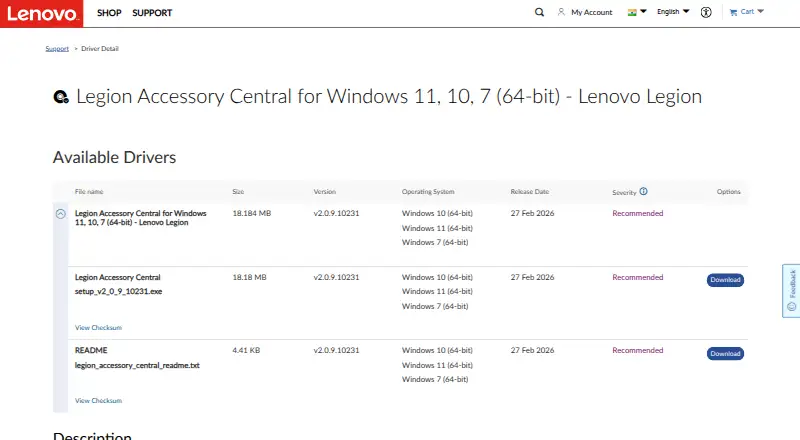
Lenovo Legion Accessory Central is free Windows software for configuring supported Legion gaming mice, keyboards, and keyboard-and-mouse combos. Its controls include macros, button remapping, and lighting. Supported products include the Legion M600s Qi and wireless mice, M300s RGB and M300 RGB mice, K300 RGB and K500 RGB keyboards, and KM300 RGB combo. Lenovo says the M600s’s programmable lighting and six programmable buttons require the software. The support page lists version 2.0.9.10231 as recommended, released 27 February 2026; the installer is 18.18 MB. Lenovo describes version 2.0 as a redesign with an improved user experience, but warns that upgrading overwrites version 1.0 and removes existing settings. A 29 June 2022 accessibility report says every product function can be operated with a keyboard and addresses WCAG 2.0 Level A and AA and revised Section 508 standards. The software is listed for Windows 11, 10, and 7 (64-bit).
Who it suits
It suits Legion accessory owners using Windows who want to manage supported gaming mice, keyboards, and combos. M600s owners need it for programmable lighting and buttons.
What it does well
- Free plan for Windows.
- Supports macros, button remapping, and lighting control.
- Works with listed Legion mice, keyboards, and combos.
- Accessibility report says all functions are keyboard-operable.
What to know first
- Windows only; no other desktop platform is listed.
- Upgrading from version 1.0 removes previous settings.
- Compatibility is limited to supported Legion accessories.
Limits
The free plan is for Windows 11, 10, or 7 (64-bit) and supported Legion accessories. Upgrading from version 1.0 overwrites the older installation and removes previous settings.
Plans
| Plan | Billed and limits | Price |
|---|---|---|
| Legion Accessory Central | Windows 11, 10, or 7 (64-bit) · supported Legion accessories | Free |
As support.lenovo.com lists them, read 2 Oct 2026. The maker's own page has the final word.
Getting started
- Open Lenovo’s Legion Accessory Central support page
- Download the 18.18 MB Windows installer
- Install it on Windows 11, 10, or 7 (64-bit)
- Connect a supported Legion mouse, keyboard, or combo
- Configure macros, buttons, or lighting
Verdict
Legion Accessory Central offers configuration controls for a defined set of Legion accessories at no cost. Before upgrading from version 1.0, account for the loss of previous settings.
Questions
How much does Legion Accessory Central cost?
It is free, with a listed price of $0 plan.
Which platforms does it support?
It supports Windows 11, Windows 10, and Windows 7 (64-bit).
Which accessories work with it?
Listed products include Legion M600s Qi and wireless mice, M300s RGB and M300 RGB mice, K300 RGB and K500 RGB keyboards, and the KM300 RGB combo.
Does it support macros and remapping?
Yes. The listed controls include macro support and button remapping, along with lighting control.
What happens when upgrading from version 1.0?
Version 2 overwrites version 1.0, and Lenovo warns that previous settings are lost.
Facts from Lenovo Legion Accessory Central's own pages
- Accessibility keyboard support
- The report says all product functionality is operable through a keyboard. · static.lenovo.com, 2 Oct 2026
- Accessibility report
- Lenovo published an Accessibility Conformance Report for the software dated 29 June 2022. · static.lenovo.com, 2 Oct 2026
- Accessibility standards
- The report covers WCAG 2.0 Level A and AA and the revised Section 508 standards. · static.lenovo.com, 2 Oct 2026
- Download size
- The listed installer is 18.18 MB. · support.lenovo.com, 2 Oct 2026
- Latest listed release
- The support page lists version 2.0.9.10231, released 27 February 2026, as recommended. · support.lenovo.com, 2 Oct 2026
- Manufacturer
- Lenovo describes itself as a global technology company focused on delivering “smarter technology for all.” · lenovo.com, 2 Oct 2026
- Mouse lighting
- The M600s product sheet says its one-zone programmable RGB backlight requires Legion Accessory Central. · news.lenovo.com, 2 Oct 2026
- Mouse programmable buttons
- The M600s product sheet lists six programmable buttons and says they require Legion Accessory Central. · news.lenovo.com, 2 Oct 2026
- Product type
- Lenovo describes Legion Accessory Central as software for Windows 11, 10, and 7 (64-bit). · support.lenovo.com, 2 Oct 2026
- Supported accessories
- Lenovo lists Legion M600s Qi and wireless mice, M300s RGB and M300 RGB mice, K300 RGB and K500 RGB keyboards, and the KM300 RGB combo among supported products. · support.lenovo.com, 2 Oct 2026
- Upgrade limitation
- Lenovo warns that the new version overwrites version 1.0 and causes previous settings to be lost. · support.lenovo.com, 2 Oct 2026
- Version 2 redesign
- Lenovo says version 2.0 has a brand-new design and improved user experience. · support.lenovo.com, 2 Oct 2026
Where Lenovo Legion Accessory Central stands on Freedom251
- Gaming Peripheral Software#18 of 39