Freedom251 › Terminal Multiplexers
muxterm
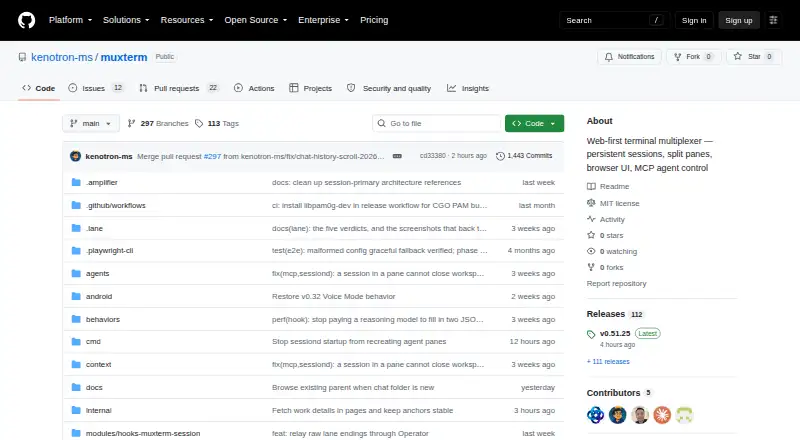
What muxterm is
Muxterm is a free, self-hosted, web-first terminal multiplexer built around a browser interface and a Go session daemon. Users can split panes, group them into named workspaces, and switch between workspaces from a bar. The daemon runs separately from the HTTP server, allowing shells to persist through server restarts, deployments, and reboots. Server-side VT emulation saves a live screen snapshot that can restore full-screen applications after reconnecting. An installable PWA supports desktop or mobile use and service-worker offline access. For MCP-compatible agents, its server exposes 25 tools across seven categories for managing workspaces, panes, terminals, and other functions. Documented integrations include Claude Code, OpenCode, and Amplifier, with lifecycle reporting for Claude, Codex, and Amplifier wrappers. Authentication uses HMAC tokens, with a localhost bypass for local use. A file-publishing tool can share one local file through an unguessable public URL, with a 24-hour default expiry, a seven-day maximum, and revocation for future reads. Muxterm is MIT licensed and distributed as a single binary.
Who it suits
Muxterm suits people who want self-hosted terminal sessions with a browser interface and persistent shells. It may also suit users of MCP-compatible agents who want tools for managing workspaces, panes, and terminals.
What it does well
- Sessions can survive server restarts and reboots.
- Named workspaces organize split panes.
- PWA includes service-worker offline support.
- MIT licensed and free.
What to know first
- Windows support is coming soon.
- GitHub reports no SECURITY.md policy.
- GitHub reports no published security advisories.
Limits
Muxterm’s persistence scope is local. Windows support is coming soon; listed access platforms are macOS, Linux, and browser/PWA.
Plans
| Plan | Billed and limits | Price |
|---|---|---|
| muxterm | MIT-licensed · self-hosted · single binary | Free |
As github.com lists them, read 4 Oct 2026. The maker's own page has the final word.
Getting started
- Open the muxterm GitHub repository.
- Use the self-hosted single-binary distribution.
- Access muxterm through its browser interface or installable PWA.
- Organize panes into named workspaces and switch between them from the workspace bar.
- Connect an MCP-compatible agent if you want to use muxterm’s MCP tools.
Muxterm is a self-hosted terminal multiplexer for developers who want browser-based panes, persistent shells, or MCP control of their workspaces. It is a strong fit for local, agent-assisted workflows, but not for anyone who needs established Windows support or a hosted session service.
Overview
Muxterm combines named workspaces and split panes with a browser interface backed by a Go session daemon. Its defining advantage is continuity: shells can outlast HTTP server interruptions. Since persistence is local, it is not a hosted service that carries sessions between machines.
The MIT license and single-binary package make it a no-cost self-hosted option. Self-hosting also means users are responsible for operating and securing their environment; the project has no published security policy or security advisories.
Key features
Named workspaces, accessible from a bar, help keep terminal arrangements separated by project or task. On reconnect, server-side VT emulation replays a live screen snapshot, which can restore full-screen applications as well as shell output. That is more useful than a simple reconnect for long-running terminal work.
The session daemon runs separately from the HTTP server, allowing shells to survive server restarts, deploys, and reboots. This suits work that must persist through service interruptions, but the local persistence scope is not a substitute for remotely hosted sessions.
The installable PWA works as a desktop or mobile app and includes service-worker offline support. The MCP server exposes 25 tools across seven categories for managing workspaces, panes, terminals, and other functions. Muxterm documents integrations with Claude Code, OpenCode, and Amplifier, and native lifecycle reporting for Claude, Codex, and Amplifier wrappers; this makes it relevant to developers who want agents to work with terminal environments.
HMAC token-based authentication and a localhost bypass support authenticated access while retaining a local-use path. The MCP publish_file tool serves one local file at an unguessable public URL, with a 24-hour default expiry, a seven-day maximum, and revocation for future reads. That offers a bounded sharing mechanism, but users should weigh the public exposure of a file against their needs.
Pricing
| Plan | Price | What it includes |
|---|---|---|
| muxterm | free | MIT-licensed software, self-hosted, single binary |
There is one free plan, with custom pane layouts and local persistence. No paid tier or seat or usage quota is part of this plan. The trade-off is self-management rather than a hosted service.
Platforms
Muxterm supports macOS, Linux, and browser/PWA access. Windows support is coming soon, so it is not the right choice for a Windows-dependent setup today. The PWA can be installed on desktop or mobile and supports offline use.
Who it's for
Muxterm is best for developers who want persistent local terminal sessions, named workspaces, and browser access, particularly those integrating MCP-compatible agents. It is less suited to people seeking hosted cross-device sessions or established Windows support, and self-hosters need to take responsibility for their own security practices.
Pros and cons
- Pros: Local shells survive server restarts, deploys, and reboots, which helps protect long-running work.
- Pros: Screen replay can restore full-screen apps after reconnecting, not just ordinary shell output.
- Pros: The MCP server's 25 tools and documented agent integrations support agent-driven workspace management.
- Cons: Persistence is local, so sessions are not a hosted service that follows users across machines.
- Cons: Windows support is still forthcoming.
- Cons: No published security policy or advisories means self-hosters must assess and manage their own security needs.
Alternatives
Terminal Multiplexers is a useful starting point for comparing the category.
- Okena is another free option with Android, iOS, API, and Windows platforms alongside Linux, macOS, and web.
- Zellij is free and open source, with no account required; choose it if you want its listed iOS access or are interested in its hosted session-sharing offering, which has a free tier and is in closed beta.
- muxel is a free GPL-3.0 option for Linux, macOS, and Windows.
- Herdr is free, Apache 2.0 software that runs locally on macOS, Linux, and Windows.
- openmux is free MIT-licensed software for macOS Apple Silicon and Linux x64/arm64.
- p2pmux is a free MIT-licensed option for Linux and macOS.
- Quil offers a free plan with no paid tier or hosted version, for Linux, macOS, and Windows.
- WMUX is a free MIT-licensed option for Linux, macOS, and Windows.
Verdict
Choose Muxterm if you want local terminal sessions that endure server interruptions, with browser workspaces and MCP tools in the same package. Look elsewhere if you need a hosted service that carries sessions between machines or reliable Windows support now.
Verdict
Muxterm combines persistent terminal sessions with browser-based workspaces and MCP tools, in a free MIT-licensed package. Its listed access platforms are macOS, Linux, and browser/PWA; Windows support is still forthcoming.
Questions
How much does muxterm cost?
Muxterm is free, with a plan price of $0. It is MIT licensed and self-hosted as a single binary.
Which platforms can I use?
Access is listed for macOS, Linux, and browser/PWA. Windows support is coming soon.
Is muxterm open source?
Yes. The repository identifies muxterm as MIT licensed.
Does muxterm work with AI agents?
Its MCP server exposes 25 tools across seven categories for MCP-compatible agents. Documented integrations include Claude Code, OpenCode, and Amplifier.
Can I use it offline?
The PWA includes service-worker offline support and can be installed as a desktop or mobile app.
What does publish_file do?
It serves one local file at an unguessable public URL. The default expiry is 24 hours, the maximum is seven days, and revocation prevents future reads.
Facts from muxterm's own pages
- AI integration
- Its MCP server exposes 25 tools across seven categories for MCP-compatible agents to manage workspaces, panes, terminals, and other functions. · github.com, 4 Oct 2026
- Authentication
- The feature list describes HMAC token-based authentication with localhost bypass for local use. · github.com, 4 Oct 2026
- License
- The repository identifies the project as MIT licensed. · github.com, 4 Oct 2026
- Mobile and offline
- The PWA can be installed as a desktop or mobile app and includes service-worker offline support. · github.com, 4 Oct 2026
- Persistence
- The session daemon runs separately from the HTTP server, allowing shells to survive server restarts, deploys, and reboots. · github.com, 4 Oct 2026
- Platforms
- The README provides macOS Homebrew and Linux installation instructions, says Windows Scoop support is coming soon, and says binaries are attached to GitHub releases. · github.com, 4 Oct 2026
- Product
- Muxterm is a web-first terminal multiplexer with persistent sessions, split panes, and a browser interface backed by a Go session daemon. · github.com, 4 Oct 2026
- Public file sharing
- The MCP publish_file tool serves one local file at an unguessable public URL, with a 24-hour default expiry, a seven-day maximum, and revocation for future reads. · github.com, 4 Oct 2026
- Reconnects
- Server-side VT emulation replays a live screen snapshot so full-screen apps can restore after reconnecting. · github.com, 4 Oct 2026
- Security policy
- GitHub reports that the project has no SECURITY.md policy and no published security advisories. · github.com, 4 Oct 2026
- Supported agent tools
- Muxterm documents integrations with Claude Code, OpenCode, and Amplifier, and native lifecycle reporting for Claude, Codex, and Amplifier wrappers. · github.com, 4 Oct 2026
- Workspaces
- Users can organize panes into named workspaces and switch between them from a bar. · github.com, 4 Oct 2026
Where muxterm stands on Freedom251
- Terminal Multiplexers#5 of 29