Freedom251 › Terminal Multiplexers
Herdr
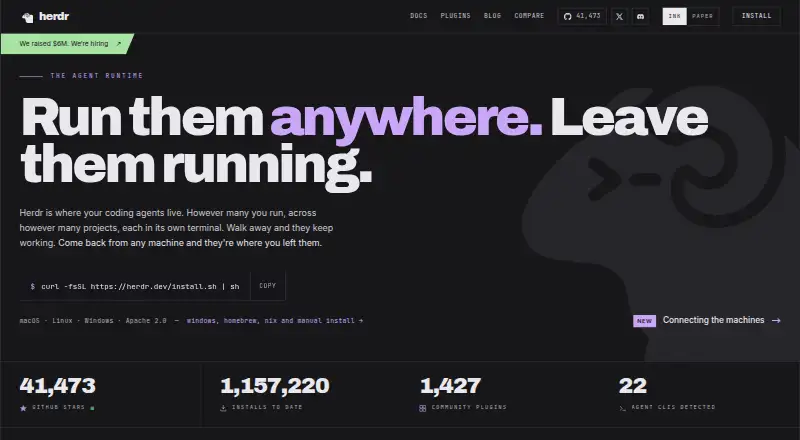
What Herdr is
Herdr is a background runtime that keeps coding agents’ terminal sessions running so users can return to them from another machine. Its terminal interface organizes workspaces, tabs, panes, and agents, and labels agents as working, blocked, or idle. Herdr says it detects 22 agent command-line tools out of the box, including Claude Code, Codex, Cursor, OpenCode, Grok, Copilot, and Hermes. Panes and their processes continue after the client detaches, and saved layouts can be restored after a server restart. Integrations can report session identities for resuming sessions after a restart; some also report agent state. Users can add SSH-accessible remote machines and view their workspaces alongside local ones. Herdr provides a local socket API and CLI for scripts, tools, and agents. It runs locally on macOS, Linux, and Windows and is free and open source under Apache License 2.0. Pane screen history is off by default because terminal output can contain sensitive material. Herdr Cloud is described as coming soon and intended to connect machines without SSH setup.
Who it suits
Herdr suits people who need coding-agent terminal sessions to persist across client disconnects or remote machines. Its API and CLI also suit users who want scripts, tools, or agents to control the runtime.
What it does well
- Keeps panes and processes running after detachment
- Restores saved layouts after server restart
- Detects 22 agent CLIs out of the box
- Free and open source under Apache License 2.0
What to know first
- Herdr Cloud is not yet available
- Pane screen history is off by default
- Remote machine access uses SSH
Plans
| Plan | Billed and limits | Price |
|---|---|---|
| Herdr runtime | Apache 2.0 · runs locally on macOS, Linux, and Windows | Free |
As herdr.dev lists them, read 8 Oct 2026. The maker's own page has the final word.
Getting started
- Visit the Herdr website.
- Run the runtime locally on macOS, Linux, or Windows.
- Organize workspaces, tabs, panes, and agents in the terminal interface.
- Add SSH-accessible remote machines to view their workspaces alongside local ones.
- Use the local socket API or CLI if scripts, tools, or agents need to control Herdr.
Herdr is a background runtime that keeps coding agents and their terminal processes available after a client disconnects. It is best for developers or teams coordinating several agents across their own computers and SSH-accessible servers. The main trade-off is clear: persistence and organization are strong, but cross-machine access still requires SSH until Herdr Cloud arrives.
Overview
Herdr provides a single terminal-oriented workspace for workspaces, tabs, panes, and coding agents. Instead of treating each agent session as a disposable terminal window, it keeps the underlying processes running and makes them reachable again. That model suits long-running coding tasks, remote development, and teams that need to monitor more than one agent at a time.
The runtime is open source under the Apache License 2.0 and runs locally. Herdr Cloud is planned to connect machines without SSH configuration, but it is not part of the current offering. Users who want a hosted, immediately connected service should therefore look elsewhere; users comfortable operating their own runtime get more control over where sessions run.
Key features
Herdr’s workspace model combines tabs, panes, and agents in one interface, with custom pane layouts for arranging work to match a project. Agent labels show whether a session is working, blocked, or idle. In practice, that status view helps a developer find an agent waiting for input or stuck on a problem without opening every pane.
The runtime detects 22 agent command-line interfaces out of the box, including Claude Code, Codex, Cursor, OpenCode, Grok, Copilot, and Hermes. That broad starting set is useful when a team mixes tools rather than standardizing on one vendor. Community plugins extend the system through GitHub’s herdr-plugin topic, although marketplace listings are not reviewed, so teams should assess plugins before deployment.
When a client detaches, Herdr leaves panes and their processes running. Saved session layouts can be restored after a server restart, while integrations can provide agent session identities for resuming work; some integrations also report agent state. These capabilities make interruptions less disruptive, but the persistence scope is local, not a cloud archive shared automatically between machines.
Remote machines can be added over SSH, placing their workspaces and agents beside local ones. A local socket API and CLI let scripts, tools, and agents control Herdr, which is valuable for automation and custom developer workflows. Pane screen history is off by default because terminal output may contain secrets, tokens, prompts, or command results; that safer default also means users must deliberately enable any history they require.
Pricing
| Plan | Price | Includes |
|---|---|---|
| Herdr runtime | free | Apache 2.0 runtime running locally on macOS, Linux, and Windows; session synchronization, collaboration features, custom pane layouts, and plugins or extensions. |
There is one published plan and no paid tier, seat charge, quota, trial period, or renewal term. The free runtime is a strong fit for individuals and teams willing to host their own sessions. It does not buy a managed cloud connection; remote access currently depends on SSH, and Herdr Cloud is described as coming soon.
Platforms
Herdr supports macOS, Linux, and Windows, plus self-hosted deployment, an API, and SSH-accessible remote machines. That combination works well for mixed-device teams and server-based development. The current cross-machine path requires SSH setup; a no-SSH workflow depends on the future Herdr Cloud service.
Who it's for
Choose Herdr if you run multiple coding agents, need their processes to survive disconnects or restarts, and want local and SSH-hosted sessions in one view. Its API, CLI, and plugin model also suit teams building automation around agent workflows. It is less suitable for readers seeking a hosted product with immediate machine linking, or for organizations that do not want to review community extensions themselves.
Pros and cons
Pros
- Persistent sessions: Detached clients do not stop pane processes, reducing lost work during interruptions.
- Agent visibility: Working, blocked, and idle states make attention queues easier to identify.
- Broad compatibility: Twenty-two agent CLIs are detected out of the box.
- Automation hooks: The local socket API and CLI allow scripts, tools, and agents to control the runtime.
- Open and free: Apache 2.0 licensing and a 0.00 USD runtime remove subscription and seat costs.
Cons
- SSH required today: Remote machines need configuration until Herdr Cloud is released.
- Local persistence: Sessions are not presented as cloud-backed storage shared automatically across machines.
- Unreviewed plugins: Community marketplace listings require your own security and quality review.
- History is off by default: The secret-safe setting may limit retrospective terminal review unless changed deliberately.
Alternatives
For a broader directory of comparable tools, see Terminal Multiplexers.
Okena is a free, open-source option spanning mobile, desktop, web, and API platforms, so choose it when device breadth matters more than Herdr’s agent-focused runtime.
Zellij is free and open source with no account required; its Zellij.online offering adds hosted session sharing in closed beta, making it the alternative to consider for that hosted direction.
muxel is a free, GPL-3.0 open-source multiplexer for Linux, macOS, and Windows.
muxterm is a free MIT-licensed self-hosted single binary for Linux, macOS, web, and Windows.
RMUX is free self-hosted software with MIT or Apache-2.0 licensing and API support.
LibreBooking is free GPL-3.0 open-source resource-scheduling software rather than an agent terminal runtime.
openmux is free MIT-licensed software for macOS Apple Silicon and Linux x64 or arm64.
p2pmux is a free MIT-licensed option for Linux and macOS.
Verdict
Herdr is a strong choice for developers and teams running multiple coding agents who need durable local sessions, clear agent status, SSH access, and automation controls without paying for the runtime. Choose it when you are comfortable managing the machines and SSH connections yourself. Look elsewhere if you need a currently available hosted service that links computers without setup, or if you require a curated plugin marketplace.
Verdict
Herdr focuses on persistent terminal sessions for coding agents across local and SSH-accessible machines. Its runtime is free, while the planned Herdr Cloud connection is described as coming soon.
Questions
Is Herdr free?
Yes. The Herdr runtime is listed at $0.00 and is distributed under Apache License 2.0.
Which operating systems does it run on?
Herdr runs locally on macOS, Linux, and Windows. SSH-accessible remote machines can also be added.
Is Herdr open source?
Yes. It is distributed under the Apache License 2.0.
Can I connect remote machines?
Yes. You can add remote machines over SSH and view their workspaces and agents alongside local ones. Herdr Cloud is described as coming soon and intended to connect machines without SSH setup.
Which coding agents does Herdr detect?
Herdr says it detects 22 agent CLIs out of the box, including Claude Code, Codex, Cursor, OpenCode, Grok, Copilot, and Hermes.
Does Herdr keep terminal output history?
Pane screen history is off by default because terminal output can contain secrets, tokens, prompts, and command output.
Facts from Herdr's own pages
- Agent compatibility
- Herdr says it detects 22 agent CLIs out of the box, including Claude Code, Codex, Cursor, OpenCode, Grok, Copilot, and Hermes. · herdr.dev, 8 Oct 2026
- Agent status
- Herdr marks agents as working, blocked, or idle so users can find agents that need attention. · herdr.dev, 8 Oct 2026
- API
- Herdr provides a local socket API and CLI for scripts, tools, and agents to control it. · herdr.dev, 8 Oct 2026
- Cloud availability
- Herdr Cloud is described as coming soon and intended to connect users’ machines without SSH setup. · herdr.dev, 8 Oct 2026
- Integrations
- Herdr integrations can report agent session identities for resuming sessions after a server restart, and some also report agent state. · herdr.dev, 8 Oct 2026
- Open source
- Herdr is distributed under the Apache License 2.0. · herdr.dev, 8 Oct 2026
- Persistence
- Herdr keeps panes and their processes running when the client detaches, and can restore saved session layouts after a server restart. · herdr.dev, 8 Oct 2026
- Plugins
- Community plugins are published on GitHub and discovered through the herdr-plugin topic; Herdr says marketplace listings are not reviewed. · herdr.dev, 8 Oct 2026
- Product
- Herdr is a background runtime that keeps coding agents’ terminal sessions running so users can return to them from another machine. · herdr.dev, 8 Oct 2026
- Remote access
- Users can add remote machines over SSH and see their workspaces and agents alongside local ones. · herdr.dev, 8 Oct 2026
- Security and data
- Pane screen history is off by default because terminal output can include secrets, tokens, prompts, and command output. · herdr.dev, 8 Oct 2026
- Support
- The maker’s site links to a Discord community and lists [email protected] as a contact email. · herdr.dev, 8 Oct 2026
- Workspace management
- Herdr organizes workspaces, tabs, panes, and agents in a single terminal interface. · herdr.dev, 8 Oct 2026
Where Herdr stands on Freedom251
- Terminal Multiplexers#1 of 29