Freedom251 › Terminal Multiplexers

Quil
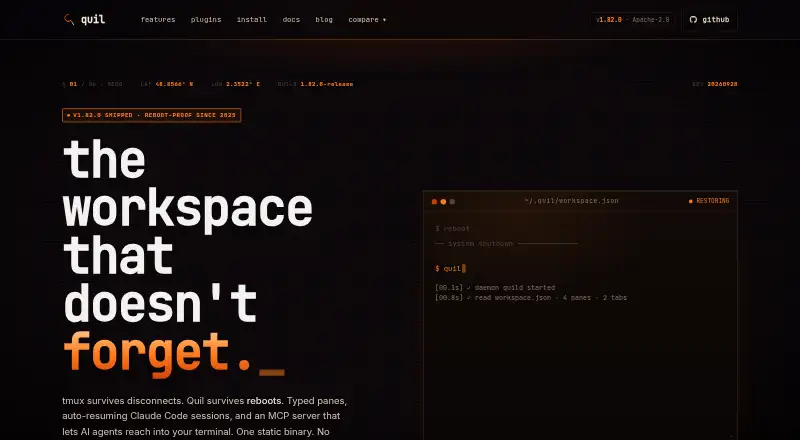
What Quil is
Quil is a free terminal multiplexer for developers running several tools alongside AI coding assistants. It continuously saves tabs, panes, working directories, and layout, then restores the workspace after a host reboot. AI panes for Claude Code, OpenCode, and Codex can resume sessions after daemon restarts. Built-in pane types include terminals, SSH, Stripe CLI, lazygit, hunk, k9s, lazysql, and those AI tools. Its MCP server lets compatible clients such as Claude Desktop, Claude Code, and Cursor interact with a running Quil session. Users can add pane types through TOML plugin files, which reload when saved. A command palette can find panes and tabs and search pane scrollback. Quil supports Linux, macOS, and Windows, with SSH remote attach to Linux or macOS machines; remote attach is marked beta. There is no hosted version or cloud account, and workspace state is stored locally under ~/.quil/. The maker says Quil has no telemetry or database. Docker sandboxing is available for Claude Code, Codex, and OpenCode, but network egress is not bounded and users provide the container image.
Who it suits
Quil suits developers coordinating terminal tools and AI coding sessions who want workspaces restored after reboots. It is also aimed at users comfortable keeping state locally or attaching to remote Linux or macOS machines over SSH.
What it does well
- Free with no paid tier.
- Restores saved workspace layout after a host reboot.
- AI panes can resume sessions after daemon restarts.
- Custom pane types use reloadable TOML files.
- Works on Linux, macOS, and Windows.
What to know first
- No hosted version or cloud account.
- Workspace state stays local under ~/.quil/.
- Remote attach is marked beta.
- Docker sandbox network egress is not bounded.
Limits
The free plan has no paid tier or hosted version, and workspace state is local to your machine. Docker sandboxing is available for Claude Code, Codex, and OpenCode, but network egress is not bounded and you supply the container image.
Plans
| Plan | Billed and limits | Price |
|---|---|---|
| Free | No paid tier · No hosted version · Local state on your own machine | Free |
As quil.cc lists them, read 30 Sept 2026. The maker's own page has the final word.
Getting started
- Open https://quil.cc/.
- Choose the Linux, macOS, or Windows platform.
- Run Quil as a terminal CLI on your machine.
- Use built-in pane types or define additional types in TOML plugin files.
- For remote attachment, connect to a Linux or macOS machine over SSH; this feature is marked beta.
Verdict
Quil focuses on persistent terminal workspaces, including resumable AI panes and customizable tool panes. Its local-only state and lack of a hosted version are important considerations, as is the beta status of remote attach.
Questions
How much does Quil cost?
Quil is free: free. There is no paid tier.
Is Quil open source?
Yes. Quil is described as open source under the Apache License 2.0.
Which platforms does Quil support?
Quil supports Linux, macOS, and Windows, as well as terminal CLI use and SSH remote access.
Can Quil restore a workspace after reboot?
Yes. It snapshots tabs, panes, working directories, and layout, then restores the workspace after a host reboot.
Which AI coding sessions can resume?
AI panes for Claude Code, OpenCode, and Codex can resume sessions after daemon restarts.
Does Quil store workspace data in the cloud?
No. Quil has no hosted version or cloud account; it stores workspace state locally under ~/.quil/.
Facts from Quil's own pages
- AI session resume
- AI panes can resume sessions for Claude Code, OpenCode, and Codex after daemon restarts. · quil.cc, 30 Sept 2026
- Container sandbox limits
- Docker sandboxing is available for Claude Code, Codex, and OpenCode, but network egress is not bounded and users supply the container image. · quil.cc, 30 Sept 2026
- Custom plugins
- Users can define pane types in TOML plugin files, which reload when saved without compiling or restarting Quil. · quil.cc, 30 Sept 2026
- Deployment and data
- Quil has no hosted version or cloud account and stores workspace state locally under ~/.quil/. · quil.cc, 30 Sept 2026
- License and size
- The home page describes Quil as open source under Apache License 2.0 and lists the binary at about 40 MB. · quil.cc, 30 Sept 2026
- Maker
- The site says Quil is made by @artyomsv and links to Artjoms Stukans on GitHub. · quil.cc, 30 Sept 2026
- MCP integration
- Quil's MCP server lets MCP-capable clients including Claude Desktop, Claude Code, and Cursor interact with a running Quil session. · quil.cc, 30 Sept 2026
- Platforms
- Quil provides native binaries for Linux, macOS, and Windows, with no WSL required on Windows. · quil.cc, 30 Sept 2026
- Privacy
- The maker says Quil has no telemetry and no database. · quil.cc, 30 Sept 2026
- Purpose
- Quil is a reboot-proof terminal multiplexer for developers running multi-tool workflows alongside AI coding assistants. · quil.cc, 30 Sept 2026
- Remote access
- Remote attach runs panes on a remote Linux or macOS machine over SSH without opening a network port there; the feature is marked beta. · quil.cc, 30 Sept 2026
- Typed panes
- Built-in pane types include terminals, Claude Code, OpenCode, Codex, SSH, Stripe CLI, lazygit, hunk, k9s, and lazysql. · quil.cc, 30 Sept 2026
- Workspace recovery
- Quil continuously snapshots tabs, panes, working directories, and layout, then restores the workspace after a host reboot. · quil.cc, 30 Sept 2026
- Workspace search
- The command palette can fuzzy-find panes and tabs and search scrollback across panes. · quil.cc, 30 Sept 2026
Where Quil stands on Freedom251
- Terminal Multiplexers#9 of 29