Freedom251 › Game Remote Play Software

Moonlight Web
What Moonlight Web is
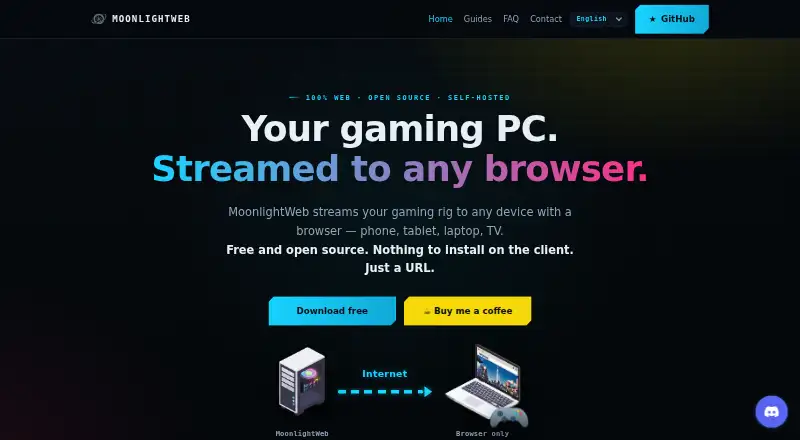
Moonlight Web is a free, open-source server for streaming a gaming PC to devices with a modern browser. Install the server on the gaming PC; clients open a URL and do not need an app or account. The maker states support for up to 4K HDR at 240 fps and latency under 20 ms over Wi-Fi. Browser decoding uses WebCodecs for H.264, HEVC, and AV1, subject to browser codec support. Controls include Xbox and PlayStation controllers with rumble, keyboard, pointer-lock mouse, touch trackpad, and virtual keyboard. The client can discover and pair with Sunshine, Wolf, and MultiSeat hosts. Remote streams use direct peer-to-peer WebRTC, with an outgoing connection to an introduction server and no public web ports exposed. Sessions can include up to four players, including the host. The gaming PC needs a hardware-encoding-capable GPU, and clients need a modern browser. Linux hosts require x64 and a recent supported distribution; HDR for Linux hosts is not implemented yet. The project is GPL-3.0 licensed, with no accounts, subscriptions, or paid tiers.
Who it suits
Moonlight Web suits people who want to stream a gaming PC to modern browsers on computers, phones, tablets, or TVs. The gaming PC must have a GPU capable of encoding.
What it does well
- Clients connect by URL without an app or account.
- Supports H.264, HEVC, and AV1 decoding through WebCodecs.
- Supports Xbox and PlayStation controllers and touch controls.
- Sessions support up to four players.
What to know first
- Clients need a modern browser.
- The gaming PC needs a hardware-encoding-capable GPU.
- Available codecs depend on browser decoding support.
- Linux-host HDR is not implemented yet.
Limits
The host needs a hardware-encoding-capable GPU, and clients need a modern browser. Available codecs depend on browser decoding support; HDR is not implemented for Linux hosts.
Plans
| Plan | Billed and limits | Price |
|---|---|---|
| MoonlightWeb | Free, open-source (GPL-3.0) · no accounts, subscriptions, or paid tiers | Free |
As moonlightweb.top lists them, read 4 Oct 2026. The maker's own page has the final word.
Getting started
- Install the server on a gaming PC running Windows, Apple Silicon macOS, or Linux.
- On a client device, open the Moonlight Web URL in a modern browser.
- Discover a compatible host on the network and pair with its PIN.
- Choose an available browser-supported codec and connect controls as needed.
- For remote play, use the outgoing introduction-server connection to help the browser find the PC.
Moonlight Web is a free, open-source way to stream games from a self-hosted gaming PC to a modern browser. It suits players who want to use a mix of phones, computers, tablets and TVs without installing a client app. Its broad device reach is compelling, provided the host can encode video and the browser supports a suitable codec.
Overview
Only the gaming PC needs the server installed; clients connect by opening a URL, with no app or account. That makes Moonlight Web a useful fit for households switching between devices, but browser access does not eliminate the need for a capable host PC or a compatible modern browser.
It can discover and pair over the network with Sunshine, Wolf and MultiSeat hosts. For remote play, streams use direct peer-to-peer WebRTC, while an outgoing connection to an introduction server helps the browser find the PC without exposing public web ports. Hosts pair with a PIN, and the remote entry link is served over HTTPS.
Key features
The project states support for up to 4K HDR at 240 fps and latency under 20 ms over Wi-Fi, using WebRTC over UDP with adaptive congestion control. These are ambitious capabilities rather than a promise for every setup: the host’s encoding hardware, connection and client browser all matter.
Browser decoding covers H.264, HEVC and AV1 through WebCodecs, with codecs unavailable to a browser greyed out. That makes compatibility visible, but it also means a preferred codec may not be usable on every client. WebGPU-based upscaling and sharpening uses SGSRv1 and FSR1 shaders on the client, avoiding extra processing load on the gaming PC.
Control options include Xbox and PlayStation controllers with rumble, keyboard, pointer-lock mouse, touch trackpad and virtual keyboard. A session can include up to four players: the host and as many as three invited friends, making the service more than a single-player streaming route.
Optional anonymous usage statistics cover resolution, frame rate, codec, connection type, session duration, app version and operating system. The maker says collection does not begin before consent. The website also uses self-hosted, cookieless Umami analytics and says it does not store visitors’ IP addresses.
Pricing
MoonlightWeb costs nothing. The GPL-3.0 project has no accounts, subscriptions or paid tiers, and the maker mentions optional tips. There is no trial to manage or renewal to cancel; the trade-off is that this is self-hosted software, so the user needs a gaming PC capable of video encoding.
Platforms
The server runs on Windows, Apple Silicon macOS and Linux. The client is a modern web browser on PC, Mac, tablet, phone or TV, so those client devices do not need a dedicated app. Linux hosting requires x64, a hardware-encoding-capable GPU and a distribution at least as recent as Ubuntu 22.04, Debian 12 or Fedora 36; Linux-host HDR is not implemented yet.
Who it's for
Moonlight Web is best for players with an encoding-capable gaming PC who want browser access across several kinds of devices, or who want to invite a few friends into a session. It is a weaker fit for anyone without suitable host hardware, or whose browser cannot decode the codecs they need. Players specifically seeking HDR from a Linux host should look elsewhere for now.
Pros and cons
- Pro: Browser clients need no app or account, which keeps access practical across PCs, phones, tablets and TVs.
- Pro: Direct peer-to-peer remote streams avoid exposing public web ports, and host pairing uses a PIN.
- Pro: Four-player sessions and controller support with rumble suit shared play better than a single-user-only setup.
- Con: The gaming PC must have a GPU capable of encoding, so the service is not a way to stream from just any computer.
- Con: Codec availability depends on browser decoding support, which can constrain client choice.
- Con: Linux-host HDR is not implemented, despite support for HDR on other supported setups.
Alternatives
Moonlight Game Streaming is another free option across Android, iOS, Linux, macOS and Windows, with no subscriptions or paid versions. Choose it when a platform-native client is preferable to Moonlight Web’s browser-based approach.
Parsec offers a free personal, non-commercial plan for desktop streaming and sharing, plus an Individuals (Warp) plan at $8.33 a month. It is worth comparing if a paid tier is acceptable; Moonlight Web instead has no paid tiers.
Chiaki-ng is a free, open-source PlayStation Remote Play client for Android, Linux, macOS and Windows. Greenlight is a free, open-source option for Linux, macOS, web and Windows. Steam is free to use across mobile and desktop platforms, though game and content prices vary and some subscriptions may be free. Sunshine is free, self-hosted software that runs on your own hardware. Nearcade and Pulsar are also free alternatives.
Browse more options in Game Remote Play Software.
Verdict
Moonlight Web is a strong choice for players with a capable encoding GPU who want account-free browser streaming across varied devices and sessions of up to four people. Its main reason to look elsewhere is compatibility: host encoding hardware and browser codec support set real boundaries, and Linux-host HDR is not ready.
Verdict
Moonlight Web offers browser-based streaming with controller support, remote connections, and sessions for up to four players. Check host encoding requirements and browser codec support before choosing it.
Questions
Does Moonlight Web cost anything?
The listed MoonlightWeb plan is free. The project has no accounts, subscriptions, or paid tiers; optional tips are mentioned.
Is Moonlight Web open source?
Yes. It is licensed under GPL-3.0.
What devices can run the client?
The client runs in modern browsers on PCs, Macs, tablets, phones, and TVs. No app or account is needed to connect through a URL.
Which systems can host the server?
The gaming PC server supports Windows, Apple Silicon macOS, and Linux. Linux hosts require x64, a hardware-encoding-capable GPU, and a distribution at least as recent as Ubuntu 22.04, Debian 12, or Fedora 36.
Can I play with other people?
Yes. A session supports up to four players, including the host and up to three invited friends.
What controls and hosts are supported?
Controls include Xbox and PlayStation controllers with rumble, keyboard, pointer-lock mouse, touch trackpad, and virtual keyboard. Moonlight Web can discover and pair with Sunshine, Wolf, and MultiSeat hosts.
Facts from Moonlight Web's own pages
- Analytics
- The website uses self-hosted, cookieless Umami analytics and says it does not store visitors’ IP addresses. · moonlightweb.top, 4 Oct 2026
- Client setup
- The client needs no app or account; users open a URL in a browser. · moonlightweb.top, 4 Oct 2026
- Compatible hosts
- MoonlightWeb can discover and pair with Sunshine, Wolf and MultiSeat hosts on the network. · moonlightweb.top, 4 Oct 2026
- Controls
- Xbox and PlayStation controllers with rumble, keyboard, pointer-lock mouse, touch trackpad and virtual keyboard are supported. · moonlightweb.top, 4 Oct 2026
- Data collection
- Optional anonymous usage statistics include resolution, frame rate, codec, connection type, session duration, app version and operating system; the maker says no statistics are sent before consent. · moonlightweb.top, 4 Oct 2026
- Discovery and pairing
- Finds other hosts using mDNS and pairs them with a PIN; Sunshine, Wolf, and MultiSeat hosts can be discovered from the same page. · moonlightweb.top, 4 Oct 2026
- Latency
- Uses WebRTC UDP with adaptive congestion control and states latency is under 20 ms over Wi-Fi. · moonlightweb.top, 4 Oct 2026
- License and pricing
- The project is GPL-3.0 licensed, with no accounts, subscriptions or paid tiers; the maker mentions optional tips. · moonlightweb.top, 4 Oct 2026
- Linux requirements
- The Linux guide requires x64 with a hardware-encoding-capable GPU and a distribution at least as recent as Ubuntu 22.04, Debian 12 or Fedora 36; Linux-host HDR is not implemented yet. · moonlightweb.top, 4 Oct 2026
- Multiplayer
- A session supports up to four players, including the host and up to three invited friends. · moonlightweb.top, 4 Oct 2026
- Notable limits
- The gaming PC needs a GPU capable of encoding, and the client needs a modern browser; available codecs depend on browser decoding support. · moonlightweb.top, 4 Oct 2026
- Platforms
- The server runs on Windows, Apple Silicon macOS, or Linux, while phones, tablets, laptops, and TVs use a browser as the client. · moonlightweb.top, 4 Oct 2026
- Product
- MoonlightWeb is a free, open-source, self-hosted server that streams a gaming PC to devices with a modern browser. · moonlightweb.top, 4 Oct 2026
- Purpose
- A self-hosted server streams a gaming PC to devices with a modern browser; only the gaming PC needs the server installed. · moonlightweb.top, 4 Oct 2026
- Remote connections
- Remote streams use direct peer-to-peer WebRTC; an outgoing connection to an introduction server helps browsers find the PC, and no public web ports are exposed. · moonlightweb.top, 4 Oct 2026
- Remote play
- Streams use direct peer-to-peer WebRTC; remote access uses an outgoing connection to an introduction server and does not require exposed web ports. · moonlightweb.top, 4 Oct 2026
- Security
- Hosts pair with a PIN, and the remote entry link is served over HTTPS; the maker says streams go directly from the PC to the browser. · moonlightweb.top, 4 Oct 2026
- Streaming
- Supports up to 4K HDR at up to 240 fps with H.264, HEVC, and AV1 hardware decoding through WebCodecs. · moonlightweb.top, 4 Oct 2026
- Streaming performance
- The maker states support for up to 4K HDR at 240 fps and under 20 ms latency over Wi-Fi. · moonlightweb.top, 4 Oct 2026
- Support
- The FAQ directs users with unanswered questions to GitHub. · moonlightweb.top, 4 Oct 2026
- Supported server systems
- The gaming PC server supports Windows, Apple Silicon macOS and Linux; the browser client can run on devices including phones, tablets, laptops and TVs. · moonlightweb.top, 4 Oct 2026
- Video codecs
- The browser client supports H264, HEVC and AV1 decoding through WebCodecs, with unavailable codecs greyed out. · moonlightweb.top, 4 Oct 2026
- Video enhancement
- Client-side WebGPU upscaling and sharpening uses SGSRv1 and FSR1 shaders, with no extra load on the gaming PC. · moonlightweb.top, 4 Oct 2026
Where Moonlight Web stands on Freedom251
- Game Remote Play Software#6 of 27