Freedom251 › Math Learning Apps

MobyMax
by MobyMax
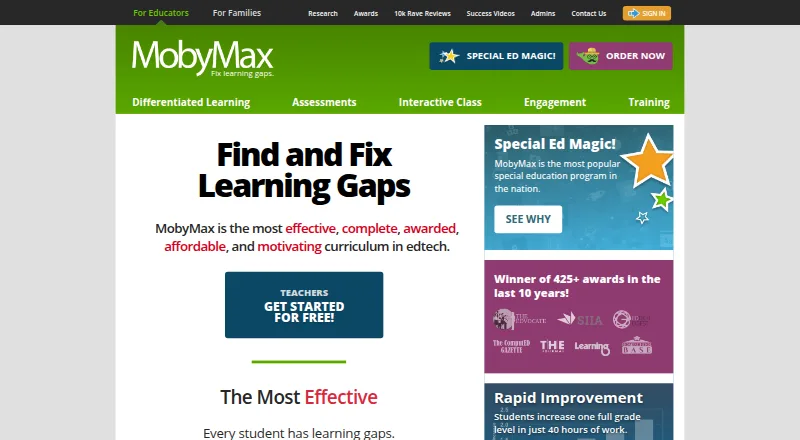
What MobyMax is
MobyMax is a learning platform for finding and addressing learning gaps among K–8 students. It offers 115 modules covering kindergarten through eighth grade, and automatically assigns lessons using students’ diagnostic results and progress. Assessments include Skill Checker, Placement Tests, and Benchmarker tests aligned with state standards. Teachers can monitor progress in real time and review standards data at student, class, school, and district levels. Interactive Class tools support live lessons using the curriculum. Schools can set up automatic rostering with Clever or ClassLink; Google Classroom credentials and CSV imports are also options. Clever access has eligibility and continued-sync requirements. MobyMax is available on Android, iOS, macOS, web, and Windows, and can be used on a device with a browser and internet connection. The free educator version has limited access compared with licensed features. Family costs $7.99 a month for K–8 subjects; schoolwide licensing is listed at $4,795 USD per year. The maker says it complies with COPPA and FERPA and uses encryption to protect personal information.
Who it suits
MobyMax suits teachers, administrators, parents, and students, including homeschool families. Its assessment, lesson assignment, and progress tools are aimed at K–8 learning.
What it does well
- 115 modules cover kindergarten through eighth grade.
- Lessons adapt to diagnostic results and student progress.
- Teachers can monitor progress in real time.
- Interactive Class supports live curriculum lessons.
- Available across mobile, desktop, and web platforms.
What to know first
- Free educator access is limited compared with licensed features.
- Clever sync has license and active-student requirements.
- Offline access is not available.
Limits
The free educator version has limited access compared with licensed features. The Family plan is $7.99 per month for K–8 subjects. Clever integration requires a schoolwide or districtwide license or licenses for at least 100 students, and continued sync requires at least 11 active students per school.
Plans
| Plan | Billed and limits | Price |
|---|---|---|
| Free | Free educator version · Limited access compared with licensed features | Free |
| Family | billed monthly · K-8 subjects | $7.99 a month |
| MAX Schoolwide License | Unlimited teachers and students for one year · Unlimited teachers · Unlimited students · 1 year | $4,795 a year |
| MAX Districtwide License | Unlimited teachers · Unlimited students | On request |
| Teacher free version | Free version · no obligation | Free |
| Free educator | free registration · Teacher access · limited features after 30-day full-access period | Free |
| SBS License | per teacher · SideBySide Sessions | $149 a year |
| MobyMax Schoolwide License | one year · Unlimited teachers and students · one school | $4,795 a year |
The first 8 of 13 plans, as mobymax.com lists them, read 20 Sept 2026. The maker's own page has the final word. Every plan
Getting started
- Visit the MobyMax website.
- Choose the free educator version, Family plan, or a school or district license.
- Open MobyMax on Android, iOS, macOS, web, or Windows, or use a browser-connected device.
- Sign in with Google Classroom credentials, roster through Clever or ClassLink when eligible, or import a CSV.
- Use assessments and student progress to guide lessons.
Overview
MobyMax is a K–8 learning platform that pairs curriculum with assessment-led instruction and progress tracking. It suits schools seeking a coordinated set of teacher tools, as well as families who want K–8 subject coverage, though the best fit depends on whether you need a home or school license.
Its defining strength is the link between diagnostic results and automatically assigned lessons: educators can identify needs and follow what happens next in one system. The breadth may be more than a single learner or small classroom needs, and school buyers should account for the conditions attached to Clever rostering.
Key features
Assessment and adaptive lessons
MobyMax says its curriculum contains 115 modules across kindergarten through eighth grade. Skill Checker, Placement Tests, and state-standards-based Benchmarker tests help identify learning gaps; the platform then assigns lessons using assessment results and student progress. This is useful when teachers want instruction to respond to individual needs rather than assign the same work to everyone. It does not remove the educator’s role in interpreting results and monitoring progress.
Progress monitoring and live instruction
Teachers can track progress in real time and examine standards data by student, class, school, or district. That range supports classroom follow-up as well as broader academic oversight, though school- and district-level views are less relevant to a household. Interactive Class tools also support live lessons using MobyMax’s curriculum.
Access, rostering, and privacy
Automatic rostering is offered through Clever and ClassLink; Google Classroom credentials can be used to sign in, and CSV import is another option. Clever requires a schoolwide or districtwide license, or licenses for at least 100 students, and continued sync requires at least 11 active students per school. That makes Clever a less straightforward route for small groups. A remote-learning document says the platform works on any device with a browser and internet connection, without additional hardware or operating-system requirements; offline access is not available.
MobyMax says it complies with COPPA and FERPA, does not collect students’ personal home addresses, Social Security numbers, or dates of birth, and uses security measures including encryption. It also hosts free live training webinars several times a week, a useful support option for educators adopting a broad platform.
Pricing
The free educator version costs nothing and provides limited access compared with licensed features. A separate teacher free version is also free, with no obligation. These options let educators start without a paid license, but the limited feature access makes them less suitable when a school needs the full licensed experience.
The Family plan costs $7.99 a month, billed monthly, and covers K–8 subjects. It is the clearest fit for a household seeking home access without a schoolwide purchase. The MAX Schoolwide License and MobyMax Schoolwide License each cost $4,795 a year. MAX includes unlimited teachers and students for one year; MobyMax covers one school with unlimited teachers and students for one year.
The MAX Districtwide License has custom pricing and includes unlimited teachers and students. The MobyMax Districtwide License also has custom pricing, is billed for one year, covers all schools in a district with unlimited teachers and students, and can save up to 20% off schoolwide pricing. These district options suit broader deployments; the schoolwide price is substantial for an individual teacher or small group. MobyMax also advertises a 30-day trial.
Platforms
MobyMax is available on Android, iOS, macOS, web, and Windows. Browser and internet access can support use across devices, but the lack of offline access rules it out for learners who need lessons without a connection.
Who it's for
MobyMax is strongest for K–8 teachers and schools that want curriculum, assessment, adaptive assignments, and progress data in one platform. Its school and district licenses extend the case to administrators overseeing multiple classrooms. Parents and homeschool families can consider the monthly Family plan, while users who need offline study or schools unable to meet Clever’s licensing and active-student thresholds should weigh alternatives or other sign-in and import routes.
Pros and cons
- Pros: Assessment results and student progress drive lesson assignments, connecting diagnosis with follow-up instruction.
- Pros: Standards data can be reviewed from student through district level, supporting both classroom decisions and wider oversight.
- Pros: Multiple roster and sign-in options, plus browser access across devices, give schools several ways to deploy it.
- Cons: Clever use has minimum license and active-student requirements, which can complicate smaller deployments.
- Cons: There is no offline access, so an internet connection is necessary.
- Cons: Schoolwide pricing is $4,795 a year, a significant commitment for a single teacher or family.
Alternatives
For a different learning format or narrower need, consider Brilliant, which has a free tier capped at two lessons or practice sets per day, or Monster Math, a freemium option with a $59.99 USD yearly Premium plan. BrainTrail offers a free Family plan for one learner with one 10-question trail per concept; choose it when that limited format fits better. MathScore has free K–8 topics at every grade level and a first paid student plan at $9.95 a month, while Boddle offers free access and paid annual or monthly plans. Grasple is a web-based option with a free teacher account capped at 100 unique students. Asobo has a free teacher plan capped at one account, one active classroom, 40 active students, and five skill checks per month. Kaer Math is another freemium option, with a free tier limited to five lives per day.
For broader comparisons, see Adaptive Learning Software, K-12 Curriculum Platforms, and Math Learning Apps.
Verdict
Choose MobyMax if you are a K–8 educator or school looking to connect assessment, adaptive assignments, and progress monitoring across a broad curriculum. Its main advantage is that those tools work together, while the main reasons to look elsewhere are the schoolwide cost, Clever’s eligibility conditions, or the need for offline use.
Verdict
MobyMax combines K–8 curriculum, assessments, adaptive lesson assignment, and teacher progress monitoring. Consider its plan limits and Clever requirements when choosing how to use it.
Questions
Does MobyMax have a free plan?
Yes. The free educator version costs nothing and has limited access compared with licensed features.
How much does the Family plan cost?
It costs $7.99 per month and covers K–8 subjects.
Which devices and platforms can use MobyMax?
It is available on Android, iOS, macOS, web, and Windows. Its remote-learning document says it works on a device with a browser and internet connection.
What grades and subjects does it cover?
Its 115 modules cover kindergarten through eighth grade. The Family plan is described as covering K–8 subjects.
What roster and classroom sign-in options are available?
Automatic rostering options include Clever and ClassLink. Google Classroom credentials can be used to sign in, and CSV import is also available.
Who makes MobyMax?
MobyMax is the maker. It is headquartered in Pittsburgh, PA, and was founded in 2010.
Facts from MobyMax's own pages
- Adaptive learning
- It automatically assigns lessons based on students’ diagnostic results and progress. · mobymax.com, 29 Sept 2026
- API and SDKs
- The public Help Center contains no API or SDK documentation, while the terms prohibit automated access, copying and resale of site content. · mobymax.com, 14 Oct 2026
- Assessments
- Assessment tools include placement tests, benchmarkers, skill checkers, reading-level assessments, fluency tests, quizzes and Quick Question. · support.mobymax.com, 14 Oct 2026
- Audience
- MobyMax describes its users as teachers, administrators, parents, and students, including homeschool families. · support.mobymax.com, 29 Sept 2026
- Clever limit
- Clever integration is limited to schools or districts with a schoolwide or districtwide license, or licenses for at least 100 students; continued sync requires at least 11 active students per school. · support.mobymax.com, 29 Sept 2026
- Clever limitation
- Clever syncing requires a schoolwide, districtwide or 100-plus-student license and at least 11 active students per school. · support.mobymax.com, 14 Oct 2026
- Company facts
- LinkedIn lists MobyMax as a privately held e-learning company headquartered in Pittsburgh, with 51-200 employees and a 2011 founding year. · linkedin.com, 14 Oct 2026
- Curriculum
- MobyMax says it has 115 modules covering kindergarten through eighth grade. · mobymax.com, 29 Sept 2026
- Curriculum coverage
- The service lists 115 modules spanning kindergarten through eighth-grade subjects. · mobymax.com, 14 Oct 2026
- Customer support
- Support is available by email, phone and contact form Monday-Wednesday and Friday 8:00-17:00 ET and Thursday 8:30-17:00 ET. · support.mobymax.com, 14 Oct 2026
- Data practices
- The privacy materials say schools may use aliases, and MobyMax does not sell or rent information, use targeted advertising or require student addresses, Social Security numbers or birth dates. · data.mobymax.com, 14 Oct 2026
- Device access
- A MobyMax remote-learning document says it works on any device with a browser and internet connection, with no additional hardware or operating system requirements. · go.mobymax.com, 29 Sept 2026
- Device support
- Supported devices include Windows 10 or later, macOS 12 or later, current ChromeOS, iPads using Safari and Android devices using Chrome. · support.mobymax.com, 14 Oct 2026
- Differentiated learning
- Placement results or teacher assignments are used to give students individualized lessons at their level and pace. · support.mobymax.com, 14 Oct 2026
- Documentation
- The Help Center provides administrator, teacher, subject, assessment and Interactive Class articles plus videos, FAQs and live chat. · support.mobymax.com, 14 Oct 2026
- Employee rating
- Glassdoor lists MobyMax at 4.1 out of 5 from 109 employee reviews, with 70% saying they would recommend it. · glassdoor.co.uk, 14 Oct 2026
- Engagement tools
- The platform includes badges, certificates, games, game time, class rewards, team activities and messaging. · perf-web-cj.mobymax.com, 14 Oct 2026
- Founded
- 2010 · mobymax.com, 23 Sept 2026
- Founders
- MobyMax's About page says Glynn Willett and Wade Willett founded the company in 2010. · mobymax.com, 14 Oct 2026
- Free plan
- Yes · mobymax.com, 20 Sept 2026
- Integrations
- Automatic rostering options include Clever and ClassLink; Google Classroom credentials can be used to sign in, and CSV import is also available. · support.mobymax.com, 29 Sept 2026
- Interactive Class
- Interactive Class provides live whole-class whiteboards, Quick Question activities, team games, leaderboards and teacher-created problems. · perf-web-cj.mobymax.com, 14 Oct 2026
- Interactive instruction
- MobyMax offers Interactive Class tools for live lessons using its curriculum. · teachers.mobymax.com, 29 Sept 2026
- Legal maker
- The site's terms name MobyMax Education, LLC as operator, while the trademark record identifies Learn Without Limits, LLC as MOBYMAX owner. · mobymax.com, 14 Oct 2026
Where MobyMax stands on Freedom251
- Math Learning Apps#3 of 122
- Reading Comprehension Software#3 of 28
- Adaptive Learning Software#6 of 30
- K-12 Curriculum Platforms#8 of 29