Freedom251 › Math Learning Apps
BrainTrail
What BrainTrail is
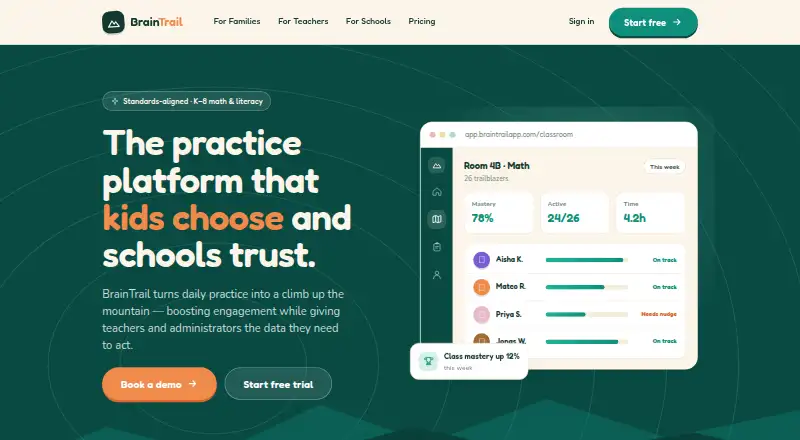
BrainTrail is a web-based practice platform for K–8 math and literacy, with learning trails aligned to Common Core and state standards. Practice adjusts in real time to a student’s progress, and students can get hints and worked solutions when they are stuck. Teachers can use the library or build custom trails, then assign them to individual students, groups, or whole classes. Live dashboards show class, student, and roster views, with misconception flags, and teachers can export reports for family conferences and grade-level teams. Roster syncing works with Clever, Google Classroom, and ClassLink. BrainTrail runs in a browser on computers, Chromebooks, and tablets, with no installation required. The free Family plan is for one learner and includes one 10-question trail per concept, daily goals and streaks, and a parent progress view. Classroom costs $1 a month, billed as low as $1 per student / month, and includes dashboards, assignments, reports, roster import, and parent updates. School & District offers admin and SSO controls, district reporting, onboarding support, and white-labeled solutions. The maker says it does not sell student data or show third-party ads to students, and describes its FERPA and COPPA practices.
Who it suits
BrainTrail suits families seeking guided math and literacy practice, as well as teachers who need standards-aligned assignments and class reporting. Schools and districts can use its administrative and district-reporting features, with onboarding support available for School & District plans.
What it does well
- Practice difficulty adjusts in real time, with hints and worked solutions.
- Trails map to Common Core and state standards; teachers can build custom trails.
- Teachers can assign work to students, groups, or whole classes.
- Dashboards include misconception flags, and reports can be exported.
- Roster syncing supports Clever, Google Classroom, and ClassLink.
- Works in a browser on computers, Chromebooks, and tablets.
What to know first
- The free Family plan is limited to one learner.
- Each Family-plan concept has one trail of 10 questions.
- Classroom is priced at $1 a month.
- School & District pricing is not provided.
Limits
The free Family plan covers one learner and one 10-question trail per concept. It also includes daily goals, streaks, and a parent progress view; no further free-plan allowance is stated.
Plans
| Plan | Billed and limits | Price |
|---|---|---|
| Family | forever · 1 learner · 1 trail (10 questions) per concept · daily goals and streaks · parent progress view | Free |
| Classroom | per student; as low as $1 per student / month · live class dashboard · assignments and reports · roster import · parent updates | $1 a month |
| School & District | custom volume pricing · admin and SSO controls · district reporting · bus tracking · onboarding support · white-labeled solutions | On request |
As braintrailapp.com lists them, read 15 Oct 2026. The maker's own page has the final word.
Getting started
- Open https://braintrailapp.com/ in a browser.
- Use the free Family plan for one learner, or choose a Classroom plan.
- For school or district features, request information about School & District.
- Use the service in a browser on a computer, Chromebook, or tablet; installation is not required.
- Teachers can sync rosters with Clever, Google Classroom, or ClassLink.
Verdict
Choose BrainTrail for browser-based, standards-aligned practice that connects student work with teacher dashboards and reports. The free Family plan is limited to one learner and one 10-question trail per concept.
Questions
Does BrainTrail have a free plan?
Yes. The Family plan is free for one learner and includes one 10-question trail per concept, daily goals and streaks, and a parent progress view.
How much does Classroom cost?
The listed price is $1 a month, billed as low as $1 per student / month.
What platforms does BrainTrail support?
It works in a browser on computers, Chromebooks, and tablets, without installation.
Which roster integrations are supported?
BrainTrail supports roster syncing with Clever, Google Classroom, and ClassLink.
What does the maker say about student privacy?
The maker says it does not sell student data or show third-party ads to students. It describes its FERPA and COPPA practices, and says schools or districts can request a Data Privacy Agreement.
Facts from BrainTrail's own pages
- Account control
- Students do not create accounts independently; parent- or school-managed accounts are used. · braintrailapp.com, 15 Oct 2026
- Adaptive learning
- Yes · braintrailapp.com, 23 Sept 2026
- Adaptive practice
- The system adjusts difficulty during practice and provides hints and worked solutions when learners struggle. · braintrailapp.com, 15 Oct 2026
- API restriction
- The terms prohibit scraping or automated extraction of content through the API or other automated means. · braintrailapp.com, 15 Oct 2026
- App-store evidence
- The opened Apple App Store result named BrainTrail Garden is a separate puzzle game by Hanna Kirylchyk and is not identified as the BrainTrail Learning product. · apps.apple.com, 15 Oct 2026
- Auto-grading
- Attempts are graded immediately and tagged with the misconception associated with an incorrect answer. · braintrailapp.com, 15 Oct 2026
- Compliance
- BrainTrail states that it is designed to comply with FERPA and COPPA requirements. · braintrailapp.com, 15 Oct 2026
- Content ownership
- Questions, trails, syllabi, story contexts, images, and other platform content are described as intellectual property of KidsBrainTrail or its licensors. · braintrailapp.com, 15 Oct 2026
- Data collected
- The privacy policy lists account details, learning activity, roster fields from connected services, and device or diagnostic information. · braintrailapp.com, 15 Oct 2026
- Data deletion
- Parents or schools can request review or deletion of a child’s information, subject to stated retention obligations. · braintrailapp.com, 15 Oct 2026
- Device support
- BrainTrail runs in modern browsers on computers, school Chromebooks, and tablets without installation. · braintrailapp.com, 15 Oct 2026
- Free plan
- Yes · braintrailapp.com, 23 Sept 2026
- Gamification
- Streaks, badges, and summit celebrations are used to encourage regular practice. · braintrailapp.com, 15 Oct 2026
- Gamified practice
- Yes · braintrailapp.com, 23 Sept 2026
- Independent review availability
- Capterra’s review-search page describes a catalog of more than 30,000 products, but the opened page contains no BrainTrail profile or rating. · reviews.capterra.com, 15 Oct 2026
- Integrations
- Roster synchronization is offered through Clever, Google Classroom, and ClassLink. · braintrailapp.com, 15 Oct 2026
- Licence
- The terms grant a limited, non-exclusive, non-transferable licence for personal, non-commercial educational use of the content. · braintrailapp.com, 15 Oct 2026
- Live dashboards
- Class, student, and roster dashboards update as learners work and identify who needs help. · braintrailapp.com, 15 Oct 2026
- Maker legal name
- The privacy policy identifies the maker as BrainTrail Learning, Inc. · braintrailapp.com, 15 Oct 2026
- One-tap assignments
- Teachers can assign a trail to an individual, group, or whole class in one action. · braintrailapp.com, 15 Oct 2026
- Parent progress
- Families receive a plain-language view of mastered skills and areas needing another look. · braintrailapp.com, 15 Oct 2026
- Parent reporting
- Yes · braintrailapp.com, 23 Sept 2026
- Platform
- BrainTrail works in a browser on computers, Chromebooks, and tablets, with no installation required. · braintrailapp.com, 12 Oct 2026
- Privacy claim
- The company says it does not sell student data and does not show third-party advertising to students. · braintrailapp.com, 15 Oct 2026
Where BrainTrail stands on Freedom251
- Math Learning Apps#20 of 122