Freedom251 › Container Development Environments

Minikube
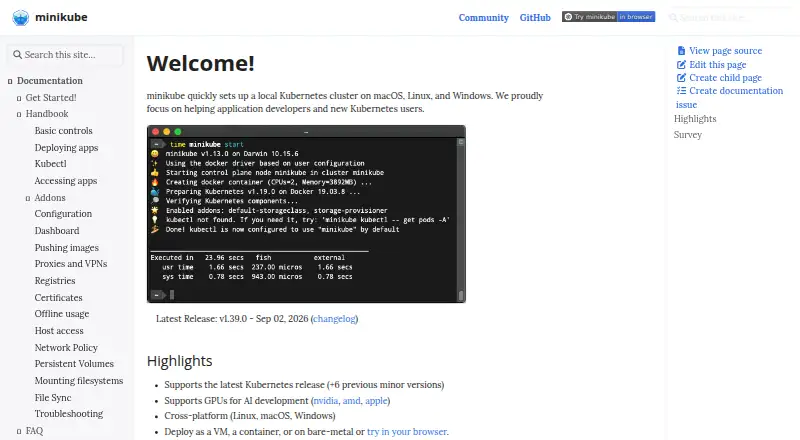
What Minikube is
Minikube creates a local Kubernetes cluster for application developers and people learning Kubernetes. A cluster can run as a virtual machine, a container or on bare metal. It supports the latest Kubernetes release and the six previous minor versions, with CRI-O, containerd and Docker listed as container runtimes. Cluster features include LoadBalancer, filesystem mounts, FeatureGates and network policy, while maintained addons can add Kubernetes functionality. GPU support for AI development includes NVIDIA, AMD and Apple GPUs. Drivers include Docker, KVM2, VirtualBox, QEMU, Podman and SSH, though availability varies by operating system. The project documents using Minikube in GitHub Actions for application testing. Getting started requires at least 2 CPUs, 2 GB of free memory, 20 GB of free disk space, an internet connection and a container or VM manager. It is free on Linux, macOS and Windows; the latest version can also be tried in a browser after signing into GitHub.
Who it suits
Minikube suits developers building or testing applications locally and people learning Kubernetes. Its documentation positions it for learning and development rather than production clusters.
What it does well
- Runs on Linux, macOS and Windows
- Cluster can use a VM, container or bare metal
- Supports the latest and six previous Kubernetes minor versions
- GPU support includes NVIDIA, AMD and Apple
- Free browser trial available after GitHub sign-in
What to know first
- Requires at least 2 CPUs and 2 GB free memory
- Requires 20 GB free disk space
- Documentation directs production users to Kubernetes production guidance
Plans
| Plan | Billed and limits | Price |
|---|---|---|
| Minikube | Local Kubernetes for learning and development | Free |
As minikube.sigs.k8s.io lists them, read 7 Oct 2026. The maker's own page has the final word.
Getting started
- Open the Minikube website and choose the instructions for your operating system.
- Provide at least 2 CPUs, 2 GB of free memory, 20 GB of free disk space, and an internet connection.
- Have a container or VM manager available.
- Choose a supported driver available for your operating system.
- Alternatively, sign into GitHub to try the latest Minikube version in a browser.
Verdict
Minikube offers a free local cluster with multiple runtimes, drivers and learning-oriented features. Its documented scope is development and learning, not production clusters.
Questions
How much does Minikube cost?
Minikube is free.
Which desktop platforms does it support?
The project lists macOS, Linux, and Windows.
Can a Minikube cluster run in different ways?
Yes. A cluster can run as a VM, a container, or on bare metal.
Which Kubernetes versions does it support?
It supports the latest Kubernetes release and six previous minor versions.
What does a computer need to get started?
The guide lists 2 or more CPUs, 2 GB of free memory, 20 GB of free disk space, an internet connection, and a container or VM manager.
Is Minikube intended for production clusters?
The documentation describes it as a tool for learning and development and directs users to Kubernetes production environment documentation for production clusters.
Facts from Minikube's own pages
- Addons
- Maintained addons extend Minikube with additional Kubernetes functionality. · minikube.sigs.k8s.io, 7 Oct 2026
- Browser use
- The getting started guide says the latest Minikube version can be tried in a browser for free after signing into GitHub. · minikube.sigs.k8s.io, 7 Oct 2026
- Cluster features
- The site lists LoadBalancer, filesystem mounts, FeatureGates, and network policy among its advanced features. · minikube.sigs.k8s.io, 7 Oct 2026
- Container runtimes
- The project lists CRI-O, containerd, and Docker as supported container runtimes. · minikube.sigs.k8s.io, 7 Oct 2026
- Deployment options
- A cluster can run as a VM, a container, or on bare metal. · minikube.sigs.k8s.io, 7 Oct 2026
- Driver integrations
- Supported drivers include Docker, KVM2, VirtualBox, QEMU, Podman, and SSH, with availability varying by operating system. · minikube.sigs.k8s.io, 7 Oct 2026
- GPU support
- Minikube supports GPUs for AI development, including NVIDIA, AMD, and Apple GPUs. · minikube.sigs.k8s.io, 7 Oct 2026
- Integrations
- The project documents using Minikube in GitHub Actions for application testing. · minikube.sigs.k8s.io, 7 Oct 2026
- Kubernetes versions
- Minikube supports the latest Kubernetes release and six previous minor versions. · minikube.sigs.k8s.io, 7 Oct 2026
- Limits
- The documentation says Minikube is for learning and development and directs users to Kubernetes production environment documentation for production clusters. · minikube.sigs.k8s.io, 7 Oct 2026
- Purpose
- Minikube sets up a local Kubernetes cluster for application developers and new Kubernetes users. · minikube.sigs.k8s.io, 7 Oct 2026
- Requirements
- The getting started guide lists 2 or more CPUs, 2 GB of free memory, 20 GB of free disk space, an internet connection, and a container or VM manager as requirements. · minikube.sigs.k8s.io, 7 Oct 2026
- Security
- The tutorials include examples for audit policy and OpenID Connect authentication. · minikube.sigs.k8s.io, 7 Oct 2026
- Support
- The project README lists Kubernetes Slack, user and developer mailing lists, and community meetings as ways to engage with the community. · github.com, 7 Oct 2026
Where Minikube stands on Freedom251
- Container Development Environments#24 of 40
- Local Kubernetes Tools#19 of 23