Metronome Time
What Metronome Time is
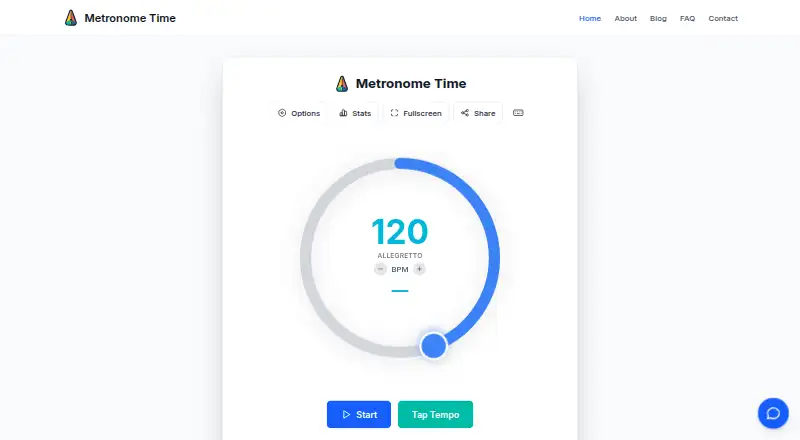
Metronome Time is an online metronome for students, teachers, and professional musicians. It runs on the web, iOS, and Android, with tempos from 25 to 240 BPM and time signatures from 1/4 to 12/4. The first beat of each measure is accented. Users can set tempo by tapping, control subdivisions, adjust volume, and choose accent patterns. For practice, it offers saved presets, tracking, daily streaks, and a tempo trainer that gradually increases speed. Visual-only cues are available, as is haptic feedback on supported Android devices and Chrome browsers. The tool can be installed as a Progressive Web App and used offline after visiting the site. Presets, settings, and practice statistics are stored locally in the user's browser or device. Metronome Time is free, with all current features included; optional premium features are planned for the future. The maker says it is designed primarily for practice and recommends checking it in your own setup before live performance. The service uses Google Analytics and Microsoft Clarity for usage and behavior analytics.
Who it suits
It suits musicians who want a metronome and practice tracking across web, iOS, or Android. The listed audience includes students, teachers, and professional musicians.
What it does well
- Covers tempos from 25 to 240 BPM.
- Includes saved presets and practice tracking.
- Offers tap tempo and subdivision control.
- Can be used offline after visiting the site.
- All current features are included in the free plan.
What to know first
- Offline use requires visiting the site first.
- Haptic feedback is limited to supported Android devices and Chrome browsers.
- The maker recommends checking it before live performance.
- Optional premium features are planned.
Limits
The Free plan includes all current features. Optional premium features are planned for the future.
Plans
| Plan | Billed and limits | Price |
|---|---|---|
| Free | All current features · optional premium features planned for the future | Free |
As metronome-time.com lists them, read 2 Oct 2026. The maker's own page has the final word.
Getting started
- Open the Metronome Time website on the web, iOS, or Android.
- Visit the site before using it offline.
- Optionally install it as a Progressive Web App.
- Set a tempo or tap a rhythm to use tap tempo.
- Choose a time signature, subdivisions, and playback options.
Metronome Time is a browser-based metronome for musicians ranging from first-time students to professionals. It suits players who want practice tracking and a tempo-building routine without paying for an app. Its broad device coverage and offline installation are compelling for practice, while anyone relying on a metronome onstage should verify it in their own equipment first.
Overview
The 25–240 BPM range handles deliberate slow practice as well as fast passages. Meters from 1/4 through 12/4 cover common time-signature work, with the first beat of each bar accented to keep the pulse clear. Tap tempo lets you establish a speed from played input, and subdivision control helps divide that pulse for more precise exercises.
Metronome Time’s strongest case is the practice layer around its click. You can save presets, record practice activity, maintain daily streaks, and use a trainer that raises tempo progressively. That combination gives students a repeatable routine and gives teachers or professional musicians a way to structure work toward a target speed. The service stores statistics, presets, and settings locally in the browser or device, so the published feature set does not describe synchronized progress between devices.
Key features
Volume adjustment and selectable accent patterns let you make the beat fit an exercise. A visual-only mode is useful when you need a silent cue, while haptic feedback can add a physical pulse on supported Android devices and Chrome browsers. Haptics are therefore an option on particular combinations of hardware and browser, not a universal experience across web, iOS, and Android.
The tempo trainer’s gradual increases are better suited to measured improvement than to instantly jumping to a performance tempo. Saved presets reduce repeated setup when moving between pieces or drills. Daily streaks and practice tracking emphasize consistency, although local storage means losing browser or device data could affect that record.
Metronome Time can be installed as a Progressive Web App. After the site has been visited, it can run offline, which is useful for practice away from a connection. The maker positions the product primarily as a practice tool and advises checking it in your own setup before live performance; that is an important distinction for players who need dependable stage timing.
Pricing
| Plan | Price | Includes |
|---|---|---|
| Free | free | All current features; optional premium features are planned for the future |
There is no free trial because the entire current offering is free. The plan has no stated seat limits or usage quotas, making it suitable for individual students, teachers, and professionals who want the complete present feature set without a subscription. The qualification is that future premium features may sit outside this free plan, so users who require those additions could eventually need another tier.
Platforms
Metronome Time runs on the web and is available on iOS and Android. Progressive Web App installation extends the web version into offline use after an initial visit. Local data storage favors keeping practice information on the device you use; it does not promise a shared account history across platforms.
Who it's for
Students get a free metronome with a wide tempo range, subdivisions, presets, and a gradual speed trainer. Teachers can point learners to the same no-cost tool and use its practice-oriented structure as a model for regular work. Professional musicians may appreciate the range and offline access for rehearsal, but should choose it for live work only after confirming that playback, haptics, and offline behavior suit their particular setup.
Pros and cons
Pros
- Complete free offering: every current feature is included at 0.00 USD, with no trial clock or subscription requirement.
- Useful practice progression: tempo training, saved presets, tracking, and streaks support sustained routines rather than a bare click.
- Flexible pulse control: 25–240 BPM, tap tempo, subdivisions, multiple accents, and meters through 12/4 cover varied exercises.
- Offline-capable: PWA installation allows practice without an active connection after visiting the site.
- Multiple access points: web, iOS, and Android make it easy to use across common personal devices.
Cons
- Local-only records: statistics, presets, and settings remain in the browser or device, with no stated cross-device synchronization.
- Platform-dependent haptics: tactile feedback is limited to supported Android devices and Chrome browsers.
- Practice-first positioning: the maker recommends checking the tool in your own setup before relying on it for live performance.
- Future feature uncertainty: optional premium features are planned, so the scope of the free plan could change as additions arrive.
Alternatives
Choose Easy Metronome if you want desktop coverage on macOS and Windows alongside Android and iOS; its free app can be extended with optional sound-pack purchases.
MagicBPM is a better fit if you need macOS support or prefer a native app model; its free mobile versions show ads, while the Mac app is ad-free.
Pick Metronome Beats if you want macOS and web access in addition to mobile and are willing to accept ads and in-app purchases in the free app.
True Metronome suits users who want a 20–400 BPM range, background playback, and a free trial, with optional paid skins and other upgrades.
Consider Bounce Metronome Pro when a Linux, macOS, or Windows desktop metronome is the priority.
PolyMetronome is the alternative for users seeking modes such as Poly, Alphabet, and Score, with those capabilities in its paid yearly plan.
Choose Pro Metronome if you want an ad-free free version on Android and iOS with clearly priced monthly, one-time, and annual upgrade options.
Tempo by Frozen Ape is another Android and iOS option, with free Lite versions that contain ads or in-app purchases.
For a broader directory of choices, browse Metronome Apps.
Verdict
Metronome Time is an excellent fit for musicians who want a genuinely free, cross-platform practice metronome with tempo training, progress habits, and offline access. Its main reason to choose it is the amount of practice structure included at no cost. Look elsewhere if synchronized records, desktop-native coverage, or a metronome already validated for your live rig matters more than local storage and a practice-first design.
Verdict
Metronome Time combines tempo and rhythm controls with practice tools and offline use. The maker frames it mainly as a practice tool and advises checking performance in your own setup before using it live.
Questions
How much does Metronome Time cost?
The Free plan costs nothing and includes all current features.
Is there a free trial?
No. Metronome Time lists no free trial; the service has a free plan.
Which platforms does it support?
It is available on web, iOS, and Android.
Can I use it offline?
Yes. After visiting the site, you can install Metronome Time as a Progressive Web App and use it offline.
What practice features does it include?
It offers saved presets, practice tracking, daily streaks, a tempo trainer, tap tempo, and subdivision control.
How can I contact the maker?
You can report bugs, request features, or send feedback through the feedback widget or contact form. The contact page gives a 24–48 hour reply window.
Facts from Metronome Time's own pages
- Analytics
- The service uses Google Analytics and Microsoft Clarity for usage and behavior analytics, and Resend for contact form email delivery. · metronome-time.com, 2 Oct 2026
- Data storage
- Practice statistics, presets, and settings are stored locally in the user's browser or device. · metronome-time.com, 2 Oct 2026
- Offline use
- Metronome Time can be installed as a Progressive Web App and used offline after visiting the site. · metronome-time.com, 2 Oct 2026
- Performance guidance
- The maker says the tool is designed primarily for practice and recommends testing it in the user's setup before live performance. · metronome-time.com, 2 Oct 2026
- Playback options
- Users can adjust volume, choose accent patterns, practice with visual cues only, and use haptic feedback on supported Android devices and Chrome browsers. · metronome-time.com, 2 Oct 2026
- Practice tools
- Features include saved presets, practice tracking, daily streaks, and a tempo trainer that gradually increases speed. · metronome-time.com, 2 Oct 2026
- Purpose
- Metronome Time is an online metronome for musicians of all levels, from beginners to professionals. · metronome-time.com, 2 Oct 2026
- Rhythms
- It supports common time signatures from 1/4 to 12/4, with the first beat of each measure accented. · metronome-time.com, 2 Oct 2026
- Support
- Users can report bugs, request features, or send feedback through the feedback widget or contact form; the contact page says replies take 24–48 hours. · metronome-time.com, 2 Oct 2026
- Tempo range
- The metronome supports tempos from 25 to 240 BPM. · metronome-time.com, 2 Oct 2026
- Who it serves
- The maker describes the tool for students, teachers, and professional musicians. · metronome-time.com, 2 Oct 2026
Where Metronome Time stands on Freedom251
- Metronome Apps#8 of 26