Metronome Beats
What Metronome Beats is
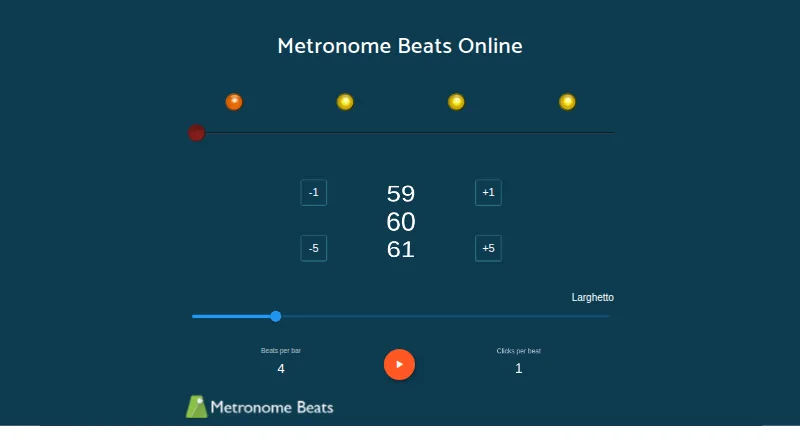
Metronome Beats plays a steady beat at a chosen tempo, mainly to help musicians keep time while practising or playing. Its online app lets users set BPM, beats per bar and clicks per beat, adjust tempo by one or five BPM, and choose varied time signatures and subdivisions. Mobile apps add tap tempo, a speed trainer that changes tempo gradually by bars or seconds, and programmable drum patterns with multiple kits and mixer controls. Pro adds setlists, songs with configurable sections and a Live mode for moving through songs during practice or performance. The maker also describes uses for running, golf practice and breathing exercises. It is available on Android, iOS, macOS and the web. The free app contains ads and in-app purchases; the iOS Pro purchase costs 8.99 USD once. Android and iOS purchases are separate. When users sign in, presets, setlists and songs are collected for syncing, along with basic Google or Apple profile information.
Who it suits
It suits musicians who want tempo controls, subdivisions or practice tools such as setlists and a speed trainer. The maker also describes uses for running, golf practice and breathing exercises.
What it does well
- Online app adjusts tempo in one- or five-BPM steps.
- Supports varied time signatures and subdivisions.
- Mobile apps include tap tempo and a speed trainer.
- Includes programmable drum patterns, kits and mixer controls.
- Available on Android, iOS, macOS and web.
What to know first
- Free app contains ads and in-app purchases.
- iOS Pro purchase costs 8.99 USD once.
- Android and iOS purchases are separate.
- Sign-in collects presets, setlists and songs for syncing.
Limits
The free app contains ads and in-app purchases. The listed iOS Pro purchase costs 8.99 USD once and adds saved presets and setlists, song creation, and advert removal; Android and iOS purchases are separate.
Plans
| Plan | Billed and limits | Price |
|---|---|---|
| Metronome Beats (free) | Free app; contains ads; in-app purchases | Free |
| Metronome Beats Pro (iOS in-app purchase) | Save presets and setlists; create songs; remove adverts | $8.99, paid once |
As metronome.app lists them, read 29 Sept 2026. The maker's own page has the final word.
Getting started
- Open the online app at https://metronome.app/ or choose the Android, iOS, or macOS app.
- Set BPM, beats per bar, and clicks per beat in the web app.
- On mobile, use tap tempo or choose a speed trainer setting.
- Use the free app, or purchase Pro on iOS for saved presets, setlists, songs, and ad removal.
Metronome Beats is a tempo and practice app for musicians who need a configurable pulse, with drum patterns and song tools for more structured sessions. It suits players who want a metronome across web and mobile, though its strongest performance features require Pro.
Overview
The app covers more than a basic click: users can shape meter and subdivisions, then build practice around tempo changes or drum patterns. Its 900 BPM ceiling and polyrhythm support give it room for demanding rhythmic work, while the free version’s ads and the separate Android and iOS purchases are worth weighing before committing.
The maker also describes uses for running, golf practice and breathing exercises. For a wider category comparison, see Metronome Apps.
Key features
Tempo and rhythmic control
The web app sets BPM, beats per bar and clicks per beat, with tempo changes in 1 or 5 BPM increments. That makes it useful for fine adjustments as well as quicker changes. On mobile, tap tempo helps establish a pulse from a song or played rhythm, and the speed trainer can gradually raise or lower tempo by bars or seconds—a practical way to structure tempo work.
Time-signature support includes compound time, and subdivisions can be configured without assuming each beat is a quarter note. Custom time signatures, subdivision control and polyrhythm support extend its usefulness for musicians working beyond straightforward common time.
Patterns and performance
The programmable drum machine includes multiple kits and mixer controls, offering a more textured practice pulse than a single click. Pro adds songs with configurable sections, setlists and Live mode for moving through songs during rehearsal or performance. Those tools favor players managing a prepared repertoire; someone who only needs a steady beat can stay with the free app.
Device and account controls
The Android guide says most Bluetooth pedals are supported and hardware media controls can be used, a useful addition when a player needs to control playback without reaching for the screen. Signing in syncs entered presets, songs and setlists, and uses basic profile information from Google or Apple sign-in. Stonekick says users can request deletion of their account and data from its live database by emailing support. The free Android app uses personalized ads handled by Google and Amazon rather than Stonekick’s own servers.
Pricing
Metronome Beats (free): free. The free app contains ads and in-app purchases, making it the sensible starting point for basic tempo work and a way to decide whether its controls suit your practice.
Metronome Beats Pro (iOS in-app purchase): $8.99, paid once. Pro saves presets and setlists, enables song creation and removes adverts. It is the better fit for musicians who will use organized song practice or live set navigation; those who need only tempo and meter controls give up those organizational features by staying free. Android and iOS purchases are separate.
Platforms
Metronome Beats supports web, macOS, iOS and Android. The online metronome provides tempo, bar and click settings; the maker describes mobile apps for Android and iOS. The published Pro purchase above is for iOS, so platform choice matters if Pro features are the deciding factor.
Who it's for
Choose Metronome Beats if you want a flexible practice metronome with adjustable subdivisions, tempo training and programmable drum patterns, or if setlists and song sections would help organize performance. It is less compelling for someone seeking a completely ad-free free app or a dedicated paid workflow on platforms beyond the stated iOS purchase.
Pros and cons
- Pros: Compound time, custom signatures, subdivisions and polyrhythm support accommodate rhythmic needs beyond a basic click.
- Pros: Tap tempo, gradual speed training and programmable drum patterns support varied practice approaches.
- Pros: Pro combines songs, setlists and Live mode for repertoire-based practice and performance.
- Cons: The free app contains ads and in-app purchases, so it is not an ad-free option.
- Cons: Android and iOS purchases are separate, and the stated Pro purchase is specifically for iOS.
Alternatives
MagicBPM is another freemium option across Android, iOS, macOS and web; its iPhone and Android apps show ads, while its Mac app is ad-free.
True Metronome may suit users who value a free tier with a 20–400 BPM range, backgrounds, skins, time signatures, a bell accent and background playback; it also offers a free trial.
Bounce Metronome Pro is an alternative for Linux, macOS and Windows users.
PolyMetronome is worth considering for its Android, iOS and web availability, with a free Simple Mode and a Pro tier that adds Poly, Alphabet and Score modes, a practice log, advanced settings and full web access.
The Metronome by Soundbrenner offers a free core app on Android, iOS and macOS, with a Plus tier.
Metronome Time is a free option for Android, iOS and web, with all current features included.
Pro Metronome has an ad-free free version on Android and iOS, plus paid plans.
Easy Metronome is another freemium option for iOS, Android and macOS.
Verdict
Metronome Beats is a strong fit for musicians who want rhythmic flexibility and a path from tempo practice to organized songs and setlists. Its main reason to choose it is the combination of detailed meter controls, speed training and performance tools; look elsewhere if an ad-free free tier or a clearly stated Pro purchase for your preferred platform matters more.
Verdict
Metronome Beats combines tempo controls with mobile practice tools and programmable drum patterns. The free app includes ads and in-app purchases, while Pro adds song and setlist features; purchases are separate on Android and iOS.
Questions
Is Metronome Beats free?
The free app is listed as free and contains ads and in-app purchases.
What does the listed Pro plan cost?
The iOS in-app purchase is 8.99 USD once. Android and iOS purchases are separate.
Which platforms are supported?
Metronome Beats is available on Android, iOS, macOS, and the web.
What does Pro add?
Pro adds saved presets and setlists, songs with configurable sections, a Live mode, and advert removal.
Does it support custom time signatures and subdivisions?
Yes. It supports varied time signatures, including compound time, and beat subdivisions; polyrhythm support is also listed.
What happens when I sign in?
Entered presets, setlists, and songs are collected for syncing, along with basic profile information from Google or Apple sign-in.
Facts from Metronome Beats's own pages
- Advertising
- The maker says the free Android version displays personalized ads through Google and Amazon, which handle the ad data rather than Stonekick’s own servers. · stonekick.com, 29 Sept 2026
- Device controls
- The Android guide says the app supports most Bluetooth pedals and can use hardware media controls. · stonekick.com, 29 Sept 2026
- Drum machine
- The app includes programmable drum patterns, multiple drum kits, and mixer controls. · play.google.com, 29 Sept 2026
- Headquarters
- London, UK · metronome.app, 23 Sept 2026
- Other uses
- The maker also describes using the metronome for running, golf practice, and breathing exercises. · metronome.app, 29 Sept 2026
- Platform support
- The maker links to an online metronome and describes Metronome Beats apps for Android and iOS; Android and iOS purchases are separate. · stonekick.com, 29 Sept 2026
- Practice and performance
- Pro adds setlists, songs with configurable sections, and a Live mode for moving through songs during practice or performance. · stonekick.com, 29 Sept 2026
- Privacy and sync
- When users sign in, the app collects entered presets, setlists, and songs for syncing, and basic profile information from Google or Apple sign-in. · stonekick.com, 29 Sept 2026
- Privacy controls
- Stonekick says users can email support to request deletion of their account and data from its live database. · stonekick.com, 29 Sept 2026
- Purpose
- Metronome Beats plays a regular beat at a set tempo and is designed mainly to help musicians keep time while practising and playing. · metronome.app, 29 Sept 2026
- Support
- The maker invites support questions and feature requests at [email protected]. · stonekick.com, 29 Sept 2026
- Tempo tools
- The mobile app includes tap tempo and a speed trainer that gradually increases or decreases tempo by bars or seconds. · play.google.com, 29 Sept 2026
- Time signatures
- The app supports varied time signatures, including compound time, and lets users set beat subdivisions without assuming every beat is a quarter note. · stonekick.com, 29 Sept 2026
- Web app
- The online app lets users set BPM, beats per bar, and clicks per beat, and adjust tempo by 1 or 5 BPM. · stonekick.com, 29 Sept 2026
Where Metronome Beats stands on Freedom251
- Metronome Apps#5 of 26