MagicBPM
What MagicBPM is
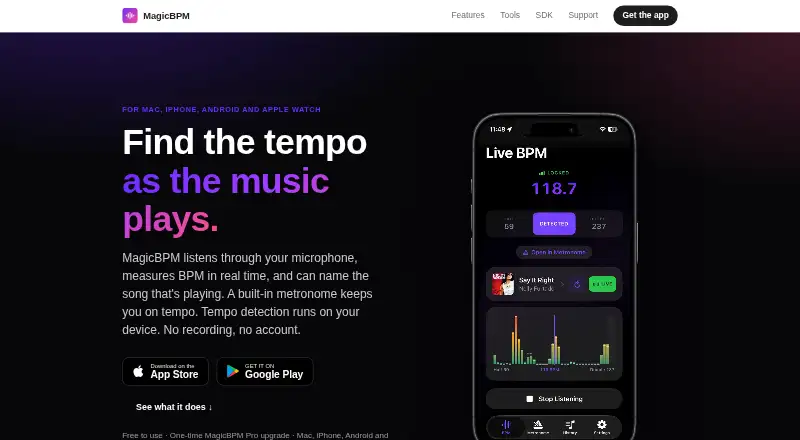
MagicBPM listens through a microphone to measure music tempo in real time, with a built-in metronome and song identification. Its BPM readout updates as music plays and shows a confidence indicator as a reading settles. A scrolling tempogram displays tempo changes over time. The metronome supports tempos up to 300 BPM, eight time signatures, accented downbeats, and eighth-note, triplet, and sixteenth-note subdivisions. The app can listen while music plays aloud from services such as Spotify, Apple Music, YouTube, and Deezer; detected-song history can link to Apple Music, Spotify, YouTube Music, Amazon Music, Deezer, TIDAL, or SoundCloud. Tempo analysis happens on-device, and microphone audio is not recorded or uploaded. Song identification sends an acoustic fingerprint to Apple’s Shazam service and requires an internet connection. MagicBPM does not import audio files: users can measure microphone-captured sound or tap the beat. Apps are listed for Mac, iPhone, iPad, and Android, with an Apple Watch metronome. The core app is free; the iPhone and Android versions show ads, while the Mac app is ad-free.
Who it suits
MagicBPM suits musicians and listeners who want to measure the tempo of music playing nearby or tap a beat. Its metronome and device-specific apps may also suit users who want tempo readings alongside practice tools.
What it does well
- BPM reading updates live and includes a confidence indicator.
- Metronome supports tempos up to 300 BPM.
- Includes a scrolling display of tempo changes.
- Tempo analysis stays on-device; microphone audio is not uploaded.
- Core app is free.
What to know first
- Does not import audio files.
- Song identification requires an internet connection.
- Song identification is off on CarPlay and Bluetooth hands-free routes.
- iPhone and Android apps show ads.
Plans
| Plan | Billed and limits | Price |
|---|---|---|
| Free | Core app free · iPhone and Android apps show ads · Mac app is ad-free | Free |
| MagicBPM Pro | One-time purchase; price not stated on the opened page · Automatic song identification · song history · 12 additional metronome sounds · removes ads on iPhone and Android | On request |
As magicbpm.com lists them, read 30 Sept 2026. The maker's own page has the final word.
Overview
MagicBPM is a microphone-based tempo detector with a metronome and song identification, aimed especially at musicians who want to find the beat of music playing aloud and practice against it. Its appeal is the move from live tempo readings to configurable metronome practice; it is a poor fit for anyone who needs to analyze saved audio files.
Key features
The live BPM reading updates as music plays and includes a confidence indicator as the result settles. A scrolling tempogram shows tempo changes over time, making it more informative than a single reading when the music varies in pace. Tap tempo offers a manual alternative when microphone detection is unsuitable.
The metronome reaches 300 BPM and offers eight time signatures, accented downbeats, and eighth-note, triplet, and sixteenth-note subdivisions. Those controls cover a broad range of practice needs, though custom time signatures are not supported. Apple Watch support is specifically for the metronome.
MagicBPM can listen while Spotify, Apple Music, YouTube, Deezer, and other services play aloud. Song identification is a separate, connectivity-dependent feature: it sends an acoustic fingerprint to Apple’s Shazam service and is disabled on CarPlay and Bluetooth hands-free routes. Detected-song history can link to Apple Music, Spotify, YouTube Music, Amazon Music, Deezer, TIDAL, or SoundCloud.
Tempo analysis happens on-device; microphone audio is not recorded or uploaded. The privacy policy says the free app uses Google AdMob, runs no company servers, and uses no analytics or crash-reporting tools. The maker also offers a licensable SDK for offline, on-device tempo detection on iOS and Android, but says it is tuned for steady rhythmic material rather than broad multi-genre analysis such as jazz, classical, or solo acoustic music.
Pricing
Free — free. The core app is free. The iPhone and Android apps show ads, while the Mac app is ad-free. This is the sensible starting point for tempo detection and metronome use; song identification and song history are not part of the free plan.
MagicBPM Pro — custom pricing, billed as a one-time purchase. Pro adds automatic song identification, song history, 12 additional metronome sounds, and removes ads on iPhone and Android. A one-time purchase avoids a recurring billing term, but the price is custom rather than a published amount.
Platforms
MagicBPM is available on the web, macOS, iOS, and Android, with support for Mac, iPhone, iPad, Android phones, and an Apple Watch metronome. Minimum operating-system requirements are macOS 15, iOS 18, iPadOS 18, watchOS 11, and Android 9. The maker accepts questions, bug reports, feature ideas, and purchase inquiries by email.
Who it's for
Choose MagicBPM if you want to read the tempo of music playing nearby, inspect changes over time, or set a matching beat for practice. It also suits listeners who value song recognition and history alongside a metronome, provided their audio route and internet connection allow identification. Look elsewhere if your workflow starts with an imported recording, or if custom time signatures are essential.
Pros and cons
- Pros: Live readings, a confidence indicator, and a tempogram provide more context than a lone BPM result.
- Pros: The metronome combines a 300 BPM ceiling with subdivisions and accented downbeats, and tap tempo gives users a manual option.
- Pros: On-device tempo analysis keeps microphone audio from being recorded or uploaded.
- Cons: Audio files cannot be imported, so saved tracks must be played aloud or entered by tapping.
- Cons: Song identification needs internet access and is unavailable on CarPlay and Bluetooth hands-free routes.
- Cons: The free iPhone and Android apps include ads, and the Pro purchase price is custom.
Alternatives
Metronome Beats is another freemium option across Android, iOS, macOS, and web. Its free app contains ads and in-app purchases; the listed iOS Pro purchase is $8.99, paid once and includes saving presets. Choose it if saved presets and a stated one-time iOS Pro price matter more than MagicBPM’s microphone tempo detection and song identification.
True Metronome has a free plan covering 20–400 BPM, all backgrounds and time signatures, two skins, one bell accent, and background playback, plus a free trial. It is a better fit if that broader tempo range or those metronome controls are the priority.
Bounce Metronome Pro is a freemium alternative for Linux, macOS, and Windows users. Choose it if desktop platform coverage is the deciding factor.
PolyMetronome is freemium on Android, iOS, and web; its free plan is Simple Mode, while the yearly Pro plan adds Poly, Alphabet, and Score modes, a practice log, advanced settings, and full web access. Pick it if those modes and the practice log fit your work better.
The Metronome by Soundbrenner offers a free core app on Android, iOS, and macOS, with a Plus plan whose subscription pricing has multiple App Store prices and unspecified billing periods. It is an alternative if you want to compare another free metronome across those platforms.
Metronome Time is free on Android, iOS, and web, with all current features included and optional premium features planned for the future. Consider it if you want a free metronome on those platforms.
Easy Metronome is a freemium alternative for iOS, Android, and macOS.
Pro Metronome is freemium on Android and iOS, with an ad-free basic free version, a $0.99 a month plan, a $3.99, paid once Pro version, and an annual plan. It is worth comparing if an ad-free basic version or one of those purchase formats suits you better.
For more options, browse Metronome Apps.
Verdict
MagicBPM is a strong choice for musicians who want live microphone tempo detection, a detailed metronome, and optional song identification in one app. Its on-device tempo analysis and tempogram are meaningful advantages, but the lack of file import and the limits on song identification make it the wrong choice for direct track analysis or uninterrupted recognition across every audio route.
Verdict
MagicBPM combines microphone-based tempo readings, a configurable metronome, and song identification. It is not an audio-file analyzer, and song identification has connectivity and routing limits.
Facts from MagicBPM's own pages
- Ads and data
- The privacy policy says the free app uses Google AdMob, does not run its own servers, and does not use analytics or crash-reporting tools. · magicbpm.com, 30 Sept 2026
- Audio-file limit
- The app does not import audio files; it measures sound captured by the microphone or lets users tap the beat. · magicbpm.com, 30 Sept 2026
- Developer
- Google Play identifies the developer as DMYTRO OSIPA and lists a San Jose, California address. · play.google.com, 30 Sept 2026
- Device support
- The app supports Mac, iPhone, iPad, Android phones, and an Apple Watch metronome; listed minimums are macOS 15, iOS 18, iPadOS 18, watchOS 11, and Android 9. · magicbpm.com, 30 Sept 2026
- Identification limit
- Song identification requires an internet connection and is switched off on CarPlay and Bluetooth hands-free routes. · magicbpm.com, 30 Sept 2026
- Live detection
- The BPM readout updates as music plays and includes a confidence indicator for when the reading settles. · magicbpm.com, 30 Sept 2026
- Metronome
- The metronome supports tempos up to 300 BPM, eight time signatures, accented downbeats, and eighth-note, triplet, and sixteenth-note subdivisions. · magicbpm.com, 30 Sept 2026
- Music services
- The app can listen while Spotify, Apple Music, YouTube, Deezer, and other music services play aloud; detected-song history can link to Apple Music, Spotify, YouTube Music, Amazon Music, Deezer, TIDAL, or SoundCloud. · magicbpm.com, 30 Sept 2026
- Privacy
- Tempo analysis happens on-device and microphone audio is not recorded or uploaded; song identification sends an acoustic fingerprint to Apple’s Shazam service. · magicbpm.com, 30 Sept 2026
- Purpose
- MagicBPM listens through a microphone and measures music tempo in real time, with a built-in metronome and song identification. · magicbpm.com, 30 Sept 2026
- SDK
- A licensable SDK provides on-device, offline tempo detection for iOS and Android, and the maker invites developers to contact it about licensing and pricing. · magicbpm.com, 30 Sept 2026
- SDK scope
- The maker says the SDK is tuned for steady rhythmic material and that general-purpose libraries are stronger for broad multi-genre offline analysis such as jazz, classical, and solo acoustic music. · magicbpm.com, 30 Sept 2026
- Support
- The maker accepts questions, bug reports, feature ideas, and purchase inquiries by email and says it reads every message. · magicbpm.com, 30 Sept 2026
- Tempo visualization
- A scrolling tempogram displays tempo changes over time. · magicbpm.com, 30 Sept 2026
Where MagicBPM stands on Freedom251
- Metronome Apps#4 of 26