Freedom251 › Reference Management Software

Mendeley Reference Manager
What Mendeley Reference Manager is
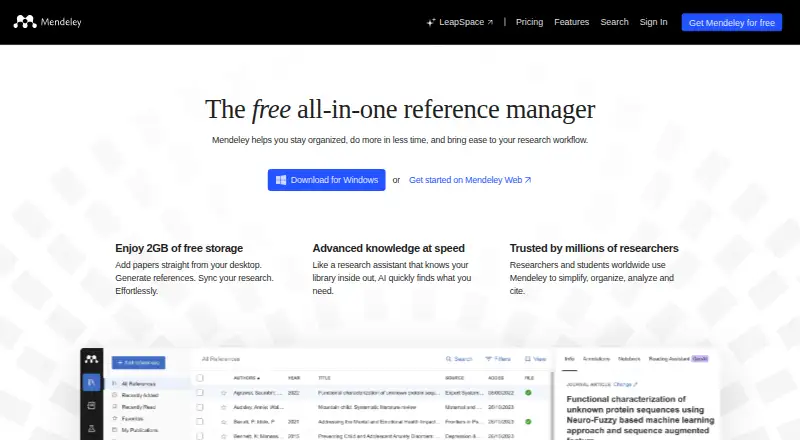
Mendeley Reference Manager is a web and desktop app for organizing references and supporting research workflows. Users can import PDFs or folders into a library, read documents, and add comments, highlights, and annotations; Mendeley Notebook lets them collect thoughts. Mendeley Cite inserts citations and builds bibliographies in Microsoft Word using a selected citation style. Shared groups let colleagues, course-mates, or co-authors contribute references and annotate PDFs together. Web Importer saves papers, web pages, and other documents from search engines and academic databases, and is available for Chrome, Firefox, Edge, and Safari. Watched Folders can automatically import PDFs from a selected desktop folder, while offline mode syncs library changes after reconnection. The free plan includes 2GB of storage and five Reading Assistant questions. Paid plans begin at $4.99/mo; higher tiers list more storage and additional features. Mendeley is available on the web, Windows, Linux, macOS, and as a browser extension. The Windows download page lists Windows 10 and above as supported.
Who it suits
It suits students, researchers, and collaborators who need to organize PDF references and create citations in Microsoft Word. Teams can use shared groups to add references and annotate documents together.
What it does well
- Imports PDFs or folders into a library.
- Annotates PDFs with comments, highlights, and notes.
- Mendeley Cite builds Word bibliographies.
- Shared groups support collaborative reference libraries.
- Free plan includes 2GB of storage.
What to know first
- Free accounts include only five Reading Assistant questions.
- Windows support is listed for Windows 10 and above.
- No mobile apps are listed.
Limits
The Free plan includes 2GB of storage and five Reading Assistant questions. Plus costs $4.99 a month and includes 5GB of storage; Pro includes 10GB, while Max includes unlimited storage.
Plans
| Plan | Billed and limits | Price |
|---|---|---|
| Free | Free plan · 2GB storage · 5 Reading Assistant questions | Free |
| Pro | Or $110 / year - One month free · Reading Assistant (Unlimited) · Compare Experiments · Ask My Library · 10GB Storage | $110 a year |
| Max | $14.99/ month · Reading Assistant (Unlimited) · Compare Experiments · Ask My Library · Unlimited Storage | $14.99 a month |
| Max | Or $165 / year - One month free · Reading Assistant (Unlimited) · Compare Experiments · Ask My Library · Unlimited Storage | $165 a year |
| Plus | $4.99/ month · Reading Assistant (Unlimited) · 5GB Storage | $4.99 a month |
| Plus | Or $55 / year - One month free · Reading Assistant (Unlimited) · 5GB Storage | $55 a year |
| Pro | $9.99/ month · Reading Assistant (Unlimited) · Compare Experiments · Ask My Library · 10GB Storage | $9.99 a month |
As mendeley.com lists them, read 29 Sept 2026. The maker's own page has the final word.
Getting started
- Visit https://www.mendeley.com/.
- Choose the Free plan or a paid plan.
- Install the desktop application for Windows, Linux, or macOS, or use the web platform.
- Add PDFs or folders to your library, or import a supported reference format.
- Add Web Importer for Chrome, Firefox, Edge, or Safari if you want to save papers from web sources.
- Use Mendeley Cite in Microsoft Word to insert citations and build a bibliography.
Mendeley Reference Manager brings research references, PDF reading and Word citations into one workflow. It suits students and researchers who want a shared library as well as a personal one. The main trade-off is a relatively small free storage allowance, with more capacity and unlimited Reading Assistant questions reserved for paid plans.
Overview
Import PDFs or entire folders with a click or by dragging and dropping, or collect papers, web pages and other documents through Web Importer. The browser extension supports Chrome, Firefox, Edge and Safari, and the library also accepts BibTeX, EndNote XML and RIS files. This range gives researchers several practical routes to bring existing and newly found material together.
Watched Folders automatically add PDFs placed in a selected desktop folder, a useful option for people who already save papers in a consistent place. Mendeley also has an offline mode: library changes sync when you reconnect, which helps when working without internet access.
Key features
The PDF reader supports comments, highlights and annotations, and Mendeley Notebook gives readers a place to collect thoughts. That makes the app more useful than a citation list for people who want reading notes alongside their papers. Groups provide shared libraries where colleagues, course-mates or co-authors can add references and annotate PDFs in real time. This is a clear advantage for collaborative reading, though the core use case remains research rather than general document management.
Mendeley Cite inserts citations and builds bibliographies in Microsoft Word using a chosen citation style. Researchers who write in Word get a direct route from their library to a formatted bibliography; readers using another word processor should not choose Mendeley for this feature.
Free accounts include five Reading Assistant questions. Plus, Pro and Max make Reading Assistant questions unlimited; Pro and Max also include Compare Experiments and Ask My Library. The free allowance is modest, so frequent use of the assistant points toward a paid plan.
Uploaded data is secured using the AES-256 standard applied by major banks. That is a stated security measure, but it does not by itself describe every aspect of data handling.
Pricing
| Plan | Price | What it includes |
|---|---|---|
| Free | free | 2GB storage and 5 Reading Assistant questions |
| Plus | $4.99 a month | Unlimited Reading Assistant questions and 5GB storage |
| Pro | $9.99 a month | Unlimited Reading Assistant questions, Compare Experiments, Ask My Library and 10GB storage |
| Max | $14.99 a month | Unlimited Reading Assistant questions, Compare Experiments, Ask My Library and unlimited storage |
The free plan is a reasonable starting point for a library that fits within 2GB and needs only occasional Reading Assistant questions. Plus raises storage to 5GB and removes that question limit, but does not include Compare Experiments or Ask My Library. Pro adds both tools and doubles Plus storage; Max is the option for users who need those same features without a stated storage ceiling. The paid prices are monthly; the free plan costs nothing.
Platforms
Mendeley is available on the web, Windows, macOS, Linux and as a browser extension. Windows support covers Windows 10 and above, while the Linux download is a generic 64-bit version. There are no mobile apps, so it is a weaker fit for people who need a dedicated phone or tablet app. The download page points users to the Mendeley Support Center and release notes for help and updates.
Who it's for
Mendeley is a strong fit for students, academics and co-authors who organize PDFs, annotate papers and write in Microsoft Word. Its shared libraries suit groups that need to contribute references and discuss PDFs together. It is less compelling for mobile-first researchers or for someone whose library exceeds the free 2GB cap but who does not want a paid plan.
Pros and cons
- Pros: PDF importing, annotation, Notebook notes and Word citations connect core research tasks in one application.
- Pros: Real-time group libraries support shared reference collection and PDF annotation.
- Pros: Offline mode syncs library changes after reconnecting.
- Cons: Free storage is capped at 2GB, which can constrain a large PDF collection.
- Cons: The free plan includes only five Reading Assistant questions.
- Cons: No mobile apps are offered, and Word is the stated writing integration.
Alternatives
Citation Management Software and Reference Management Software are useful starting points for comparing tools across these categories.
Choose Zotero instead if mobile access or a broader platform mix matters: it lists Android and iOS apps as well as Linux, macOS, web, Windows, an extension, API and self-hosted options. Its free plan has 300 MB storage, while a 2 GB plan costs $20 a year.
Sciwand may suit readers looking for core reading, organizing and writing tools free forever, with AI free for 7 days; its paid Lifetime plan is $29.99, paid once. Consider Databyss if a free, non-commercial open-source application is the priority. JabRef is another free and open-source option with Linux, macOS and Windows support and a browser extension.
Lean Library Workspace is worth considering for a project-focused workflow: its Free basic plan allows up to 3 projects and up to 3 invitations per shared project, with no article or smart citation suggestions. Petal offers a free plan with 1 GB storage, 1 seat, 3 guests, 400 AI credits and 2 collections, but citation export is not included.
EndNote may be preferable for someone seeking a one-time upgrade purchase: its Upgrade License is $94, paid once for EndNote 21 or earlier users and EndNote 2025. Bookends is another alternative.
Verdict
Choose Mendeley if you want to keep PDF reading, collaborative reference libraries and Microsoft Word citations together, especially when offline access matters. Its main reason to look elsewhere is the combination of a 2GB free cap and no mobile apps; researchers who need more space or phone-based access should compare other tools before settling in.
Verdict
Mendeley combines reference organization, PDF annotation, and Word citation tools, with shared groups for collaborative work. The free plan has a 2GB storage limit; paid plans start at $4.99/mo.
Questions
Is Mendeley Reference Manager free?
Yes. The Free plan costs nothing and includes 2GB of storage and five Reading Assistant questions.
What do the paid plans cost?
Plus costs $4.99 a month, Pro costs $9.99 a month, and Max costs $14.99 a month.
Which platforms does Mendeley support?
The listed platforms are extension, Linux, macOS, web, and Windows. The Windows download supports Windows 10 and above; the Linux download is generic 64-bit.
Can Mendeley create citations in Word?
Yes. Mendeley Cite inserts citations and builds bibliographies in Microsoft Word using a chosen citation style.
Can I use Mendeley with collaborators?
Yes. Shared groups let colleagues, course-mates, or co-authors add references and annotate PDFs together.
Which reference import formats are supported?
The listed import formats are BibTeX, EndNote XML, and RIS.
Facts from Mendeley Reference Manager's own pages
- Automatic folder import
- Watched Folders automatically import PDFs placed in a selected desktop folder. · mendeley.com, 29 Sept 2026
- Browser importing
- Web Importer saves papers, web pages and other documents from search engines and academic databases, and is available for Chrome, Firefox, Edge and Safari. · mendeley.com, 29 Sept 2026
- Citation writing
- Mendeley Cite inserts citations and builds bibliographies in Microsoft Word using a chosen citation style. · mendeley.com, 29 Sept 2026
- Collaboration
- Groups provide shared libraries where colleagues, course-mates or co-authors can add references and annotate PDFs in real time. · mendeley.com, 29 Sept 2026
- Company history
- Mendeley was founded in 2007 by Paul Föckler, Victor Henning and Jan Reichelt and was based in London, UK, according to its 2008 launch announcement. · blog.mendeley.com, 29 Sept 2026
- Linux support
- The Linux download page offers a generic 64-bit Linux download. · mendeley.com, 29 Sept 2026
- Offline access
- The Reference Manager guide describes an offline mode that syncs library changes when the user reconnects. · blog.mendeley.com, 29 Sept 2026
- PDF library
- Users can import PDFs or entire folders into their library with a single click or by dragging and dropping. · mendeley.com, 29 Sept 2026
- PDF reading
- Users can read PDFs and add comments, highlights and annotations, then collect thoughts in the Mendeley Notebook. · mendeley.com, 29 Sept 2026
- Purpose
- Mendeley Reference Manager is a free web and desktop reference management application for organizing references and supporting research workflows. · static.mendeley.com, 29 Sept 2026
- Security
- The pricing page says uploaded data is secured using the AES-256 standard applied by major banks. · mendeley.com, 29 Sept 2026
- Storage limit
- Free accounts include 2GB of storage and five Reading Assistant questions. · mendeley.com, 29 Sept 2026
- Support
- The download page directs users to the Mendeley Support Center and release notes for help and updates. · mendeley.com, 29 Sept 2026
- Windows support
- The Windows download page lists Windows 10 and above as supported. · mendeley.com, 29 Sept 2026
Where Mendeley Reference Manager stands on Freedom251
- Reference Management Software#12 of 26
- Citation Management Software#11 of 23