Freedom251 › Citation Management Software

Databyss
What Databyss is
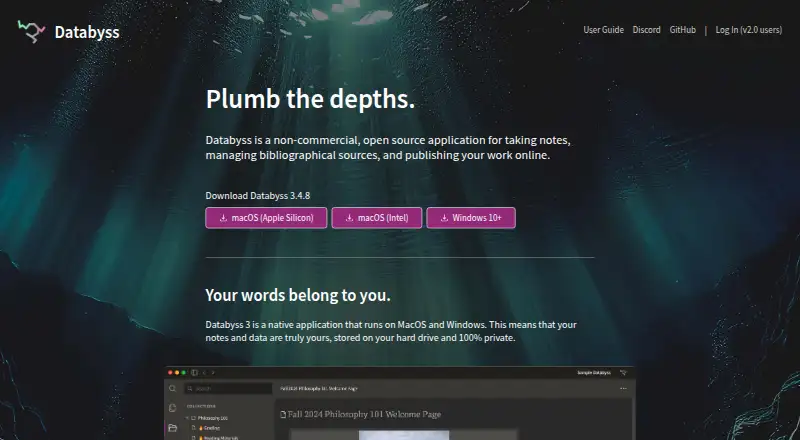
Databyss is a non-commercial, open-source application for research notes, bibliographical sources, and publishing work online. Its Databyss 3 desktop app is available for macOS and Windows; listed builds include Apple Silicon and Intel Macs and Windows 10+. The site says notes and other data are stored on the user’s hard drive and describes them as 100% private.
Users can keep reference material and PDFs in the app, then export bibliographies and citations in major styles. Search can reveal connections among notes, topics, sources, authors, and collections. Collections can be published to shareable URLs, and other Databyss users can import their notes, topics, and sources. Mobile access has limited functionality: pages are read-only and search is unavailable. The Databyss Foundation, Inc. is a 501(c)(3) charitable organization focused on open and equitable infrastructure for people working in the humanities and digital humanities. The Databyss plan is listed as free, with a free plan and no free trial.
Who it suits
Databyss suits people working with research notes and bibliographical sources, particularly in the humanities and digital humanities. It is useful for users who want to manage PDFs, export citations, or publish collections for other Databyss users to import.
What it does well
- Stores notes and data on the user's hard drive.
- Manages reference material and PDFs.
- Exports citations and bibliographies in major styles.
- Publishes collections to shareable URLs.
- Search connects notes, topics, sources, authors, and collections.
What to know first
- Mobile pages are read-only.
- Search is unavailable on mobile.
- Desktop app is listed for macOS and Windows.
Limits
Mobile access is read-only and does not include search. The listed desktop downloads are for macOS Apple Silicon, macOS Intel, and Windows 10 or later.
Plans
| Plan | Billed and limits | Price |
|---|---|---|
| Databyss | Non-commercial, open source application | Free |
As databyss.org lists them, read 4 Oct 2026. The maker's own page has the final word.
Getting started
- Open the Databyss website.
- Download Databyss 3 for macOS Apple Silicon, macOS Intel, or Windows 10+.
- Install and open the desktop application.
- Use mobile access for read-only pages if needed.
- Publish a collection to create a shareable URL.
Overview
Databyss is a research application for linking notes, bibliographical sources and collections, then publishing selected collections online. It is best suited to humanities researchers who want a free, non-commercial desktop workspace with local data and citation tools. Its combination of reference management and collection sharing is useful, but mobile access is limited to reading.
Key features
Search connects notes, topics, sources, authors and collections, helping researchers follow relationships across a growing body of work rather than treating each note as a standalone item. Databyss also stores PDFs and manages bibliographical sources, then exports citations and bibliographies in major styles. That makes it a credible fit for source-heavy research from reading through citation, though the available features are centered on research organization and publishing.
Collections can be published at shareable URLs, and other Databyss users can import the associated notes, topics and sources. This supports sharing with collaborators who use Databyss, but the stated import route does not extend to users of other tools. The application is open source and non-commercial; the Databyss Foundation, Inc. is a 501(c)(3) organization focused on open and equitable infrastructure for humanities and digital humanities work.
Databyss 3 is a native macOS and Windows application. Notes and data are stored on the user's hard drive, which suits people who prefer local storage and a privacy-oriented setup. On mobile, pages are read-only and search is unavailable, so it is not a good primary workspace for research on a phone.
Pricing
Databyss costs nothing. The Databyss plan is a non-commercial, open source application, with no free trial because the product is free. That removes a subscription barrier for individual researchers and teams considering it, while the non-commercial designation makes it a poor match for work that requires a commercial application.
Platforms
Databyss is available for macOS, Windows and the web. Databyss 3 downloads are offered for macOS Apple Silicon, macOS Intel and Windows 10+. Mobile access is limited: pages can be read, but they cannot be searched, and the mobile experience is not a full editing workspace.
Who it's for
Databyss is a strong candidate for humanities researchers who want to keep notes and bibliographical material together, export citations, and share collections with other Databyss users. Its free, open-source, non-commercial model and local data storage will appeal to users who prioritize those qualities. Researchers who need full mobile search or a sharing workflow that accommodates users outside Databyss should look elsewhere.
Pros and cons
- Pros: Free and open source, with no paid plan to weigh against a budget.
- Pros: Local storage, PDF support and citation exports bring several stages of reference work into one application.
- Pros: Search links notes, sources, topics, authors and collections, while published collections can be shared by URL.
- Cons: Mobile pages are read-only and have no search, limiting its usefulness away from a computer.
- Cons: Importing shared notes, topics and sources is described for other Databyss users, restricting that collaboration path to the same application.
- Cons: Its non-commercial purpose rules it out for users seeking a commercial research product.
Alternatives
For a broader comparison, see Citation Management Software.
- Zotero is worth considering if you need Android, iOS, Linux or browser-extension access alongside desktop and web platforms; its free plan includes 300 MB of storage.
- Mendeley Reference Manager suits readers who want a free plan with 2GB of storage and Reading Assistant questions, or prefer its browser-extension and Linux support.
- Sciwand is an option for readers who want iOS support and core reading, organizing and writing tools on its free plan, with AI free for 7 days.
- JabRef is another free and open-source choice for Linux users.
- Lean Library Workspace may suit users who want a web or mobile workspace with up to three projects on its free basic plan.
- Logically is an alternative for readers seeking AI tools, though its free plan caps reference and file storage at 100MB.
- Qiqqa is an option for Windows users looking for a reference-management alternative with a free-storage offer.
- KDE Keysmith is a Linux-only alternative.
Verdict
Choose Databyss if you want a free, non-commercial research workspace that keeps data on your computer, connects notes with sources, and supports citation exports and shareable collections. The main reason to look elsewhere is mobile: read-only pages without search make Databyss a poor fit for research that depends on a full phone or tablet workflow.
Verdict
Databyss combines research notes, reference management, citation exports, and collection publishing in a free, non-commercial application. Mobile use is limited to reading pages, without search.
Questions
How much does Databyss cost?
The Databyss plan costs nothing.
Is Databyss open source?
Yes. It is described as a non-commercial, open-source application.
Which desktop platforms are available?
Databyss 3 downloads are listed for macOS Apple Silicon, macOS Intel, and Windows 10 or later.
Can I use Databyss on mobile?
Yes, with limited functionality. Pages are read-only, and search is unavailable.
Can I share my work?
Users can publish collections to shareable URLs. Other Databyss users can import the collections’ notes, topics, and sources.
Who is behind Databyss?
The Databyss Foundation, Inc. is a 501(c)(3) charitable organization focused on open and equitable infrastructure for humanities and digital humanities work.
Facts from Databyss's own pages
- Available builds
- The site lists Databyss 3.4.6 downloads for macOS Apple Silicon, macOS Intel, and Windows 10+. · databyss.org, 4 Oct 2026
- Citations
- Bibliographies and citations can be exported in all major styles. · databyss.org, 4 Oct 2026
- Desktop app
- Databyss 3 is a native application for macOS and Windows. · databyss.org, 4 Oct 2026
- Download
- The homepage offers Databyss 3.4.6 downloads for macOS Apple Silicon, macOS Intel, and Windows 10+. · databyss.org, 4 Oct 2026
- Local data
- The site says Databyss 3 stores notes and data on the user's hard drive and describes them as 100% private. · databyss.org, 4 Oct 2026
- Local storage
- The site says notes and data are stored on the user’s hard drive and are 100% private. · databyss.org, 4 Oct 2026
- Mobile access
- The signup page says Databyss works on mobile with limited functionality; pages are read-only and search is unavailable there. · mapp.databyss.org, 4 Oct 2026
- Mobile use
- The Databyss signup page says mobile functionality is limited to read-only pages and has no search. · mapp.databyss.org, 4 Oct 2026
- Organization
- The site identifies the Databyss Foundation, Inc. as a 501(c)(3) charitable organization focused on open and equitable infrastructure for people working in the humanities and digital humanities. · databyss.org, 4 Oct 2026
- Product
- Databyss is a non-commercial, open source application for taking notes, managing bibliographical sources, and publishing work online. · databyss.org, 4 Oct 2026
- Publishing
- Users can publish collections to shareable URLs, and other Databyss users can import the notes, topics, and sources. · databyss.org, 4 Oct 2026
- Purpose
- Databyss is a non-commercial, open source application for taking notes, managing bibliographical sources, and publishing work online. · databyss.org, 4 Oct 2026
- References
- Users can manage reference material, store PDFs in Databyss, and export bibliographies and citations in major styles. · databyss.org, 4 Oct 2026
- Search
- Databyss search reveals connections between notes, topics, sources, authors, and collections. · databyss.org, 4 Oct 2026
- Sharing
- Users can publish collections to shareable URLs, and other Databyss users can import their notes, topics, and sources. · databyss.org, 4 Oct 2026
Where Databyss stands on Freedom251
- Citation Management Software#8 of 23