Wren
What Wren is
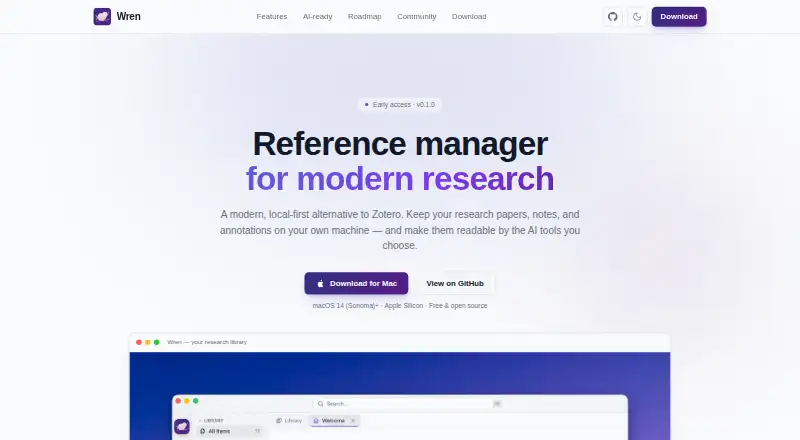
Wren is a free, open-source reference manager for research that keeps a library on the user’s device. It supports more than 40 bibliographic item types and stores PDFs, EPUBs, HTML snapshots, images, and notes as plain files. Its built-in PDF and EPUB readers include annotation tools, and PDF highlights can be exported within a PDF. For writing and organizing research notes, the Markdown editor supports math, code highlighting, reference links, anchored comments, and automatic backlinks. Wren searches both document text and meaning, with semantic results linked to passages in their source documents. Its on-device PDF processing can analyze layouts, recognize text in scanned papers, and extract tables while offline. Libraries can sync through iCloud Drive, Dropbox, Google Drive, or another folder the user already syncs; a Wren account and Wren servers are not required. A Chrome connector captures references, PDFs, and snapshots through Wren’s local server. Optional AI integrations work with user-provided models, including local use. Wren also offers a local REST API, wren:// links, and import and export for BibTeX, BibLaTeX, CSL-JSON, and portable archives. The listed Mac app requires macOS 14 or later and Apple Silicon.
Who it suits
Wren suits researchers who want to organize and annotate a varied collection of papers, books, web snapshots, and notes. It is also suited to people who want offline document processing, local library syncing, or optional AI using a model they provide.
What it does well
- Stores research files and notes as plain files.
- Reads and annotates PDFs and EPUBs.
- Searches document text and meaning.
- Processes PDFs, including scanned papers, offline.
- Syncs through folders users already sync.
- Imports and exports several citation formats.
What to know first
- The listed app requires macOS 14 or later and Apple Silicon.
- Windows and Linux builds are on the roadmap.
- There are no mobile apps.
Limits
The free plan is listed for macOS 14 or later on Apple Silicon. Windows and Linux builds are on the roadmap, and there are no mobile apps.
Plans
| Plan | Billed and limits | Price |
|---|---|---|
| Free | macOS 14 Sonoma+ · Apple Silicon desktop app · v0.1.0 early access | Free |
As wrenapp.dev lists them, read 15 Oct 2026. The maker's own page has the final word.
Getting started
- Visit https://wrenapp.dev/.
- Use a Mac with Apple Silicon and macOS 14 (Sonoma) or later.
- Install the Mac app.
- Save references, documents, and notes in a library.
- Optionally connect a Chrome browser connector or sync the library through a folder you already sync.
Verdict
Choose Wren if you want a free, open-source research library with annotation, semantic search, and offline PDF processing. Its listed app is for Apple Silicon Macs on macOS 14 or later, so it may not suit users on other platforms.
Questions
Is Wren free?
Yes. Wren has a free, open-source plan.
Which platforms does Wren support?
The listed Mac app requires macOS 14 (Sonoma) or later and Apple Silicon. Windows and Linux builds are on the roadmap, and there are no mobile apps.
Can Wren annotate PDFs?
Yes. Its PDF reader includes annotation tools, and highlights can be exported embedded in a PDF.
Can I use Wren without sending my library to Wren servers?
Yes. Libraries can sync through iCloud Drive, Dropbox, Google Drive, or another folder the user already syncs, without a Wren account or Wren servers.
Which citation formats can Wren import and export?
Wren supports BibTeX, BibLaTeX, CSL-JSON, and portable archives.
Facts from Wren's own pages
- AI behavior
- AI helpers enrich metadata, structure documents and build embeddings; Wren states it has no chat or answer-generation feature. · github.com, 15 Oct 2026
- AI integrations
- Optional bring-your-own-model AI supports OpenAI, Anthropic, Gemini, Ollama, and Apple MLX, including fully local use with no key. · wrenapp.dev, 7 Oct 2026
- Annotations
- Highlights and other annotations are stored separately from original PDFs and can be exported into PDF copies. · github.com, 15 Oct 2026
- API
- A local REST API on 127.0.0.1 can list items, search, retrieve citations, browse collections and tags, and add notes. · github.com, 15 Oct 2026
- Attachments
- It stores PDFs, EPUBs, HTML snapshots, images, notes and web links as local attachments. · github.com, 15 Oct 2026
- Availability
- The listed Mac app requires macOS 14 (Sonoma) or later and Apple Silicon; Windows and Linux builds are on the roadmap. · wrenapp.dev, 7 Oct 2026
- Bibliographic model
- Wren supports more than 40 Zotero-style item types with structured bibliographic fields and creators. · github.com, 15 Oct 2026
- Browser capture
- The Chrome connector saves references, PDFs and snapshots and is compatible with the Zotero connector workflow. · wrenapp.dev, 15 Oct 2026
- Browser connector
- A Chrome browser connector saves references, PDFs, and snapshots in one click and communicates with Wren's local server. · wrenapp.dev, 7 Oct 2026
- Build requirements
- Source builds require macOS, Rust 1.96 or newer, Node.js 20 or newer and Xcode Command Line Tools. · github.com, 15 Oct 2026
- Deep links
- The wren:// URL scheme can open entries and specific PDF pages or annotations. · github.com, 15 Oct 2026
- Document extraction
- An on-device pipeline performs layout analysis, OCR and table recognition, including on scanned PDFs. · wrenapp.dev, 15 Oct 2026
- EPUB reader
- The EPUB reader supports chapters, in-book search, font sizing and light or dark themes. · github.com, 15 Oct 2026
- Import and export
- Import and export formats include BibTeX, BibLaTeX, CSL-JSON and a portable native .wren archive. · github.com, 15 Oct 2026
- Integrations
- Optional AI providers include OpenAI, Anthropic, Google Gemini, Ollama and oMLX; cloud-folder sync can use iCloud Drive, Dropbox, Google Drive or OneDrive. · github.com, 15 Oct 2026
- Library
- It supports 40+ bibliographic item types and stores PDFs, EPUBs, HTML snapshots, images, and notes as plain files. · wrenapp.dev, 7 Oct 2026
- License
- The Wren application is released under the MIT License, while its separate browser connector is AGPL-3.0. · github.com, 15 Oct 2026
- Limit: collaboration
- The roadmap lists bundle sharing and peer-to-peer encrypted sync as future features, so they are not current capabilities. · github.com, 15 Oct 2026
- Limit: mobile availability
- Companion iOS and Android apps are listed on the roadmap rather than as currently shipped products. · wrenapp.dev, 15 Oct 2026
- Limit: platform coverage
- The repository identifies the project as early development and macOS-only for now; Windows and Linux builds are listed as future work. · github.com, 15 Oct 2026
- Limit: plugin API
- A documented plugin or automation API is listed as planned rather than shipped. · github.com, 15 Oct 2026
- Local storage
- The library is stored on the user's machine using plain files and a local database. · github.com, 15 Oct 2026
- Notes
- The Markdown editor includes KaTeX mathematics, Shiki code highlighting, slash commands, anchored comments and backlinks. · wrenapp.dev, 15 Oct 2026
- Organization
- Collections, colorable tags, saved smart filters and duplicate detection with merging are available. · github.com, 15 Oct 2026
Where Wren stands on Freedom251
- WebSocket Tools#3 of 55
- Citation Management Software#4 of 23
- Reference Management Software#5 of 26