Freedom251 › Hardware Diagnostic Software
MemTest64
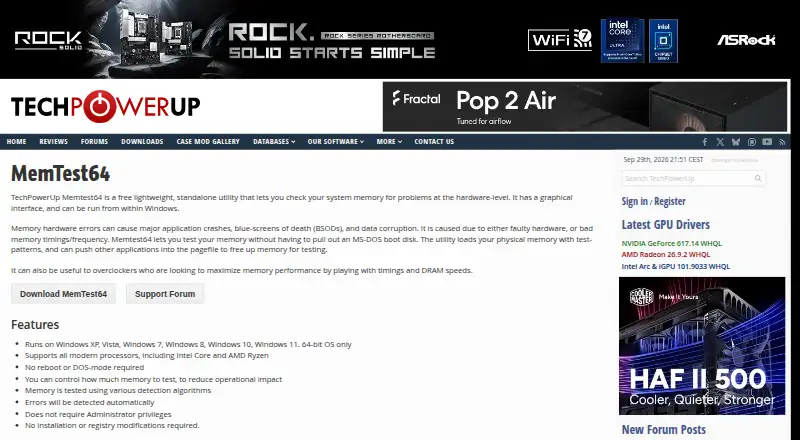
What MemTest64 is
MemTest64 is a free Windows utility for checking system memory for hardware-level problems. It runs in Windows through a graphical interface and loads physical memory with test patterns, using detection algorithms to identify errors automatically. You choose how much memory to test, which lets you limit the memory allocated to the check and reduce its effect on other work. The utility runs without a reboot or DOS mode and does not require administrator privileges. It also needs no installation and makes no registry modifications. MemTest64 supports modern processors, including Intel Core and AMD Ryzen. Its supported systems are 64-bit editions of Windows XP, Vista, 7, 8, 10, and 11. The maker says it can help overclockers tune memory timings and DRAM speeds to maximize performance. TechPowerUp lists version 1.0, dated April 20, 2017, and the product page links to a support forum. The listed plan is free; the utility has no free trial.
Who it suits
MemTest64 suits Windows users who want to check system memory for hardware-level errors without rebooting or installing software. Overclockers may also find it useful when adjusting memory timings and DRAM speeds.
What it does well
- Checks memory with test patterns and detection algorithms.
- Automatically detects errors.
- Lets users control how much memory to test.
- Runs without reboot, DOS mode, or administrator privileges.
- Requires no installation or registry changes.
What to know first
- Supports only 64-bit Windows systems.
- No support for macOS or Linux is listed.
Limits
MemTest64 is limited to 64-bit versions of Windows XP, Vista, 7, 8, 10, and 11.
Plans
| Plan | Billed and limits | Price |
|---|---|---|
| MemTest64 | Free utility · 64-bit Windows only | Free |
As techpowerup.com lists them, read 7 Oct 2026. The maker's own page has the final word.
Getting started
- Open the MemTest64 website.
- Download and run the standalone utility in Windows.
- Choose how much memory to test.
- Run the memory check and review automatically detected errors.
Verdict
Choose MemTest64 if you need a free way to check memory from within a 64-bit Windows system, with control over how much memory is tested. It may also suit overclockers adjusting memory timings and DRAM speeds. Look elsewhere if you need a tool for another platform.
Questions
How much does MemTest64 cost?
Its listed plan costs nothing.
Is there a free plan or trial?
MemTest64 is a free utility. It has no free trial.
Which systems does it support?
It supports 64-bit editions of Windows XP, Vista, 7, 8, 10, and 11.
Does MemTest64 need to be installed?
No. It runs as a standalone utility and makes no registry modifications.
Does it require a reboot or administrator privileges?
No. It runs within Windows without a reboot, DOS mode, or administrator privileges.
Where can users get support?
The product page links to a MemTest64 support forum.
Facts from MemTest64's own pages
- Download version
- TechPowerUp's utilities listing identifies MemTest64 version 1.0, dated April 20, 2017. · techpowerup.com, 7 Oct 2026
- Error detection
- Errors are detected automatically. · techpowerup.com, 7 Oct 2026
- Installation
- It requires no installation and makes no registry modifications. · techpowerup.com, 7 Oct 2026
- Intended users
- The maker says it can help overclockers maximize memory performance by adjusting timings and DRAM speeds. · techpowerup.com, 7 Oct 2026
- Interface
- It is a lightweight, standalone utility with a graphical interface that runs from within Windows. · techpowerup.com, 7 Oct 2026
- Memory allocation
- The user can control how much memory to test to reduce operational impact. · techpowerup.com, 7 Oct 2026
- Memory testing
- It loads physical memory with test patterns and uses various detection algorithms to test memory. · techpowerup.com, 7 Oct 2026
- No reboot
- It runs without requiring a reboot or DOS mode. · techpowerup.com, 7 Oct 2026
- Permissions
- It does not require administrator privileges. · techpowerup.com, 7 Oct 2026
- Processors
- The software supports modern processors, including Intel Core and AMD Ryzen. · techpowerup.com, 7 Oct 2026
- Purpose
- MemTest64 checks system memory for hardware-level problems. · techpowerup.com, 7 Oct 2026
- Support
- The product page links to a MemTest64 support forum. · techpowerup.com, 7 Oct 2026
- Supported systems
- The listed supported systems are Windows XP, Vista, 7, 8, 10, and 11, all 64-bit only. · techpowerup.com, 7 Oct 2026
Where MemTest64 stands on Freedom251
- Hardware Diagnostic Software#12 of 26