Freedom251 › AI Audio-to-MIDI Software

Melody Scanner
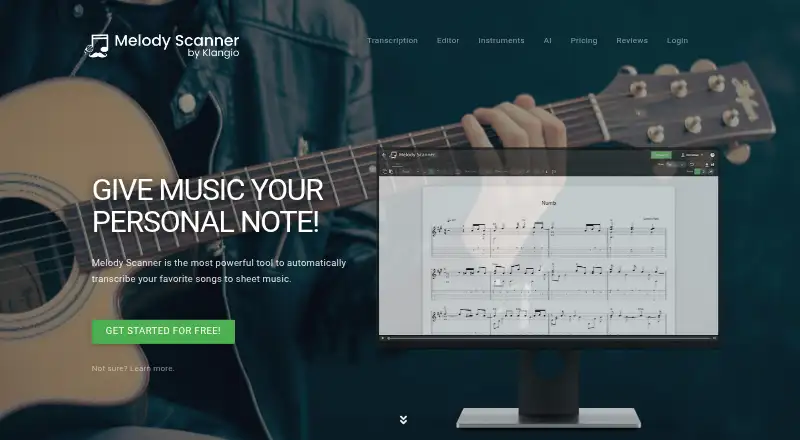
What Melody Scanner is
Melody Scanner transcribes songs into sheet music from instrument recordings, audio files, and YouTube videos. You can record an instrument or import MIDI, MusicXML, and MP3 files; paid plans also list MP3, M4A, and OGG uploads. Scores can be edited in classical notation, piano roll, or guitar tabs, with PDF export available. Supported modes include piano, guitar, flute, violin, saxophone, bass, singing, and chords. The maker says piano mode handles polyphony, velocity, and hand separation, with accuracy up to 86%. Smart editing can help transpose scores and label chords. The browser app runs without installation, and the product is also listed for iOS and Android. Melody Scanner supports solo instruments, not bands or orchestras. The free plan allows recordings up to one minute and sheets up to 40 bars or about two minutes. Monthly access is $9.99 a month; the yearly plan is $49.99 a year. Both paid plans list recordings up to five minutes, full sheets, and MIDI/MusicXML export.
Who it suits
It suits musicians who want to turn solo recordings, audio files, or YouTube videos into editable scores. It may also suit users who need notation, piano roll, or guitar tab editing and PDF export.
What it does well
- Accepts recordings, notation files, audio, and YouTube videos.
- Offers classical notation, piano roll, and guitar tabs.
- Supports piano polyphony, velocity, and hand separation.
- Browser app requires no installation.
- Free plan includes PDF export.
What to know first
- Supports solo instruments, not bands or orchestras.
- Free recordings are limited to one minute.
- Free sheets are limited to 40 bars or about two minutes.
Limits
The free plan allows recordings up to one minute and sheets limited to 40 bars or about two minutes. Paid plans allow recordings up to five minutes and list full sheets; Melody Scanner supports solo instruments only.
Plans
| Plan | Billed and limits | Price |
|---|---|---|
| FREE | YouTube import · AI composition · record up to 1 minute · sheets limited to 40 bars/about 2 minutes · PDF export | Free |
| YEARLY SUBSCRIPTION | billed annually · YouTube import · AI composition · record up to 5 minutes · upload MP3, M4A, OGG · full sheets · custom PDF export · MIDI/MusicXML export | $49.99 a year |
| MONTHLY SUBSCRIPTION | YouTube import · AI composition · record up to 5 minutes · upload MP3, M4A, OGG · full sheets · custom PDF export · MIDI/MusicXML export | $9.99 a month |
As melodyscanner.com lists them, read 30 Sept 2026. The maker's own page has the final word.
Getting started
- Open Melody Scanner in a browser, or use its iOS or Android platform.
- Record an instrument, import MIDI, MusicXML or MP3, or choose a YouTube video.
- Edit the score in classical notation, piano roll or guitar tabs.
- Use the free plan for recordings up to one minute and sheets up to 40 bars or about two minutes.
- Choose a monthly or annual subscription for recordings up to five minutes, full sheets and additional export options.
Melody Scanner converts musical input into editable sheet music for musicians working with solo parts. Its range of input and score views is useful, but ensemble work and longer free transcriptions are outside its sweet spot.
Overview
You can start with a recording, an audio or notation file, or a YouTube video, then work with the result in several score views. The browser app needs no installation, and Android and iOS versions extend access beyond desktop. The central limitation is firm: it supports solo instruments, not bands or orchestras.
Key features
Input flexibility is a practical strength. The tool can record an instrument, import MIDI or MusicXML, and generate notation from YouTube; paid plans also accept MP3, M4A, and OGG uploads. The five-minute recording and audio ceiling on paid plans makes it better suited to short performances and excerpts than long-form material.
Scores can be edited in classical notation, piano roll, or guitar tabs, and PDF export is available. Paid subscribers can also export MIDI and MusicXML and create custom PDFs, which makes the paid tier more useful when the score needs to move into another workflow.
Modes cover piano, guitar, flute, violin, saxophone, bass, singing, and chords. That breadth serves varied solo musicians, while the lack of ensemble support rules it out for transcribing a complete group. Smart editing can help transpose scores and label chords. The maker says piano mode supports polyphony, velocity, and hand separation, and claims accuracy of up to 86%; treat that as a ceiling claim, not a promise for every recording.
Pricing
The free plan costs nothing. It includes YouTube import, AI composition, recording up to one minute, sheets limited to 40 bars or about two minutes, and PDF export. Those caps make it suitable for trying short ideas, but restrictive for a full piece or more involved transcription.
The MONTHLY SUBSCRIPTION costs $9.99 a month. It adds recording up to five minutes, MP3, M4A, and OGG uploads, full sheets, custom PDF export, and MIDI/MusicXML export, alongside YouTube import and AI composition. Choose it for a short-term project or occasional paid use.
The YEARLY SUBSCRIPTION costs $49.99 a year, billed annually, with the same features and limits as monthly. It is the lower-cost route for sustained use, but requires paying for the year upfront. Both paid plans retain the five-minute recording limit and solo-instrument scope.
Platforms
Melody Scanner runs in a browser and is also available on Android and iOS. Its browser access avoids installation, while mobile versions suit users who want to work from a phone or tablet.
Who it's for
This is a sensible option for musicians who want to turn a short solo recording, audio excerpt, or YouTube performance into notation they can edit. Pianists may value the stated polyphony and hand-separation support; guitarists have a dedicated tab view. It is not the right choice for arranging band or orchestral recordings, or for users who need longer recordings than the five-minute maximum.
Pros and cons
- Pros: Multiple input routes, three editing views, and support for eight listed modes give solo musicians flexibility in how they create and refine scores.
- Pros: The annual plan includes full sheets and MIDI/MusicXML export for $49.99 a year, making it materially more capable than the tightly capped free tier.
- Cons: The free plan's one-minute recording and 40-bar sheet limits make it a sampler rather than a dependable option for full-length work.
- Cons: Paid recordings stop at five minutes, and the tool does not support bands or orchestras.
Alternatives
AnthemScore is worth considering if you want a desktop option across Linux, macOS, and Windows as well as web: its free web trial allows full songs for 14 days, then limits use to unlimited 30-second clips.
Drum2Notes offers a repeatable free demo of the first 20 seconds and a Pro plan for full transcription, for users focused on that alternative.
Klangio Transcription Studio has unlimited free demo transcriptions up to 20 seconds with PDF downloads, making it a short-clip option.
MuScriptor pairs a free hosted demo with MIT-licensed code and model weights for non-commercial use.
Piano2Notes provides unlimited 20-second demos with PDF, MIDI, and MusicXML previews; its Pro plan costs $14.99 a month.
ScoreCloud may suit users who want to notate from singing: its free plan holds 10 songs online and prints with a watermark, while Plus costs $5.99 a month.
Violin2Notes offers unlimited 20-second demos and PDF previews, with an annual Pro option.
Wind2Notes gives repeatable demos of up to 20 seconds without signup, and a Pro plan at $14.99 a month.
For broader comparisons, see AI Music Transcription Software and AI Audio-to-MIDI Software.
Verdict
Melody Scanner is best for musicians who need an editable score from a short solo performance or source recording, especially when choosing among notation, piano roll, and tab views matters. Its wide input options and capable paid exports are the reasons to choose it; the solo-only scope and five-minute ceiling are strong reasons to look elsewhere for ensemble or longer-form work.
Verdict
Melody Scanner brings several transcription inputs and score-editing views together, with a free plan and paid export options. Its solo-instrument limit and short free-plan recording and sheet allowances are important constraints.
Questions
Is Melody Scanner free?
Yes. Its free plan costs nothing and allows YouTube import, AI composition, recordings up to one minute, sheets limited to 40 bars or about two minutes, and PDF export.
What do the paid plans cost?
The monthly subscription is $9.99 a month. The yearly subscription is $49.99 a year, billed annually.
Which platforms can I use?
Melody Scanner is listed for web, iOS and Android. The browser app runs without installation.
What can I import or transcribe?
You can record an instrument, import MIDI, MusicXML or MP3, and generate sheet music from YouTube videos. Paid plans also list MP3, M4A and OGG uploads.
Can it transcribe a band or orchestra?
No. Melody Scanner currently supports solo instruments only.
What exports do the plans include?
The free plan includes PDF export. Monthly and yearly subscriptions list custom PDF export and MIDI/MusicXML export.
Facts from Melody Scanner's own pages
- Browser app
- The product page says no installation is required and the app runs directly in a browser. · melodyscanner.com, 30 Sept 2026
- Company
- Klangio GmbH describes itself as a Karlsruhe music software company focused on AI-based music transcription tools. · klang.io, 30 Sept 2026
- Editing views
- Scores can be edited in classical notation, piano roll, or guitar tabs views, with PDF export available. · melodyscanner.com, 30 Sept 2026
- Headquarters
- Karlsruhe, Germany · melodyscanner.com, 28 Sept 2026
- Inputs
- Users can record an instrument, import MIDI, MusicXML or MP3 files, and generate sheet music from YouTube videos. · melodyscanner.com, 30 Sept 2026
- Intended users
- The maker describes the product as a tool for musicians to create scores from recordings, audio files or YouTube videos. · melodyscanner.com, 30 Sept 2026
- Notable limit
- Melody Scanner currently supports solo instruments only, not bands or orchestras. · melodyscanner.com, 30 Sept 2026
- Piano accuracy claim
- The maker says its piano mode supports polyphony, velocity and hand separation and is up to 86% accurate. · melodyscanner.com, 30 Sept 2026
- Privacy
- The maker's privacy policy says the website is hosted in a data center in the European Union and that it has a data processing agreement with its host. · klang.io, 30 Sept 2026
- Purpose
- Melody Scanner automatically transcribes songs into sheet music. · melodyscanner.com, 30 Sept 2026
- Smart editing
- Smart score editing can assist with transposing scores and labeling chords. · melodyscanner.com, 30 Sept 2026
- Support
- The maker links users to a support page and a help center with guides, troubleshooting and tips. · klang.io, 30 Sept 2026
- Supported instruments
- The site lists piano, guitar, flute, violin, saxophone, bass, singing and chords as supported modes. · melodyscanner.com, 30 Sept 2026
Where Melody Scanner stands on Freedom251
- AI Audio-to-MIDI Software#8 of 29
- AI Music Transcription Software#8 of 29