Freedom251 › Music Transcription Software
AnthemScore
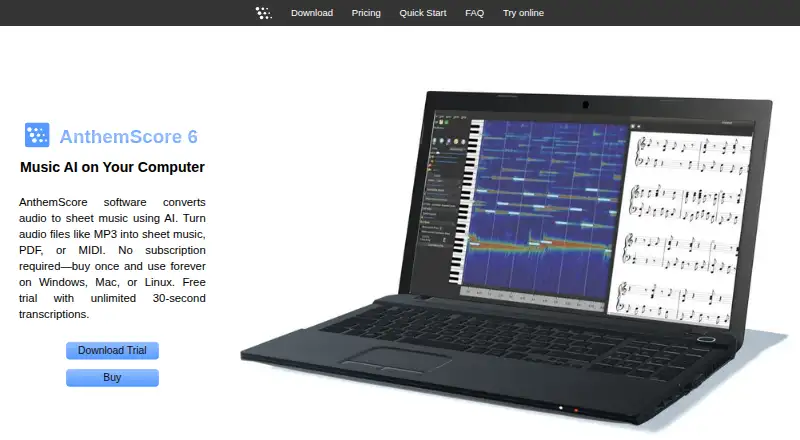
What AnthemScore is
AnthemScore uses AI to turn audio into sheet music, PDF, or MIDI. Its desktop app uses machine learning to identify notes, percussion, beats, and instruments, then provides tools to edit notes, measures, signatures, and tempo. Playback can be slowed without changing pitch, and users can format scores for selected instruments, keys, ranges, and staves, including standard notation or tablature. AnthemScore Web accepts audio or MIDI and offers PDF, MusicXML, and MIDI output; listed inputs include MP3, WAV, M4A, FLAC, OGG, MP4, and MID, plus microphone recording. The free web plan offers full-song transcription for 14 days, then unlimited 30-second clips. Paid web plans cost $8.33 a month and $24.99 a month, billed annually. Desktop one-time purchase plans cost 29.00 USD, 39.00 USD, and 99.00 USD. Desktop downloads are available for Windows, macOS, and Linux and require a 64-bit computer. The FAQ says vocals and chords are not currently detected, DRM-protected files do not work, and non-A440 music may be processed inaccurately.
Who it suits
AnthemScore suits musicians who want to convert audio into editable sheet music or MIDI, including users who need tablature or PDF output. It is less suited to work centered on vocals, chords, DRM-protected recordings, or music outside standard A440 tuning.
What it does well
- Machine-learning note and instrument detection
- Edit notes, measures, signatures, and tempo
- Web output includes PDF, MusicXML, and MIDI
- Score formatting includes tablature
- Desktop app works offline after activation
What to know first
- Vocals and chords are not detected
- DRM-protected files do not work
- Desktop app requires a 64-bit computer
- Web data and generated output are stored
Limits
The free web plan offers a 14-day full-song trial; afterwards it allows unlimited 30-second clips in the browser. Web Plus costs $8.33 a month billed annually and allows up to 30 songs a month, up to 6 minutes each, with PDF, MIDI, and MusicXML downloads. Web Pro costs $24.99 a month billed annually and allows up to 100 songs a month, up to 10 minutes each, with the same downloads and desktop app access while subscribed.
Plans
| Plan | Billed and limits | Price |
|---|---|---|
| AnthemScore Web Free | 30-second transcriptions · 14-day full-song trial | Free |
| AnthemScore Web Pro | $299.90 billed annually · 100 songs/month · 10 minutes/song · PDF, MIDI, musicXML downloads · desktop app included while subscribed | $24.99 a month |
| AnthemScore 6 Lite | Unlimited full-song transcription · PDF viewing, saving and printing · 1 year updates | $29, paid once |
| AnthemScore 6 Professional | Lite features · musicXML, MIDI and ASDT export · note editing · playback controls · 1 year updates | $39, paid once |
| AnthemScore Web Plus | $99.90 billed annually · 30 songs/month · 6 minutes/song · PDF, MIDI, musicXML downloads | $8.33 a month |
| AnthemScore 6 Studio | Professional features · batch processing · lifetime updates | $99, paid once |
As lunaverus.com lists them, read 21 Oct 2026. The maker's own page has the final word.
Getting started
- Open the AnthemScore website.
- Choose the web version or a desktop download for Windows, macOS, or Linux.
- For desktop use, install it on a 64-bit laptop or desktop.
- Use the web free plan for its 14-day full-song trial, or choose a paid web plan for monthly song limits and downloads.
- For desktop use, choose Lite, Professional, or Studio as a one-time purchase.
- Upload audio or MIDI in the web version, or open a supported audio file in the desktop app.
Overview
AnthemScore is an AI-assisted transcription tool that turns audio into sheet music and supports further score editing on desktop. It is best suited to musicians who want to turn instrumental recordings into editable notation, rather than transcribe vocals or chords. The desktop editions offer the broadest editing and licensing options, while the browser service puts tighter limits on song length and monthly volume.
Key features
The desktop app uses machine learning to identify notes, percussion, beats, and instruments. Users can correct notes, edit measures and signatures, adjust tempo, and slow playback without changing pitch. Those controls make it more than a one-step converter: they give users a way to refine a transcription, though the stated inability to detect vocals or chords rules out some common transcription needs.
Instrument formatting can tailor a score to an instrument’s key, range, and staff, with standard notation or tablature. That is useful when the goal is a playable part rather than a generic score. The web service accepts audio or MIDI and offers PDF, MusicXML, and MIDI output; it takes MP3, WAV, M4A, FLAC, OGG, MP4, and MID files, as well as microphone recordings. Desktop support includes MP3, WAV, FLAC, OGG, WavPack, and MusePack. DRM-protected files do not work.
There is a conflict in the product information about chord detection: a feature entry says it is available, while the FAQ says AnthemScore cannot currently detect chords. Treat chord transcription as unsupported unless the maker confirms otherwise. Songs not tuned to standard A440 may also be processed inaccurately.
Pricing
The free AnthemScore Web plan allows full-song transcription for a 14-day trial, with a six-minute song limit during that period. Afterwards, it offers unlimited 30-second clips that can be viewed and played in a browser. It is a useful way to try short passages, but not a continuing full-song option.
AnthemScore Web Plus costs $8.33 a month, billed annually. It includes up to 30 songs a month, six minutes per song, unlimited 30-second clips, and PDF, MIDI, and MusicXML downloads. This fits modest regular use, but the monthly song and length caps matter for larger projects. Web Pro costs $24.99 a month, billed annually, and raises the limits to 100 songs a month and 10 minutes per song. It adds the desktop app while subscribed, making it the web tier for heavier use or users who also need desktop access.
The one-time desktop editions avoid a recurring subscription. AnthemScore 6 Lite costs 29.00 USD once and provides unlimited full-song transcriptions plus PDF viewing, saving, and printing, with one year of free updates. It is the lower-cost choice for users who need finished PDFs but not the Professional editing and export tools. AnthemScore 6 Professional costs 39.00 USD once and adds MIDI, MusicXML, and ASDT export, note editing tools, and audio playback controls. Studio costs 99.00 USD once and adds batch processing and lifetime software updates to Professional. It is the clearest fit for batch work or buyers who value ongoing updates; Lite and Professional include only one year of free updates.
Platforms
The web service runs in a browser, and desktop downloads are available for Windows, macOS, and Linux. Desktop use requires a 64-bit laptop or desktop; phones, tablets, virtual machines, and 32-bit systems are unsupported. A desktop activation key initially works on up to four computers, with one additional device for each full year after purchase. The activated app can run offline.
Web transcription content, settings, actions, modifications, and generated output are collected and stored. Sensitive information is encrypted using SSL; card payments go through third parties such as Stripe or PayPal, and card numbers are not stored on Lunaverus servers. Desktop users can disable update checks and opt out of feature usage reporting in Preferences; crash reports are sent only with user permission.
Who it's for
AnthemScore makes sense for musicians who need to convert instrumental audio into notation, edit the result, or export MIDI and MusicXML. The desktop editions suit people who want unlimited full-song transcription without a web song quota, while Web Plus and Pro suit users who prefer browser access and can work within their respective monthly limits. It is a poor fit for vocal or chord transcription, DRM-protected recordings, or desktop users without a supported 64-bit computer.
Support is available by email at [email protected]; users are advised to check spam if a reply has not arrived within a week.
Pros and cons
- Pros: Desktop transcription has no stated song quota, and paid desktop editions offer a one-time purchase rather than a subscription.
- Pros: Professional and Studio add note editing, playback controls, multiple export formats, and, for Studio, batch processing.
- Cons: Vocals and chords are stated transcription limits, and non-A440 material may be inaccurate.
- Cons: Web plans cap monthly songs and song length; after its 14-day full-song trial, the free plan is limited to 30-second clips.
- Cons: Desktop use excludes phones, tablets, virtual machines, and 32-bit systems.
Alternatives
For short percussion-focused demos across Android, iOS, and web, Drum2Notes has a free demo covering the first 20 seconds, repeatable without charge; its Pro plan is custom pricing.
Klangio Transcription Studio offers unlimited free demos up to 20 seconds with PDF downloads and no account required, a better starting point for repeated short previews.
Melody Scanner has a free tier with YouTube import, recording up to one minute, sheets capped at 40 bars or about two minutes, and PDF export, which suits someone seeking those specific free-tier workflows.
MuScriptor is a free option with a hosted demo and code under the MIT license, with model weights under CC BY-NC 4.0 for non-commercial use.
Piano2Notes offers unlimited free demos limited to the first 20 seconds per transcription, with PDF, MIDI, and MusicXML previews, for users who want to preview those formats.
ScoreCloud offers a free tier for 10 online songs with watermarked printing and notation from singing; its Plus plan is $5.99 a month, billed monthly, with unlimited songs.
Violin2Notes offers unlimited free demos of the first 20 seconds with PDF preview, a narrower preview option for violin-focused work.
Wind2Notes offers repeatable, no-signup demos up to 20 seconds, for users who want a brief preview before choosing a plan.
Browse more options in AI Music Transcription Software, AI Audio-to-MIDI Software, and Music Transcription Software.
Verdict
Choose AnthemScore if you want instrumental audio transcribed into notation and value desktop editing, export choices, or an unlimited full-song desktop license. Its one-time desktop tiers are the main draw; look elsewhere if vocals or chords are central to the job, or if you need to work on unsupported devices.
Verdict
AnthemScore offers both web transcription and desktop editing, with output and purchase options that vary by plan. Its stated transcription limits and computer requirements should be checked against the material and setup you plan to use.
Questions
Is AnthemScore free?
Yes. AnthemScore Web Free costs nothing. It includes a 14-day full-song trial, then unlimited 30-second clips that can be viewed and played in the browser.
What do the paid web plans cost?
Web Plus is $8.33 a month billed annually. Web Pro is $24.99 a month billed annually.
What does the desktop app cost?
AnthemScore 6 Lite is $29, paid once, Professional is $39, paid once, and Studio is $99, paid once.
Which platforms are supported?
The listed platforms are web, Windows, macOS, and Linux. The desktop app requires a 64-bit laptop or desktop.
Which audio formats can it use?
The web inputs list MP3, WAV, M4A, FLAC, OGG, MP4, and MID, plus microphone recording. Desktop common formats include MP3, WAV, FLAC, OGG, WavPack, and MusePack; DRM-protected files do not work.
Can AnthemScore detect vocals or chords?
Its FAQ says vocals and chords are not currently detected. It also says music not tuned to standard A440 may not be processed accurately.
Facts from AnthemScore's own pages
- API and SDKs
- The official documentation pages describe desktop and browser use but provide no public API or SDK documentation. · lunaverus.com, 21 Oct 2026
- Audio formats
- Desktop documentation lists MP3, WAV, FLAC, OGG, WavPack and MusePack input, while DRM files are unsupported. · lunaverus.com, 21 Oct 2026
- Automatic detection
- Machine learning detects notes, percussion, beats and instruments. · lunaverus.com, 21 Oct 2026
- Batch processing
- Batch audio queuing is restricted to the Studio edition. · lunaverus.com, 21 Oct 2026
- Chord detection
- Chord symbols can be detected from audio and edited manually. · lunaverus.com, 21 Oct 2026
- Company formation
- Washington records show Lunaverus LLC was established on 2023-07-26 and remains active in the listed record. · bizprofile.net, 21 Oct 2026
- Company headquarters
- Washington business records list Lunaverus LLC at 22409 SE 244th St, Maple Valley, Washington. · bizprofile.net, 21 Oct 2026
- Company history
- The AnthemScore trademark record lists first commercial use on 2015-12-23. · uspto.report, 21 Oct 2026
- Company legal name
- The maker identifies AnthemScore as a trademark of Lunaverus LLC. · lunaverus.com, 21 Oct 2026
- Desktop audio formats
- The FAQ lists MP3, WAV, FLAC, OGG, WavPack, and MusePack as supported common formats, and says DRM-protected files do not work. · lunaverus.com, 3 Oct 2026
- Desktop license
- A desktop activation key works on up to four computers initially, with one additional device per full year after purchase, and the activated app can run offline. · lunaverus.com, 3 Oct 2026
- Desktop operating systems
- The desktop app offers Windows, macOS, and Linux downloads and requires a 64-bit laptop or desktop; phones, tablets, virtual machines, and 32-bit systems are unsupported. · lunaverus.com, 3 Oct 2026
- Documentation depth
- Official documentation covers installation, file formats, instruments, playback, notes, measures, percussion, lyrics, viewing, export, languages, memory and display. · lunaverus.com, 21 Oct 2026
- Editing tools
- The desktop app supports note, beat, measure, time-signature, key-signature and tempo editing. · lunaverus.com, 21 Oct 2026
- Instrument formatting
- Scores can be formatted for instrument key, range and staff, including standard notation or tablature. · lunaverus.com, 21 Oct 2026
- Licence
- AnthemScore is proprietary commercial software; the terms require acceptance of an included license.txt file. · alternativeto.net, 21 Oct 2026
- Limit: manual work
- Reddit users said generated notation can require more work than manual transcription and needs musical review. · reddit.com, 21 Oct 2026
- Limit: transcription accuracy
- Reddit commenters repeatedly described recognition as imperfect, especially for professional work, and said results vary by song. · reddit.com, 21 Oct 2026
- Linux support
- Linux is distributed as an AppImage and was tested on Ubuntu 20.04 and later. · lunaverus.com, 21 Oct 2026
- Notable release
- Version 6.3.0 was released on 2026-09-29 with improved melody, rhythm, swing, chord, beat and instrument-part detection plus automatic updates. · lunaverus.com, 21 Oct 2026
- Notable transcription limits
- The FAQ says AnthemScore cannot currently detect vocals or chords, DRM files do not work, and songs not tuned to standard A440 may not be processed accurately. · lunaverus.com, 3 Oct 2026
- Note correction
- Users can add or remove notes with clicks or an intelligent slider. · lunaverus.com, 21 Oct 2026
- Offline operation
- Activated desktop software runs offline indefinitely; internet is needed for activation or updates. · lunaverus.com, 21 Oct 2026
- Praise: cleanup workflow
- An AlternativeTo reviewer called AnthemScore seemingly the best audio-to-MIDI option while warning that output needs cleanup. · alternativeto.net, 21 Oct 2026
Where AnthemScore stands on Freedom251
- Music Transcription Software#2 of 31
- AI Music Transcription Software#2 of 29
- AI Audio-to-MIDI Software#3 of 29