Material Design for Bootstrap
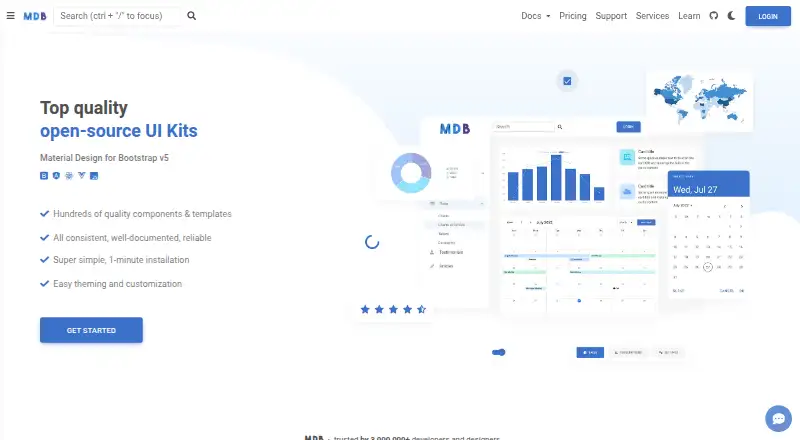
What Material Design for Bootstrap is
Material Design for Bootstrap (MDB) is a UI kit for building websites with Bootstrap components, templates and plugins. Its Standard Bootstrap version uses plain JavaScript and is also compatible with jQuery. The Standard Bootstrap library lists more than 700 UI components and templates, and MDB also offers Angular, React and Vue versions. Developers can customize themes with CSS variables or Sass files, including dark mode and custom color modes. PRO tiers add advanced components such as charts, datatables, pickers, a lightbox, calendar and table editor. MDB supports right-to-left languages and internationalization for Bootstrap projects. The Core plan is free and uses an MIT license for personal and commercial use. PRO project allowances depend on the license tier: Single Use covers one project, Multi Use five, and higher tiers unlimited projects; individual tiers are for one developer. MDB GO is a free command-line tool for hosting and deploying projects. The PRO offering includes AI chat trained on MDB source code and documentation, along with expert support. MDB states that purchases have a 30-day refund guarantee and that component test coverage is above 90%.
Who it suits
MDB suits developers building websites with Bootstrap who want a component library, templates and theme customization. It also offers versions for Angular, React and Vue, and PRO project licenses for individuals and teams.
What it does well
- Core is free under an MIT license for personal and commercial use.
- Standard Bootstrap lists 700+ components and templates.
- Theme options include dark mode and custom color modes.
- Supports right-to-left languages and internationalization.
- MDB GO provides free command-line hosting and deployment.
What to know first
- Advanced components are included in PRO tiers.
- Individual PRO tiers are for one developer.
- Single Use and Multi Use licenses cap projects at one and five.
Limits
The free Core plan is identified as an MIT-licensed UI kit; the facts do not describe a usage quota for it. PRO project allowances are one project for Single Use, five for Multi Use and unlimited for higher tiers.
Plans
| Plan | Billed and limits | Price |
|---|---|---|
| Core | MIT license · free for personal and commercial use | Free |
| Team | Unlimited projects · all PRO components, design blocks, plugins and templates · team management · license recycling | On request |
| MDB PRO | 12 months of support, updates and other Premium Access features included · Single Use: 1 project · Multi Use: 5 projects · higher tiers: unlimited projects · individual tiers are for one developer | On request |
As mdbootstrap.com lists them, read 30 Sept 2026. The maker's own page has the final word.
Getting started
- Visit the MDB website.
- Choose the Standard Bootstrap, Angular, React or Vue technology.
- Start with the free Core plan or choose a PRO tier for advanced components.
- Use MDB GO's command-line interface to publish a project.
Material Design for Bootstrap (MDB) is a Material Design toolkit built around Bootstrap for creating responsive websites. It fits developers and teams that want a substantial, themeable component base across several front-end stacks, while its free commercial-use core also works for independent projects. The key decision is whether the additional PRO components, support and project allowances are worth moving beyond that capable core.
Overview
MDB combines implementation code with a Material Design system, supplying components, templates and plugins rather than just visual guidelines. Standard Bootstrap uses plain JavaScript and remains compatible with jQuery, making it suitable for both newer builds and projects that already rely on that library. The catalog contains more than 700 UI components and templates, so teams can start from a broad interface foundation instead of assembling common controls individually.
Customization is a central strength. CSS variables or Sass files support custom themes, dark mode and custom color modes, allowing a product to keep its own visual identity. Responsive components, accessibility guidance, right-to-left language support and internationalization cover practical requirements for varied audiences. MDB GO adds free command-line hosting and deployment for publishing projects. MDB is headquartered in Warsaw, Poland.
Key features
- Framework choice: Standard Bootstrap, Angular, React and Vue versions let teams use MDB within established front-end stacks. The plain-JavaScript edition also supports jQuery.
- Large component library: More than 700 components and templates provide substantial coverage for website interfaces, reducing repetitive construction work.
- Theme controls: CSS variables and Sass enable dark mode and custom color modes, giving designers control beyond MDB's default appearance.
- PRO additions: Charts, datatables, pickers, lightbox, calendar and table editor target data-heavy or interaction-rich products that need more than standard Bootstrap controls.
- Development integrations: PRO materials cover Express, Laravel, Django, Flask, Rails, ASP.NET, Blazor, Vite, Webpack, Parcel and Gulp, which helps teams align MDB with common server and build tooling.
- Quality and support: MDB says its components are continually tested and updated, with current coverage above 90%. PRO support combines 24/7 AI chat trained on MDB documentation and source code with expert help and unlimited tickets, usually answered within one workday.
- Design workflow: The primary asset format is Figma, and the system is design-system ready, useful when design and implementation need a shared foundation.
Pricing
Core — $0.00 USD, free: The MIT-licensed core is free for personal and commercial use. It is the obvious fit for individuals and teams that need the standard component library, theming and framework choices without a purchase. It does not include the advanced PRO component set or PRO-specific support and access.
MDB PRO — custom pricing: Individual tiers are for one developer. Single Use covers one project, Multi Use covers five, and higher tiers allow unlimited projects; MDB defines a project as a domain or app. The plans include 12 months of support, updates and other Premium Access features, with a 30-day refund guarantee. Choose this route when charts, data tables, pickers or the other advanced controls are central to the product, and check the project allowance carefully before committing.
Team — custom pricing: Team includes unlimited projects, all PRO components, design blocks, plugins and templates, plus team management and license recycling. It is aimed at organizations sharing MDB across multiple contributors rather than a single developer. The absence of a published price means budgeting requires a direct quote.
Platforms
MDB is self-hosted and web-focused. Its technology editions cover Standard Bootstrap, Angular, React and Vue, while the listed integrations extend into major back-end frameworks and front-end build tools. MDB GO provides free command-line hosting and deployment, but the kit remains a development resource rather than a native mobile application.
Who it's for
MDB suits developers who want Bootstrap conventions with Material styling, especially teams supporting several JavaScript frameworks or multilingual and right-to-left interfaces. Its free MIT core is a strong starting point for commercial sites, prototypes and internal tools. Beginners can use the MDB course with HTML and CSS familiarity; JavaScript is useful but not required. Teams building sophisticated dashboards or editors should consider PRO, while a project needing only a small, minimal styling layer may find 700-plus components excessive.
Pros and cons
- Pros: Free MIT commercial-use core; more than 700 components and templates; Angular, React, Vue and Bootstrap options; CSS-variable and Sass theming with dark and custom color modes; RTL and internationalization support; Figma and design-system readiness; free CLI hosting and deployment; stated testing coverage above 90%.
- Cons: Advanced controls such as charts, datatables and calendar are reserved for PRO; individual PRO licenses are limited to one developer; project caps differ sharply between one-project, five-project and unlimited tiers; Team and PRO pricing is custom, complicating cost comparisons.
Alternatives
Figma Wireframe Kit is a better fit when the priority is a free Figma-oriented kit with unlimited drafts and UI templates across a wide range of platforms.
Ant Design Icons suits projects seeking a free MIT-licensed icon package with npm support for Vanilla, React, React Native, Angular and Vue.
Carbon Design System is the simpler choice for an open-source web design system with no paid tiers stated.
Clarity Design System offers another free, MIT-licensed web system when a dedicated open-source design system is preferred.
Flowbite Figma Design System is an alternative freemium Figma system whose community edition provides minimal style guidelines and component variants.
GOV.UK Design System is aimed at teams wanting publicly available, MIT-licensed code for self-hosted and web projects.
Shadcn Studio Figma UI Kit fits users who want a free community tier with limited resources or a one-time $99 Basic plan for one user and unlimited projects.
Singapore Government Design System is a free option for web and API projects.
For broader discovery, browse UI Kit Libraries.
Verdict
Choose MDB if you need a Bootstrap-based Material UI kit with a generous free commercial-use core, extensive components and serious theme and localization controls. Look elsewhere when you need advanced controls without a PRO purchase, a clearly published price, or licensing that avoids project and developer limits.
Verdict
Choose MDB if you need a Bootstrap UI kit with a free commercial-use Core plan, a large component library and theme controls. Look at PRO if you need its advanced components or higher project allowances; the listed plan details do not give a price.
Questions
Does MDB have a free plan?
Yes. Core is listed as free and uses an MIT license for personal and commercial use.
Which frameworks does MDB offer?
MDB offers Standard Bootstrap, Angular, React and Vue technologies.
What do PRO tiers add?
They include advanced components such as charts, datatables, pickers, lightbox, calendar and table editor.
How many projects can a PRO license cover?
Single Use covers one project, Multi Use five, and higher tiers allow unlimited projects. Individual tiers are for one developer.
What support is included with PRO?
The PRO page describes 24/7 AI chat trained on MDB source code and documentation, plus expert support with unlimited tickets usually answered within one workday.
Is there a refund guarantee?
MDB states that purchases have a 30-day refund guarantee.
Facts from Material Design for Bootstrap's own pages
- Audience
- The MDB course is aimed at beginners and assumes familiarity with HTML and CSS; JavaScript knowledge is described as useful but not required. · mdbootstrap.com, 30 Sept 2026
- Component library
- The Standard Bootstrap page lists 700+ UI components and templates. · mdbootstrap.com, 30 Sept 2026
- Core components
- The Standard Bootstrap version is built with plain JavaScript and also works with jQuery. · mdbootstrap.com, 30 Sept 2026
- Customization
- MDB supports theming and customization, including dark mode and custom color modes through CSS variables or Sass files. · mdbootstrap.com, 30 Sept 2026
- Deployment
- MDB GO is described as a free hosting and deployment tool that publishes projects with a command-line interface. · mdbootstrap.com, 30 Sept 2026
- Frameworks
- MDB offers Standard Bootstrap, Angular, React and Vue technologies. · mdbootstrap.com, 30 Sept 2026
- Headquarters
- Warsaw, Poland · mdbootstrap.com, 28 Sept 2026
- Integrations
- The PRO page lists integrations for Express, Laravel, Django, Flask, Rails, ASP.NET and Blazor, plus Vite, Webpack, Parcel and Gulp. · mdbootstrap.com, 30 Sept 2026
- License limits
- The PRO FAQ defines a project as a domain or app; Single Use allows one project, Multi Use five, and higher tiers unlimited projects. · mdbootstrap.com, 30 Sept 2026
- Product
- MDB is a Material Design UI kit for Bootstrap with components, templates and plugins for building websites. · mdbootstrap.com, 30 Sept 2026
- PRO offerings
- PRO tiers include advanced components such as charts, datatables, pickers, lightbox, calendar and table editor. · mdbootstrap.com, 30 Sept 2026
- Refunds
- MDB states that purchases have a 30-day refund guarantee. · mdbootstrap.com, 30 Sept 2026
- RTL and translations
- The homepage states that MDB supports right-to-left languages and internationalization for translating Bootstrap projects. · mdbootstrap.com, 30 Sept 2026
- Support
- The PRO page describes 24/7 AI chat trained on MDB source code and documentation, plus expert support with unlimited tickets usually answered within one workday. · mdbootstrap.com, 30 Sept 2026
- Testing
- MDB states that its components are continually tested and updated, with current test coverage above 90%. · mdbootstrap.com, 30 Sept 2026
Where Material Design for Bootstrap stands on Freedom251
- UI Kit Libraries#9 of 26