
Ant Design Icons
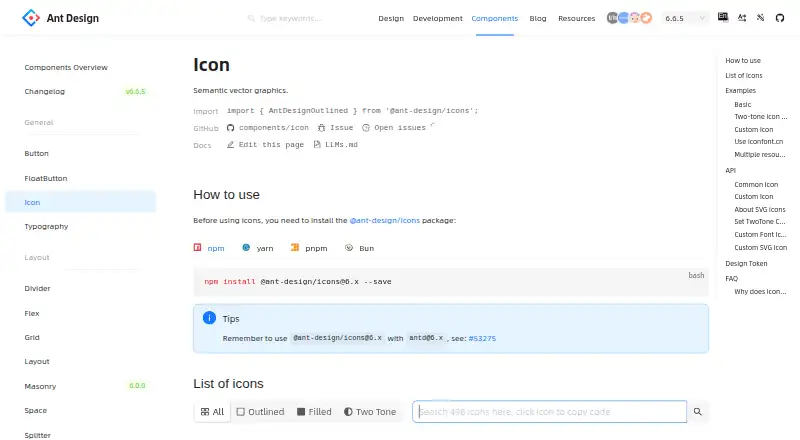
What Ant Design Icons is
Ant Design Icons is a free icon library for adding semantic vector graphics to interfaces. Its documentation lists 498 icons in outlined, filled and two-tone styles. Icons render as SVG, with properties for adjusting size and color; two-tone icons can use a primary color or both primary and secondary colors. The API also supports rotation, animation and custom icon components.
Developers can use packages for Vanilla, React, React Native, Angular and Vue. The documentation describes adding custom SVGs through webpack with @svgr/webpack or through Vite with vite-plugin-svgr, as well as using SVG sprite symbols from iconfont.cn projects. The project repository identifies the license as MIT, and commercial use is allowed. The documentation shows installing the React package with npm, yarn, pnpm or Bun, and recommends matching @ant-design/icons 6.x with antd 6.x.
SVG icons can work offline without a CDN-hosted font icon file. Importing the whole icon set can increase bundle size, so the documentation points developers toward importing only the icons they need. Ant Design is made by Ant Group and the Ant Design Community; the project was founded in 2018 and is headquartered in Hangzhou, China.
Who it suits
Ant Design Icons suits developers building interfaces who want a free, customizable SVG icon set with packages for several frameworks. Its MIT license and permission for commercial use also suit commercial projects, provided the available formats fit the development stack.
What it does well
- Free plan with MIT license and commercial use allowed.
- 498 icons in outlined, filled and two-tone styles.
- Packages cover Vanilla, React, React Native, Angular and Vue.
- SVG icons support offline use without a CDN font file.
- Custom icons can be added as React components or SVGs.
What to know first
- No icon font format is listed.
- Importing all SVG icons can add bundle size.
Plans
| Plan | Billed and limits | Price |
|---|---|---|
| Ant Design Icons | MIT licensed · npm packages for Vanilla, React, React Native, Angular, and Vue | Free |
As ant.design lists them, read 8 Oct 2026. The maker's own page has the final word.
Getting started
- Open the Ant Design icon documentation.
- Choose the package for your framework, such as React.
- Install the React package with npm, yarn, pnpm or Bun.
- For React projects using Ant Design, match @ant-design/icons 6.x with antd 6.x.
- Import the icons needed for your interface; add custom SVGs through the documented webpack or Vite route if needed.
Overview
Ant Design Icons is a free library of semantic vector graphics for interface use, aimed at developers working across several frameworks. Its customizable SVGs and custom-icon options make it a flexible choice, though projects that need icon fonts or import the entire set may be better served elsewhere.
Key features
The library offers 498 icons in outlined, filled, and two-tone styles. SVG rendering allows developers to set size and color; two-tone icons can use one or two chosen colors. Rotation, animation, and custom icon components add flexibility for interfaces that need more than fixed artwork.
Teams can bring their own assets, too. The React documentation covers SVG imports through webpack with @svgr/webpack or Vite with vite-plugin-svgr, and createFromIconfontCN can use SVG sprite symbols from iconfont.cn projects. SVGs work fully offline without a CDN-hosted font file, a useful advantage for applications that cannot depend on that external asset. The trade-off is format: there is no icon font.
Packages are available for Vanilla, React, React Native, Angular, and Vue. For React projects using Ant Design, the documentation recommends pairing @ant-design/icons 6.x with antd 6.x. Importing every SVG can add bundle size, so selecting only needed icons is the better approach for payload-sensitive applications. There is also a styling caveat: enabling StyleProvider layer can cause icon styles to lose priority against @layer antd and affect component styling.
Pricing
Ant Design Icons costs nothing. The free plan is MIT-licensed and includes npm packages for Vanilla, React, React Native, Angular, and Vue; commercial use is permitted. There is no free trial because the library is free, and no paid tier is needed to access its listed packages.
Platforms
The project lists Android, iOS, and web as platforms, with icon formats for SVG, React, React Native, Angular, and Vue. The framework packages make it relevant to teams building across different application environments; SVG's offline support also avoids reliance on a CDN-hosted font file.
Who it's for
Ant Design Icons suits developers who want a free, customizable SVG library with several visual styles and the option to integrate custom assets. It is a particularly natural fit for projects using the documented React package and compatible Ant Design versions. Teams that require an icon font, or want to import every icon without considering bundle size, should look for a different fit.
Pros and cons
- Pros: 498 icons across three styles provide options for varied interface needs.
- Pros: SVG styling, two-tone color controls, animation, rotation, and custom-icon workflows allow substantial adaptation.
- Pros: MIT licensing, commercial use, and free framework packages make adoption accessible across listed frameworks.
- Cons: No icon font is available, ruling it out for projects that depend on that format.
- Cons: Importing the full SVG set can increase bundle size, so teams need to choose imports deliberately.
- Cons: The StyleProvider layer caveat can affect component styling, and React projects should account for the recommended version pairing.
Alternatives
Icon Libraries is a useful directory for comparing other icon-focused options. Consider Figma Wireframe Kit instead when you need a free starter with unlimited drafts, UI kits, and templates alongside access to Figma products. Carbon Design System is another free, open-source option for teams looking for a broader design system to use and contribute to. Choose Clarity Design System if an MIT-licensed open-source design system better suits the project. Flowbite Figma Design System offers a free community edition. GOV.UK Design System is a free, MIT-licensed option with publicly available code. Material Design for Bootstrap may suit teams seeking a free MIT-licensed core for personal and commercial use, with a paid Team tier also offered. Shadcn Studio Figma UI Kit has a free community plan with limited resources and community support, plus a one-time Basic plan for 99.00 USD. Singapore Government Design System is another free design-system option, with web and API platforms.
UI Kit Libraries can help when the project needs a broader kit rather than an icon library.
Verdict
Choose Ant Design Icons for a free, commercially usable SVG library with flexible styling, offline support, and packages across several frameworks. Its main drawbacks are the lack of an icon font and the need to manage bundle size when importing icons; teams requiring that format or unwilling to curate imports should choose another library.
Verdict
Choose Ant Design Icons if you need a free SVG icon library with several style options, framework packages and support for custom icons. Look elsewhere if your project requires an icon font format. When using the full set, account for the bundle-size consideration in the documentation.
Questions
Is Ant Design Icons free?
Yes. The listed plan is free, and the project repository identifies its license as MIT.
Can I use Ant Design Icons commercially?
Yes, commercial use is allowed.
Which platforms and frameworks does it support?
The listed platforms are Android, iOS and web. Packages are listed for Vanilla, React, React Native, Angular and Vue.
How many icons and styles are included?
The documentation lists 498 icons in outlined, filled and two-tone styles.
Can I add custom icons or use the icons offline?
The documentation describes custom React components, SVG imports through webpack or Vite, and iconfont.cn SVG sprites. SVG icons support complete offline use without a CDN-hosted font icon file.
Is there an icon font format?
No. The listed icon formats include SVG and framework options, and the icon font field is no.
Facts from Ant Design Icons's own pages
- Bundle size consideration
- The documentation notes that importing all SVG icons can add bundle size and refers to importing icons as needed. · ant.design, 8 Oct 2026
- Color
- Two-tone icons support setting a primary color or primary and secondary colors. · ant.design, 8 Oct 2026
- Custom iconfont integration
- The createFromIconfontCN helper can use SVG sprite symbols generated by iconfont.cn projects. · ant.design, 8 Oct 2026
- Custom icons
- The docs describe custom icons using a React component, iconfont.cn SVG sprites, or SVG imports through webpack or Vite. · ant.design, 8 Oct 2026
- Customization
- The API supports rotating and animating icons, setting two-tone colors, and using custom icon components. · ant.design, 8 Oct 2026
- Custom SVG integration
- The documentation describes importing custom SVGs as React components with webpack and @svgr/webpack or Vite and vite-plugin-svgr. · ant.design, 8 Oct 2026
- Founded
- 2018 · ant.design, 28 Sept 2026
- Framework packages
- The project lists packages for Vanilla, React, React Native, Angular, and Vue. · github.com, 8 Oct 2026
- Headquarters
- Hangzhou, China · ant.design, 28 Sept 2026
- Icon count
- The page lists 498 icons. · ant.design, 8 Oct 2026
- Icon set
- The icon documentation lists 498 icons. · ant.design, 8 Oct 2026
- Icon styles
- The icon library includes outlined, filled, and two-tone styles. · ant.design, 8 Oct 2026
- Installation
- The documentation shows installing the React package with npm, yarn, pnpm, or Bun and recommends matching @ant-design/icons 6.x with antd 6.x. · ant.design, 8 Oct 2026
- Known issue
- The docs say enabling StyleProvider layer can cause icon styles to deprioritize @layer antd and affect component styling. · ant.design, 8 Oct 2026
- License
- The project repository identifies its license as MIT. · github.com, 8 Oct 2026
- Maintainers
- The Ant Design site says it is made by Ant Group and the Ant Design Community. · ant.design, 8 Oct 2026
- Offline use
- The documentation says SVG icons support complete offline use without a CDN-hosted font icon file. · ant.design, 8 Oct 2026
- Purpose
- Ant Design Icons provides semantic vector graphics for use in interfaces. · ant.design, 8 Oct 2026
- Rendering
- Icons render as SVG and support styling with properties such as size and color. · ant.design, 8 Oct 2026
- Styles
- Icons are available in outlined, filled, and two-tone themes. · ant.design, 8 Oct 2026
- Support
- The Ant Design docs link to GitHub issues, discussions, Stack Overflow, and SegmentFault for help. · ant.design, 8 Oct 2026
- Version compatibility
- The docs advise using @ant-design/[email protected] with [email protected]. · ant.design, 8 Oct 2026
Where Ant Design Icons stands on Freedom251
- Icon Libraries#1 of 46
- Ui Frameworks#1 of 24
- Component Libraries Software#1 of 15
- UI Kit Libraries#2 of 26