Freedom251 › Translation Software
Mate Translate
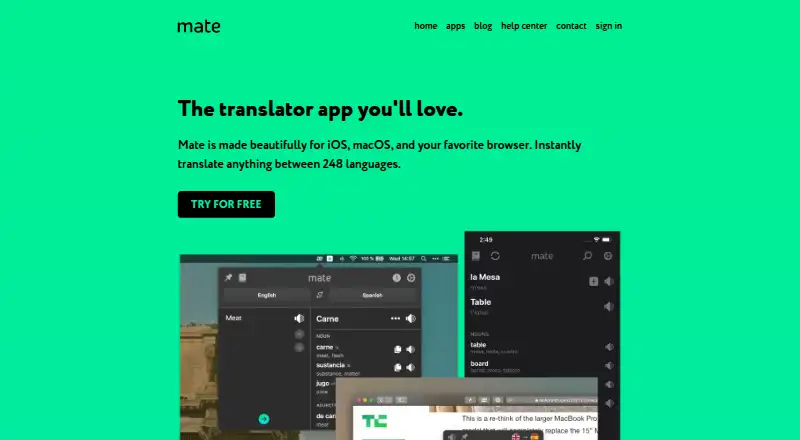
What Mate Translate is
Mate Translate is a translation app for iOS, macOS, and browsers, made by Mate Translate in Berlin, Germany. It supports website translation across 250 languages, but does not translate documents. Its tools include Basic, Advanced, and AI translation styles; Pro adds a formality control. Translations can be spoken, with phonetics, word genders, and synonyms available. Users can save and categorize phrases. Pro syncs History and Phrasebook across devices, and includes offline translation; iPhone and iPad support offline use in 55+ languages.
The browser extension can translate selected page text, translate a full page manually, provide a right-click translation action, and translate Netflix subtitles. Mate for iOS supports translation in Safari, iMessage, PDF files, Mail, and other apps; browser add-ons are listed for Chrome, Firefox, Opera, and Edge. Mate has a free plan and a 7-day trial. The free browser extension includes popup and on-page translations, three synonyms per translation, local History and Phrasebook, and click-to-translate Netflix subtitles. Pro is available through subscription plans, with fair-use limits on Advanced and AI requests; when a limit is reached, translation falls back to Basic.
Who it suits
Mate suits people who translate frequently and want translation woven into browser or iOS workflows. It is especially relevant to users who want to save phrases, access spoken translations, or use Pro syncing and offline translation.
What it does well
- Supports website translation in 250 languages.
- Offers Basic, Advanced, and AI translation styles.
- Provides phonetics, spoken translations, word genders, and synonyms.
- Browser add-ons support page and Netflix subtitle translation.
- Pro syncs History and Phrasebook across devices.
What to know first
- Does not support document translation.
- There is no native Windows or Android app.
- Advanced and AI translations have fair-use limits.
Limits
The free browser extension includes three synonyms per translation and local History and Phrasebook. Advanced and AI styles have daily and monthly fair-use allowances and a maximum request size; after a limit, Mate falls back to Basic.
Plans
| Plan | Billed and limits | Price |
|---|---|---|
| Mate Monthly | Mate Pro subscription | On request |
| Mate Annual | Mate Pro subscription | On request |
| Mate Weekly | Mate Pro subscription | On request |
| Mate Educational Annual | Educational subscription | On request |
| Browser extension | Free forever · Popup and on-page translations · Three synonyms per translation · Local History and Phrasebook · Click-to-translate Netflix subtitles | Free |
| Mate Pro | Annually; price varies by plan shown in the app or account · One subscription covers Mac, iPhone, iPad, and browser extensions · Advanced and AI styles have fair-use limits | On request |
| Mate Pro | Monthly; price varies by plan shown in the app or account · One subscription covers Mac, iPhone, iPad, and browser extensions · Advanced and AI styles have fair-use limits | On request |
As matetranslate.com lists them, read 21 Sept 2026. The maker's own page has the final word.
Getting started
- Visit matetranslate.com.
- Choose the free browser extension or a Mate Pro subscription.
- Install a browser add-on for Chrome, Firefox, Opera, or Edge, or use Mate on iOS or macOS.
- Use popup or on-page translation in the browser, or select translation in supported iOS apps.
- Enable Pro for offline translation or synced History and Phrasebook.
Overview
Mate Translate brings translation into browsers and Apple apps, with language aids and a phrasebook for people who translate often as part of their workflow. Its browser controls and app integrations are its strongest case; the lack of document translation and native Windows or Android apps narrows its reach.
It supports 250 languages and offers Basic, Advanced and AI translation styles. That range is useful for everyday text and web-page translation, but file-based work calls for another tool.
For a broader comparison, see Translation Software.
Key features
Translation styles and language aids
Basic, Advanced and AI styles offer a choice of translation approach, while Pro adds a formality control for readers who need to adjust tone. Advanced and AI have daily and monthly fair-use allowances and a maximum request size; once a limit is reached, Mate falls back to Basic. That preserves access to translation, but users relying on the more advanced styles should expect constraints.
Mate can speak translations and show phonetics, word genders and synonyms. These tools make it more useful for checking pronunciation and word usage than a plain text converter. Users can save and categorize phrases, and Pro syncs History and Phrasebook across devices.
Browser and app workflow
The browser extension supports selecting page text, manually translating a full page, a right-click translation action and Netflix subtitle translation. These controls suit users who want translation close to the page they are reading, rather than switching to a separate tool. Mate for iOS also supports translation in Safari, iMessage, PDF files, Mail and other apps.
Offline translation is included in Pro; iPhone and iPad support it in more than 55 languages. That is useful when a connection is unavailable, but does not make Mate a document translator: document translation is not offered.
Pricing
Mate's free browser extension costs nothing, billed Free forever. It includes popup and on-page translations, three synonyms per translation, local History and Phrasebook, and click-to-translate Netflix subtitles. This is the sensible starting point for browser users who do not need syncing or Pro features.
Mate Pro is billed annually, with a price that varies by plan and is shown in the app or account. One subscription covers Mac, iPhone, iPad and browser extensions; it adds offline translation and syncs History and Phrasebook across devices. Advanced and AI styles remain subject to fair-use limits. Monthly, annual and weekly Mate Pro subscriptions are offered, along with an educational annual subscription; each has custom pricing. The free extension gives up Pro syncing and offline translation, while the subscription's undisclosed price makes cost comparison difficult.
The free plan and 7-day trial let readers try Mate before committing. The trial is short, so it is best used to check whether the browser and Apple-app workflow fits regular use.
Platforms
Mate is available on macOS and iOS, and its browser add-ons are listed for Chrome, Firefox, Opera and Edge. It has no native Windows or Android app. The extension works on Windows and Linux, and Firefox for Android supports the extension, but readers who require a dedicated Windows or Android app should look elsewhere.
Who it's for
Mate suits frequent translators who work in browsers or Apple apps and value pronunciation aids, saved phrases and optional cross-device syncing. Its integrations make it a stronger fit for ongoing reading and communication than for occasional file translation. It is not the right choice for document translation or for people who need native Windows or Android software.
Mate says text sent for translation goes to translation providers along with the language pair, and those providers' terms prohibit using the text for training. Without an account, History and Phrasebook remain on the device; synced account data can be viewed and deleted by the user. Mate says passwords are stored hashed, Apple handles App Store payments, and Paddle processes purchases made directly from Mate. Email support is available, and Mate asks users to identify the app and platform when requesting help.
Pros and cons
- Pros: Browser controls include page selection, manual full-page translation and Netflix subtitle translation, keeping common tasks close to the content.
- Pros: Phrase saving, pronunciation and word-usage aids support repeat translation and language learning.
- Pros: Pro syncs History and Phrasebook across Mac, iPhone, iPad and browser extensions, with offline translation on Pro and on iPhone and iPad in 55+ languages.
- Cons: No document translation, so it cannot serve readers whose main job is translating files.
- Cons: There is no native Windows or Android app; browser extensions are the workaround.
- Cons: Advanced and AI styles have fair-use allowances and request-size limits, and Pro pricing varies by plan.
Alternatives
Crowdin is a freemium alternative with a free plan and apps across desktop, mobile and web platforms; consider it when that wider platform mix matters.
Papago is another freemium choice, with monthly allowances for image, document and voice translation. Choose it if those media types matter more than Mate's browser and Apple-app integrations.
iTranslate offers a free text-translation plan and a Pro plan with a keyboard extension and custom phrases. It is worth comparing if those are the features you need.
Localizely has a free plan with 250 hosted string keys, one project and unlimited users and languages. It is the more relevant option for hosted localization strings rather than browser-based translation.
QuillBot is a freemium option focused on paraphrasing and writing tools, including a free tier with a 100-word paraphrasing limit.
Apertium is a free, open-source translation platform.
Bing Translator is free and shows a 1,000-character input limit, making it an option for readers who want a free translator rather than Mate's integrated browser and Apple-app workflow.
CafeTran Espresso has a free plan with 1,000 translation units and 500 glossary terms, plus an annual subscription at €80 a year. Consider it when translation units and glossary terms are a better match for your work.
Verdict
Choose Mate Translate if you regularly translate web pages or text inside browsers and Apple apps, and value phrase saving, pronunciation aids and optional Pro syncing. Its workflow integrations are the clearest reason to choose it. Look elsewhere if you need document translation, a native Windows or Android app, or predictable Pro pricing.
Verdict
Choose Mate if you want website translation integrated with browsers or Apple apps, plus phrase saving and optional Pro syncing. Look elsewhere if document translation or a native Windows or Android app is essential.
Questions
Does Mate Translate have a free plan?
Yes. The browser extension is free forever and includes popup and on-page translations, three synonyms per translation, local History and Phrasebook, and click-to-translate Netflix subtitles.
What does Mate Pro cost?
Prices vary by plan and are shown in the app or account. Monthly, Annual, Weekly, and Educational Annual subscriptions are listed.
Which platforms does Mate support?
Platforms listed include Android, browser extensions, iOS, Linux, macOS, web, and Windows. Mate has no native Windows or Android app; its browser extension works on Windows and Linux, and Firefox for Android supports the extension.
Can Mate translate documents?
No. Website translation is supported, while document translation is not.
Does Mate work offline?
Offline translation is included in Pro. iPhone and iPad support offline translation in 55+ languages.
How does Mate handle translation data?
Mate says text sent for translation goes to translation providers with the language pair, and those providers' terms do not allow use of the text for training. Without an account, History and Phrasebook stay on the device; users can view and delete synced account data.
Facts from Mate Translate's own pages
- App integrations
- Mate for iOS supports translation in Safari, iMessage, PDF files, Mail, and other apps; browser add-ons are listed for Chrome, Firefox, Opera, and Edge. · matetranslate.com, 12 Oct 2026
- Browser features
- The browser extension supports page selection, manual full-page translation, a right-click action, and Netflix subtitle translation. · matetranslate.com, 12 Oct 2026
- Document translation
- No · matetranslate.com, 21 Sept 2026
- Fair-use limits
- Advanced and AI translations have daily and monthly fair-use allowances and a maximum request size, after which Mate falls back to Basic. · matetranslate.com, 12 Oct 2026
- Free plan
- Yes · matetranslate.com, 21 Sept 2026
- Headquarters
- Berlin, Germany · matetranslate.com, 28 Sept 2026
- Intended users
- Mate describes itself as made for people who translate frequently and want translation integrated into their workflow. · matetranslate.com, 12 Oct 2026
- Offline use
- Offline translation is included in Pro; iPhone and iPad support offline translation in 55+ languages. · matetranslate.com, 12 Oct 2026
- Phrasebook and sync
- Users can save and categorize phrases, and Pro syncs History and Phrasebook across devices. · matetranslate.com, 12 Oct 2026
- Platform availability
- Mate has no native Windows or Android app, but its browser extension works on Windows and Linux and Firefox for Android supports the extension. · matetranslate.com, 12 Oct 2026
- Privacy controls
- Without an account, History and Phrasebook stay on the device; synced account data can be viewed and deleted by the user. · matetranslate.com, 12 Oct 2026
- Pronunciation
- Mate can speak translations and display phonetics; it also offers word genders and synonyms. · matetranslate.com, 12 Oct 2026
- Purpose
- Mate is a translation app for iOS, macOS, and browsers, and its homepage says it translates between 248 languages. · matetranslate.com, 12 Oct 2026
- Security
- Mate says passwords are stored hashed and that Apple handles App Store payments while Paddle processes purchases made directly from Mate. · matetranslate.com, 12 Oct 2026
- Support
- Mate offers email support and asks users to identify the app and platform when requesting help. · matetranslate.com, 12 Oct 2026
- Supported languages
- 250 · matetranslate.com, 21 Sept 2026
- Translation data
- Mate says text sent for translation goes to translation providers with the language pair, and those providers' terms do not allow use of the text for training. · matetranslate.com, 12 Oct 2026
- Translation tools
- Mate offers Basic, Advanced, and AI translation styles, with a formality control in Pro. · matetranslate.com, 12 Oct 2026
- Website translation
- Yes · matetranslate.com, 21 Sept 2026
Where Mate Translate stands on Freedom251
- Translation Software#25 of 156
- Translation apps#30 of 158