Freedom251 › Translation Software
Apertium
What Apertium is
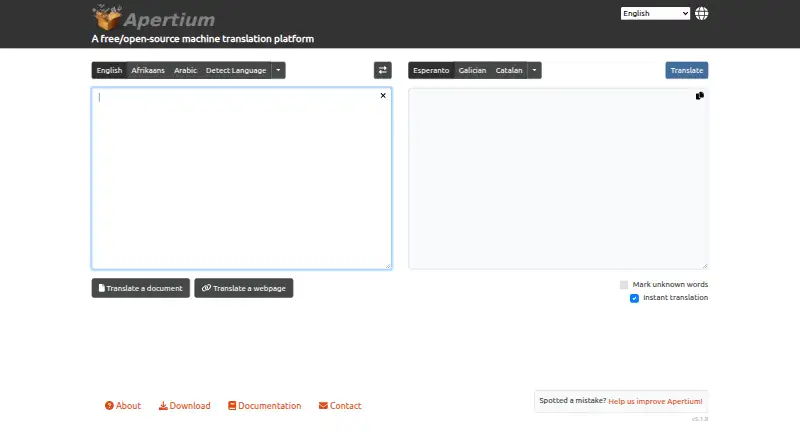
Apertium is a free, open-source platform for developing rule-based machine translation systems. Its web app translates text, webpages, and documents, and also provides linguistic analysis and generation interfaces. The translation toolchain uses deterministic linguistic rules and does not currently include statistical or neural machine translation. Language resources are organized as reusable single-language packages and translation pairs. Document translation supports DOCX, XLSX, PPTX, ODT, TXT, RTF, HTML, and LaTeX, with a documented file limit below 32 MB. The web interface depends on an Apertium HTTP API such as APy or ScaleMT; APy provides text, document, and webpage translation as well as morphological analysis and generation. Apertium Simpleton offers a graphical interface for Windows and Mac and can download language packages for offline translation. Linux users can use command-line tools, with installation options for several distributions. APy can be installed with pip or apt, or run from a Docker image. A documented format-handling limitation is that its tools cannot process reordered formatting markers, called superblanks.
Who it suits
Apertium suits users and developers seeking rule-based translation tools, including those who need document translation or linguistic analysis. Its desktop and Linux options may suit users who want local interfaces or offline language packages.
What it does well
- Translates text, webpages, and documents.
- Supports DOCX, XLSX, PPTX, ODT, and other formats.
- Simpleton can download language packages for offline translation.
- APy provides morphological analysis and generation.
- Available as free, open-source software.
What to know first
- Document files must be below 32 MB.
- The toolchain does not currently use neural translation methods.
- Tools cannot handle reordered formatting markers called superblanks.
- The web interface requires an Apertium HTTP API.
Limits
The web interface’s document translation has a documented file limit below 32 MB. Apertium tools cannot handle reordered formatting markers, called superblanks.
Plans
| Plan | Billed and limits | Price |
|---|---|---|
| Free/open-source platform | — | Free |
As apertium.com lists them, read 12 Oct 2026. The maker's own page has the final word.
Getting started
- Visit the Apertium website.
- Choose the web interface, a desktop interface, Linux command-line tools, or an API deployment.
- For web translation, use an Apertium HTTP API such as APy or ScaleMT.
- For offline use with Simpleton, download language packages.
- Install APy with pip or apt, or run it from a Docker image.
Overview
Apertium is a free, open-source platform for building rule-based machine translation systems, with a web app, desktop software and Linux command-line options. It suits users who value reusable language resources, offline desktop translation or an API they can deploy; it is less suited to workflows that depend on neural translation or complex document formatting.
Key features
The web app handles text, webpages and documents, and also offers linguistic analysis and generation. Apertium’s approach is deterministic: it applies linguistic rules rather than statistical or neural methods. That makes its design distinct, but users seeking those other translation approaches should look elsewhere.
Language resources are organized as reusable single-language packages and translation pairs. This structure supports development and reuse across language combinations. The web interface depends on an Apertium HTTP API, such as Apertium APy or ScaleMT, so it is not a standalone web service independent of that infrastructure.
Apertium APy exposes text, webpage and document translation alongside morphological analysis and generation. It can be installed with pip or apt, or run from a Docker image. Apertium services are also used by applications including Virtaal, Okapi, OmegaT, begiak and Wikipedia Content Translation, making the platform relevant beyond its own web and desktop interfaces.
Document translation supports DOCX, XLSX, PPTX, ODT, TXT, RTF, HTML and LaTeX, with a file-size limit below 32 MB. That range covers common office and markup formats, but the size cap can rule it out for larger files. Apertium’s format-handling tools also cannot handle reordered formatting markers, or superblanks, which makes it a poor fit when documents rely on that formatting behavior.
Pricing
Apertium’s Free/open-source platform costs nothing. There are no paid tiers to weigh against one another: the free plan is the option for anyone who wants to use the platform, including developers deploying APy or desktop users downloading language packages. The practical trade-offs are technical rather than pricing-based: the web interface requires an Apertium HTTP API, documents must stay below 32 MB, and reordered formatting markers are unsupported.
Platforms
Apertium supports web, Windows, macOS, Linux, API use and self-hosting. Apertium Simpleton provides graphical software for Windows and Mac, with downloadable language packages for offline translation. Linux users can follow documented command-line instructions, with installation options for Debian, Ubuntu, Fedora, CentOS and OpenSUSE. The API can be deployed through pip, apt or Docker. These options offer flexibility, but they ask more of users who want a ready-to-use web interface without managing API infrastructure.
Who it's for
Apertium is a strong fit for developers, language-technology users and organizations that want a free, self-hostable rule-based translation platform or reusable language data. Its offline desktop packages also suit Windows and Mac users who want translation without relying on a live connection. It is a weaker choice for users who need neural translation, larger document uploads, or reliable handling of reordered formatting markers. The reviewed official pages do not state a security certification or compliance standard, so organizations with formal requirements should assess that before adoption.
Pros and cons
- Pro: Free and open source, with web, desktop, command-line and self-hosted API options, so users can choose between an interface and deployment flexibility.
- Pro: Supports several office, text and markup document formats, as well as webpage translation and linguistic analysis and generation.
- Pro: Downloadable language packages enable offline translation through Apertium Simpleton on Windows and Mac.
- Con: The translation toolchain is rule-based and does not include statistical or neural methods, limiting its appeal to users seeking those approaches.
- Con: The web app relies on an Apertium HTTP API, which adds deployment requirements for anyone operating the interface.
- Con: Document uploads must be below 32 MB, and reordered formatting markers are unsupported, creating real constraints for some document workflows.
Alternatives
Choose Papago if its monthly allowances for images, documents and voice translation better match your needs. QuillBot is another freemium option, with a free plan centered on paraphrasing up to 100 words and two modes rather than Apertium’s rule-based translation platform.
iTranslate offers a free text-translation plan and a PRO option, while Lara Translate gives free users 60,000 characters per month, one user and document uploads up to 10 MB. For localization workflows, compare Localizely, whose free plan includes 250 hosted string keys and one project, or SimpleLocalize, whose Community plan includes 500 translation keys, 10 projects and one team member. Bing Translator is a free alternative with a 1,000-character input limit on its page and an Azure Translator F0 plan.
Browse the Translation Software directory for more options.
Verdict
Choose Apertium if you want a free, open-source rule-based translation platform with offline desktop packages, API deployment choices and support for multiple document formats. Its main advantage is that flexibility without a subscription; look elsewhere if you need neural translation, larger document uploads or support for reordered formatting markers.
Verdict
Apertium offers rule-based translation across web, desktop, and command-line options, with support for multiple document formats. Its file-size cap and formatting-marker limitation are worth considering for document workflows.
Questions
Is Apertium free?
Yes. Its listed plan is free, and it is described as free and open source.
What can Apertium translate?
The web app supports text, webpage, and document translation. APy also supports all three.
Which document formats does the web interface support?
DOCX, XLSX, PPTX, ODT, TXT, RTF, HTML, and LaTeX, with a documented file limit below 32 MB.
Which platforms can I use?
The listed platforms are API, Linux, macOS, self-hosted, web, and Windows. Simpleton provides a graphical interface for Windows and Mac, and the project documents Linux command-line use.
Does Apertium work offline?
Apertium Simpleton can download language packages for offline translation.
Does Apertium use neural or statistical machine translation?
Its toolchain uses deterministic linguistic rules and does not currently include statistical or neural machine translation methods.
Facts from Apertium's own pages
- Analysis and generation
- The web app also provides linguistic analysis and generation interfaces. · github.com, 12 Oct 2026
- API access
- Yes · apertium.com, 21 Sept 2026
- API capabilities
- Apertium APy exposes text, document, and webpage translation, as well as morphological analysis and generation. · github.com, 12 Oct 2026
- API deployment
- Apertium APy can be installed with pip or apt, or run from a Docker image. · github.com, 12 Oct 2026
- Desktop platforms
- Apertium Simpleton provides a graphical interface for Windows and Mac and can download language packages for offline translation. · wiki.apertium.org, 12 Oct 2026
- Document formats
- The web interface supports document translation in DOCX, XLSX, PPTX, ODT, TXT, RTF, HTML, and LaTeX, with a documented file limit below 32 MB. · wiki.apertium.org, 12 Oct 2026
- Document translation
- Yes · apertium.com, 21 Sept 2026
- Free plan
- Yes · apertium.com, 21 Sept 2026
- Integration
- Apertium services are used by applications including Virtaal, Okapi, OmegaT, begiak, and Wikipedia Content Translation. · wiki.apertium.org, 12 Oct 2026
- Known limitation
- Apertium’s official format-handling documentation says its tools cannot handle reordered formatting markers, called superblanks. · wiki.apertium.org, 12 Oct 2026
- Language resources
- Language data is organized into reusable single-language packages and translation pairs. · github.com, 12 Oct 2026
- Linux support
- The project documents command-line use on Linux and provides installation options including Debian, Ubuntu, Fedora, CentOS, and OpenSUSE. · github.com, 12 Oct 2026
- Security and compliance
- The reviewed official pages do not state a security certification or compliance standard. · apertium.com, 12 Oct 2026
- Translation memory
- Yes · apertium.com, 21 Sept 2026
- Translation style
- Apertium’s toolchain uses deterministic linguistic rules and does not currently include statistical or neural machine translation methods. · github.com, 12 Oct 2026
- Web app requirement
- Apertium’s web interface relies on an Apertium HTTP API such as Apertium APy or ScaleMT. · github.com, 12 Oct 2026
- Website translation
- Yes · apertium.com, 21 Sept 2026
- Web translation
- The Apertium web app supports text, webpage, and document translation. · github.com, 12 Oct 2026
- What it does
- Apertium describes itself as a free/open-source platform for developing rule-based machine translation systems. · wiki.apertium.org, 12 Oct 2026
Where Apertium stands on Freedom251
- Translation Software#2 of 156
- Translation apps#33 of 158