
DeepL Translator
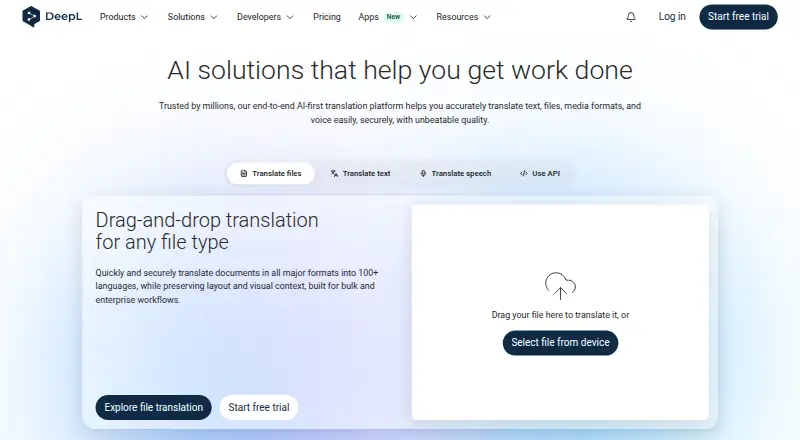
What DeepL Translator is
DeepL Translator is a translation service for text, documents, and websites, with translation memory, glossary tools, and API access. It supports 100 languages. Browser extensions for Chrome, Firefox, and Edge provide translation and writing improvements while browsing; listed integrations include Microsoft Word, Google Workspace, Microsoft 365, and AI agents. The free version costs nothing and includes 50,000 characters per user each month, one file translation per month for files up to 5 MB, and one glossary with five entries per language pair. Individual costs €7.49 a month billed annually and includes a 30-day free period; it allows 300,000 characters monthly and three file translations. Team costs €24.99 a month billed annually, and Business costs €49.99 a month. Enterprise pricing is custom. DeepL lists TLS encryption and ISO 27001 and SOC 2 Type II certified processes and infrastructure. For Pro subscribers, content and results are temporarily stored only as technically needed and then deleted. The maker was founded in 2017 and is headquartered in Cologne, Germany.
Who it suits
DeepL Translator suits people translating text, documents, or websites, as well as teams using shared file limits or language tools in other systems. Its extensions also suit users who want translation and writing improvements while browsing.
What it does well
- Supports 100 languages.
- Includes document and website translation.
- Browser extensions are available for Chrome, Firefox, and Edge.
- API supports integration of Language AI into systems.
- Pro content and results are deleted after temporary storage.
What to know first
- The free version allows one file translation per user monthly.
- Individual allows three file translations per month.
- The free version's file limit is 5 MB.
Limits
The free version includes 50,000 characters per user per month, one file translation per month, and a 5 MB file limit. Individual includes 300,000 characters and three file translations per month, with a 30 MB file limit.
Plans
| Plan | Billed and limits | Price |
|---|---|---|
| Free version | 50,000 characters per user/month · 1 file translation per month · Up to 5 MB per file · 1 glossary · 5 glossary entries per language pair | Free |
| Individual | billed annually; free for 30 days · 300,000 characters per month · 3 file translations per month · Up to 30 MB per file · 1 glossary · 1 saved translation | €7.49 a month |
| Team | billed annually; free for 30 days · 1,000,000 characters per user/month · 20 file translations per month · Up to 30 MB per file · 5 glossaries · 10 saved translations | €24.99 a month |
| Business | billed annually · 100 file translations per month · 20 shared style rule lists · Unlimited glossaries · Unlimited saved translations · 99.0% availability | €49.99 a month |
| Enterprise | Custom files/month · Unlimited shared style rule lists · Unlimited glossaries · 99.9% availability | On request |
As deepl.com lists them, read 20 Sept 2026. The maker's own page has the final word.
Getting started
- Open https://www.deepl.com/en/translator.
- Start with the free version or select a paid plan.
- A 30-day trial is listed for Individual and Team.
- Install the Chrome, Firefox, or Edge extension to translate and improve writing while browsing.
- Use the API documentation to integrate Language AI into a system.
DeepL Translator is a translation service for text, documents, and websites, with browser extensions, apps, and API access. It suits people and teams handling repeat translation work, especially when consistent terminology matters. Occasional users can start free, but frequent file translation calls for a paid plan.
Overview
DeepL supports 100 languages and combines translation with glossaries, translation memory, and browser-based writing improvements. Integrations with Microsoft Word, Google Workspace, Microsoft 365, and AI agents help fit it into existing workflows; its API lets developers build multilingual experiences into other systems. That breadth makes it a stronger fit for recurring work than for a single quick lookup.
Chrome, Firefox, and Edge extensions bring translation and writing improvements into browsing. Desktop and mobile apps broaden the ways individuals can use the service, while API access is more relevant to developers and product teams. DeepL was founded in 2017 and is headquartered in Cologne, Germany.
Key features
Documents and terminology
Document translation is available across plans, but the quotas and file sizes make a substantial difference. Free allows one file per month up to 5 MB; Individual raises that to three files up to 30 MB, and Team allows 20 files up to 30 MB. Those limits make Free suitable for occasional documents, not a steady stream of larger files.
Terminology controls scale with the plans: Free includes one glossary with five entries per language pair, Individual one glossary, and Team five. Business and Enterprise offer unlimited glossaries. Team also provides 10 saved translations, while Individual includes one. These tools make higher tiers more useful when work repeats and vocabulary needs to stay consistent.
Security and administration
DeepL cites ISO 27001 and SOC 2 Type II certified processes and infrastructure, and lists TLS encryption. For Pro subscribers, content and results are stored temporarily only as technically needed and then deleted. Team administration is included in Team and available for Business and Enterprise; single sign-on is available across those plans, with thresholds shown for Team and Business. Teams can share a total file allowance or assign the same number of files to each member.
Pricing
The Free version costs nothing and includes 50,000 characters per user per month, one file translation per month up to 5 MB, and one glossary with five entries per language pair. It is a practical starting point for light use, but the monthly file cap is restrictive for regular document translation.
Individual costs €7.49 a month, billed annually, and is free for 30 days; it can be canceled anytime. It includes 300,000 characters per month, three file translations up to 30 MB each, one glossary, and one saved translation. This suits an individual with recurring but moderate work; the limited file quota and single glossary remain constraints.
Team costs €24.99 a month, billed annually, with a 30-day free period and cancellation anytime. It includes 1,000,000 characters per user per month, 20 file translations up to 30 MB each, five glossaries, and 10 saved translations. With team administration and file-sharing options, it is the more suitable choice for collaborative use.
Business costs €49.99 a month, billed annually. It includes 100 file translations, 20 shared style rule lists, unlimited glossaries and saved translations, and 99.0% availability. Enterprise has custom pricing, custom files per month, unlimited shared style rule lists and glossaries, and 99.9% availability; premium support is available for Enterprise. Business and Enterprise fit organizations that need larger shared controls, while Enterprise is the option for custom file quotas and higher stated availability.
Platforms
DeepL is available through browser extensions, desktop and mobile apps, and an API. The extensions support Chrome, Firefox, and Edge. The API supports integration of Language AI into other systems, so it is the relevant route for developers rather than a substitute for the consumer-facing apps.
Who it's for
DeepL is a good fit for individuals, teams, and developers who need translation as part of ongoing work, particularly when document handling, saved terminology, or integration with existing tools matters. It is less compelling for users who translate files frequently but want to stay on the free plan, given the one-file monthly allowance and 5 MB cap.
Pros and cons
- Pros: Text, document, and website translation, plus API access, cover both individual workflows and integration needs.
- Pros: Glossaries and translation memory support repeat work, with glossary allowances expanding on higher plans.
- Pros: Browser extensions add translation and writing improvements while browsing.
- Cons: Free permits just one file translation monthly and caps each file at 5 MB.
- Cons: Individual is billed annually and still limits file translations to three per month.
Alternatives
Consider Papago if its listed monthly allowances for images, documents, and voice translation better match the work. iTranslate is another freemium option, with a free text translation plan and a PRO plan that includes a keyboard extension and custom phrase features.
Lara Translate may suit a light user who wants a free allowance of 60,000 characters per month, one user, and documents up to 10 MB. Yandex Translate is a free option for personal, noncommercial text and web-page translation.
Google Cloud Translation is worth considering for API-focused use, with a stated free allowance of 500,000 characters per month. LibreTranslate is an alternative for readers seeking a service that includes self-hosted platform support.
Baidu Translate is another freemium translation option. Lingvanex Translator may suit readers seeking a paid annual all-in-one plan, listed at $99.99 a year.
Browse AI Translation Tools, Writing Style Checkers, AI writing assistants, and Translation Software for more options.
Verdict
Choose DeepL if you need a broad translation workflow with document and website support, reusable terminology tools, and routes into browser, desktop, mobile, or API use. Its free tier is enough for light translation, but file caps make a paid plan the more realistic choice for regular document work; look elsewhere if those limits or annual billing do not fit.
Verdict
DeepL Translator covers text, document, and website translation, with extensions, glossaries, translation memory, and API access. Review the plan limits if you need frequent file translations or larger free-version uploads.
Questions
Is DeepL Translator free?
Yes. The Free version costs nothing and includes 50,000 characters per user per month and one file translation monthly.
How much does Individual cost?
Individual costs €7.49 a month billed annually and includes a 30-day free period. Team costs €24.99 a month billed annually, and Business costs €49.99 a month.
How many languages does it support?
DeepL Translator supports 100 languages.
Which browser extensions are available?
Extensions are available for Chrome, Firefox, and Edge. They support translation and writing improvements while browsing.
Does it have an API and integrations?
Yes. The API supports building multilingual experiences and integrating Language AI into systems. Listed integrations include Microsoft Word, Google Workspace, Microsoft 365, and AI agents.
What security and data retention details are listed?
DeepL cites TLS encryption and ISO 27001 and SOC 2 Type II certified processes and infrastructure. For Pro subscribers, content and results are stored temporarily only as technically needed and then deleted.
Facts from DeepL Translator's own pages
- API access
- Yes · deepl.com, 20 Sept 2026
- API capability
- DeepL API supports building multilingual experiences and integrating Language AI into systems. · deepl.com, 27 Sept 2026
- Browser extensions
- Chrome, Firefox, and Edge extensions support translation and writing improvements while browsing. · deepl.com, 27 Sept 2026
- Business reach
- DeepL says it is trusted by over 200,000 businesses globally. · deepl.com, 27 Sept 2026
- Data retention
- For Pro subscribers, content and results are temporarily stored only as technically needed and then deleted. · deepl.com, 27 Sept 2026
- Document translation
- The document translator supports PDF, Word, and PowerPoint files while preserving formatting and layout. · deepl.com, 27 Sept 2026
- TLS encryption
- TLS encryption is listed under security and compliance features. · deepl.com, 27 Sept 2026
- Founded
- 2017 · deepl.com, 28 Sept 2026
- Free file limit
- The free version includes 1 file translation per user/month. · deepl.com, 27 Sept 2026
- Free plan
- Yes · deepl.com, 20 Sept 2026
- Glossary tools
- Yes · deepl.com, 20 Sept 2026
- Headquarters
- Cologne, Germany · deepl.com, 28 Sept 2026
- Individual file limit
- Individual includes 3 file translations per month. · deepl.com, 27 Sept 2026
- Product integrations
- DeepL lists integrations with Microsoft Word, Google Workspace, Microsoft 365, and AI agents. · deepl.com, 27 Sept 2026
- Security certifications
- DeepL cites ISO 27001 and SOC 2 Type II certified processes and infrastructure. · deepl.com, 27 Sept 2026
- Single sign-on
- Single sign-on is available for Team, Business, and Enterprise, with thresholds shown for Team and Business. · deepl.com, 27 Sept 2026
- Support channels
- Support resources include the Help Center, community, API documentation, and premium support for Enterprise. · deepl.com, 27 Sept 2026
- Supported languages
- 100 · deepl.com, 20 Sept 2026
- Team administration
- Team administration is included in Team and is available for Business and Enterprise users. · deepl.com, 27 Sept 2026
- Team file sharing
- Teams can share a total file limit or assign the same number of files to each member. · deepl.com, 27 Sept 2026
- Translation memory
- Yes · deepl.com, 20 Sept 2026
- Website translation
- Yes · deepl.com, 20 Sept 2026
Where DeepL Translator stands on Freedom251
- Translation apps#12 of 158
- Translation Software#21 of 156
- Language Translation Software#10 of 30
- AI Translation Tools#11 of 24