Yandex Translate
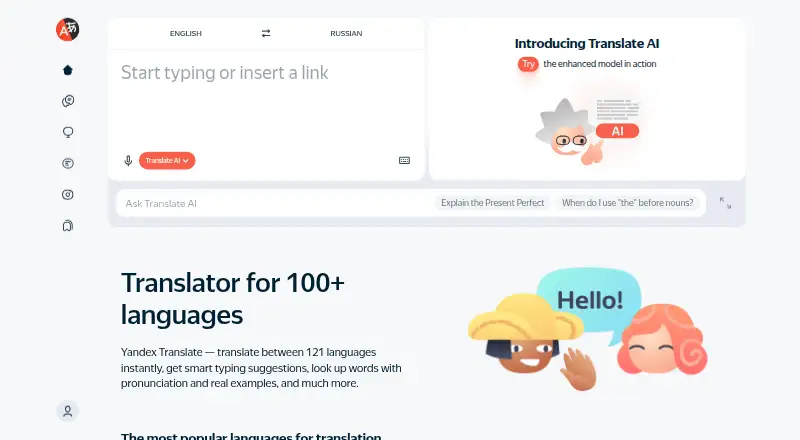
What Yandex Translate is
Yandex Translate is a translation service for words, expressions, text in photos and images, websites, and mobile apps. Its web version supports more than 90 languages, including traditional and less common languages, and can translate documents and websites. For image text, it can identify the language and let users download the translated image; blurry text, cursive, and handwriting are not recognized. The web service is available in a browser, and mobile-browser, Android, and iOS options are also available. In the mobile app, typed text can be translated offline. English and Russian dictionaries are included by default, while dictionaries for other languages need to be downloaded. Voice input and dialog mode need an internet connection. Yandex also offers glossary tools and API access. Its AI functions can handle translation-related requests such as grammar explanations and style recommendations, though usage may be limited. Users can translate in Telegram chats through the Yandex Translate bot. The service is free for personal, noncommercial use. Some functions may require registration or sign-in with a Yandex ID. The web version does not retain translation history, though locally stored device history can be viewed.
Who it suits
Yandex Translate suits people who need to translate text, web pages, images, or mobile app content across a broad range of languages. Its offline typed-text feature may also suit mobile users who download the dictionaries they need, while voice input and dialog mode require internet access.
What it does well
- Translates words, images, websites, and mobile apps.
- Web version supports more than 90 languages.
- Mobile app translates typed text offline.
- Includes glossary tools and API access.
- Telegram bot supports translation in chats.
What to know first
- Voice input and dialog mode require internet access.
- Blurry image text, cursive, and handwriting are not recognized.
- The service is for personal, noncommercial use.
- Web translation history is not stored or downloadable.
Limits
The free plan is for personal, noncommercial use. Offline typed translation is available in the mobile app, but voice input and dialog mode need an internet connection; other language dictionaries must be downloaded.
Plans
| Plan | Billed and limits | Price |
|---|---|---|
| Yandex Translate | Personal, noncommercial use · automated translation of text and web pages | Free |
As translate.yandex.com lists them, read 8 Oct 2026. The maker's own page has the final word.
Getting started
- Open https://translate.yandex.com/ in a browser.
- Choose the web version or use the mobile-browser, Android, or iOS option.
- For offline mobile translation, use the included English or Russian dictionary, or download another language dictionary.
- Sign in with a Yandex ID if a function requires registration.
Yandex Translate is a free translation service for personal users who need text, websites, documents, images, and mobile-app content across a wide range of languages. It is strongest as a broad, flexible everyday translator with some offline text support. Commercial users and anyone requiring offline voice conversations should choose another service.
Overview
Yandex Translate covers browser, mobile, API, and Telegram use. Its web version supports more than 90 languages, including traditional and less common languages, while the apps handle typed text and other translation tasks on the go. The service is free, but its terms limit use to personal, noncommercial purposes, which rules it out for many business workflows.
Key features
Text, website, document, image, and mobile-app translation give Yandex Translate unusually broad everyday coverage in one service. Website and document support suit readers moving between languages while browsing or handling files, and API access provides a route for developers to integrate translation into their own products.
Image translation detects text in an image and can download the translated image. It works best with clear, printed text; blurry images, cursive, and handwriting are not recognized. That makes it useful for signs, menus, and documents, but unreliable for difficult scans or personal notes.
Glossary tools help organize preferred terminology, although there is no translation memory. Individuals can define terms, but teams that depend on reusing previous translations will find the missing memory feature limiting.
The mobile apps translate typed text without an internet connection. English and Russian dictionaries are included by default, and other language dictionaries must be downloaded first. Voice input and dialog mode remain online-only, so offline support is a text fallback rather than a full conversation solution.
Yandex describes AI functions for translation-related requests, including grammar explanations and style recommendations, with usage potentially limited. Telegram users can translate chats through the Yandex Translate bot. The web version does not retain translation history on Yandex servers; locally stored device history can be viewed but not downloaded. Some functions may require a Yandex ID sign-in. Yandex says technical and organizational safeguards protect personal information, and its Help pages offer contact support.
Pricing
| Plan | Price | Includes | Best for |
|---|---|---|---|
| Yandex Translate | free | Automated translation of text and web pages; personal, noncommercial use | Individuals and personal projects |
There is no free trial because the service is already free, and no paid tier, seat allowance, renewal charge, or published usage quota is given. The important limitation is contractual: use is personal and noncommercial, so organizations should not treat the free plan as a business license.
Platforms
Yandex Translate is offered on the web, through a mobile-browser version, on Android and iOS, and via API. Telegram integration adds chat translation through the Yandex Translate bot. Offline typed-text translation is available in the mobile apps after the required dictionaries are installed.
Who it's for
Choose it for free personal translation across many languages, especially when website, document, image, and occasional offline typed-text translation matter. It is a sensible fit for travelers who can accept online voice features, students, and developers needing API access for noncommercial projects. Look elsewhere for commercial deployment, shared translation-memory workflows, or offline voice and dialog translation.
Pros and cons
Pros
- More than 90 web languages: broad coverage includes traditional and uncommon languages.
- Wide content support: translates text, websites, documents, images, and mobile-app content.
- Offline typed text: mobile dictionaries allow text translation without a connection.
- Developer and chat access: API availability and a Telegram bot extend it beyond a standalone website.
- Free personal plan: there is no subscription price or trial decision for individual use.
Cons
- Noncommercial terms: businesses cannot rely on the service for commercial use.
- Voice remains online: voice input and dialog mode do not work offline.
- Image recognition limits: blurry, cursive, and handwritten text is unsupported.
- No translation memory: recurring team terminology cannot be reused through a memory system.
- History is device-bound: web history is not stored centrally and local history cannot be downloaded.
Alternatives
Google Translate is a comparable free option with document translation up to 10 MB and PDFs up to 300 pages. Pick iTranslate if you want a freemium service with a free text-translation tier and a paid PRO plan that adds a keyboard extension and custom phrases. Papago suits users who prefer published monthly allowances, including 30 images, 20 documents, and 30 minutes of voice translation on its free plan.
Lara Translate is aimed at users comfortable with a 60,000-character monthly free allowance, one user, and documents up to 10 MB. Choose DeepL Translator for a free tier capped at 50,000 characters per user monthly, one file per month, and one glossary. Argos Translate is the alternative for an open-source, self-hosted offline translation library.
Google Cloud Translation fits API projects with a 500,000-character monthly neural-translation free allowance; paid text usage is listed at $20 a month billed at the stated rate. Baidu Translate offers team-oriented plans, including a five-user minimum and per-user Chinese-character allowances. Choose the AI Translation Tools or Translation Software lists to compare broader categories.
Verdict
Yandex Translate is a strong free choice for personal users who value wide language coverage, image and website translation, API access, and offline typed text on mobile. Its decisive drawbacks are the personal-use-only terms and the need for an internet connection for voice and dialog translation. Choose it for flexible everyday translation; choose another tool when your work is commercial or your conversations must stay fully offline.
Verdict
Choose Yandex Translate for free personal translation across web, mobile, images, and more than 90 web-supported languages. It may be less suitable for commercial use or when offline voice and dialog translation are needed.
Questions
Is Yandex Translate free?
Yes. The listed plan costs nothing and is for personal, noncommercial use.
Which platforms are available?
Yandex lists web, mobile-browser, Android, iOS, and API options.
Can it translate documents and websites?
Yes. Document and website translation are supported.
Can it translate without internet?
The mobile app translates typed text offline. Voice input and dialog mode require an internet connection.
Does it offer an API and glossary tools?
Yes. API access and glossary tools are listed.
Who makes Yandex Translate?
The maker is Yandex Translate, headquartered in Moscow, Russia, and founded in 2000.
Facts from Yandex Translate's own pages
- Account requirement
- Some functions may require registration or sign-in with a Yandex ID account. · yandex.com, 8 Oct 2026
- AI translation
- The terms describe AI functions for translation-related requests, including grammar explanations and style recommendations, and say usage may be limited. · yandex.com, 8 Oct 2026
- API access
- Yes · translate.yandex.com, 20 Sept 2026
- Browser availability
- Yandex lists a browser web version, a mobile-browser version, and Android and iOS apps. · yandex.com, 8 Oct 2026
- Document translation
- Yes · translate.yandex.com, 20 Sept 2026
- Founded
- 2000 · translate.yandex.com, 28 Sept 2026
- Free plan
- Yes · translate.yandex.com, 20 Sept 2026
- Glossary tools
- Yes · translate.yandex.com, 20 Sept 2026
- Headquarters
- Moscow, Russia · translate.yandex.com, 28 Sept 2026
- Image translation
- The web version can detect the language in image text and lets users download the translated image; it cannot recognize blurry text, cursive, or handwriting. · yandex.com, 8 Oct 2026
- Language coverage
- The web version supports more than 90 languages, including traditional and uncommon languages. · yandex.com, 8 Oct 2026
- Offline limitation
- Voice input and dialog mode require an internet connection. · yandex.com, 8 Oct 2026
- Offline use
- The mobile app translates typed text offline; English and Russian dictionaries are available by default, while other language dictionaries must be downloaded. · yandex.com, 8 Oct 2026
- Privacy and security
- Yandex says it uses technical and organizational measures to protect personal information from unauthorized, accidental, or unlawful destruction, loss, alteration, misuse, disclosure, or access. · yandex.com, 8 Oct 2026
- Support
- Yandex Translate Help pages provide a contact-support option for product questions and issues. · yandex.com, 8 Oct 2026
- Telegram integration
- Yandex says users can translate in chats with the Yandex Translate bot in Telegram. · yandex.com, 8 Oct 2026
- Translation history
- The web version does not store translation history; users can view history stored locally on their device, but cannot download it. · yandex.com, 8 Oct 2026
- Translation memory
- No · translate.yandex.com, 20 Sept 2026
- Use restriction
- The service terms specify personal, noncommercial use. · yandex.com, 8 Oct 2026
- Website translation
- Yes · translate.yandex.com, 20 Sept 2026
- What it translates
- Automatically translates words, expressions, text in photos and images, websites, and mobile apps. · yandex.com, 8 Oct 2026
Where Yandex Translate stands on Freedom251
- Translation apps#4 of 158
- Live Speech Translation Apps#7 of 52
- Translation Software#64 of 156
- Language Translation Software#15 of 30
- AI Translation Tools#18 of 24