
Google Translate
What Google Translate is
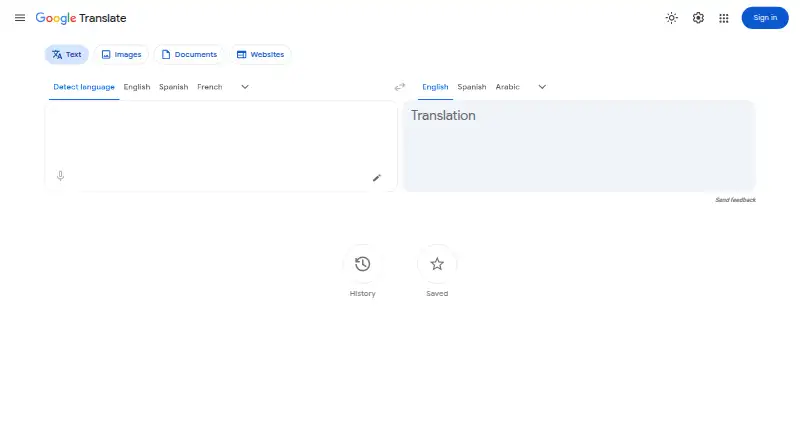
Google Translate is a free service for translating text and other language input across the web and mobile devices. The web app can detect the source language of typed text and lets users select a target language. On mobile, users can translate text through the camera or from phone images, provide voice input, handwrite characters, and translate copied text from another app. Conversation support helps people who speak different languages communicate, while downloadable language packs enable offline use. Saved words and phrases can be accessed across devices. The Google Play listing says typed text translation supports 108 languages. The web app also translates DOCX, PDF, PPTX and XLSX files up to 10 MB, with PDFs limited to 300 pages. Document translation is unavailable on mobile and smaller screens, and text embedded in images or scanned PDF pages is not translated. Computer microphone translation is fully supported in Chrome, with limited support in Safari and Edge. Google Translate is available on Android, iOS, the web and through an API, and it offers website translation. The Google Play listing says app data is encrypted in transit and users can request data deletion.
Who it suits
It suits people who need translation across text, speech, images or documents, including offline use with downloaded language packs. Document users should plan to work on a larger screen rather than a mobile device.
What it does well
- Free to use on web, Android and iOS.
- Mobile translation supports camera and image input.
- Downloaded language packs allow offline translation.
- Saved words and phrases sync across devices.
- Web document translation supports four file formats.
What to know first
- Document translation is unavailable on mobile.
- Scanned PDF pages and image text are not translated.
- Document files are limited to 10 MB.
- Microphone translation has limited Safari and Edge support.
Limits
Document translation supports files up to 10 MB, with PDFs limited to 300 pages. It is unavailable on mobile and smaller screens, and does not translate text within images or scanned PDF pages.
Plans
| Plan | Billed and limits | Price |
|---|---|---|
| Google Translate | Free to use; document translation up to 10 MB; PDFs up to 300 pages | Free |
As translate.google.com lists them, read 9 Oct 2026. The maker's own page has the final word.
Getting started
- Open Google Translate on the web or install the Android or iOS app.
- Select languages or enter text for source language detection in the web app.
- Download language packs in the mobile app if you need offline translation.
- Upload a supported DOCX, PDF, PPTX, or XLSX file in the web app for document translation.
- Use the API if you need programmatic access.
Overview
Google Translate is a free translation service for text, speech, images, and documents. It suits people who need quick translation across everyday situations, especially when camera input or offline access matters. Its broad input options are useful, but document translation has firm format, size, and device limits.
Key features
The web app detects the source language of typed text and lets users select a target language. On mobile, camera and image translation can help interpret text in the user’s surroundings, while speech input and handwriting offer alternatives to typing. Conversation support is designed for exchanges between people speaking different languages; it makes the app more versatile than a text-only lookup tool.
Downloaded language packs allow translation without an internet connection, a practical advantage when connectivity is uncertain. Mobile users can copy text from another app and tap to translate it, and saved words and phrases remain accessible across devices. These features make Translate useful for repeat lookups as well as one-off questions. The Google Play listing says typed text translation is supported between 108 languages.
The web app translates DOCX, PDF, PPTX, and XLSX files up to 10 MB, with PDF documents limited to 300 pages. That is sufficient for many routine files, but not large documents; text embedded in images and scanned PDF pages is not translated. Document translation is unavailable on mobile and smaller screens, so phone-first document work is a poor fit. Computer microphone translation is fully supported in Chrome, while Safari and Edge have limited support.
Google Play says app data is encrypted in transit and users can request deletion of their data. Google also provides a Translate Help Center and user community for troubleshooting.
Pricing
Google Translate costs nothing, with a free plan and no free trial. The plan includes document translation up to 10 MB and PDFs up to 300 pages; its file and screen restrictions still apply. There is no paid tier to choose for larger documents in this offering.
Platforms
Google Translate is available on Android, iOS, web, and API. The mobile apps provide camera translation, offline language packs, speech and handwriting input, and translation of copied text from other apps. The web app handles document translation, but only on larger screens. For computer microphone translation, Chrome is the fully supported browser; Safari and Edge offer limited support.
Who it's for
Choose Google Translate for everyday multilingual lookups, conversations, camera-based reading, and translation on the move, particularly if offline packs matter. It also suits users who want occasional document translation within the stated file caps. Look elsewhere if your workflow depends on translating scanned pages, larger files, or documents directly from a phone or small screen.
Pros and cons
- Pros: Text, speech, image, handwriting, and conversation inputs cover more situations than typed text alone.
- Pros: Downloadable language packs enable offline translation, and saved vocabulary is accessible across devices.
- Pros: The free plan includes web document translation for four common file formats, within its caps.
- Cons: Documents are limited to 10 MB and 300 PDF pages, and image text or scanned PDF pages are excluded.
- Cons: Document translation is unavailable on mobile and smaller screens.
- Cons: Computer microphone support is limited in Safari and Edge compared with Chrome.
Alternatives
iTranslate is worth considering if you want a freemium option with a browser extension and desktop platforms including macOS and Windows; its free plan covers text translation, while PRO adds a keyboard extension and custom phrase features.
Papago may suit users looking for a service with monthly allowances for images, documents, and voice translation.
Lara Translate is an alternative if a defined free monthly text quota is useful: its free plan covers 60,000 characters per month for one user and documents up to 10 MB.
Yandex Translate is another free option for personal, noncommercial translation of text and web pages.
Argos Translate is the alternative to consider when an open-source offline translation library for Linux, Python, command-line, or GUI use is the priority.
DeepL Translator may fit users who want a free plan with a stated monthly character allowance and limited file translation.
Google Cloud Translation is aimed at API-based use, with a free allowance of 500,000 characters per month and a paid text plan priced at $20 a month, billed 50.
Baidu Translate is another freemium translation option.
For more choices, browse AI Translation Tools or Translation Software.
Verdict
Google Translate is a strong free choice for people who need flexible everyday translation across mobile and web, especially when offline packs, camera input, or conversations are important. Choose something else if document translation is central to your work and you need scanned-page support, larger files, or a mobile document workflow.
Verdict
Google Translate covers several input types and offers both mobile and web tools, including offline language packs. Its document limits and browser support distinctions matter if those are central to your use.
Questions
How much does Google Translate cost?
Google Translate is free to use. Its listed plan is free.
Is there a free trial?
No. Google Translate does not offer a free trial.
Which platforms support Google Translate?
It is available on Android, iOS, and the web, and offers API access.
Which document formats can it translate?
The web app supports DOCX, PDF, PPTX, and XLSX files up to 10 MB. PDF files are limited to 300 pages.
Can I use it offline?
Yes. The mobile app can translate offline after language packs are downloaded.
Who provides Google Translate support?
Google provides a Translate Help Center and a user community for questions and troubleshooting.
Facts from Google Translate's own pages
- API access
- Yes · translate.google.com, 20 Sept 2026
- Browser support
- Computer microphone translation is fully supported in Chrome, with limited support in Safari and Edge. · support.google.com, 9 Oct 2026
- Camera translation
- The mobile app can translate text through the camera or from images on a phone. · translate.google.com, 9 Oct 2026
- Conversations
- The app supports conversations between people who speak different languages. · translate.google.com, 9 Oct 2026
- Document limitation
- Document translation is unavailable on smaller screens and mobile, and text found in images or scanned PDF pages is not translated. · support.google.com, 9 Oct 2026
- Documents
- The web app translates DOCX, PDF, PPTX, and XLSX documents up to 10 MB, with PDF files limited to 300 pages. · support.google.com, 9 Oct 2026
- Document translation
- Yes · translate.google.com, 20 Sept 2026
- Free plan
- Yes · translate.google.com, 20 Sept 2026
- Language coverage
- The Google Play listing states the app supports text translation by typing between 108 languages. · play.google.com, 9 Oct 2026
- Offline use
- Users can download language packs to translate without an internet connection. · translate.google.com, 9 Oct 2026
- Other apps
- On mobile, users can copy text from another app and tap to translate it. · translate.google.com, 9 Oct 2026
- Purpose
- Google Translate helps people connect across languages using text, speech, images, and other translation features. · translate.google.com, 9 Oct 2026
- Saved translations
- Saved words and phrases can be accessed across devices. · translate.google.com, 9 Oct 2026
- Security and data
- The Google Play listing says app data is encrypted in transit and users can request data deletion. · play.google.com, 9 Oct 2026
- Speech and handwriting
- Users can provide voice input or handwrite characters and words that their keyboard does not support. · translate.google.com, 9 Oct 2026
- Support
- Google provides a Translate Help Center and a user community for questions and troubleshooting. · support.google.com, 9 Oct 2026
- Text translation
- The web app offers text translation with source language detection and selectable languages. · translate.google.com, 9 Oct 2026
- Website translation
- Users can enter a website URL to translate a webpage, though website translation is not supported in all regions. · support.google.com, 9 Oct 2026
Where Google Translate stands on Freedom251
- Translation apps#2 of 158
- Translation Software#9 of 156
- Live Speech Translation Apps#3 of 52
- Language Translation Software#4 of 30
- AI Translation Tools#5 of 24