Freedom251 › AI Music Mastering Software
MasteringBOX
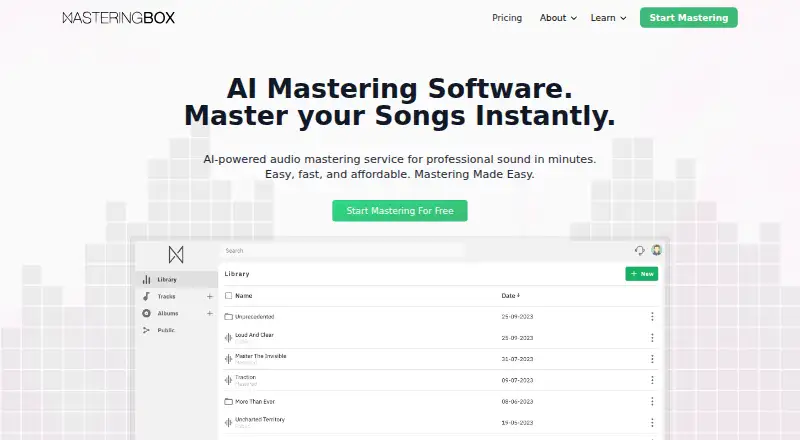
What MasteringBOX is
MasteringBOX is an online, AI-powered audio mastering application that analyzes a track’s dynamic and spectral characteristics and applies adjustments. After uploading a track, users can preview the master, adjust loudness and a three-band dynamic EQ, and compare the result with the original. Tracks can be remastered without extra cost. Masters can be downloaded as M4A, MP3, WAV, or HD WAV; M4A and MP3 files can include cover art and track information. Projects can be organized into folders and albums. Album tracks can be downloaded as a ZIP, while DDP 2.0 album exports are in beta. Users can publish tracks and albums with a player supporting comments, likes, and sharing, and create artist profiles. The free account allows one MP3 or M4A master every 24 hours, provides 200 MB of storage, and retains masters for up to 90 days depending on settings. MasteringBOX is available on Android, iOS, and the web. A free plan is available; paid pricing is listed from €6/mo (annual). Free, Basic, Pro, and Unlimited accounts are for personal use and the subscriber’s own tracks; Studio subscribers may master client tracks.
Who it suits
MasteringBOX suits people who want to master their own tracks online, adjust loudness and EQ, and download or share finished masters. The free account is limited, while paid accounts offer expanded mastering and storage options.
What it does well
- Preview and compare masters with original tracks
- Supports M4A, MP3, WAV, and HD WAV downloads
- Album tracks can be downloaded as a ZIP
- Available on Android, iOS, and web
What to know first
- Free account allows one MP3 or M4A master per day
- Free storage is limited to 200 MB
- Free masters are retained for up to 90 days
- Personal-use accounts are limited to the subscriber’s own tracks
Limits
The free account allows one MP3 or M4A master every 24 hours, has 200 MB of storage, and keeps masters for up to 90 days depending on settings. Basic allows unlimited MP3/M4A mastering with 180-day storage; Pro includes three WAV/HD masters per month and 360-day storage.
Plans
| Plan | Billed and limits | Price |
|---|---|---|
| Free | 1 master per day · 90 day storage · Loudness Control · Create Albums | Free |
| Pro | 3 WAV/HD Masters per month · 360 day storage · Loudness and EQ Control · Advanced Mastering Settings · Premium Support | $12.99 a month |
| Unlimited | Unlimited mastering in all formats · Unlimited storage · Advanced Mastering Settings · Premium Support | $24.99 a month |
| Basic | Unlimited mastering in MP3/M4a · 180 day storage · Loudness and EQ Control · Cover Art and ID3 Tags · Basic Support | $7.99 a month |
As masteringbox.com lists them, read 11 Oct 2026. The maker's own page has the final word.
Getting started
- Open the MasteringBOX website or use its Android or iOS app.
- Choose the Free account or a paid plan.
- Upload a track for analysis and processing.
- Preview the master, adjust loudness or EQ, and save it.
- Download the master or organize tracks into an album.
MasteringBOX is an online mastering service for musicians who want to refine tracks and manage album releases in one place. It is strongest for artists who value adjustable loudness and EQ, multiple export formats, and sharing tools. The personal-use terms and strict free quota make it a weaker fit for studios mastering client work or anyone needing frequent free exports.
Overview
The service analyzes a track’s dynamics and spectral characteristics, applies mastering adjustments, then lets users preview and refine the result before saving it. Loudness control, a 3-band dynamic EQ, and comparison with the original give users some say in the final sound; remastering does not cost extra. That is more useful than a fixed one-pass result, though the controls do not amount to a full production environment.
Projects can be organized into folders, and albums can be downloaded as ZIP files or exported as DDP 2.0 master files, a feature marked beta. Published tracks and albums can use a player with comments, likes, and sharing; artist profiles can include a bio, pictures, tracks, and albums. These tools make MasteringBOX useful beyond the mastering step, but the beta DDP export is less dependable as a release deliverable than the standard ZIP option.
Key features
Track control and exports
Masters are available as M4A, MP3, WAV, or HD WAV. Cover art and track information can be embedded in M4A and MP3 files, which helps keep those files identified when shared. Loudness targets are supported. The ability to compare versions and adjust a three-band dynamic EQ is a practical advantage for users who want to make modest corrections rather than accept an automatic pass unchanged.
Albums and sharing
Album folders, ZIP downloads, and DDP 2.0 export support release organization, while the player and artist profiles provide a place to share work and collect reactions. This combination suits independent artists managing their own catalog; it is less compelling for users seeking only a one-off master and no publishing or album workflow.
Pricing
MasteringBOX has a free plan and paid options, but the plan prices are given in USD while the pricing note says paid access starts at €6/mo (annual). Those are different price presentations, so compare the exact plan and billing terms before subscribing.
- Free — free: One MP3 or M4A master per day, 200 MB storage, and masters kept for up to 90 days depending on settings. It includes loudness control and album creation. The daily cap and storage ceiling make it suitable for occasional trials, not a steady release schedule.
- Basic — $7.99 a month: Unlimited MP3/M4A mastering, 180-day storage, loudness and EQ controls, cover art and ID3 tags, and Basic Support. It fits users who do not need WAV output, but the format restriction is significant for release workflows that require WAV.
- Pro — $12.99 a month: Three WAV/HD masters per month, 360-day storage, loudness and EQ controls, advanced mastering settings, and Premium Support. This suits users who need higher-quality exports in limited quantities; the three-master monthly allowance can constrain a prolific release schedule.
- Unlimited — $24.99 a month: Unlimited mastering in all formats, unlimited storage, advanced settings, and Premium Support. It is the most flexible option for frequent personal projects, but not a client-work plan.
Free, Basic, Pro, and Unlimited accounts are for personal use and the subscriber’s own tracks. Studio subscribers may master client tracks. The maker offers a 14-day satisfaction refund for premium accounts if fewer than three tracks have been mastered, plus a 14-day grace period for an unused renewed plan. Basic Support is included with Basic; Pro and Unlimited include Premium Support.
Uploaded tracks are stored for downloading or sharing, with data held on servers in Canada, Germany, and/or Spain. Users can access, correct, export, or delete their data through account settings, and can delete an account at any time.
Platforms
MasteringBOX is available on Android, iOS, and the web, giving users mobile and browser access. The listed platforms do not include desktop operating systems as a separate app offering.
Who it's for
Choose MasteringBOX if you master your own music, want to adjust loudness and EQ after automated processing, and value album organization or sharing alongside export options. The free plan is a low-commitment way to try that workflow, but one daily MP3 or M4A master and 200 MB of storage are restrictive. Studios working on client tracks should look to the Studio account; users who need frequent WAV output will need Pro or Unlimited rather than Basic.
Pros and cons
- Pros: Loudness and dynamic EQ adjustments, original-versus-master comparison, and free remastering make it possible to refine results without paying per revision.
- Pros: WAV and HD WAV exports, embedded metadata and cover art for M4A/MP3, and album ZIP downloads support a range of delivery needs.
- Pros: Album organization, DDP 2.0 export, and sharing profiles extend the service beyond single-track processing.
- Cons: Free mastering is limited to one MP3 or M4A track every 24 hours, with only 200 MB storage and up to 90-day retention.
- Cons: Basic excludes WAV, while Pro limits WAV/HD output to three masters a month.
- Cons: The personal-use restriction rules out client mastering on Free, Basic, Pro, and Unlimited accounts.
- Cons: DDP 2.0 export is in beta, so users needing a settled album-master delivery route should not depend on it alone.
Alternatives
AI Music Mastering Software is a category directory for comparing more options.
- AI Mastering is worth considering if unlimited mastering on a free plan matters more than MasteringBOX’s album and EQ workflow.
- Matchering is a free, open-source option for users who want software under a GPLv3 license and do not need published paid plans.
- RoEx Mastering suits users who want a free preview before paying a credit to download a master.
- SoundBoost.ai may suit users who prefer a free tier with 10 revisions per project, though it does not allow finalizing or downloads.
- TrackGleam is an alternative for users seeking unlimited free mastering with WAV and MP3 output and no watermark or sign-up.
- Auralith Forge offers three full-length masters as a one-time free allowance, plus unlimited 30-second previews.
- Barichord Audio Lab is an option for users who want unlimited uploads and previews with manual EQ and effects tools on its free plan.
- Engineer Guy AI Master Track may fit users looking for a free mix session with basic feedback before deciding whether to pay for its Pro plan.
Verdict
MasteringBOX is a good fit for independent musicians who want adjustable automated mastering plus album and sharing tools in one service. Its strongest case is the combination of refinement controls and multiple delivery formats; its main drawbacks are the tight free limits, constrained WAV allowance on Pro, and personal-use terms on most accounts. Choose it for your own catalog and a workflow that benefits from album organization. Look elsewhere if you need generous free WAV mastering or need to process client tracks without a Studio account.
Verdict
MasteringBOX pairs track processing with loudness and EQ controls, multiple download formats, and album and sharing tools. Consider the free account’s daily mastering and storage limits, and note that paid pricing starts at €6/mo (annual).
Questions
Is MasteringBOX free?
Yes. The Free plan costs nothing and allows one MP3 or M4A master per day.
What does paid pricing start at?
The pricing note says paid plans start at €6/mo on an annual term. The listed plans also show Basic at $7.99 a month, Pro at $12.99 a month, and Unlimited at $24.99 a month.
Which platforms are supported?
MasteringBOX is available on Android, iOS, and the web.
Can I download WAV files?
Yes. Masters can be downloaded as WAV or HD WAV, as well as M4A or MP3. Pro includes three WAV/HD masters per month, and Unlimited includes mastering in all formats.
Can I master tracks for clients?
The account terms say Free, Basic, Pro, and Unlimited are for personal use and the subscriber’s own tracks. Studio subscribers may master client tracks.
What is the refund policy?
The maker states a 14-day satisfaction refund policy for premium accounts if fewer than three tracks have been mastered, plus a 14-day grace period for an unused renewed plan.
Facts from MasteringBOX's own pages
- Account use
- Free, Basic, Pro, and Unlimited accounts are for personal use and the subscriber’s own tracks; the terms say Studio subscribers may master client tracks. · masteringbox.com, 11 Oct 2026
- Albums
- Users can organize projects into folders, export albums as DDP 2.0 master files (beta), or download album tracks as a ZIP file. · masteringbox.com, 11 Oct 2026
- Data controls
- The data policy says users can access, rectify, export, or delete data through account settings, and can delete their account at any time. · masteringbox.com, 11 Oct 2026
- EQ and preview
- Users can control loudness, adjust a 3-band dynamic EQ, compare mastered and original versions, and remaster a track without extra cost. · masteringbox.com, 11 Oct 2026
- Free limits
- The free account allows one MP3 or M4A master every 24 hours, has a 200 MB storage limit, and keeps masters for up to 90 days depending on user settings. · masteringbox.com, 11 Oct 2026
- Output formats
- Masters can be downloaded as M4A, MP3, WAV, or HD WAV; cover art and track information can be embedded in M4A and MP3 files. · masteringbox.com, 11 Oct 2026
- Privacy and storage
- The data policy says uploaded tracks are stored for download or sharing, and data is stored on servers in Canada, Germany, and/or Spain. · masteringbox.com, 11 Oct 2026
- Product
- MasteringBOX is an online, AI-powered audio mastering application that analyzes a track’s dynamic and spectral characteristics and applies adjustments. · masteringbox.com, 11 Oct 2026
- Refunds
- The maker states a 14-day satisfaction refund policy for premium accounts if fewer than three tracks have been mastered, plus a 14-day grace period for an unused renewed plan. · masteringbox.com, 11 Oct 2026
- Sharing
- Users can publish tracks and albums with a player that supports comments, likes, and sharing, and create artist profiles with bios, pictures, tracks, and albums. · masteringbox.com, 11 Oct 2026
- Support
- The pricing page lists Basic Support for Basic and Premium Support for Unlimited and Pro plans. · masteringbox.com, 11 Oct 2026
- Workflow
- The service analyzes and processes uploaded tracks, then lets users preview and adjust loudness and EQ before saving the master. · masteringbox.com, 11 Oct 2026
Where MasteringBOX stands on Freedom251
- AI Music Mastering Software#13 of 50