Freedom251 › AI Music Mastering Software
Engineer Guy AI Master Track
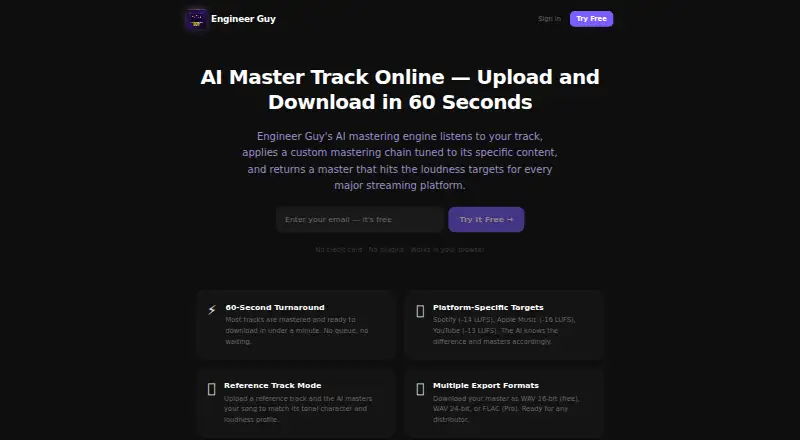
What Engineer Guy AI Master Track is
Engineer Guy AI Master Track analyzes, coaches, and masters uploaded audio tracks through a web browser, with no plugins required. The product page says most tracks are ready to download in under a minute. Users can provide a reference track for matching its tonal character and loudness profile, and Mix Coach gives feedback on EQ, compression, levels, and stereo field. The mastering page lists targets of Spotify -14 LUFS, Apple Music -16 LUFS, and YouTube -13 LUFS, and sets a true peak ceiling of -1 dBTP. WAV and MP3 files up to 300MB are accepted. WAV 16-bit export is listed for free; WAV 24-bit and FLAC are available on Pro. Plans include Free, Pro at $7 a month, and Studio at $15 a month. Stem separation, which splits a track into vocals, drums, bass, and instruments, is a Studio feature. The product recommends AI mastering for independent releases, demos, social content, and most indie-level streaming releases. It says users retain their music rights and files are processed and stored only for their session.
Who it suits
It suits independent artists and creators preparing releases, demos, or social media audio. Browser-based mastering and mix feedback may also help users who want track-specific guidance without plugins.
What it does well
- Accepts WAV and MP3 files up to 300MB.
- Reference matching uses a track supplied by the user.
- Mix Coach comments on four mix areas.
- Free plan includes WAV 16-bit export.
- Files are retained only for the session, according to the page.
What to know first
- Free plan includes one mix session.
- WAV 24-bit and FLAC exports require Pro.
- Stem separation is a Studio feature.
Limits
Free is limited to 1 mix session and includes WAV 16-bit export. WAV 24-bit and FLAC are listed for Pro, while stem separation is a Studio feature.
Plans
| Plan | Billed and limits | Price |
|---|---|---|
| Free | 1 mix session · Mix Coach · Basic feedback | Free |
| Studio | $15/mo · Everything in Pro · Stem separation · Voice Copilot · Priority processing | $15 a month |
| Pro | $7/mo · Unlimited sessions · Batch upload · Auto-Master · All genres | $7 a month |
As engineerguyapp.com lists them, read 11 Oct 2026. The maker's own page has the final word.
Getting started
- Open the AI Master Track page in a browser.
- Choose Free, Pro, or Studio, or use the free trial.
- Upload a WAV or MP3 file up to 300MB.
- Optionally upload a reference track for matching.
- Review Mix Coach feedback and download the mastered track.
Verdict
Engineer Guy AI Master Track combines mastering, reference matching, and mix feedback in a browser workflow. Check the plan details if you need multiple sessions, higher-bit WAV or FLAC exports, or stem separation.
Questions
Is there a free plan or trial?
Yes. The Free plan costs nothing, and a free trial is also listed.
What are the paid plan prices?
Pro costs $7 a month, billed $7/mo. Studio costs $15 a month, billed $15/mo.
Which audio files can I upload?
The service accepts WAV and MP3 files up to 300MB.
What export formats are included?
Free includes WAV 16-bit. Pro lists WAV 24-bit and FLAC.
Does it support reference tracks and loudness targets?
Yes. You can provide a reference track for tonal and loudness matching. Listed targets are Spotify -14 LUFS, Apple Music -16 LUFS, and YouTube -13 LUFS.
What happens to my music rights and uploaded files?
The product says users retain 100% of their music rights and files are processed and stored only for their session.
Facts from Engineer Guy AI Master Track's own pages
- Browser access
- The product page says the service works in a browser and requires no plugins. · engineerguyapp.com, 11 Oct 2026
- Contact
- The homepage lists [email protected] as its contact email. · engineerguyapp.com, 11 Oct 2026
- Exports
- The page lists WAV 16-bit as free, with WAV 24-bit and FLAC available on Pro. · engineerguyapp.com, 11 Oct 2026
- Headquarters
- Phoenix, AZ · engineerguyapp.com, 28 Sept 2026
- Intended users
- The product page recommends AI mastering for independent releases, demos, social media content, and most indie-level streaming releases. · engineerguyapp.com, 11 Oct 2026
- Mix feedback
- Mix Coach provides feedback on EQ, compression, levels, and stereo field for the uploaded track. · engineerguyapp.com, 11 Oct 2026
- Reference matching
- Users can upload a reference track so the AI can match its tonal character and loudness profile. · engineerguyapp.com, 11 Oct 2026
- Rights
- The online mastering page says users retain 100% of their music rights and that files are processed and stored only for their session. · engineerguyapp.com, 11 Oct 2026
- Stem separation
- The site says stem separation splits a track into vocals, drums, bass, and instruments, and lists it as a Studio feature. · engineerguyapp.com, 11 Oct 2026
- Streaming targets
- The mastering page lists targets of Spotify -14 LUFS, Apple Music -16 LUFS, and YouTube -13 LUFS. · engineerguyapp.com, 11 Oct 2026
- Supported input formats
- The online mastering page says it accepts WAV or MP3 files up to 300MB. · engineerguyapp.com, 11 Oct 2026
- True peak
- The mastering process sets a true peak ceiling of -1 dBTP, according to the product page. · engineerguyapp.com, 11 Oct 2026
- Turnaround
- The product page says most tracks are mastered and ready to download in under a minute. · engineerguyapp.com, 11 Oct 2026
- What it does
- Engineer Guy analyzes, coaches, and masters uploaded audio tracks using AI. · engineerguyapp.com, 11 Oct 2026
Where Engineer Guy AI Master Track stands on Freedom251
- AI Music Mastering Software#11 of 50