Freedom251 › AI Music Mastering Software
TrackGleam
What TrackGleam is
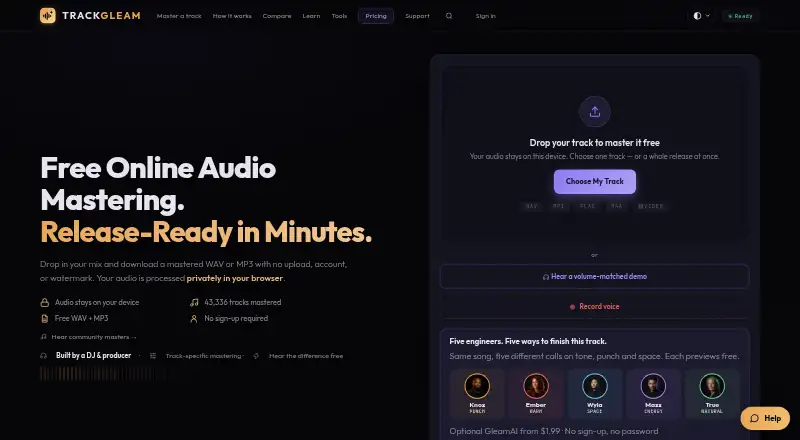
TrackGleam is a browser-based audio mastering tool with EQ, compression, saturation, stereo shaping and true-peak limiting. It accepts WAV, MP3, FLAC and M4A audio, as well as MP4, MOV and WebM video, mastering the video’s audio track. Gleam Engine V5 uses a 14-stage chain and genre-aware presets, with optional linear-phase reference matching. GleamAI analyzes more than 60 measurements and offers five mastering directions: punch, warmth, space, energy and transparency. Free and paid masters can be downloaded as WAV or MP3 without a watermark. A purchase also includes GleamLab tools Mix Doctor and Music Visualizer, which do not spend mastering credits. Audio processing runs locally on the device; AI mastering sends numeric track measurements rather than the audio file. If users choose the Music Visualizer’s lyric-finding option, a temporary mono audio copy is sent to Groq for transcription. TrackGleam has web, Android and iOS availability. Free Gleam offers unlimited mastering at no cost; paid options include one-time credits and Producer subscriptions. Unlimited Producer use is for music the subscriber creates, owns or is authorized to master.
Who it suits
TrackGleam suits musicians who want browser-based mastering for audio or video tracks, including those who prefer local audio processing. Producers considering unlimited use should check that their tracks meet the stated ownership or authorization condition.
What it does well
- Free plan offers unlimited mastering.
- Exports WAV and MP3 without a watermark.
- Accepts audio and video files.
- Audio processing runs locally on the device.
- Purchases include Mix Doctor and Music Visualizer.
What to know first
- Producer unlimited use is restricted to authorized music.
- Lyric finding sends a temporary audio copy to Groq.
- Producer monthly costs $8.99 per month.
Limits
Free Gleam provides unlimited free mastering. Single costs $1.99, paid once master, and Creator Pack costs $5 per 10 masters; Producer monthly is $8.99 a month and Producer yearly is $89.99 a year, with unlimited use limited to music you create, own or are authorized to master.
Plans
| Plan | Billed and limits | Price |
|---|---|---|
| Free Gleam | Unlimited free mastering · WAV + MP3 · no watermark or sign-up | Free |
| Free | Free forever · Unlimited free masters · WAV and MP3 downloads · No watermark · No signup · Local processing | Free |
| Single | One-time payment · 1 watermark-free GleamAI master · Credit never expires · 14-day money-back guarantee | $1.99, paid once |
| Creator Pack | One-time payment · 10 GleamAI masters · 50¢ each · Credits never expire · 14-day money-back guarantee | $5, paid once |
| Producer monthly | Monthly · cancel anytime · Unlimited watermark-free GleamAI masters of your own music | $8.99 a month |
| Producer | Monthly recurring; $89.99 billed yearly option · Unlimited GleamAI masters · Cancel in two clicks · 3-day trial when offered · Personal use license | $8.99 a month |
| Producer yearly | Billed once a year · Unlimited watermark-free GleamAI masters of your own music | $89.99 a year |
As trackgleam.com lists them, read 3 Oct 2026. The maker's own page has the final word.
Getting started
- Open trackgleam.com in a web browser.
- Choose Free Gleam to master without signing up, or select a paid option.
- Upload a supported audio file or video file in the web tool.
- Choose mastering controls or a GleamAI direction, with optional reference matching.
- Download the master as WAV or MP3.
- Install the iOS or Google Play app if you prefer a mobile app.
Overview
TrackGleam is an audio mastering service for musicians working in a browser or on a phone. It best suits people who want free mastering for occasional tracks, or paid AI masters without committing to a subscription. Its broad format support and watermark-free exports are useful strengths, but paid unlimited use is restricted to music you create, own or are authorized to master.
Key features
Gleam Engine V5 applies a 14-stage chain with genre-aware presets, while optional linear-phase reference matching can help shape a master toward a reference track. GleamAI analyzes more than 60 measurements and offers five directions—punch, warmth, space, energy and transparency. Those choices give users some control over the result, though they do not replace individualized decisions from a mastering engineer.
The browser tool accepts WAV, MP3, FLAC and M4A audio, plus MP4, MOV and WebM video, processing the video’s audio track. It supports loudness targets, and masters can be downloaded as WAV or MP3 without a watermark on both free and paid plans. This makes the free option practical for finished exports, not merely previews.
Processing runs locally on the device, and AI mastering sends numeric track measurements rather than the audio file. The Music Visualizer’s optional “Find lyrics with AI” feature is an exception: when used, it sends a temporary mono audio copy to Groq for transcription. GleamLab’s Mix Doctor and Music Visualizer come with any purchase and use no mastering credits, adding value for buyers who will use those tools.
The Community Showcase can search Apple Music and play Apple Music previews or Spotify tracks. TrackGleam also has iOS and Google Play apps, with purchases handled by Apple or Google respectively. Support chat is available any time; email usually receives a reply within 1–2 business days.
Pricing
Free Gleam costs nothing and offers unlimited free mastering, WAV and MP3 downloads, no watermark and no sign-up. It is the clearest starting point for anyone who does not need GleamAI masters, and the free exports mean there is no need to pay simply to remove a watermark.
For occasional AI mastering, Single costs $1.99 as a one-time payment for one watermark-free GleamAI master; its credit never expires. Creator Pack costs $5 as a one-time payment for 10 watermark-free masters, also with credits that never expire. The pack is better suited to users with several projects, while Single avoids buying unused credits.
Producer monthly costs $8.99 a month, billed monthly, and can be canceled anytime. Producer yearly costs $89.99 a year, billed once a year. Both provide unlimited watermark-free GleamAI masters of your own music. The yearly plan suits regular users willing to pay upfront; neither unlimited plan is for mastering other people’s tracks unless you are authorized to do so. A 14-day refund window applies, with subscription refunds limited to two downloaded GleamAI masters since the charge.
Platforms
TrackGleam runs on the web and has Android and iOS apps. The browser tool supports WAV, MP3, FLAC and M4A inputs, along with MP4, MOV and WebM video. App purchases go through the relevant mobile app store.
Who it's for
TrackGleam is a sensible choice for independent musicians who want to master their own work, especially those who value free WAV or MP3 exports or need only occasional AI masters. Its video-audio input also suits users preparing audio from supported video files. It is less suitable for professional mastering workflows that depend on an engineer’s judgment, or for subscribers who need unrestricted use on clients’ tracks without authorization.
Pros and cons
- Pro: Unlimited free mastering and watermark-free WAV or MP3 downloads make it possible to complete exports without a paid plan.
- Pro: Genre-aware presets, five GleamAI directions, reference matching and loudness targets offer several ways to guide a master.
- Pro: One-time credits never expire, so occasional users need not pay monthly or rush to use a balance.
- Con: Unlimited Producer use is limited to music you own, create or are authorized to master, which narrows its fit for client work.
- Con: The optional lyric feature transfers a temporary mono audio copy to Groq, unlike the local processing used for mastering.
Alternatives
AI Music Mastering Software is a useful place to compare more tools in the category.
- AI Mastering is worth considering if you want a free service with unlimited mastering and a wider range of platform options, including desktop, API and self-hosted support.
- Matchering is the alternative for users who prefer free, GPLv3 open-source software and can work within its supported platforms.
- SoundBoost.ai may suit someone who wants a free revision workflow, though its free plan does not allow finalizing or downloads.
- Tunr is an option for Mac or Windows users seeking a free desktop tool with a machine-counted licensing arrangement.
- AudioMaster.ai is another free web option, specifically for non-commercial use.
- Auralith Forge is an alternative with free previews and a one-time single-master purchase option.
- Barichord Audio Lab may fit users who want free uploads, previews and manual EQ and effects before buying a per-credit workflow.
- Free Music Creator AI Mastering is another web option with a free monthly allowance and a one-time starter pack.
Verdict
Choose TrackGleam if you want free, watermark-free masters or occasional AI mastering with credits that do not expire. Its format range, reference matching and local processing make it a versatile option for mastering your own music. Look elsewhere if you need an engineer’s tailored judgment or unlimited subscription use for tracks you do not own or have permission to master.
Verdict
TrackGleam covers common mastering controls, several input formats and WAV or MP3 exports, with a free option and paid credits or subscriptions. Its optional lyric feature transfers a temporary audio copy, while Producer unlimited use has an ownership or authorization limit.
Questions
Is TrackGleam free?
Yes. Free Gleam costs nothing and offers unlimited free mastering without sign-up.
What do the paid plans cost?
Single is 1.99 USD for one master, and Creator Pack is 5.00 USD for 10 masters. Producer monthly is $8.99 a month; Producer yearly is $89.99 a year.
What platforms does TrackGleam support?
TrackGleam is available on the web, Android and iOS.
What files can it master?
The web tool accepts WAV, MP3, FLAC and M4A audio, plus MP4, MOV and WebM video files. For video, it masters the audio track.
Does mastering upload my audio?
Audio processing runs locally on the device. AI mastering sends numeric track measurements rather than the audio file.
What is the refund policy?
The maker offers a 14-day refund window. Subscription refunds are subject to a limit of two downloaded GleamAI masters since the charge.
Facts from TrackGleam's own pages
- Additional tools
- A purchase unlocks GleamLab tools including Mix Doctor, Why This Master and Reference Match for life. · trackgleam.com, 21 Oct 2026
- AI analysis
- GleamAI reads more than 60 numeric measurements from a song and writes a track-specific mastering recipe. · trackgleam.com, 21 Oct 2026
- AI mastering
- GleamAI offers five fictional mastering directions named Knox Kicker, Ember Loam, Wyla Span, Maxx Voltage and True Morrow. · trackgleam.com, 21 Oct 2026
- API and SDKs
- The terms describe access through the website and TrackGleam apps and provide no public API or SDK interface. · trackgleam.com, 21 Oct 2026
- Apple App Store rating
- The Apple listing says the app has not received enough ratings or reviews to display an overview. · apps.apple.com, 21 Oct 2026
- Chrome-Stats app record
- Chrome-Stats recorded 122 downloads, version 1.1.0 and a September 2, 2026 update for the Android package. · chrome-stats.com, 21 Oct 2026
- Company background
- The maker describes TrackGleam as built and maintained by independent music people and says it began as the Auracle product before being renamed. · trackgleam.com, 21 Oct 2026
- Company founder
- The About page identifies DJ H3MP as the DJ, producer and founder who built TrackGleam. · trackgleam.com, 21 Oct 2026
- Downloads
- Free and paid masters can be downloaded as WAV or MP3 without a watermark. · trackgleam.com, 3 Oct 2026
- GleamAI
- GleamAI analyzes more than 60 measurements and offers five fictional mastering directions: punch, warmth, space, energy, and transparency. · trackgleam.com, 3 Oct 2026
- Google Play app
- The Android listing identifies Alienated Media as developer, shows 100+ downloads and was updated September 2, 2026. · play.google.com, 21 Oct 2026
- Independent developer feedback request
- In a Reddit launch post, the creator specifically sought feedback on workflow clarity, trust in original-versus-master comparison and whether controls felt overwhelming. · reddit.com, 21 Oct 2026
- Input formats
- The service accepts WAV, MP3, FLAC, M4A and video files whose audio track can be mastered. · trackgleam.com, 21 Oct 2026
- Integrations
- The Community Showcase can search Apple Music and play Apple Music previews or Spotify tracks; the privacy policy also names Pexels for stock media and Google Fonts on some tool pages. · trackgleam.com, 3 Oct 2026
- License
- TrackGleam’s engine, processing code, settings, targets and rules are copyrighted and treated as trade secrets; users may access them only through the website and apps. · trackgleam.com, 21 Oct 2026
- Limit: beta vocal separation
- The vocal separator is a desktop beta that can leave audible artifacts and whose speed depends on available GPU or CPU resources. · trackgleam.com, 21 Oct 2026
- Limit: browser rendering
- The visualizer must remain in a visible browser tab because background-tab throttling can stop animation during rendering. · trackgleam.com, 21 Oct 2026
- Limit: no warranty
- TrackGleam states that results vary by source material and it does not guarantee commercial loudness, platform performance or artistic satisfaction. · trackgleam.com, 21 Oct 2026
- Loudness control
- Automatic mastering targets release-competitive loudness under a −1.0 dBTP true-peak ceiling, while Low intensity targets about −14 LUFS. · trackgleam.com, 21 Oct 2026
- Mastering chain
- The Gleam Engine uses a 14-stage chain including parametric and dynamic EQ, multiband and glue compression, saturation, stereo processing, limiting and dithering. · trackgleam.com, 21 Oct 2026
- Mastering engine
- Gleam Engine V5 uses a 14-stage chain with genre-aware presets and optional linear-phase reference matching. · trackgleam.com, 3 Oct 2026
- Mobile apps
- TrackGleam has an iOS app and a Google Play app, with app purchases handled by Apple's In-App Purchase or Google Play respectively. · trackgleam.com, 3 Oct 2026
- Music visualizer
- The visualizer renders reactive lyric and music videos locally and supports 9:16, 1:1 and 16:9 output sizes. · trackgleam.com, 21 Oct 2026
- Notable limit
- Producer unlimited use is for tracks the subscriber creates, owns, or is authorized to master. · trackgleam.com, 3 Oct 2026
Where TrackGleam stands on Freedom251
- AI Music Mastering Software#18 of 50