Freedom251 › Audio Mastering Software

Tunr
What Tunr is
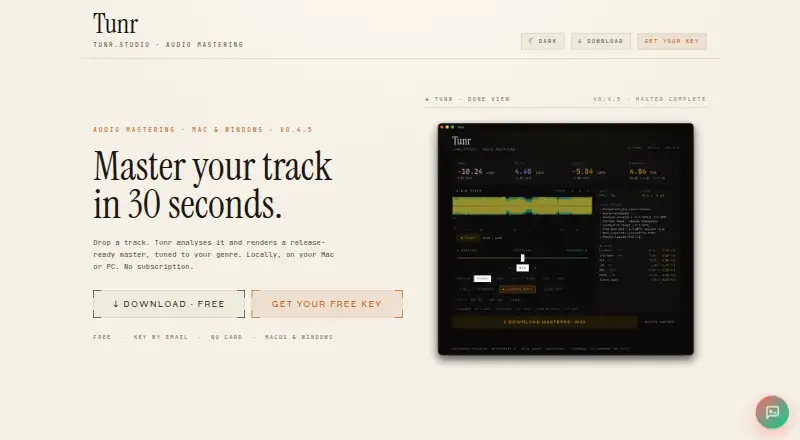
Tunr is a desktop audio mastering app for macOS and Windows that analyzes tracks and creates genre-aware masters locally. Mastering works without an internet connection. Auto mode applies a mastering chain, while Reference mode matches a selected track’s tone, dynamics, and loudness; that mode accepts WAV, FLAC, and MP3. The A/B Mixer supports crossfades, null and blind tests, loudness matching, and stereo, mono, mid, or side listening. Batch mode processes queued tracks in sequence using the same settings and saves each as it finishes. Without a licence key, the free plan renders three masters per machine; mixer comparison and analysis do not count against that limit. A free licence key gives unlimited masters on two machines. Tunr is standalone rather than a DAW plugin, and supports macOS 11 or later on Apple Silicon and Intel, plus 64-bit Windows 10 or later. The maker says audio files are not uploaded and the app has no usage telemetry or third-party trackers.
Who it suits
Tunr suits musicians who want local desktop mastering with automatic or reference-based processing. Its batch mode may help those working through queued tracks, while its mixer offers tools for comparing audio.
What it does well
- Mastering runs locally without an internet connection.
- Reference mode accepts WAV, FLAC, and MP3.
- Batch mode processes queued tracks sequentially.
- Free licence key permits unlimited masters on two machines.
What to know first
- Unlicensed use is limited to three masters per machine.
- It is not a DAW plugin.
- Supports only macOS and Windows.
Limits
Without a licence key, the free plan renders three masters per machine. The free licence key provides unlimited masters on two machines.
Plans
| Plan | Billed and limits | Price |
|---|---|---|
| Free | Free key by email; counted per machine · 3 masters before licence key · 16-bit output · 24-bit output | Free |
| Free licence key | Free key by email · Unlimited masters · two machines per licence · free lifetime updates | Free |
As tunr.studio lists them, read 22 Sept 2026. The maker's own page has the final word.
Getting started
- Visit the Tunr website.
- Use a Mac running macOS 11 or later, or a 64-bit Windows 10 or later computer.
- Use the free plan for three masters per machine, or request the free licence key by email for unlimited masters on two machines.
Tunr suits DJs and independent producers who want to master tracks on a desktop without sending audio to a service. Its blend of reference matching and careful A/B comparison is the draw; the standalone format and three-render limit without a key narrow its fit.
Overview
Tunr analyzes tracks and creates genre-aware masters locally, so mastering itself works offline. Auto mode applies a mastering chain, while Reference mode aims to match a chosen track’s tone, dynamics, and loudness. That gives users a direct route to a master or a reference-led starting point, but it does not guarantee that the result will suit every track.
It is a standalone desktop app, not a DAW plugin. Users who want mastering inside their production session will need another workflow; those comfortable with a separate mastering step get a focused tool. The maker says the app grew out of a DJ and electronic-music producer’s own workflow, which helps explain its practical emphasis.
Key features
Reference matching and A/B checks
Reference mode accepts WAV, FLAC, and MP3. Its A/B Mixer includes equal-power crossfade, null tests, blind tests, loudness matching, and stereo, mono, mid, or side listening. These controls support more deliberate comparisons than simply switching between files. Track analysis and comparison do not count toward the free render limit, so users can explore the mixer without spending one of their three masters.
Batch processing and output
Batch mode queues tracks and processes them one after another with the same settings, saving each as it finishes. That is useful for a consistent run of tracks, though it does not provide separate settings for each queued item. Tunr supports WAV export and loudness targets; the free plan’s listed output depths are 16-bit and 24-bit.
Local processing and privacy
Mastering runs on the computer and does not require an internet connection. The maker says audio is never uploaded and the app uses no usage telemetry or third-party trackers. Tunr does make network requests for GitLab updates and license activation and periodic revocation checks, described as roughly monthly. Paddle handles billing as Merchant of Record; the maker says it does not see or store card numbers or CVV. The app includes open-source components including Matchering, Pedalboard, pyloudnorm, and FFmpeg.
Pricing
Tunr has two free options, with no paid plan described. The Free plan costs nothing and provides a key by email; it allows three masters per machine before a licence key is needed. It is a sensible way to assess the workflow, but too limited for regular mastering. The plan lists both 16-bit and 24-bit output.
The Free licence key also costs nothing, is delivered by email, and allows unlimited masters on two machines per licence, with free lifetime updates. It removes the render cap but does not expand the machine allowance beyond two. Users who need more licensed machines should account for that restriction.
Platforms
Tunr runs on macOS 11 or later on Apple Silicon and Intel, and 64-bit Windows 10 or later. It is a desktop application, not a plugin, so it suits users prepared to handle mastering outside their DAW.
Who it's for
Tunr is a good fit for DJs and independent producers who want local processing, repeatable batch settings, and a way to compare a master against a reference. The free key makes it especially approachable for a solo user working across up to two machines. It is less suitable for anyone who needs an integrated DAW plugin or a licence spanning more than two machines.
Pros and cons
- Pro: Reference matching targets tone, dynamics, and loudness, while the mixer supports several focused comparison methods.
- Pro: Offline mastering and the maker’s no-upload, no-telemetry, no-tracker policy are a strong fit for users who want audio to stay local.
- Pro: Batch mode saves each track as it finishes, which helps with repeated processing.
- Con: Without a licence key, three renders per machine is a small allowance for ongoing use.
- Con: The app is standalone, so it cannot be used as a DAW plugin.
- Con: The free key is limited to two machines per licence.
Alternatives
Matchering is another free option, with Linux, macOS, Windows, self-hosted, and web platforms; choose it if those deployment choices matter more than Tunr’s specific desktop workflow.
IK Multimedia ReSing has a free tier with two voices, two instruments, and one RVC import, while its $129.99, paid once paid plan includes 10 voices. It is the alternative to consider for voice and instrument work rather than Tunr’s mastering focus.
Voxengo SPAN is a free real-time FFT spectrum analyzer plugin for macOS and Windows, a better fit when analysis inside a plugin is the priority.
StudioZIO Mastering Suite is a free macOS option available as AU, VST3, AAX, and standalone, with no licence key or account; choose it if plugin formats are important.
TDR Limiter 6 GE offers a free option and a €60, paid once personal/small business licence for one user on up to five computers. It may suit users who value that wider computer allowance.
Acustica Audio Erin Studio is another macOS and Windows option.
DSP-Quattro is a macOS freemium app with a free trial and a listed new licence at $99 a month; consider it if a trial or macOS-only workflow fits your needs.
oXygen Mastering Suite is a free option for Linux, macOS, and Windows.
Browse more Audio Mastering Software or AI Music Mastering Software.
Verdict
Choose Tunr if you want offline desktop mastering with reference matching, detailed A/B listening, and batch processing, especially as a solo producer using no more than two machines. Look elsewhere if you need a DAW plugin or a broader machine licence; the free key removes the render cap, but not those workflow limits.
Verdict
Tunr offers local mastering, reference matching, and batch processing in a standalone desktop app. Note the three-master limit without a licence key and check that your operating system meets its requirements.
Questions
How much does Tunr cost?
The listed Free plan costs nothing. The free licence key is also free and is billed by email.
What does the free licence key include?
It allows unlimited masters on two machines and includes free lifetime updates.
Which platforms does Tunr support?
Tunr supports macOS 11 or later on Apple Silicon and Intel, and 64-bit Windows 10 or later.
What audio formats can Reference mode accept?
Reference mode accepts WAV, FLAC, and MP3.
Is Tunr a DAW plugin?
No. Tunr is a standalone desktop app.
Does Tunr upload audio files?
The maker says audio files are never uploaded. The app checks for updates and makes licence activation and periodic revocation checks.
Facts from Tunr's own pages
- A/B mixer
- The mixer supports equal-power crossfade, null tests, blind tests, loudness matching, and stereo, mono, mid, or side listening. · tunr.studio, 30 Sept 2026
- App network requests
- The app checks for updates with GitLab and performs license activation and periodic revocation checks; the policy says the revocation check is roughly monthly. · tunr.studio, 30 Sept 2026
- Audio formats
- The Reference mode page lists WAV, FLAC, and MP3 as accepted audio formats. · tunr.studio, 30 Sept 2026
- Batch mode
- Batch mode processes queued tracks one after another with the same settings and saves each as it finishes. · tunr.studio, 30 Sept 2026
- Free tier limit
- Without a licence key, Tunr renders three masters per machine; comparing and analyzing tracks in the A/B Mixer does not count toward that limit. · tunr.studio, 30 Sept 2026
- Headquarters
- Zikhron Yaakov, Israel · tunr.studio, 28 Sept 2026
- Included components
- The terms list Matchering, Pedalboard, pyloudnorm, and FFmpeg among the third-party open-source components included with Tunr. · tunr.studio, 30 Sept 2026
- Intended users
- The maker says Tunr was built by a DJ and electronic-music producer to simplify his own mastering workflow. · tunr.studio, 30 Sept 2026
- Mastering modes
- Auto mode applies a mastering chain, and Reference mode matches a chosen track’s tone, dynamics, and loudness. · tunr.studio, 30 Sept 2026
- Offline use
- Mastering runs on the user’s computer and does not require an internet connection. · tunr.studio, 30 Sept 2026
- Payment data
- Paddle handles billing data as Merchant of Record, and the maker says it does not see or store card numbers or CVV. · tunr.studio, 30 Sept 2026
- Privacy
- The maker says audio files are never uploaded and the app has no usage telemetry or third-party trackers. · tunr.studio, 30 Sept 2026
- Standalone app
- Tunr is a standalone app and is not a DAW plugin. · tunr.studio, 30 Sept 2026
- Support
- The maker offers email support directly and describes Tunr as a one-person operation. · tunr.studio, 30 Sept 2026
- Supported systems
- Tunr supports macOS 11 or later on Apple Silicon and Intel, and 64-bit Windows 10 or later. · tunr.studio, 30 Sept 2026
- What it does
- Tunr is a desktop audio mastering app that analyzes tracks and creates genre-aware masters locally. · tunr.studio, 30 Sept 2026
Where Tunr stands on Freedom251
- Audio Mastering Software#3 of 33
- AI Music Mastering Software#27 of 50