Freedom251 › AI Lesson Plan Generators

Make My Lesson
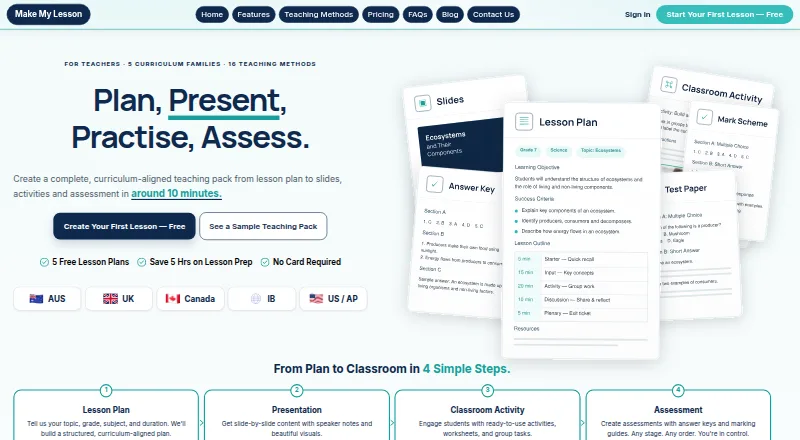
What Make My Lesson is
Make My Lesson creates teaching packs aligned to curriculum routes, bringing lesson plans, presentations, activities, and assessments into one workflow. Plans can include standards-aligned objectives, timings, differentiation, and a balance of Bloom’s levels. From those objectives, the presentation stage creates a slide deck calibrated to the lesson duration, with speaker notes. Classroom activities pair a student sheet with a teacher answer key; assessments include a paper and mark scheme.
The site lists 69 curriculum routes across Australia, the UK, Canada, International Baccalaureate, and the US/AP, as well as 16 teaching methods. Materials can be exported as PDF or PowerPoint, downloaded in ZIP files, printed, or shared to Google Classroom and Microsoft Teams. Apps are listed for Android and iOS, alongside web access. The Free plan includes five generations, with no card required. Paid pricing is listed from $15.99/mo, while the Monthly plan is $9.99 a month; paid credits expire at the end of the plan period. The privacy policy says lesson inputs are sent to US-based AI providers and advises against entering identifying student information.
Who it suits
It suits teachers who want to prepare curriculum-aligned lesson materials, including activities and assessments, across the listed regions and routes. It may also fit educators who need to export or share materials through common classroom services.
What it does well
- Plans can include differentiation and timings.
- Presentations include speaker notes.
- Activities include a teacher answer key.
- Materials can be shared to Google Classroom and Teams.
- Free plan includes five generations.
What to know first
- Paid credits expire at the plan period’s end.
- Teachers are advised not to enter identifying student information.
- Lesson inputs are sent to US-based AI providers.
Limits
The Free plan includes five generations, and the lesson-plan page says each plan uses one credit. Unused paid-plan credits expire when the plan period ends.
Plans
| Plan | Billed and limits | Price |
|---|---|---|
| Free | Forever free · 5 generations · all listed features · unlimited editing and Ayla refinements · PDF/PPTX/ZIP export · Google Classroom and Microsoft Teams sharing | Free |
| 3 Months | $27 USD for 3 months (regular $47.97 USD) · 90 generations · credits expire at period end · every feature included | $27 a month |
| 6 Months | $50 USD for 6 months (regular $95.94 USD) · 180 generations · credits expire at period end · every feature included | $50 a month |
| Annual | $90 USD for 12 months (regular $191.88 USD) · 360 generations · credits expire at period end · every feature included | $90 a year |
| Monthly | $9.99 USD promotional price (regular $15.99 USD) · 30 generations · credits expire at period end · every feature included | $9.99 a month |
| Schools and departments | Email for a quote · Teaching teams · individual accounts · separate credits for each teacher | On request |
As makemylesson.ai lists them, read 14 Oct 2026. The maker's own page has the final word.
Getting started
- Open https://www.makemylesson.ai/ on the web or use the listed Android or iOS app.
- Choose the Free plan, which includes five generations and requires no card, or select a listed paid plan.
- Create a lesson plan using its objectives, timings, differentiation, and Bloom’s balance options.
- Generate a presentation, activity, or assessment from the lesson plan.
- Export, print, download, or share the materials to Google Classroom or Microsoft Teams.
Overview
Make My Lesson is a teaching-resource tool for educators who want a lesson plan and related classroom materials shaped around a curriculum route. It suits teachers preparing a connected set of resources more than those who need only a quick outline. Its main appeal is bringing planning, slides, activities, and assessment together; its generation caps and expiring paid credits deserve attention before committing.
Key features
Planning and lesson materials
Lesson plans can include standards-aligned objectives, timings, differentiation, and a balance of Bloom’s levels. That makes the planning workflow relevant to teachers who need to account for pacing and varied learner needs, rather than just produce a topic outline. The result can then feed a duration-calibrated slide deck with speaker notes, linking presentation preparation to the lesson’s objectives.
Activities include a student activity sheet and teacher answer key, while assessments include a paper and mark scheme. That breadth is useful when a teacher wants several materials for one lesson; someone seeking only one resource type may not need the fuller pack-building approach.
Curriculum, exports, and privacy
Make My Lesson lists 69 curriculum routes across Australia, the UK, Canada, International Baccalaureate, and the US/AP, along with 16 teaching methods. This gives teachers in those contexts a range of starting points, though the practical fit depends on whether the relevant route and method suit their class.
Resources can be exported as PDF or PowerPoint, downloaded in ZIP files, printed, or shared to Google Classroom and Microsoft Teams. That gives teachers several ways to move materials into classroom workflows. The service also has Android, iOS, and web access.
Lesson inputs are sent to US-based AI model providers, which are instructed not to use inputs or outputs to train their models. The privacy policy says passwords are encrypted, data is encrypted in transit, and staff access is limited by role. The platform does not create student accounts, and teachers are asked not to enter identifying student information in lesson inputs. That is a clear boundary to keep in mind when preparing materials about a class.
Pricing
The Free plan costs nothing, billed Forever Free, and includes five generations. The lesson-plan page says one credit is used per plan and no card is required, making it a low-commitment way to see whether the workflow fits occasional preparation. Five generations will be restrictive for teachers building packs regularly.
The Monthly plan is $9.99 a month, billed Monthly, with 30 generations; $15.99 USD is shown before discount. The 3 Months plan costs $27, paid once, billed For 3 months, with 90 generations; $47.97 USD is shown before discount. The 6 Months plan costs $50, paid once, billed For 6 months, with 180 generations; $95.94 USD is shown before discount. The Annual plan costs $90 a year, billed For 12 months, with 360 generations; $191.88 USD is shown before discount. These larger allowances suit teachers who expect to generate materials steadily, but unused paid credits expire when the plan period ends, so the longer options are a poor fit if demand is unpredictable.
Schools and departments have custom pricing by quote. The plan is aimed at teaching teams, with individual accounts and separate credits for each teacher, rather than a shared pool.
Platforms
Make My Lesson is available on web, Android, and iOS. The mobile apps broaden access beyond a browser, while the listed PDF and PowerPoint exports, printing, ZIP downloads, and Google Classroom and Microsoft Teams sharing support taking materials into existing teaching routines.
Who it's for
It is best suited to teachers who want curriculum-oriented plans and several connected lesson materials, and who can make regular use of a generation allowance. Teachers who need only occasional plans can start with the five-generation free tier; those who work across a team can consider the quote-based school option. It is less compelling for anyone who wants a narrow, single-purpose tool or cannot avoid including identifying student information in lesson inputs.
Pros and cons
- Pro: Plans, slides, activities, and assessments connect around lesson objectives, which can reduce the work of assembling a complete set of materials.
- Pro: 69 curriculum routes and 16 teaching methods give educators multiple stated frameworks to choose from.
- Pro: PDF and PowerPoint exports, printing, ZIP downloads, and classroom-platform sharing offer several ways to use generated resources.
- Con: The free allowance is five generations, so it is suited to limited use rather than sustained planning.
- Con: Paid credits expire at the end of the plan period, making unused capacity a cost for teachers whose workload varies.
- Con: Lesson inputs go to US-based AI providers, and teachers must avoid entering identifying student information.
Alternatives
Browse AI Lesson Plan Generators to compare tools in the category. Common Planner is a web-based freemium alternative with a free teacher plan, daily, weekly, and monthly planning, and posting to Google Classroom; choose it if that planning cadence and classroom posting matter more than Make My Lesson’s connected resource packs.
Eduaide offers a free web plan with generation limits and limited input context, plus lesson plans, worksheets, organizers, games, and assessments. Its Pro plan is $49.99 a year, billed $4.17/mo; it may suit teachers prioritizing that broader set of resource types. Education Copilot has a free web plan with three core AI templates for lesson plans and handouts, plus editing and document export, and a Pro plan at $9 a month. Choose it if those document-focused templates are enough for your needs.
GradeAid offers five resources a week on its free web plan with PDF and Word export, while its Pro plan is $8.99 a month for 200 resources a month and lesson series up to 12 lessons. It is a better fit if those weekly free resources or the stated monthly volume and lesson series are priorities. GradeWithAI is the alternative to consider if automated submission grading and AI detection are the main requirements.
Homeroomie gives free users three lesson plans per month and three worksheets per lesson, with one of eight worksheet themes; the free plan has no unit planner or substitute-plan generator. It is worth considering if that specific worksheet allowance fits better. LessonSmith has a Pro plan at $8 a month, billed or KES 1,000 a month, with 40 lesson plans a month, one scheme of work every three months, five support plans a month, and all subject assistants; choose it if those quotas and subject assistants better match your planning needs.
TeachTools offers three generations a month on its free plan, five core tools, print-ready PDFs, and one-click Google Docs export. It may suit teachers who prefer those print and Docs outputs over Make My Lesson’s broader connected packs.
Verdict
Choose Make My Lesson if you want curriculum-oriented lesson plans that can lead into slides, activities, and assessments, and you can use its credits before they expire. The connected workflow is its strongest reason to choose it. Look elsewhere if you need a larger free allowance, a focused grading tool, or the flexibility to let paid credits go unused without losing them.
Verdict
Make My Lesson combines planning, presentation creation, activities, and assessments around listed curriculum routes. Check the credit limits and privacy guidance before using it with lesson inputs.
Questions
How much does Make My Lesson cost?
The Free plan costs nothing. Listed paid plans are Monthly at $9.99 a month, 3 Months at 27.00 USD once, 6 Months at 50.00 USD once, and Annual at $90 a year.
What is included in the Free plan?
It includes five generations. The lesson-plan page says one credit is used per plan and no card is required.
Which platforms are available?
The listed platforms are Android, iOS, and web. The site links to apps on the Apple App Store and Google Play.
What materials can it create?
It can create lesson plans, presentations, classroom activities, and assessments. Activities include a student sheet and teacher answer key; assessments include a paper and mark scheme.
Can I share or export materials?
The listed options include PDF and PowerPoint exports, ZIP downloads, printing, and sharing to Google Classroom and Microsoft Teams.
How does it handle lesson inputs and student information?
The privacy policy says lesson inputs are sent to US-based AI model providers instructed not to train on inputs or outputs. It asks teachers not to enter identifying student information in lesson inputs.
Facts from Make My Lesson's own pages
- Activities and assessments
- Classroom activities include a student activity sheet and teacher answer key, while assessments include a paper and mark scheme. · makemylesson.ai, 29 Sept 2026
- AI data handling
- Lesson inputs are sent to third-party AI providers in the United States, with instructions not to use inputs or outputs for model training. · makemylesson.ai, 14 Oct 2026
- API and SDKs
- The public product pages describe no API, SDK or developer integration surface. · makemylesson.ai, 14 Oct 2026
- Apple app requirements
- The iOS app requires iOS 15 or later; the listing also specifies iPadOS 15 and macOS 12 with Apple M1 or later for Mac compatibility. · apps.apple.com, 14 Oct 2026
- Assessments
- Its assessment stage creates an assessment paper and mark scheme aligned to what the lesson taught. · makemylesson.ai, 14 Oct 2026
- Ayla assistant
- Ayla can refine lessons, suggest activities, adjust difficulty and adapt materials for ELL, SEN and gifted learners. · makemylesson.ai, 14 Oct 2026
- Classroom activities
- The platform creates a student activity sheet together with a teacher answer key. · makemylesson.ai, 14 Oct 2026
- Company founded
- The LinkedIn company profile lists Skyen Solutions as founded in 2025. · linkedin.com, 14 Oct 2026
- Company headquarters
- Skyen Solutions lists Manama, Bahrain as headquarters and describes itself as privately held. · linkedin.com, 14 Oct 2026
- Company legal operator
- The website identifies Skyen Systems Pty Ltd (ACN 701 564 730) as the web operator and subscription seller. · makemylesson.ai, 14 Oct 2026
- Company size
- The LinkedIn profile lists Skyen Solutions at 2–10 employees. · linkedin.com, 14 Oct 2026
- Company trade name
- The product's acceptable-use page identifies it as a Skyen Solutions product, trading under Qismat Ventures W.L.L. in Bahrain. · makemylesson.ai, 14 Oct 2026
- Credit expiry
- Unused paid-plan credits expire when the plan period ends. · makemylesson.ai, 29 Sept 2026
- Curriculum coverage
- The service advertises five curriculum families and 69 dedicated routes on its main site. · makemylesson.ai, 14 Oct 2026
- Data and AI
- The privacy policy says lesson inputs are sent to US-based AI model providers, which are instructed not to use inputs or outputs to train their models. · makemylesson.ai, 29 Sept 2026
- Data deletion
- Account details and generated packs are scheduled for deletion within 30 days after account deletion, subject to legally required retention. · makemylesson.ai, 14 Oct 2026
- Documentation
- The public help material consists of a 50-answer FAQ, feature pages and policy pages; no separate developer documentation is presented. · makemylesson.ai, 14 Oct 2026
- Editing
- Generated documents are described as fully editable, with manual editing and Ayla refinements not consuming credits. · makemylesson.ai, 14 Oct 2026
- Exports and sharing
- The site lists PDF and PowerPoint exports, ZIP downloads, printing, and sharing to Google Classroom and Microsoft Teams. · makemylesson.ai, 29 Sept 2026
- Free allowance
- The Free plan includes five generations, and the lesson-plan page says one credit per plan with no card required. · makemylesson.ai, 29 Sept 2026
- Google Play availability
- The Android listing shows 1K+ downloads, contains ads and offers in-app purchases. · play.google.com, 14 Oct 2026
- Google Play data safety
- Google Play reports that the developer declares no data shared with third parties, no data collected, encryption in transit and user-requested deletion. · play.google.com, 14 Oct 2026
- Headquarters
- Hoppers Crossing, Victoria, Australia · makemylesson.ai, 28 Sept 2026
- Integrations
- Official pages list sharing or export to Google Classroom, Microsoft Teams, Google Docs, Google Slides, PDF, DOCX, PPTX and ZIP. · makemylesson.ai, 14 Oct 2026
Where Make My Lesson stands on Freedom251
- AI Lesson Plan Generators#7 of 26