Freedom251 › AI Lesson Plan Generators

Brisk Teaching
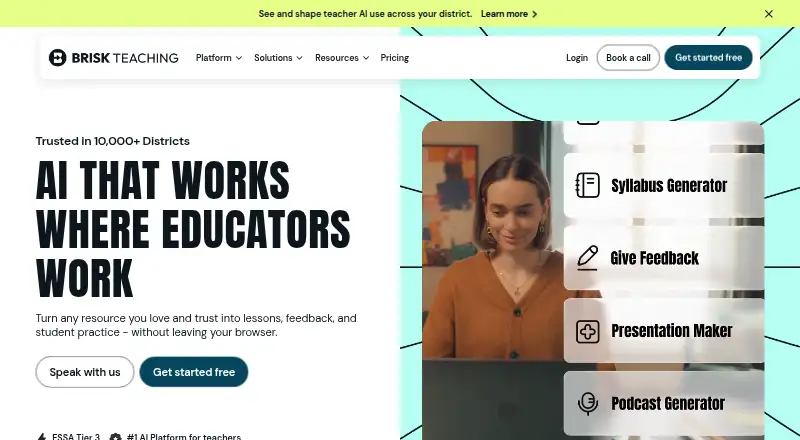
What Brisk Teaching is
Brisk Teaching helps educators create materials, give feedback and adapt instruction within tools they already use. Its teaching tools include lesson and unit planning, practice tests, guided notes, translation, feedback and student learning activities. Brisk Boost can turn articles, YouTube videos, Google Docs and PDFs into student activities, with settings for grade level, language, guardrails and learning objectives. The service is available on the web and through a browser extension supported by Chrome and Edge. Listed integrations and supported tools include Google Docs, Slides, Forms, Classroom, YouTube, Microsoft tools, Canvas, Schoology, Blackboard, Kahoot! and Nearpod. Teachers can use a free plan with 20+ tools, and new sign-ups receive 14 days of Premium access. Premium and Intelligence customers receive customer success support, onboarding and professional learning; Intelligence also includes white-glove curriculum setup. Brisk says it does not sell or share personal data or use student or teacher data to train or fine-tune AI models. It also states that it is SOC 2 Type II compliant, encrypts data in transit and at rest, and complies with FERPA, COPPA, GDPR and Canadian privacy legislation. The company notes limitations in AI-generated math content.
Who it suits
It suits educators who want planning, feedback and student activity tools alongside their existing classroom tools. Schools and districts may consider the Premium or Intelligence offerings for standards alignment, onboarding or curriculum setup.
What it does well
- Free plan includes 20+ tools.
- Brisk Boost supports articles, videos, Docs and PDFs.
- Activity settings include grade level and learning objectives.
- States compliance with FERPA, COPPA and GDPR.
- Offers 14 days of Premium access to new sign-ups.
What to know first
- Extension support is limited to Chrome and Edge.
- AI-generated math content has stated limitations.
- Canvas QTI export and certain LTI access require Schools & Districts plans.
Limits
The Free plan includes 20+ tools. Canvas QTI export and LTI 1.3 access in Canvas and Schoology are available for Schools & Districts plans. New sign-ups receive 14 days of free Premium access.
Plans
| Plan | Billed and limits | Price |
|---|---|---|
| Free | For teachers · 20+ tools · self-serve resources and community | Free |
| Intelligence | Custom Pricing · For districts · includes Premium · curriculum-grounded resources · white-glove curriculum setup | On request |
| Premium | Custom Pricing · For schools and districts · includes Free · 35+ tools · standards alignment · onboarding and professional development | On request |
As briskteaching.com lists them, read 7 Oct 2026. The maker's own page has the final word.
Getting started
- Visit https://www.briskteaching.com.
- Choose the web experience or install the browser extension for Google Chrome or Microsoft Edge.
- Sign up to receive 14 days of free Premium access.
- Use the Free plan, which costs nothing and includes 20+ tools.
- Schools and districts can ask about Premium or Intelligence custom pricing.
Overview
Brisk Teaching is a set of educator tools for creating classroom materials, adapting instruction and giving feedback within familiar teaching platforms. It is best suited to teachers who want more than lesson planning, and to schools or districts seeking curriculum-grounded resources and implementation support. The free plan offers a broad starting point, while school-level LMS capabilities require custom-priced plans.
Key features
Brisk brings together lesson and unit planning, practice tests, guided notes, translation, feedback and student learning activities. That breadth makes it a practical fit for teachers moving between planning and classroom support, rather than a single-purpose lesson generator. Brisk Boost can turn articles, YouTube videos, Google Docs and PDFs into student activities, with controls for grade level, language, guardrails and learning objectives. Those controls help tailor a source to a class; they do not remove the need for teacher judgment, particularly in math, where Brisk acknowledges limitations in AI-generated content.
The integrations span Google Docs, Slides, Forms and Classroom, YouTube, Microsoft tools, Canvas, Schoology, Blackboard, Kahoot! and Nearpod. Brisk is offered on the web and as an extension for Chrome and Edge. Canvas QTI export and LTI 1.3 access in Canvas and Schoology are available on Schools & Districts plans, an important distinction for schools that need those LMS workflows.
Brisk says it does not sell or share personal data and does not use student or teacher data to train or fine-tune AI models. It also says it is SOC 2 Type II compliant, encrypts data in transit and at rest, and complies with FERPA, COPPA, GDPR and Canadian provincial and territorial privacy legislation. These are relevant assurances for education settings, though schools should still assess them against their own requirements.
Pricing
Free costs nothing and includes 20+ tools, self-serve resources and community support. That makes it a substantial way for individual teachers to explore Brisk without a paid commitment, but it does not include the 35+ tools or school-level features described for Premium. New sign-ups automatically receive 14 days of free access to Brisk Premium, so teachers can assess that tier before deciding whether to continue.
Premium is custom pricing for schools and districts. It includes Free, 35+ tools, standards alignment, onboarding and professional development, making it the more relevant tier for organizations coordinating adoption and training. Intelligence is also custom pricing, for districts; it includes Premium, curriculum-grounded resources and white-glove curriculum setup. That setup may suit districts that want resources shaped around their curriculum, but the custom price means buyers need a quote to evaluate cost. District pricing is per-student enrollment, and consortium pricing is available for groups of districts. Premium and Intelligence customers receive customer success support, onboarding and professional learning; Intelligence adds the curriculum setup.
Platforms
Use Brisk on the web or through its browser extension on Google Chrome and Microsoft Edge. Its integration range is a strength for teachers already working across common classroom tools, but extension support is limited to those two browsers.
Who it's for
Brisk is a good match for teachers who want planning, feedback, differentiation and student activity creation in one tool, especially when they use its supported platforms. Schools and districts have a stronger case if they need standards alignment, onboarding or LMS features, and districts may value curriculum-grounded resources. It is a less compelling fit for math-heavy work where AI-generated content needs to be reliable without careful review, or for organizations that cannot justify custom-priced plans.
Pros and cons
- Pro: A wide range of teaching tasks, from units and practice tests to feedback and translation, gives teachers more than a basic planning assistant.
- Pro: Brisk Boost adapts several common source formats into student activities and lets teachers set grade, language, guardrails and objectives.
- Pro: Stated privacy, security and compliance commitments address concerns schools commonly weigh when adopting classroom software.
- Con: AI-generated math content has acknowledged limitations, making review especially important for math teachers.
- Con: Premium and Intelligence use custom pricing, so schools and districts must request pricing to compare budgets.
- Con: Canvas QTI export and LTI 1.3 access in Canvas and Schoology are limited to Schools & Districts plans.
Alternatives
For a wider shortlist of planning tools, browse AI Lesson Plan Generators. Consider Make My Lesson instead if you want a freemium option with a 5-generation free plan and a 30-generation monthly plan for $9.99 a month. Aila is worth considering if a free, web-based option is the priority, subject to fair-use and request limits. Choose Almanack if its free plan's standards-aligned lesson planning and curriculum design better match your planning needs. Common Planner may fit teachers who want a free forever plan with an AI lesson assistant and Google Classroom posting. Eduaide is an alternative for web-based lesson plans, worksheets, organizers, games and assessments, with a free tier that has generation and input-context limits. Education Copilot offers a free web plan with three core AI templates for lesson plans and handouts. GradeAid may suit teachers who want a free allowance of five resources a week and PDF and Word export. GradeWithAI is an alternative to consider when automated submission grading and AI detection are the priority.
Verdict
Choose Brisk Teaching if you want a broad set of educator-focused creation and feedback tools that connect with common classroom platforms, or if your school needs standards alignment and implementation support. Its strongest case is the combination of varied teacher workflows and district-oriented services. Look elsewhere if your work depends heavily on dependable AI-generated math content or if custom-priced school plans do not suit your budget.
Verdict
Brisk Teaching combines educator-focused creation tools with integrations across classroom platforms and formats. Consider its stated math-content limitations and plan-specific LMS access when deciding whether it fits.
Questions
Is Brisk Teaching free?
Yes. Its Free plan costs nothing and includes 20+ tools, self-serve resources, and a community. New sign-ups automatically receive 14 days of free Premium access.
What platforms does Brisk Teaching support?
Brisk is available on the web and as a browser extension. The extension supports Google Chrome and Microsoft Edge.
What can teachers do with Brisk?
Its tools include lesson and unit planning, practice tests, guided notes, translation, feedback, and student learning activities. Brisk Boost creates activities from resources including articles, YouTube videos, Google Docs, and PDFs.
Which tools does Brisk integrate with or support?
Listed tools include Google Docs, Slides, Forms, Classroom, YouTube, Microsoft tools, Canvas, Schoology, Blackboard, Kahoot!, and Nearpod.
What do the paid plans include?
Premium includes Free, 35+ tools, standards alignment, onboarding, and professional development. Intelligence includes Premium, curriculum-grounded resources, and white-glove curriculum setup; both use custom pricing.
How does Brisk describe its privacy and security practices?
Brisk says it does not sell or share personal data or use student or teacher data to train or fine-tune AI models. It also says it is SOC 2 Type II compliant, encrypts data in transit and at rest, and complies with FERPA, COPPA, GDPR, and Canadian provincial and territorial privacy legislation.
Facts from Brisk Teaching's own pages
- Brisk Boost
- Teachers can create student activities from resources such as articles, YouTube videos, Google Docs, and PDFs, with configurable grade level, language, guardrails, and learning objectives. · briskteaching.com, 7 Oct 2026
- Browser support
- The browser extension is currently supported on Google Chrome and Microsoft Edge. · briskteaching.com, 7 Oct 2026
- Free access trial
- New sign-ups automatically receive 14 days of free access to Brisk Premium. · briskteaching.com, 7 Oct 2026
- Integrations
- Brisk lists integrations and supported tools including Google Docs, Slides, Forms, Classroom, YouTube, Microsoft tools, Canvas, Schoology, Blackboard, Kahoot!, and Nearpod. · briskteaching.com, 7 Oct 2026
- LMS limits
- Canvas QTI export and LTI 1.3 access in Canvas and Schoology are listed as available for Schools & Districts plans. · briskteaching.com, 7 Oct 2026
- Notable limitation
- Brisk says AI-generated math content has limitations that it is actively working to improve. · briskteaching.com, 7 Oct 2026
- Pricing structure
- District pricing is per-student enrollment, and consortium pricing is available for groups of districts. · briskteaching.com, 7 Oct 2026
- Privacy
- Brisk says it does not sell or share personal data and does not use student or teacher data to train or fine-tune AI models. · briskteaching.com, 7 Oct 2026
- Purpose
- Brisk helps educators create materials, give feedback, and adapt instruction within tools they already use. · briskteaching.com, 7 Oct 2026
- Security and compliance
- Brisk says it is SOC 2 Type II compliant, encrypts data in transit and at rest, and complies with FERPA, COPPA, GDPR, and Canadian provincial and territorial privacy legislation. · briskteaching.com, 7 Oct 2026
- Support
- Premium and Intelligence customers receive customer success support, onboarding, and professional learning; Intelligence also includes white-glove curriculum setup. · briskteaching.com, 7 Oct 2026
- Teaching tools
- Its tools include lesson and unit planning, practice tests, guided notes, translation, feedback, and student learning activities. · briskteaching.com, 7 Oct 2026