Freedom251 › AI Lesson Plan Generators
Education Copilot
What Education Copilot is
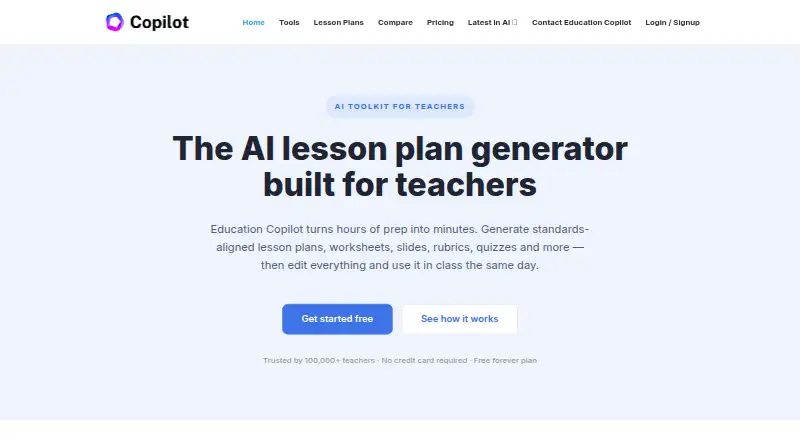
Education Copilot is a web-based AI toolkit for teachers creating classroom resources. Its tools can generate lesson plans, worksheets, handouts, slides, rubrics, quizzes, student reports, writing prompts, and unit plans. Resources can be aligned to Common Core, state standards, or standards and curriculum included in a prompt. Depending on the resource, users can edit and export materials to PDF, Word, Google Docs, or slides. The Free plan includes three core AI templates, lesson plans and handouts, editing and exporting, training videos, and community support. Pro costs $9 a month when billed annually at $108/year; it includes 10+ templates, all AI tools, unlimited usage and storage, and 24/7 chat support. The pricing page says the toolkit works best for teachers with students in grades 4 and up. The site advises against entering students’ personally identifiable information and recommends following school or district AI guidelines. School and district plans are available by request.
Who it suits
It is aimed at teachers preparing classroom materials, particularly those teaching students in grades 4 and up. Schools and districts can request plans and bulk pricing.
What it does well
- Creates a range of classroom resources.
- Can align materials to specified standards.
- Resources can be edited and exported.
- Pro includes unlimited usage and storage.
What to know first
- Free access is limited to three core AI templates.
- Pro is billed annually at $108/year.
- The site advises against entering students’ personally identifiable information.
Limits
The Free plan includes three core AI templates. Pro costs $9 a month when billed annually at $108/year and includes unlimited usage and storage, access to all AI tools, and 10+ templates.
Plans
| Plan | Billed and limits | Price |
|---|---|---|
| Free | 3 core AI templates · lesson plans and handouts · edit and export documents · training videos · community support | Free |
| Pro | Billed annually ($108/year) · save 25% · 10+ AI templates · unlimited long-form handouts · auto-save and output history · Copilot Bootcamp · 24/7 chat support | $9 a month |
As educationcopilot.com lists them, read 29 Sept 2026. The maker's own page has the final word.
Getting started
- Open https://educationcopilot.com/ in a web browser.
- Create an account or log in using Google, Facebook, Twitter, or LinkedIn.
- Start with the Free plan and its three core AI templates, or choose Pro.
- Generate a resource and specify Common Core, state standards, or curriculum details in your prompt as needed.
- Edit the result and export it in a format available for that resource.
Education Copilot is a web-based AI toolkit for teachers who need drafts of lessons, classroom materials, and assessments. It suits educators teaching grade 4 and above who want standards-aware resources they can revise and export. The main trade-off is breadth and unlimited Pro use versus a Free plan restricted to three core templates.
Overview
Education Copilot turns teacher prompts into lesson plans, worksheets, handouts, slides, rubrics, quizzes, unit plans, student reports, writing prompts, and other classroom resources. That range makes it more useful as an all-purpose preparation workspace than a tool focused on one document type. Differentiation support and assessment generation are part of the offering, while the stated best fit is teachers with students in grades 4 and up.
Resources can be aligned to Common Core, state standards, or standards and curriculum named in a prompt. Generated work remains editable and can be exported to PDF, Word, Google Docs, or slides, depending on the resource. Teachers therefore get a revisable starting point rather than a fixed output. Younger-grade educators may find the stated audience less directly aligned with their needs.
Key features
Planning and resource creation
Lesson planning, unit planning, worksheets, handouts, slides, rubrics, quizzes, student reports, and writing prompts cover both preparation and assessment. Long-form handout generation is specifically included in Pro, making that tier more relevant for teachers producing substantial classroom packets.
Standards and editing
Prompt-based standards alignment can target Common Core, state requirements, or a specified curriculum. Editing before export is important in practice: teachers can correct, adapt, and format a draft for their own class instead of distributing an unchangeable AI result. Export choices vary by resource, but include PDF, Word, Google Docs, and slides.
Accounts, privacy, and support
Users may create or access an account through Google, Facebook, Twitter, or LinkedIn. The company says it does not sell user data and that users control what they create and share. Personal data collected may include an email, name, address, and usage data; users can request access, correction, or deletion. The service advises against entering students’ personally identifiable information and directs teachers to follow school or district AI guidance. Support is offered at [email protected], with most messages answered within 1–2 business days.
Pricing
Free
The Free plan costs nothing and includes three core AI templates, lesson plans and handouts, document editing and export, training videos, and community support. It is a sensible way to judge the workflow, but three templates limit it for teachers who need varied resource types or frequent generation.
Pro
Pro costs $9 a month when billed annually ($108/year), with 25% savings. It adds 10+ AI templates, unlimited usage and storage, unlimited long-form handouts, auto-save and output history, Copilot Bootcamp, and 24/7 chat support. This is the practical tier for regular classroom preparation; annual billing is the key commitment, while the Free plan gives up the broader tool library and unlimited capacity.
A free trial is offered. Schools and districts can request bulk pricing for dedicated plans, so larger deployments should seek a quote rather than apply the individual Pro price.
Platforms
Education Copilot runs on the web. Its browser-based format suits laptop and desktop planning, but the published platform list does not include a dedicated mobile app.
Who it's for
Choose it if you teach grade 4 or higher and want one service for planning, differentiated materials, standards alignment, and assessment drafts. Pro is aimed at teachers generating resources often enough to need unlimited use, saving, and history. The Free plan fits occasional users validating the approach. Schools and districts may benefit from bulk-plan discussions, while all users should apply local AI rules and keep student personally identifiable information out of prompts.
Pros and cons
Pros
- Broad classroom coverage: planning, instructional materials, units, and assessments sit in one toolkit.
- Standards-aware drafting: prompts can target Common Core, state standards, or a specified curriculum.
- Flexible handoff: editing plus PDF, Word, Google Docs, and slide exports support existing teacher workflows.
- Predictable Pro capacity: unlimited usage and storage remove the Free plan’s three-template ceiling.
Cons
- Free access is narrow: only three core AI templates are included.
- Annual Pro billing: the $9 monthly rate requires a $108 annual payment.
- Grade focus: the service says it works best for students in grade 4 and above.
- Privacy requires care: teachers must exclude student personally identifiable information and follow district guidance.
Alternatives
For a broader comparison of lesson-generation tools, see AI Lesson Plan Generators.
- Make My Lesson is a fit if you want Android, iOS, and web access, with a forever-free five-generation plan and a $9.99 monthly option offering 30 generations.
- Aila suits readers seeking a free web tool, subject to fair-use and request limits.
- Almanack is worth choosing for standards-aligned planning, curriculum design, long-range planning, slides, and basic worksheets across web and API access.
- Brisk Teaching is an alternative for extension and web users wanting 20+ free teacher tools or district-focused custom pricing.
- Common Planner fits teachers wanting a free-forever web planner with daily, weekly, and monthly planning and Google Classroom posting.
- Eduaide is an option for generation-limited free use or a $49.99-per-year Pro plan covering lesson plans, worksheets, organizers, games, and assessments.
- GradeAid suits users who prefer a five-resources-per-week free allowance or 200 resources per month for $8.99.
- GradeWithAI is the alternative when automated submission grading and AI detection matter, with Pro at $20 per month.
Verdict
Education Copilot is a strong choice for grade 4-and-up teachers who want standards-aware lesson, resource, and assessment drafting in one web workspace. Choose Pro for sustained, varied use and Free for a limited trial; look elsewhere if you need a mobile-first product, a wider younger-grade focus, or grading-centered automation.
Verdict
Education Copilot offers resource generation and standards alignment, with a limited free plan and broader Pro access. Teachers should follow school or district AI guidance and avoid entering students’ personally identifiable information.
Questions
Is Education Copilot free?
Yes. The Free plan costs nothing and includes three core AI templates, lesson plans and handouts, editing and exports, training videos, and community support.
How much does Pro cost?
Pro costs $9 a month when billed annually at $108/year. The plan includes 10+ AI templates, unlimited usage and storage, and access to all AI tools.
What kinds of resources can it create?
It can generate lesson plans, worksheets, handouts, slides, rubrics, quizzes, student reports, writing prompts, and unit plans.
Can resources be aligned with standards?
Yes. Resources can be aligned to Common Core, state standards, or standards and curriculum specified in a prompt.
What export formats are available?
Depending on the resource, generated materials can be edited and exported to PDF, Word, Google Docs, or slides.
Who is Education Copilot designed for?
It is an AI toolkit for teachers, and its pricing page says it works best for teachers with students in grades 4 and up. School and district plans are also available by request.
Facts from Education Copilot's own pages
- Editing and exports
- Generated resources can be edited and exported to PDF, Word, Google Docs, or slides, depending on the resource. · educationcopilot.com, 29 Sept 2026
- Free plan limit
- The Free plan includes access to 3 core AI templates. · educationcopilot.com, 29 Sept 2026
- Headquarters
- Decatur, Texas, United States · educationcopilot.com, 28 Sept 2026
- Intended users
- The pricing page says Copilot works best for teachers with students in grades 4 and up. · educationcopilot.com, 29 Sept 2026
- Login integrations
- The privacy policy lists Google, Facebook, Twitter, and LinkedIn as services users may use to create an account or log in. · educationcopilot.com, 29 Sept 2026
- Personal information
- The privacy policy says collected personal data may include email, name, address, and usage data, and users may request access to, correction of, or deletion of their information. · educationcopilot.com, 29 Sept 2026
- Privacy
- The homepage says the company does not sell user data and that users control what they create and share. · educationcopilot.com, 29 Sept 2026
- Pro usage
- The pricing page says Pro includes unlimited usage, storage, and access to all AI tools. · educationcopilot.com, 29 Sept 2026
- Purpose
- Education Copilot is an AI toolkit for teachers that generates lesson plans, worksheets, slides, rubrics, quizzes, unit plans and other classroom resources. · educationcopilot.com, 29 Sept 2026
- Schools and districts
- The contact page says school and district plans are available and invites schools to request bulk pricing. · educationcopilot.com, 29 Sept 2026
- Standards
- The site says resources can be aligned to Common Core, state standards, or standards and curriculum specified in a prompt. · educationcopilot.com, 29 Sept 2026
- Student data guidance
- The site recommends not entering students’ personally identifiable information and advises users to follow school or district AI guidelines. · educationcopilot.com, 29 Sept 2026
- Support
- The contact page says the team replies to most messages within 1–2 business days and lists [email protected]. · educationcopilot.com, 29 Sept 2026
- Tools
- Its tools include lesson planning, worksheet and handout creation, rubrics, quizzes, student reports, writing prompts, and more. · educationcopilot.com, 29 Sept 2026
Where Education Copilot stands on Freedom251
- AI Lesson Plan Generators#9 of 26