Freedom251 › Email Collaboration Software
Mailtwine
What Mailtwine is
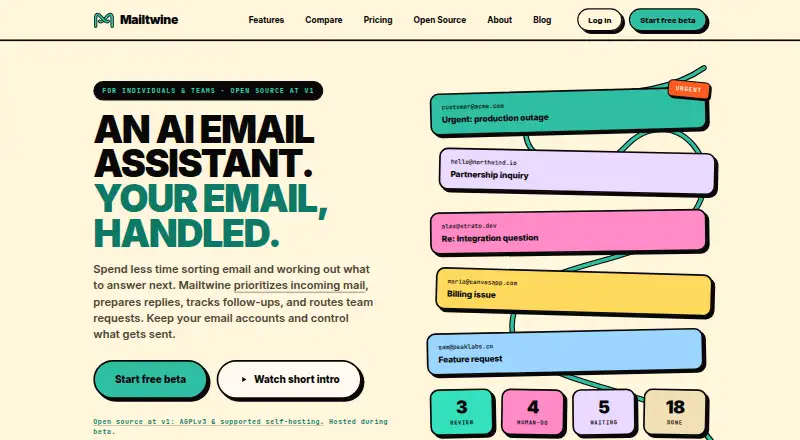
Mailtwine is an email service with tools for managing inbox work across Android, iOS, Linux, macOS, the web, and Windows. Inbox triage helps sort messages, while AI reply drafting can prepare responses and thread summaries condense email conversations. The service also supports automatic sending and follow-up actions. These listed functions cover sorting, drafting, summarizing, sending, and identifying follow-ups within one product. Mailtwine's pricing model is paid, and no regular free plan is listed. A separate beta offer, “Unlimited for FREE Beta access,” is listed as free, billed at $0 during beta. The beta includes all features with no plan limits during that period, and beta users are eligible for early-bird pricing. Paid-plan pricing is to be announced before launch, so the beta terms do not specify the later cost. Readers choosing Mailtwine should distinguish the temporary beta access terms from the paid offering, whose price has not yet been provided.
Who it suits
Mailtwine may suit people who want inbox triage, AI-assisted reply drafting, thread summaries, automatic sending, and follow-up actions across desktop, mobile, and web platforms.
What it does well
- Inbox triage helps sort messages
- AI reply drafting is included
- Summarizes email threads
- Supports automatic sending and follow-up actions
- Beta includes all features with no plan limits
What to know first
- No regular free plan is listed
- Paid-plan pricing has not been announced
- Beta access is billed at $0 only during beta
Limits
The beta offer has no plan limits during beta. Paid-plan pricing will be announced before launch.
Plans
| Plan | Billed and limits | Price |
|---|---|---|
| Unlimited for FREE Beta access | $0 during beta; paid-plan pricing will be announced before launch · All features included · No plan limits during beta · Early-bird pricing eligibility for beta users | Free |
As mailtwine.com lists them, read 24 Sept 2026. The maker's own page has the final word.
Getting started
- Visit https://mailtwine.com/.
- Access Mailtwine on Android, iOS, Linux, macOS, Windows, or the web.
- Use the “Unlimited for FREE Beta access” offer at no cost during beta.
Mailtwine is an AI email assistant that combines inbox triage, reply drafting, automatic sending, thread summaries and follow-up actions. It is best suited to people who want several email-handling tasks in one service and can work across its broad platform range. Its beta includes every feature for free with no plan limits, but the ongoing paid price has not been announced.
Overview
Mailtwine brings together organizing an inbox, composing responses and acting on conversations. That breadth is its clearest appeal: readers seeking an assistant for multiple stages of email handling may prefer it to a tool focused on a narrower task. Automatic sending makes the inclusion of drafting consequential, while triage, summaries and follow-up actions cover both sorting and next steps.
The central caveat is timing. The current offer is a beta, and its free terms apply during that period; Mailtwine is positioned as paid software, with paid-plan pricing to be announced before launch. Early-bird pricing eligibility is a benefit for beta users, but the eventual cost is not yet known.
Key features
- Inbox triage: Helps address the sorting stage of email work, making Mailtwine relevant to readers managing a busy inbox.
- AI reply drafting and automatic sending: Covers both preparing a response and sending it. Automatic sending may appeal to users seeking more than writing suggestions, though the stated feature set does not describe its controls.
- Thread summaries: Offers a way to condense conversations, useful when catching up on long exchanges.
- Follow-up actions: Extends the assistant beyond reading and replying to tracking what should happen next.
Together these functions make Mailtwine a broad email-handling assistant rather than a single-purpose drafting tool. The feature list does not establish how the functions work in practice, so readers who need particular controls should confirm that those needs are met before relying on it.
Pricing
Unlimited for FREE Beta access: free, billed $0 during beta. It includes all features with no plan limits during beta, plus eligibility for early-bird pricing. This is the strongest fit for people who want to use the full feature set now without a beta usage cap. Mailtwine is a paid product, however, and paid-plan pricing will be announced before launch; the beta offer should not be treated as a permanent free plan or as a known long-term price.
There are no cheaper and higher Mailtwine tiers to compare in the stated offer. The practical trade-off is between using the uncapped beta now and deciding later whether the paid plan suits your budget once its price is announced.
Platforms
Mailtwine supports Android, iOS, Linux, macOS, web and Windows. That is broad coverage across mobile, desktop and browser use, making it a plausible option for people who move between device types. Platform support alone does not establish whether features are identical across them.
Who it's for
Mailtwine is a reasonable choice for individuals who want triage, AI-assisted replies, sending, summaries and follow-ups together, particularly during the free beta. Its platform range also suits people who need access across mobile and desktop systems. It is less suited to anyone who needs predictable long-term costs before adopting a service: the paid price is not yet known, and the free terms are specifically for beta access.
Pros and cons
- Pro: The beta includes all features without plan limits, so users can access the complete stated toolset without a beta quota.
- Pro: Triage, drafting, automatic sending, summaries and follow-up actions span several stages of email handling instead of concentrating on replies alone.
- Pro: Support for Android, iOS, Linux, macOS, web and Windows accommodates a wide range of devices and operating systems.
- Con: Mailtwine is a paid product after beta, but its paid-plan price has not been announced, making future cost difficult to assess.
- Con: The beta's free access is time-bounded by its beta terms; it is not a stated permanent free tier.
Alternatives
For a wider comparison, browse AI Email Assistants.
- Mailbutler Smart Assistant is worth considering for readers who want a freemium option with a free Starter plan and broad platform support; its free emails include a visible Mail signature.
- Perplexity may fit people who want a freemium service with a free tier and a $20 a month Pro plan, rather than choosing solely among email assistants.
- Spike is an alternative for readers who value explicit team and storage limits: its free Starter plan allows 3 members, 1 teamspace, 60 days of search history and 15 GB storage per member.
- Superhuman Go offers a free plan with inline suggestions, chat with tabs and apps, editable and shareable docs, and synced conversations; consider it if those capabilities better match your work.
- OpenMailBot may suit readers seeking a free, self-hosted-capable option: its COMMUNITY plan includes AI features, ChromaDB and Ollama, unlimited users and inboxes, and GitHub community support.
- Serif is a paid alternative with a free plan and trial; its Lite plan is $30 a month and includes email triaging and drafting alongside a meeting recorder, task manager and knowledge base.
- Spark +AI offers a freemium route with a free plan that includes Smart Inbox, unlimited email accounts, Smart Notifications and Calendar, making it relevant for readers who prioritize those features.
- EmailOps is another free alternative for readers comparing email tools, with a free plan and support for Linux, macOS and Windows.
Verdict
Choose Mailtwine if you want one assistant to cover inbox triage, AI replies, sending, thread summaries and follow-ups, and the no-limit beta offer fits your needs. Its broad platform coverage and complete beta feature access are compelling. Look elsewhere if you need a dependable post-beta budget before committing: the main uncertainty is the price once free beta access ends.
Verdict
Mailtwine combines several email handling functions and lists broad platform coverage. The beta is free at the stated terms, but the price of the later paid plan is not yet specified.
Questions
Is Mailtwine free?
There is no free plan for the regular paid offering. Beta access is listed as free, billed at $0 during beta.
What does the beta include?
The “Unlimited for FREE Beta access” offer includes all features without plan limits during beta. Beta users are eligible for early-bird pricing.
How much will the paid plan cost?
Paid-plan pricing will be announced before launch.
What platforms does Mailtwine support?
Its listed platforms are Android, iOS, Linux, macOS, web, and Windows.
What email tasks can Mailtwine help with?
It offers inbox triage, AI reply drafting, automatic sending, thread summaries, and follow-up actions.
Where can I access Mailtwine?
The listed website is https://mailtwine.com/.
Where Mailtwine stands on Freedom251
- Email Collaboration Software#31 of 35
- AI Email Assistants#41 of 46