Freedom251 › Certificate Maker Software

MailMergic
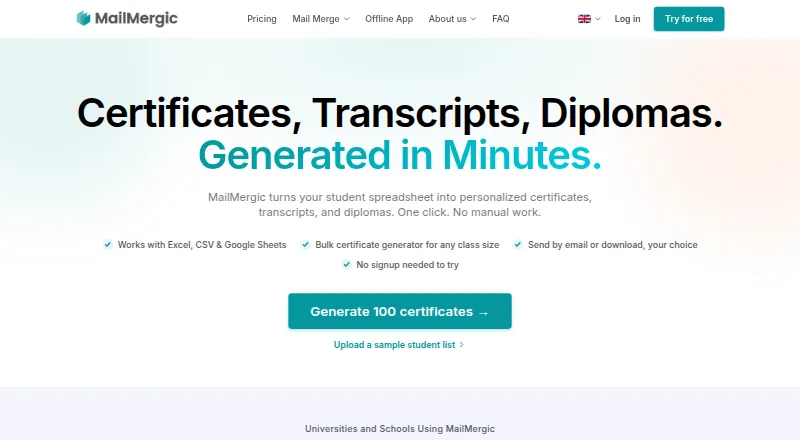
What MailMergic is
MailMergic converts spreadsheet data into personalized certificates, transcripts, diplomas, and other documents that can be downloaded or emailed. Its education workflow accepts PDF or Word templates and student details from Excel, CSV, or Google Sheets, then produces one PDF per student; the education page says one run can handle thousands of rows. Before generation, its AI checks merge data for missing values, formatting problems, and mismatches. Users can email documents to spreadsheet recipients and follow delivery, opens, and bounces in a dashboard. The education page says student information systems can provide CSV or Excel exports without API integration, while Pro and Enterprise list Zapier and a public REST API. The online service says it uses encryption in transit and at rest, EU hosting, and access controls, and that customer data is not used for advertising or AI training. An offline app processes documents on the user's device and is offered for macOS and Windows, but excludes cloud AI features. The free plan allows 25 documents per month for one user and adds watermarks. Pro costs $39 a year, billed yearly; Enterprise costs $66 a year, billed yearly. The offline app costs $107 a year, billed annually.
Who it suits
MailMergic suits registrars, school administration offices, online course providers, training teams, and other education organizations generating personalized documents from student data. It may also suit teams that need local offline document processing.
What it does well
- Accepts PDF or Word templates and spreadsheet data
- Creates one PDF per student
- Checks merge data for missing values and mismatches
- Tracks email delivery, opens, and bounces
What to know first
- Free plan is limited to 25 documents per month
- Free documents include watermarks
- Offline license activates on one computer
- Offline app excludes cloud AI features
Limits
Always-Free allows 25 documents per month for one user and adds watermarks. Pro allows 1,000 documents per month for one user; Enterprise allows 10,000 documents per month for five users. The Offline App allows unlimited documents on one computer per license and excludes cloud AI features.
Plans
| Plan | Billed and limits | Price |
|---|---|---|
| Always-Free | 25 docs / mo · 1 user · Watermarks | Free |
| Offline App | Billed annually · Equivalent billed once a year $1,284 /yr · Unlimited documents · 1 computer per license · macOS and Windows · Offline processing · All online features except cloud AI | $1,284 a year |
| Pro | Billed yearly · Save 4 months! · 1,000 docs / mo · 1 user · No watermarks · Send emails · Dedicated account manager · Zapier integration · Public API | $39 a year |
| Enterprise | Billed yearly · Save 4 months! · 10,000 docs / mo · 5 users · No watermarks · Send emails · Dedicated account manager · Zapier integration · Public API · Custom SMTP server | $66 a year |
As mailmergic.com lists them, read 29 Sept 2026. The maker's own page has the final word.
Getting started
- Open the MailMergic education website.
- Choose the online service or the offline app for macOS or Windows.
- Select the Always-Free, Pro, Enterprise, or Offline App plan.
- Upload a PDF or Word template.
- Import student information from Excel, CSV, or Google Sheets.
- Generate PDFs for students, then download them or send them by email.
MailMergic turns student spreadsheets and document templates into personalized PDFs for download or email. It is best suited to education and training teams handling recurring batches rather than occasional, one-off certificates. Its combination of pre-generation data checks and delivery tracking is useful, but plan quotas, watermarks, and the choice between cloud and single-computer offline processing matter.
Overview
Users can pair PDF or Word templates with student data from Excel, CSV, or Google Sheets to generate a separate document for each person. The education workflow is designed for thousands of rows in one run, a practical advantage for registrars, school administrators, course providers, and training teams with repeatable processes.
Before generation, MailMergic says its AI checks for missing values, formatting issues, and mismatches. These checks can flag common data problems before they reach a certificate or transcript, though they do not replace careful source records. Teams can also work from CSV or Excel exports from student information systems without an API integration.
Key features
Batch creation and email follow-up
MailMergic supports certificates, transcripts, diplomas, and other documents. Users can download PDFs or email personalized copies to spreadsheet recipients, then track delivery, opens, and bounces in a dashboard. Bringing creation and follow-up into one workflow suits teams distributing documents at scale; the stated recipient limit of 1,000 may be a constraint for larger campaigns.
Integrations and data handling
Pro and Enterprise include Zapier and a public REST API, while CSV and Excel exports offer a simpler route for teams whose systems can produce those files. For the online service, MailMergic says it encrypts data in transit and at rest, hosts it in the EU, and uses access controls; it also says customer data is not used for advertising or AI training. Its education page describes GDPR and CCPA compliance, FERPA-compatible workflows, and a FERPA addendum for U.S. institutions.
The Offline App processes documents on the user's computer, with document content not sent to MailMergic or third parties during local processing. That is a meaningful option for organizations prioritizing local processing, but each license activates on one computer and cloud AI features are excluded.
Pricing
The Always-Free plan costs nothing and allows 25 documents per month for one user, with watermarks. It is a way to try small batches, but the cap and branded output make it a poor fit for regular, polished distribution.
Pro costs $39 a year, billed yearly. It includes 1,000 documents per month for one user, no watermarks, email sending, a dedicated account manager, Zapier integration, and a public API. It is the more suitable cloud plan for a solo operator with moderate monthly volume. Enterprise costs $66 a year, billed yearly, and raises the allowance to 10,000 documents per month, adds four more users and a custom SMTP server, while retaining the other listed paid features. That makes it the stronger fit for larger teams and batches, though the stated 1,000-recipient limit remains relevant.
The Offline App costs $107 a year, billed annually, equivalent to a once-yearly charge of $1,284 /yr. It allows unlimited documents on one computer and includes all online features except cloud AI. It suits an individual who needs local processing and high volume, not a team needing shared licenses. Paid cloud plans are shown with annual billing; email support is available Monday through Sunday, 8am to 9pm UTC.
Platforms
MailMergic lists API, macOS, web, and Windows platforms. The offline app is specifically offered for macOS and Windows; each offline license covers one computer.
Who it's for
MailMergic is aimed at registrars and administrative offices, online course providers, professional development and training teams, and K-12 schools and language institutes. It makes most sense where spreadsheet-driven document batches recur and recipients need email delivery. Someone seeking a design-first tool for occasional certificates, or a multi-computer offline setup, should look elsewhere.
Pros and cons
- Pros: One-PDF-per-student generation and support for large runs reduce repetitive document preparation.
- Pros: Pre-generation checks and email tracking address data quality and delivery follow-up in the same workflow.
- Pros: CSV and Excel exports work without an API connection, while paid cloud plans add Zapier and a public API.
- Cons: The free plan's 25-document monthly cap and watermarks limit its usefulness for ongoing institutional output.
- Cons: The offline license is tied to one computer and excludes cloud AI, limiting its appeal to teams or users who need those features.
Alternatives
For a broader comparison, browse Certificate Maker Software. Berlvis Credentials is a web-based freemium alternative with a free Studio plan that watermarks exports and a paid ID Cards plan. Certhive is a web-based e-certificate service its maker describes as a side project, with a free Starter plan. CertificatesMaker is a web option with a free-forever plan described as having no limitations.
Certifier offers a free Starter plan capped at 250 credentials per year for one user, so it may suit smaller credential programs with that annual volume. CertifyLink has a free plan capped at four certificates and two events, with QR code verification and bulk generation; consider it when those limits match the job. Certopus offers a free starter tier with 250 credentials, two events, and one limited seat, and also supports self-hosting.
EZdoc AI Certificate Maker has a free plan for 25 copies per month and three lifetime designs, with CSV and XLSX uploads. Sertifier has a free plan for up to 25 recipients and a Pro plan priced at $750 a year for 500 people.
Verdict
Choose MailMergic if your education or training team regularly turns spreadsheet records into batches of certificates or other student documents and values checks before generation plus delivery tracking afterward. Its main advantage is a focused path from template and data to emailed PDFs; its main drawback is that cloud quotas and the single-computer offline license create meaningful ceilings depending on how your team works. For small tests, the free tier is enough to try the workflow, but regular institutional use is better matched to a paid plan.
Verdict
MailMergic is suited to batch document creation and delivery from student spreadsheets, with checks before generation and email tracking afterward. The free plan has a monthly document cap and watermarks; offline processing has separate device and feature limits.
Questions
Is MailMergic free?
Yes. Always-Free costs nothing and allows 25 documents per month for one user, with watermarks.
What do the paid plans cost?
Pro is listed at $39 a year, billed yearly. Enterprise is $66 a year, billed yearly; the Offline App is $107 a year, billed annually.
Which platforms does MailMergic support?
The listed platforms are API, macOS, web, and Windows. The offline app is offered for macOS and Windows.
Can MailMergic connect to other services?
Pro and Enterprise list Zapier and a public REST API. Student information systems can also supply CSV or Excel exports without an API integration.
How does the offline app handle documents?
It processes documents on the user's device, and MailMergic says document content is not sent to it or third parties during local processing.
Who makes MailMergic?
MailMergic was formed in June 2019, and its about page identifies Lennart Guth as its founder.
Facts from MailMergic's own pages
- Bulk generation
- MailMergic generates one PDF per student and says its education workflow can handle thousands of rows in a single run. · mailmergic.com, 29 Sept 2026
- Company history
- MailMergic's about page lists company formation in June 2019 and identifies Lennart Guth as founder. · mailmergic.com, 29 Sept 2026
- Data checks
- The education page says its AI scans merge data for missing values, formatting issues, and mismatches before generation. · mailmergic.com, 29 Sept 2026
- Education privacy
- The education page describes the service as GDPR and CCPA compliant, with FERPA-compatible workflows and a FERPA addendum available for U.S. institutions. · mailmergic.com, 29 Sept 2026
- Email delivery
- Users can send personalized documents to recipients from their spreadsheet and track delivery, opens, and bounces from a dashboard. · mailmergic.com, 29 Sept 2026
- Founded
- 2019 · mailmergic.com, 28 Sept 2026
- Headquarters
- Eschborn, Germany · mailmergic.com, 28 Sept 2026
- Integrations
- The pricing page lists Zapier and a RESTful public API on Pro and Enterprise, while the education page says student information systems can supply CSV or Excel exports without an API integration. · mailmergic.com, 29 Sept 2026
- Intended users
- The education page names registrars and admin offices, online course providers, training and professional development teams, and K-12 schools and language institutes. · mailmergic.com, 29 Sept 2026
- Offline limits
- Each offline license activates on one computer, the app is offered for macOS and Windows, and it excludes cloud AI features. · mailmergic.com, 29 Sept 2026
- Offline processing
- The offline app processes documents on the user's device, and MailMergic says document content is not sent to it or third parties during local processing. · mailmergic.com, 29 Sept 2026
- Online security
- MailMergic says the online service uses encryption in transit and at rest, EU-based hosting, and access controls, and that customer data is not used for advertising or AI training. · mailmergic.com, 29 Sept 2026
- Purpose
- MailMergic turns spreadsheets into personalized certificates, transcripts, diplomas, and other documents, which users can download or send by email. · mailmergic.com, 29 Sept 2026
- Support
- MailMergic lists support by email and says its contact hours are Monday through Sunday, 8am to 9pm UTC. · mailmergic.com, 29 Sept 2026
- Templates and data
- The education page says users can upload PDF or Word templates and use student data from Excel, CSV, or Google Sheets. · mailmergic.com, 29 Sept 2026
Where MailMergic stands on Freedom251
- Certificate Maker Software#7 of 28