MacDown
by MacDown
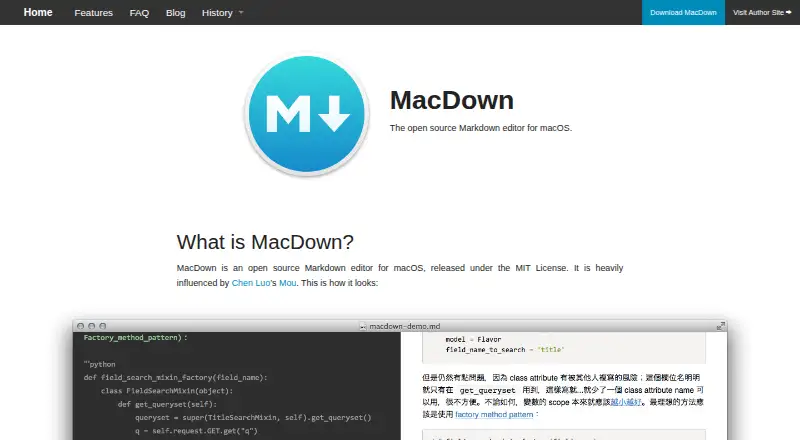
What MacDown is
MacDown is a free, open source Markdown editor for macOS, released under the MIT License. It renders Markdown into HTML with Hoedown and provides a configurable live preview, allowing writers to view the rendered document while editing. Its rendering tools support TeX-like math syntax, GFM task lists, and Jekyll front matter. It can also be configured for GFM compatibility, including tables, fenced code blocks, strikethrough, autolinks, and task lists; the resulting HTML can differ slightly in structure.
Fenced code blocks with language identifiers are highlighted using Prism. MacDown also has customizable auto-completion that can be turned off. It supports local files and exports to HTML and PDF, but does not provide cloud sync. The listed Markdown flavor is custom.
The website offers version 0.7.3 as a 19.9 MB download and provides a Homebrew Cask installation command. MacDown is made by MacDown, whose headquarters are in Taipei, Taiwan; the maker was founded in 2014. The FAQ says the project has no current plans for ports to other platforms. It also says macOS may warn that the app is from an unidentified developer because MacDown has no registered Mac developer certificate. VIM edit mode is unsupported.
Who it suits
MacDown suits macOS users who want a free Markdown editor with a live preview, local files, and HTML or PDF export. It can also work for writers who need math syntax, GFM features, or Jekyll front matter in their rendered documents.
What it does well
- Free and open source under the MIT License.
- Configurable live preview renders Markdown into HTML.
- Supports TeX-like math, GFM task lists, and Jekyll front matter.
- Prism highlights fenced code blocks with language identifiers.
- Exports to HTML and PDF and supports local files.
- Customizable auto-completion can be turned off.
What to know first
- Available only for macOS; the maker says other-platform ports are not in progress.
- Does not support cloud sync.
- VIM edit mode is unsupported.
- macOS may show an unidentified developer warning.
Limits
MacDown is limited to macOS, and backward compatibility is not promised for versions earlier than 10.8. Its FAQ also says VIM edit mode is unsupported.
Plans
| Plan | Billed and limits | Price |
|---|---|---|
| MacDown | macOS Markdown editor · MIT License | Free |
As macdown.uranusjr.com lists them, read 5 Oct 2026. The maker's own page has the final word.
Getting started
- Visit the MacDown website.
- Download the listed 19.9 MB MacDown version 0.7.3, or use the site's Homebrew Cask command.
- Open MacDown on a supported macOS version.
- Open a local Markdown file and configure the live preview or rendering options as needed.
Verdict
Choose MacDown if you use macOS and want a free editor with a configurable preview and local Markdown files. Its rendering options and HTML or PDF export cover common writing needs. Look elsewhere if you need cloud sync, VIM edit mode, or an editor for another platform.
Questions
How much does MacDown cost?
MacDown is free. Its listed plan is free.
Is MacDown open source?
Yes. MacDown is open source and released under the MIT License.
Which platforms does it support?
MacDown supports macOS. Its maker says there are no current plans in progress for ports to other platforms.
Can MacDown export documents?
Yes. It exports to HTML and PDF and supports local files.
Does it sync files through the cloud?
No. MacDown does not provide cloud sync.
How can I install it?
The website offers MacDown version 0.7.3 as a 19.9 MB download and provides a Homebrew Cask install command.
Facts from MacDown's own pages
- Auto-completion
- MacDown includes customizable auto-completion that can be turned off. · macdown.uranusjr.com, 5 Oct 2026
- Cloud sync
- No · macdown.uranusjr.com, 20 Sept 2026
- Code highlighting
- Fenced code blocks with language identifiers are highlighted using Prism. · macdown.uranusjr.com, 5 Oct 2026
- Compatibility limit
- The FAQ says MacDown does not support VIM edit mode because implementing it would require rebuilding the editor from the ground up. · macdown.uranusjr.com, 5 Oct 2026
- Donation
- The maker accepts PayPal tips and says donations do not provide anything in return. · macdown.uranusjr.com, 5 Oct 2026
- Donations
- The FAQ describes donations as tipping only and says donors receive nothing in return. · macdown.uranusjr.com, 5 Oct 2026
- Download
- The site offers MacDown version 0.7.3 as a 19.9 MB download and gives a Homebrew Cask install command. · macdown.uranusjr.com, 5 Oct 2026
- Export formats
- HTML,PDF · macdown.uranusjr.com, 20 Sept 2026
- Founded
- 2014 · macdown.uranusjr.com, 28 Sept 2026
- Free plan
- Yes · macdown.uranusjr.com, 20 Sept 2026
- GFM compatibility
- The FAQ says MacDown can be configured for GFM compatibility, with minor structural differences in the resulting HTML. · macdown.uranusjr.com, 5 Oct 2026
- GFM support
- The FAQ says MacDown can be configured for GFM compatibility with tables, fenced code blocks, strikethrough, autolinks, and task lists, with minor structural differences in resulting HTML. · macdown.uranusjr.com, 5 Oct 2026
- Latest stable download listed
- The home page lists MacDown Version 0.7.3 as a 19.9 MB download and also gives the Homebrew Cask command. · macdown.uranusjr.com, 5 Oct 2026
- Live preview
- It uses Hoedown to render Markdown into HTML and provides a configurable live preview. · macdown.uranusjr.com, 5 Oct 2026
- Local file support
- Yes · macdown.uranusjr.com, 20 Sept 2026
- macOS requirement
- The FAQ discusses support for macOS versions earlier than 10.8 as difficult to promise without slowing development. · macdown.uranusjr.com, 5 Oct 2026
- Maker
- The maker identifies himself as Tzu-ping Chung, also known as uranusjr. · uranusjr.com, 5 Oct 2026
- Markdown extensions
- Rendering tools include TeX-like math syntax, GFM task lists, and Jekyll front matter. · macdown.uranusjr.com, 5 Oct 2026
- Markdown flavor
- custom · macdown.uranusjr.com, 20 Sept 2026
- Other platforms
- The maker says there are no current plans in progress for ports to other platforms due to lack of time. · macdown.uranusjr.com, 5 Oct 2026
- Supported platforms
- macos · macdown.uranusjr.com, 20 Sept 2026
- Platform support
- The FAQ says the author does not currently have time to build ports for other platforms. · macdown.uranusjr.com, 5 Oct 2026
- Product
- MacDown is an open source Markdown editor for macOS released under the MIT License. · macdown.uranusjr.com, 5 Oct 2026
- Rendering
- It uses Hoedown to render Markdown into HTML and provides a configurable live preview. · macdown.uranusjr.com, 5 Oct 2026
Where MacDown stands on Freedom251
- Markdown editors#23 of 31