MarkdownPad
What MarkdownPad is
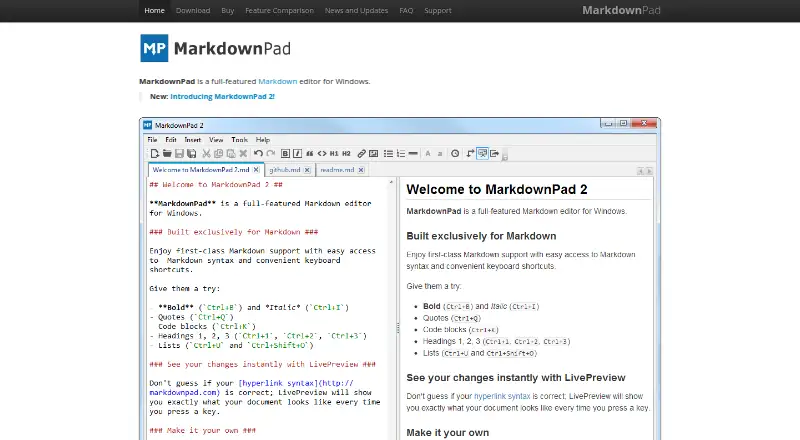
MarkdownPad is a Markdown editor for Windows that lets writers work with local files and see an HTML preview as they type. Its LivePreview follows the current editing location, while toolbar buttons and keyboard shortcuts apply or remove Markdown formatting. Writers can adjust the editor’s color schemes, fonts, sizes and layouts, and customize stylesheets with the included CSS editor. The free plan supports personal use and provides HTML document creation and export. MarkdownPad Pro adds PDF export, GitHub Flavored Markdown and Markdown Extra, including support for tables, fenced code blocks, emoji and task lists. Pro also includes an image uploader, auto-save, session management, configurable automatic updates and early access to new features. Its license is for one end user, who may use it on multiple computers as long as they are the only person using it at a time. MarkdownPad is developed by software engineer Evan Wondrasek, and the site names Apricity Software LLC in its copyright notice. The listed plans are MarkdownPad Free and MarkdownPad Pro at $14.95 a month.
Who it suits
MarkdownPad suits Windows users who write Markdown in local files and want an HTML preview while editing. The free plan is for personal use; Pro is suited to users who need PDF export, extended Markdown formats, additional editing tools or commercial-use rights.
What it does well
- Live HTML preview follows the current editing location.
- Formatting is available through shortcuts and toolbar buttons.
- Customize colors, fonts, layouts and CSS stylesheets.
- Pro supports GitHub Flavored Markdown and Markdown Extra.
- Pro includes PDF export, auto-save and session management.
What to know first
- Available for Windows only.
- Free plan is for personal use; commercial use requires Pro.
- Free version restricts open documents and custom CSS stylesheets.
- Pro is listed at $14.95 a month.
Limits
MarkdownPad Free is limited to personal use, restricts the number of open documents and custom CSS stylesheets, and does not include Pro features such as PDF export. Pro is listed at $14.95 a month.
Plans
| Plan | Billed and limits | Price |
|---|---|---|
| MarkdownPad Free | Free for personal use · Pro required for commercial use | Free |
| MarkdownPad Pro | Single User license · Use on multiple computers if only one person uses it at a time · Commercial use licensed | $14.95, paid once |
As markdownpad.com lists them, read 7 Oct 2026. The maker's own page has the final word.
Getting started
- Visit https://www.markdownpad.com/.
- Use a Windows computer.
- Choose MarkdownPad Free for personal use or MarkdownPad Pro for commercial use and Pro features.
- For the portable version, extract the ZIP file and launch MarkdownPad2.exe.
Verdict
Choose MarkdownPad if you use Windows and want local Markdown editing with a live HTML preview. The free plan covers personal use and HTML export; look to Pro for PDF export, extended Markdown formats, fewer usage restrictions or a commercial-use license.
Questions
Is MarkdownPad free?
Yes. MarkdownPad Free costs nothing and is for personal use. Pro is required for commercial use.
How much does MarkdownPad Pro cost?
MarkdownPad Pro is listed at $14.95 a month for a single-user license.
Which platforms does MarkdownPad support?
MarkdownPad is listed for Windows. The FAQ names compatibility with Windows XP, Vista, 7 and 8 and says it requires the Microsoft .NET Framework 4 Client Profile.
Can MarkdownPad export to PDF?
The product page describes PDF export, and PDF export is included with Pro.
Who develops MarkdownPad?
Software engineer Evan Wondrasek develops MarkdownPad. The site copyright names Apricity Software LLC.
Can one Pro license be used on multiple computers?
Yes. The license follows one end user, who may use it on multiple computers if they are the only person using it at any time.
Facts from MarkdownPad's own pages
- Customization
- Color schemes, fonts, sizes, layouts, and CSS stylesheets can be customized; the app includes a CSS editor. · markdownpad.com, 7 Oct 2026
- Export
- The product page describes creating HTML documents and exporting directly to PDF. · markdownpad.com, 7 Oct 2026
- Export formats
- HTML,PDF · markdownpad.com, 20 Sept 2026
- Formatting
- Markdown formatting can be applied or removed using keyboard shortcuts and toolbar buttons. · markdownpad.com, 7 Oct 2026
- Free plan
- Yes · markdownpad.com, 20 Sept 2026
- Free version limits
- Pro removes usage restrictions, including limits on open documents and custom CSS stylesheets. · markdownpad.com, 7 Oct 2026
- License
- The Pro license follows one end user, who may use it on multiple computers provided they are the only person using it at any time. · markdownpad.com, 7 Oct 2026
- Live preview
- LivePreview shows HTML as you type and automatically scrolls to the current editing location. · markdownpad.com, 7 Oct 2026
- Local file support
- Yes · markdownpad.com, 20 Sept 2026
- Maker
- MarkdownPad is developed by software engineer Evan Wondrasek, based in Minneapolis, Minnesota; the site copyright names Apricity Software LLC. · markdownpad.com, 7 Oct 2026
- Supported platforms
- windows · markdownpad.com, 20 Sept 2026
- Portable version
- A portable version can run by extracting the ZIP and launching MarkdownPad2.exe; it still uses Windows local and roaming storage for settings and stylesheets. · markdownpad.com, 7 Oct 2026
- Pro features
- Pro includes PDF export, a built-in image uploader, auto-save, session management, configurable automatic updates, and early access to new features. · markdownpad.com, 7 Oct 2026
- Pro processors
- Pro supports GitHub Flavored Markdown and Markdown Extra, including tables, fenced code blocks, emoji, and task lists. · markdownpad.com, 7 Oct 2026
- Publishing workflow
- none · markdownpad.com, 20 Sept 2026
- Purpose
- MarkdownPad is a full-featured Markdown editor for Windows. · markdownpad.com, 7 Oct 2026
- Security
- The privacy policy says site data exchanges use SSL and describes security measures to protect personal information stored on the site. · markdownpad.com, 7 Oct 2026
- Paid from
- 14.95 · markdownpad.com, 20 Sept 2026
- Support
- Users can report bugs through Help → Report a Bug or the online bug report form; purchase questions go to [email protected]. · markdownpad.com, 7 Oct 2026
- System requirement
- The FAQ says MarkdownPad requires the Microsoft .NET Framework 4 Client Profile and lists compatibility with Windows XP, Vista, 7, and 8. · markdownpad.com, 7 Oct 2026
Where MarkdownPad stands on Freedom251
- Markdown editors#24 of 31