Freedom251 › Data Orchestration Software
Luigi
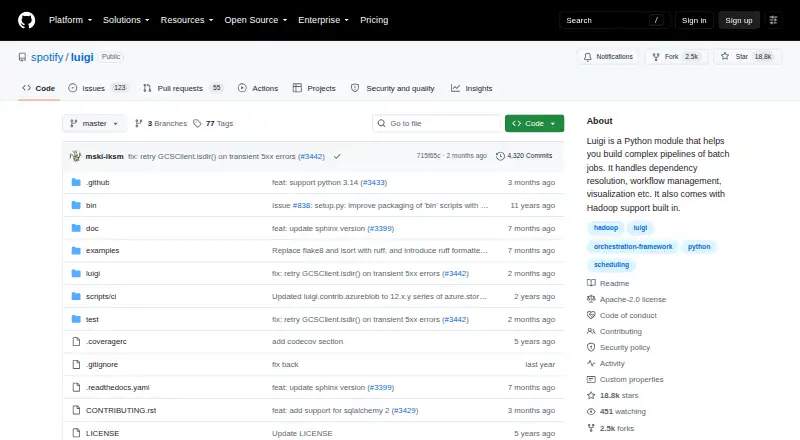
What Luigi is
Luigi is a free Python package for connecting and managing complex batch-job pipelines. It handles dependency resolution, workflow management, visualization, failure handling, and command-line integration. The project presents it for long-running work such as Hadoop jobs, database transfers, and machine-learning jobs; its documentation describes pipelines with thousands of tasks that may run for days or weeks.
Documented systems and task types include Hadoop, Hive, Pig, Spark, HDFS, databases, and local files. The Luigi server includes a web interface for searching and filtering tasks, and its HDFS and local filesystem abstractions support atomic file operations. The project instructs users to install the latest stable version with `pip install luigi`; TOML configuration is available with the optional `luigi[toml]` installation. The repository says Python 3.10 through 3.14 are tested and lists the Apache-2.0 license. Spotify's Data Team maintains Luigi, and the project links to a mailing list for discussion. It is self-hosted, with a free plan listed as free.
Who it suits
Luigi suits developers and data teams building Python workflows around long-running batch jobs, including database transfers and Hadoop or machine-learning tasks. It is a fit for teams prepared to self-host and use its documented systems.
What it does well
- Manages dependencies, failures, and workflow visualization.
- Includes a web interface for task search and filtering.
- Supports Hadoop, Hive, Pig, Spark, HDFS, and databases.
- Filesystem abstractions support atomic operations.
- Apache-2.0 licensed.
What to know first
- Self-hosted deployment.
- No event triggers.
Plans
| Plan | Billed and limits | Price |
|---|---|---|
| Luigi | Apache-2.0 licensed Python package | Free |
As github.com lists them, read 3 Oct 2026. The maker's own page has the final word.
Getting started
- Open the Luigi project website.
- Install the latest stable version with `pip install luigi`.
- For TOML configuration, install the optional `luigi[toml]` package.
- Run Luigi in a self-hosted environment and use the documented task types and systems that fit your pipeline.
Luigi is a Python toolkit for turning large batch jobs into dependency-aware workflows. It suits data teams running long, infrastructure-managed pipelines, especially where Hadoop or database work must be coordinated. Its batch focus is useful and concrete, but teams needing event-triggered automation should choose another orchestrator.
Overview
Luigi combines dependency resolution, workflow management, visualization, failure handling, and command-line integration in one package. That combination matters when a pipeline has many jobs with ordering and retry concerns; a short linear script is unlikely to justify the extra machinery.
The documentation targets workloads with thousands of tasks that can run for days or weeks. Luigi is therefore aimed at sustained batch processing rather than reactive, event-driven automation. It is free to use under the Apache-2.0 license, maintained by Spotify's Data Team, and deployed self-hosted. Self-hosting gives an organization control over its runtime, while making installation, upgrades, availability, and operations its responsibility.
Key features
Dependencies, failures, and scale
Luigi models explicit task dependencies and resolves the order in which work should run. It also handles workflow failures, which is valuable when downstream jobs must wait for several upstream results or when a multi-day run cannot be treated as one opaque command. The documented scale—thousands of tasks over days or weeks—makes it a stronger fit for substantial data pipelines than for occasional scripts.
Operational visibility
The Luigi server provides a web interface that searches and filters tasks. Operators get a practical view of what is running or completed across a large workflow instead of depending solely on terminal output. Visualization supports understanding dependencies, although the package's published scope remains workflow plumbing rather than a broad operations suite.
Data-system integrations
Documented task types cover Hadoop, Hive, Pig, Spark, HDFS, databases, and local files. That range is a meaningful advantage for mixed data estates: a single workflow model can connect distributed processing, transfers, and filesystem work. It does not amount to event-trigger support; event triggers are not part of Luigi's stated capabilities.
Safe file handling and configuration
HDFS and local-filesystem abstractions provide atomic file operations, helping prevent downstream tasks from consuming partial outputs. Installation is through pip install luigi. Teams wanting TOML-based configuration can install the optional luigi[toml] extra. The repository reports testing on Python 3.10 through 3.14, giving current Python deployments a defined compatibility range.
Pricing
| Plan | Price | What it includes |
|---|---|---|
| Luigi | free | Apache-2.0 licensed Python package |
There is no paid tier or free trial. The package itself has no seat or usage charge, so it fits teams that can budget for their own hosting and operations. The trade-off is that self-hosting costs, maintenance, and reliability work are outside the software price.
Platforms
Luigi is offered as an API and runs on Linux and self-hosted environments, with a web interface for task management. Cross-platform execution is supported. Workflow dependencies and audit logs are supported; event triggers are not.
Who it's for
Choose Luigi for a Python-centric data team chaining long-running Hadoop, Spark, database-transfer, or machine-learning batch jobs. It is particularly suitable when explicit dependencies, atomic file outputs, and a searchable task view matter more than managed hosting.
Look elsewhere if your primary requirement is event-driven scheduling, a vendor-operated service, or a workflow engine designed around a platform other than Python and self-managed infrastructure. Luigi's mailing list provides a discussion channel, while sensitive security issues are directed to Spotify's bug bounty program rather than GitHub.
Pros and cons
Pros
- Strong batch-workflow model: dependency resolution and failure handling address complex chains that are difficult to maintain as separate scripts.
- Useful at large workflow sizes: support for thousands of tasks and multi-day or multi-week runs matches serious data-processing workloads.
- Relevant data integrations: Hadoop, Hive, Pig, Spark, HDFS, databases, and local files cover common mixed data pipelines.
- Atomic filesystem abstractions: safer file completion semantics reduce the chance of exposing incomplete results.
- No license fee: the Apache-2.0 package can be adopted without per-seat or plan charges.
Cons
- No event triggers: teams building reactive workflows will need another tool or an additional trigger layer.
- Self-hosted responsibility: organizations must operate the deployment rather than relying on a hosted service.
- Python-oriented adoption: teams not centered on Python may find the package model a poor fit.
Alternatives
Browse Workload Automation Software for a wider category comparison. Choose Kestra instead if you want a free, Apache-2.0 workflow platform with web and API access across Linux, macOS, Windows, and self-hosted deployments, plus a free trial. Argo Workflows is the better direction for an open-source workflow engine built for Kubernetes.
Dagu offers a freemium model with a free Community plan, unlimited servers and workers, and up to two API keys. Rundeck is an alternative for small teams seeking a free Community edition with registration. Apache Airflow provides another free, Apache-licensed workflow option across API, Linux, macOS, self-hosted, and web environments.
Consider Windmill for a freemium platform with a free open-source tier, or Apache DolphinScheduler for a free open-source workflow orchestration platform. Flyte is another free workflow option with API, Linux, self-hosted, and web support.
Verdict
Luigi is a solid choice for Python teams that need dependable dependency management and visibility across demanding, long-running batch pipelines without paying a software license fee. Pick it for its focused data-workflow plumbing and atomic file handling. Look elsewhere when event triggers, managed operations, or a Kubernetes-first workflow model are central requirements.
Verdict
Luigi provides workflow plumbing for batch pipelines, with task management, a web interface, and integrations across documented systems. Its self-hosted model and Python package format make it most relevant to teams comfortable managing their own deployment.
Questions
How much does Luigi cost?
Luigi is free. Its listed plan is free.
Is there a free trial?
No. Luigi is offered as a free package, and no free trial is listed.
Where does Luigi run?
Luigi is self-hosted. Its listed platforms include API, Linux, self-hosted, and web.
What systems can Luigi work with?
Documented task types and systems include Hadoop, Hive, Pig, Spark, HDFS, databases, and local files.
Is Luigi open source?
Luigi is licensed under Apache-2.0.
Who maintains Luigi?
Spotify's Data Team maintains the project.
Facts from Luigi's own pages
- Atomic file operations
- Luigi provides HDFS and local file system abstractions that ensure file operations are atomic. · luigi.readthedocs.io, 3 Oct 2026
- Configuration
- Luigi supports TOML based configuration through the optional `luigi[toml]` installation. · github.com, 3 Oct 2026
- Installation
- The project instructs users to install the latest stable version with `pip install luigi`. · github.com, 3 Oct 2026
- Integrations
- Documented task types and systems include Hadoop, Hive, Pig, Spark, HDFS, databases, and local files. · luigi.readthedocs.io, 3 Oct 2026
- Intended use
- The documentation presents Luigi as workflow plumbing for chaining and automating long running batch tasks, including Hadoop jobs, database transfers, and machine learning jobs. · luigi.readthedocs.io, 3 Oct 2026
- License
- The repository identifies Luigi as licensed under Apache-2.0. · github.com, 3 Oct 2026
- Maintainer
- The project says Spotify's Data Team maintains Luigi. · github.com, 3 Oct 2026
- Purpose
- Luigi is a Python package for building complex pipelines of batch jobs. · github.com, 3 Oct 2026
- Python versions
- The repository says Python 3.10 through 3.14 are tested. · github.com, 3 Oct 2026
- Security reporting
- The security policy asks people to report sensitive security issues through Spotify's bug bounty program rather than GitHub. · github.com, 3 Oct 2026
- Support and discussion
- The project links to a mailing list for discussions and questions. · luigi.readthedocs.io, 3 Oct 2026
- Web interface
- The Luigi server includes a web interface for searching and filtering tasks. · luigi.readthedocs.io, 3 Oct 2026
- Workflow management
- It handles dependency resolution, workflow management, visualization, failure handling, and command line integration. · github.com, 3 Oct 2026
- Workflow scale
- The documentation describes pipelines containing thousands of tasks that can take days or weeks to complete. · luigi.readthedocs.io, 3 Oct 2026
Where Luigi stands on Freedom251
- Data Orchestration Software#5 of 16
- Workload Automation Software#9 of 24