Freedom251 › Animation Software
Lottie Creator
What Lottie Creator is
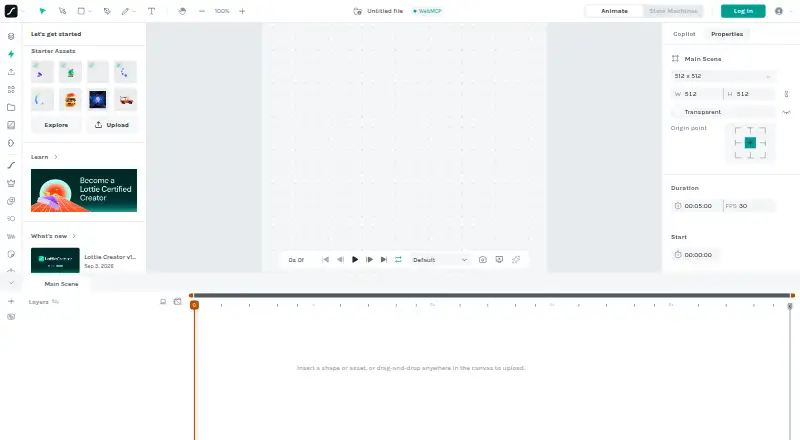
Lottie Creator is a browser-based tool for designing motion graphics, UI animations, and interactive animations. Its animation tools include keyframe controls, a Graph Editor, motion paths, nested scenes, blend modes, and matte and mask tools, with SVG import for artwork. It imports Lottie JSON, dotLottie, and SVG, and exports Lottie JSON, dotLottie, optimized Lottie formats, GIF, MP4, WebM, MOV, Google Ads, and TGS. State Machines support transitions and triggers based on user inputs, data, and events. Motion Copilot makes editable animations from prompts, alongside AI tools for themes, vectors, and state machines. Animations can be shared by link, embedded on websites, delivered via CDN links, or integrated into apps using exported Lottie JSON. The product includes cloud projects and real-time team collaboration. Its free plan allows unlimited files but exports only five animations; upgrades unlock unlimited exports and advanced tools. Creator is optimized for desktop use, while mobile supports viewing and minor edits. The maker recommends a desktop or laptop for animation creation.
Who it suits
It suits freelancers, teams, and motion designers creating motion graphics, UI animations, or interactive animations. Desktop or laptop users are the best fit for creating animations.
What it does well
- Free plan permits unlimited files.
- Includes keyframe controls and a Graph Editor.
- Imports SVG, Lottie JSON, and dotLottie.
- Exports a range of video and animation formats.
- Cloud projects support real-time collaboration.
What to know first
- Free exports are limited to five animations.
- Mobile supports viewing and minor edits only.
- Creator is optimized for desktop use.
Limits
The Free plan allows unlimited files but only five animation exports. Upgrading unlocks unlimited exports and advanced tools such as optimization, collaboration, and hosting.
Plans
| Plan | Billed and limits | Price |
|---|---|---|
| Free | Create unlimited files · export up to 5 animations | Free |
| Individual | Per user / month, Billed annually. · 1 editor · 2 GB DAM storage · 10 GB CDN · 300 AI credits / mo | $19.99 |
| Team | Per user / month, Billed annually. · 2+ editors · 5 GB DAM storage · 50 GB CDN · 600 AI credits / mo | $24.99 |
| Team+ | Tailored to seats & usage. · Suited to teams with 5–50 editors & developers · 50 GB DAM storage · 500 GB CDN · 1,500 AI credits / mo | On request |
| Enterprise | 25+ editors · Custom DAM storage and CDN · Custom AI credits · Security / compliance and audit logs + API | On request |
As creator.lottiefiles.com lists them, read 11 Oct 2026. The maker's own page has the final word.
Getting started
- Open https://creator.lottiefiles.com/.
- Use the web-based Creator on a desktop or laptop for animation creation.
- Start with the Free plan, which allows unlimited files and up to five exported animations.
- Import SVG, Lottie JSON, or dotLottie files, or create an animation in Creator.
- Share by link, embed on a website, use a CDN link, or integrate exported Lottie JSON into an app.
Verdict
Lottie Creator combines animation authoring, interactive State Machines, AI-assisted tools, sharing, and collaboration in a web app. The free plan is useful for creating files, but frequent exports and advanced tools require an upgrade.
Questions
Is Lottie Creator free?
Yes. Its Free plan is listed as free and allows unlimited files, with exports capped at five animations.
What platforms does it support?
Lottie Creator is a web product and is optimized for desktop use. Mobile devices support viewing and minor edits.
What file formats can it import and export?
It imports Lottie JSON, dotLottie, and SVG. Export formats include Lottie JSON, dotLottie, optimized Lottie formats, GIF, MP4, MOV, WebM, Google Ads, and TGS.
Can I use it for interactive animations?
Yes. State Machines support transitions and behaviors triggered by user inputs, data, and events.
Who publishes Lottie Creator?
The product site identifies Design Barn Inc. as its publisher.
Facts from Lottie Creator's own pages
- AI assistance
- Motion Copilot builds editable animations from prompts, and the product also offers AI tools for themes, vectors, and state machines. · lottiefiles.com, 11 Oct 2026
- Animation tools
- It includes keyframe controls, a Graph Editor, SVG import, matte and mask tools, blend modes, motion paths, and nested scenes. · lottiefiles.com, 11 Oct 2026
- Audience
- The maker presents Creator for freelancers, teams, motion designers, and people creating UI or interactive animations. · lottiefiles.com, 11 Oct 2026
- Cloud collaboration
- Yes · help.lottiefiles.com, 22 Sept 2026
- Collaboration
- The maker describes real-time team collaboration and cloud projects that keep updates aligned across an organization. · lottiefiles.com, 11 Oct 2026
- Device support
- Creator is optimized for desktop use; mobile devices support viewing and minor edits, while the maker recommends a desktop or laptop for animation creation. · lottiefiles.com, 11 Oct 2026
- Export formats
- dotLottie,Lottie JSON,MP4,WebM,MOV,GIF,Google Ads,TGS · help.lottiefiles.com, 22 Sept 2026
- File formats
- Creator imports Lottie JSON, dotLottie, and SVG, and exports Lottie JSON, dotLottie, optimized Lottie formats, GIF, MP4, MOV, and WebM. · lottiefiles.com, 11 Oct 2026
- Free plan
- Yes · help.lottiefiles.com, 22 Sept 2026
- Integrations
- Lottie Creator offers a plugin system and Creator Extensions, and its Web MCP currently supports Google Chrome. · lottiefiles.com, 11 Oct 2026
- Interactive motion
- State Machines let users build interactive animations with transitions and trigger behaviors based on user inputs, data, and events. · lottiefiles.com, 11 Oct 2026
- Maker
- The product site identifies its publisher as Design Barn Inc. · lottiefiles.com, 11 Oct 2026
- Motion graphics
- Yes · help.lottiefiles.com, 22 Sept 2026
- Supported platforms
- web · help.lottiefiles.com, 22 Sept 2026
- Purpose
- Lottie Creator is a browser-based tool for designing and animating Lottie, including motion graphics, UI animations, and interactive animations. · lottiefiles.com, 11 Oct 2026
- Security
- LottieFiles describes its security as SOC 2 aligned and says it uses HTTPS/TLS in transit, AES-256 encryption at rest, AWS storage, access controls, and secure development practices. · lottiefiles.com, 11 Oct 2026
- Sharing and delivery
- Animations can be shared by link, embedded on websites, or integrated into apps using exported Lottie JSON; the product also offers CDN links. · lottiefiles.com, 11 Oct 2026
- Support
- The product page links to a support page and the Help Center provides guides for Creator features and workflows. · lottiefiles.com, 11 Oct 2026
- Usage limit
- Free users can create unlimited files but can export only five animations; upgrading unlocks unlimited exports and advanced tools such as optimization, collaboration, and hosting. · lottiefiles.com, 11 Oct 2026
Where Lottie Creator stands on Freedom251
- Animation Software#43 of 106