Freedom251 › Legal Calendaring Software
LitigationDeadline
What LitigationDeadline is
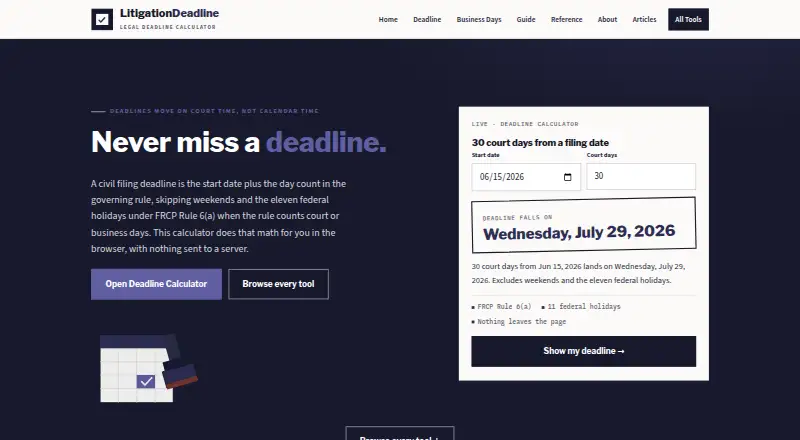
LitigationDeadline is a web-based set of calculators for counting civil litigation deadlines and business days. Its Deadline Calculator adds or subtracts calendar days or court days from a starting date. The Business Days Calculator counts inclusively between two dates and reports calendar days, weekends, and federal holidays separately. For court and business day counts, the calculators skip weekends and the eleven U.S. federal holidays. The site also offers a 2026 civil litigation deadline reference with FRCP and FRAP citations and a downloadable CSV. A Florida calculator covers nine listed deadlines, including answer, discovery, appeal, and proposal for settlement periods.
Dates, counts, and results are processed locally in JavaScript and are not sent to LitigationDeadline or third parties. The site says Google Analytics collects visit information and Google AdSense serves display ads; its privacy policy also identifies Web3Forms. The calculators do not account for extra state, county, or court-specific closures. They are reference tools, not legal advice or a replacement for checking the governing rule. Use is free on the web without an account.
Who it suits
It suits people who need a reference tool for civil litigation date calculations, including users checking federal or listed Florida deadlines. Users should verify the governing rule and account for local closures themselves.
What it does well
- Free web access without an account
- Adds or subtracts calendar or court days
- Separates weekends and federal holidays in business-day counts
- Includes 2026 FRCP and FRAP deadline references
- Processes calculator results locally in JavaScript
What to know first
- Uses federal holidays only for court and business counts
- Does not include state, county, or court-specific closures
- Not legal advice or a substitute for checking rules
Limits
The calculators use federal holidays and do not include additional state, county, or court-specific closures. The site describes them as reference tools, not legal advice or a substitute for checking the governing rule.
Plans
| Plan | Billed and limits | Price |
|---|---|---|
| LitigationDeadline calculators | No account · Federal defaults only | Free |
As litigationdeadline.com lists them, read 15 Oct 2026. The maker's own page has the final word.
Getting started
- Visit the LitigationDeadline website.
- Open the Deadline Calculator or Business Days Calculator.
- Enter the date or date range and choose the relevant counting method.
- Consult the 2026 civil litigation reference or Florida calculator when relevant.
- Check the governing rule for the matter.
LitigationDeadline is a free web tool for counting litigation dates and consulting focused civil-deadline references. It is best for legal professionals and staff who need a quick federal-default calculation or a Florida deadline lookup. Its calculators are useful cross-checks, not substitutes for applying the rule and court calendar that govern a case.
Overview
The site concentrates on date arithmetic rather than case management: calculate a deadline from a start date, count business days across a range, or consult selected litigation references. That narrow scope keeps it useful for quick checks without an account, but it is not a court-rule library and does not review individual cases.
When counting court or business days, the calculators skip weekends and the eleven U.S. federal holidays. This is a clear default for routine federal-calendar work; it can miss state, county, or court-specific closures, so users must verify the relevant calendar and governing rule before relying on a result.
The 2026 civil litigation reference includes FRCP and FRAP citations and is downloadable as a CSV. A separate Florida calculator covers nine deadlines, including answer, discovery, appeal, and proposal-for-settlement periods. These are useful, bounded references, not comprehensive coverage of every jurisdiction or procedural question.
Key features
Deadline and business-day calculators
The Deadline Calculator adds or subtracts calendar days or court days from a date. The Business Days Calculator counts inclusively between two dates and breaks out calendar days, weekends, and federal holidays. The pair covers common counting tasks without requiring a broader calendaring workflow, though the federal-holiday assumption makes local verification essential.
References and Florida deadlines
The cited 2026 reference and CSV offer a convenient way to consult selected federal civil deadlines, while the Florida calculator narrows in on nine specified deadlines. The citations help users orient a check, but the site's reference-only status means the governing rule still needs to be confirmed for each matter.
Privacy and corrections
Dates, day counts, and calculation results run locally in JavaScript and are not sent to LitigationDeadline or third parties. The site separately says Google Analytics collects visit information such as pages viewed, approximate IP location, browser type, and referring site; Google AdSense serves display ads. Its privacy policy also identifies Web3Forms among the third-party services it uses. Users can submit citation, deadline, or calculator corrections through a contact form for review.
Pricing
The LitigationDeadline calculators plan costs nothing. It requires no account and has no cost, with federal defaults only. That makes it suitable for occasional users who need basic calculations or the focused references; the trade-off is limited jurisdictional coverage and no court-rule library. There is no free trial because the plan is free, and no paid tier is needed for the described calculator access.
Platforms
LitigationDeadline runs on the web in a browser. It does not require an account for its free calculators, which suits quick desktop or mobile-browser checks, but the published platform scope is web rather than a dedicated app.
Who it's for
Lawyers, paralegals, and other legal staff handling civil matters can use it for straightforward date arithmetic, federal-default checks, or the limited Florida deadlines. It is less suitable as a primary calendaring system for teams that need broad court-specific rules, case management, or reliable treatment of local closures. The operator, Chris Terry through Encore Editorial, says the site is not a law firm, court service, or bar-association service, and does not review individual cases.
Pros and cons
- Pros: Free calculators require no account, so users can make quick date calculations without a signup step.
- Pros: Inclusive business-day counts separate weekends and federal holidays, making the result easier to inspect than a single total.
- Pros: The 2026 reference includes FRCP and FRAP citations and a CSV download, while the Florida calculator covers nine named deadline types.
- Pros: Calculation inputs and results stay local in JavaScript rather than being sent to the site or third parties.
- Cons: Federal holidays are the only holiday defaults; additional state, county, or court closures must be accounted for separately.
- Cons: The reference is not a court-rule library or legal advice, so users must verify the governing rule and date in context.
- Cons: Google Analytics visit tracking and AdSense display ads mean the site is not free of third-party tracking and advertising.
Alternatives
Legal Calendaring Software is the broader category to explore if the need extends beyond a standalone deadline calculator.
- ClockOrbit Court Deadline Calculator is another free web option with no payment required to use any tool; choose it when you want to compare a similarly no-cost calculator.
- Deadline Engine offers a free calculator with citations and calculation steps and no account requirement, plus a one-off Evidence Record plan at 19.99 USD; consider it when those calculation steps or that paid record option fit the task.
- JudgeCalc has a free calculator, a free trial, and a Pro plan billed per seat monthly or yearly; consider it when a trial or seat-based plan is relevant.
- Court Deadline Calculator is a free web service with basic deadline calculation tools; pick it if that basic toolset is the better fit.
- Dockets.ca is a paid option available on Android, iOS, Linux, macOS, web, and Windows.
- Case Calendar is a free option for Linux, macOS, self-hosting, web, and Windows.
- CourtAlert Case Management is a paid web, Windows, and self-hosted option; pricing is by inquiry, with cloud hosting carrying a fee in addition to the software license.
- Docket Enterprise is a paid on-premise application for Android, iOS, self-hosting, and Windows; contact BEC for pricing and a demo.
Verdict
Choose LitigationDeadline for free, no-account date calculations, especially when a federal-default count or one of its focused Florida references answers the immediate question. Its cited reference, CSV, and transparent calculation privacy are useful strengths. Look elsewhere for comprehensive court calendars or broader calendaring workflows, and always check local closures and the rule governing the case.
Verdict
LitigationDeadline combines date calculators with a cited 2026 reference and a Florida deadline calculator. Its federal-holiday assumptions and reference-only status mean users need to check applicable rules and local closures.
Questions
How much does LitigationDeadline cost?
It is free to use, with no account required.
Is there a free trial?
No free trial is offered; the calculators have a free plan.
What platforms does it support?
LitigationDeadline is browser-based and available on the web.
Does LitigationDeadline account for court holidays?
Its calculators skip weekends and the eleven U.S. federal holidays, but do not account for additional state, county, or court-specific closures.
What does the site provide for Florida deadlines?
Its Florida calculator covers nine listed deadlines, including answer, discovery, appeal, and proposal for settlement periods.
Who operates LitigationDeadline?
The site says it is operated by Chris Terry through Encore Editorial.
Facts from LitigationDeadline's own pages
- Advertising
- The privacy policy says Google AdSense displays ads and may set personalization cookies. · litigationdeadline.com, 15 Oct 2026
- Analytics
- The privacy policy says Google Analytics collects page, approximate IP-location, browser and referrer data in aggregate. · litigationdeadline.com, 15 Oct 2026
- API or SDK
- No public API, SDK or developer documentation is described on the reviewed official pages. · litigationdeadline.com, 15 Oct 2026
- Business-day calculator
- The business-day tool counts inclusively between two dates and reports business, calendar, weekend and federal-holiday totals. · litigationdeadline.com, 15 Oct 2026
- Contact processor
- The contact form uses Web3Forms to transmit submitted name, email and message details. · litigationdeadline.com, 15 Oct 2026
- CSV export
- The 2026 reference page provides a downloadable CSV of its deadline table. · litigationdeadline.com, 15 Oct 2026
- Data collection
- The site says Google Analytics collects visit data including pages viewed, approximate IP location, browser type, and referring site, while Google AdSense serves display ads. · litigationdeadline.com, 4 Oct 2026
- Deadline calculator
- The main calculator adds or subtracts calendar or court days from a chosen date. · litigationdeadline.com, 15 Oct 2026
- Editorial authorship
- Encore Editorial says every published piece carries a named author with an identifiable online presence. · encoreeditorial.us, 15 Oct 2026
- Federal holiday handling
- Court and business-day calculations omit weekends and eleven U.S. federal holidays listed under FRCP Rule 6(a)(6). · litigationdeadline.com, 15 Oct 2026
- Federal reference
- The 2026 reference table covers federal answer, discovery-response and appeal periods with FRCP and FRAP citations. · litigationdeadline.com, 15 Oct 2026
- Florida answer period
- The Florida calculator lists 20 days for a private defendant to answer a complaint and 40 days for the state or its agencies, subject to stated exceptions. · litigationdeadline.com, 15 Oct 2026
- Florida calculator
- A separate Florida tool models nine listed deadlines, including injury limitation, answer, discovery, appeal and settlement-proposal periods. · litigationdeadline.com, 15 Oct 2026
- Florida coverage
- The Florida calculator covers nine listed Florida deadlines, including answer, discovery, appeal, and proposal for settlement periods. · litigationdeadline.com, 4 Oct 2026
- Florida injury limit
- The Florida page states that negligence claims accruing from March 24, 2023 generally have a two-year limitation period. · litigationdeadline.com, 15 Oct 2026
- Independent publisher profile
- Encore Editorial describes itself as a small independent editorial shop without a data-science team or lobbyist. · encoreeditorial.us, 15 Oct 2026
- Integrations
- The privacy policy names Google Analytics, Google AdSense and Web3Forms as site services; it does not describe calendar or case-management integrations. · litigationdeadline.com, 15 Oct 2026
- Intended users
- The site describes its tools as reference tools for counting civil litigation dates and says they are not legal advice or a substitute for checking the governing rule. · litigationdeadline.com, 4 Oct 2026
- Licence
- The reviewed official pages do not state an open-source licence for the calculators or site code. · litigationdeadline.com, 15 Oct 2026
- Limit: jurisdiction coverage
- The Florida tool covers nine selected deadlines rather than every Florida rule or claim-specific period. · litigationdeadline.com, 15 Oct 2026
- Limit: legal advice
- The site states that its calculators and articles are informational references, not legal advice or case review. · litigationdeadline.com, 15 Oct 2026
- Limit: local closures
- The calculators do not include additional state, county or court-specific closure days beyond their federal assumptions. · litigationdeadline.com, 15 Oct 2026
- Limits
- The calculators use federal holidays and do not account for additional state, county, or court specific closures. · litigationdeadline.com, 4 Oct 2026
- No account
- The homepage says the tools require no account and have no cost. · litigationdeadline.com, 15 Oct 2026
Where LitigationDeadline stands on Freedom251
- Legal Calendaring Software#6 of 20