Freedom251 › Legal Calendaring Software

Deadline Engine
What Deadline Engine is
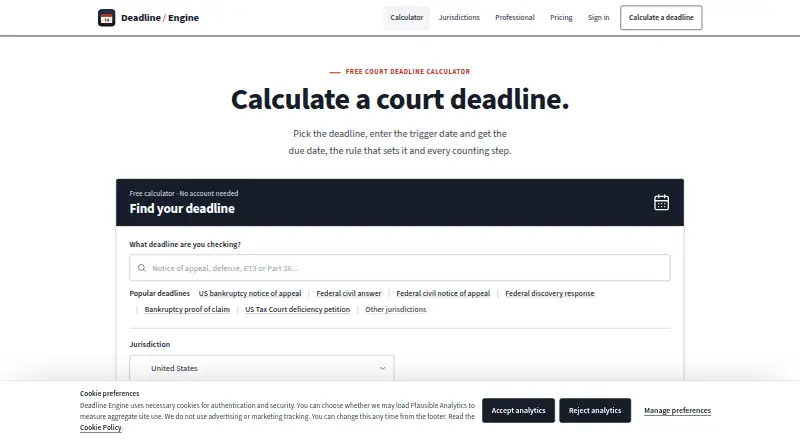
Deadline Engine calculates court and procedural deadlines and shows the governing citation alongside the calculation steps. Its catalog lists 4,871 deadline rules across 20 jurisdictions. The web service uses deterministic rule logic rather than AI, accounting for deemed service, applicable clear-day rules, business-day adjustments, official bank holidays, and court office closures. The free calculator requires no account. Users can export matters as CSV or JSON, with PDF and calendar exports available per matter. Professional adds individual matters with histories of eligible server-recomputed calculations, calendar feeds, and downloadable ICS files. An Evidence Record costs $19.99, paid once and creates a permanent PDF for one eligible server-recomputed calculation. Professional costs $29.99 a month or $299.99 a year. The service is intended for legal professionals such as solicitors, barristers, paralegals, and compliance professionals. It provides procedural information, not legal advice, and does not determine jurisdiction or decide whether a rule applies to a case.
Who it suits
It suits legal professionals who need to calculate procedural deadlines and view the rule citation and working. Professional may suit individuals who need matter histories and calendar feeds.
What it does well
- Shows citations and calculation steps.
- Free calculator requires no account.
- Accounts for holidays and court office closures.
- Professional includes calendar feeds and matter histories.
What to know first
- Does not determine jurisdiction or rule applicability.
- Users must verify dates against rules and case facts.
- Professional costs $29.99 a month.
Limits
The free plan provides deadline calculations, citations, and calculation steps. The one-off Evidence Record covers one eligible server-recomputed calculation; Professional provides unlimited matters and calculation records, plus calendar feeds.
Plans
| Plan | Billed and limits | Price |
|---|---|---|
| Free calculator | Calculate deadlines · view citations and calculation steps · no account required | Free |
| Evidence Record | one-off · One eligible server-recomputed calculation as a permanent PDF with inputs, result, citation and working | $19.99, paid once |
| Professional monthly | per month · Individual plan · unlimited matters and calculation records · calendar feeds · two-working-day support reply target | $29.99 a month |
| Professional annual | per year · Individual plan · unlimited matters and calculation records · calendar feeds · two-working-day support reply target | $299.99 a year |
As deadlineengine.com lists them, read 29 Sept 2026. The maker's own page has the final word.
Getting started
- Open the Deadline Engine website in a web browser.
- Use the free calculator without creating an account, or select a paid option.
- Enter the information needed for a calculation.
- Review the result, citation, and calculation steps.
- Export matters as CSV or JSON, or use the available per-matter PDF and calendar exports.
Overview
Deadline Engine is a web-based calculator for court and procedural deadlines, built for individual legal professionals who need to see how a date was reached. Its strongest case is transparent, rule-based calculation with citations and working; it is not a substitute for deciding which rule governs a matter.
The catalog spans 4,871 rules across 20 jurisdictions. That reach is useful when checking procedural dates, but the engine does not determine jurisdiction, interpret evidence, read court orders, or decide whether a rule applies. It presents procedural information rather than legal advice, and users must verify dates against the rules and case facts.
Key features
Calculations use deterministic rule logic rather than AI. The engine accounts for deemed service, clear-day rules where applicable, business-day adjustments, official bank holidays, and court office closures. Seeing the citation and calculation steps makes it easier to review the arithmetic and its stated basis, though it cannot resolve uncertainty about the facts or the governing rule.
Professional saves eligible calculations recomputed by the server to individual matters and retains their history. Users can export matters as CSV or JSON, and export individual matters as PDFs or calendar files. Calendar feeds and downloadable ICS files can carry deadlines into a calendar; sync is one-way, not a two-way update loop.
The privacy approach is suited to calculations that do not need client or case identifiers: the service does not accept file uploads and does not require client names, court references, party names, or matter details to calculate. Its stated safeguards include TLS in transit, hosted-provider encryption at rest, row-level security on user-owned tables, access controls, and audit logging. Support targets an initial response within five UK working days, shortened to two UK working days for Professional subscribers.
Pricing
The Free calculator costs nothing, requires no account, and includes deadline calculations with citations and calculation steps. It is a sensible way to check the calculation approach, but it does not include matter records, retained calculation history, or calendar feeds.
Evidence Record costs $19.99, paid once, billed one-off. It turns one eligible server-recomputed calculation into a permanent PDF with inputs, result, citation, and working. That suits an occasional need for a durable record, but it is a single-calculation purchase rather than ongoing matter management.
Professional monthly costs $29.99 a month, billed monthly; Professional annual costs $299.99 a year, billed yearly. Both are individual plans with unlimited matters and calculation records, calendar feeds, and a two-working-day support reply target. Annual billing is lower than paying the monthly rate for twelve months, but commits the user for a year. No free trial is offered. Professional is aimed at an individual who needs continuing records and calendar access; teams seeking multiple seats should not assume this individual plan covers them.
Platforms
Deadline Engine runs on the web. That keeps access browser-based, while its calendar capability sends information one way rather than synchronizing edits back into the service.
Who it's for
The product is developed for individual solicitors, barristers, paralegals, and compliance professionals. It is a good fit for someone who wants a visible calculation trail and, on a paid plan, a matter-based record. It is a poor fit for anyone expecting software to interpret an order, assess evidence, or select the applicable rule without professional review.
Pros and cons
- Pros: Citations and calculation steps accompany results, making the stated basis inspectable instead of presenting only a date.
- Pros: The rule logic accounts for service, counting conventions, working days, holidays, and court office closures, all of which can affect a deadline.
- Pros: Free calculations require no account, while Professional adds unlimited individual matter records and calendar feeds.
- Cons: The user remains responsible for jurisdiction, evidence, orders, and applicability; rule coverage does not remove that legal judgment.
- Cons: Calendar sync is one-way, and Professional is described as an individual plan rather than a team offering.
- Cons: The free plan does not provide retained matter histories, and ongoing records and feeds require a paid subscription.
Alternatives
For a wider category comparison, see Legal Calendaring Software.
Choose ClockOrbit Court Deadline Calculator if you want a free web tool whose tools require no payment. LitigationDeadline may suit users who specifically want no-account, no-cost calculators with federal defaults only. Court Deadline Calculator is another free option for basic deadline calculations.
Consider Dockets.ca if you need an app across mobile, desktop, and web platforms. Case Calendar is a free option for Linux, Windows, or macOS. CalendarRules and CourtAlert Case Management are paid web alternatives. Deadlines.com may fit a larger caseload that needs unlimited users and nationwide coverage: its 30+ Cases plan is $20 a month, billed $20.00 per case/per month.
Verdict
Deadline Engine is best for an individual legal professional who values a reviewable procedural calculation and wants optional matter records and calendar feeds. Its clearest advantage is showing the citation and working alongside deterministic calculations; look elsewhere if you need software to determine which rule applies, a two-way calendar connection, or a team plan.
Verdict
Deadline Engine presents procedural calculations with citations and working, but it does not decide how a rule applies to a case. Users should verify dates against the rules and case facts.
Questions
How much does Deadline Engine cost?
The free calculator costs nothing. An Evidence Record costs $19.99, paid once. Professional costs $29.99 a month or $299.99 a year.
Can I use the calculator without an account?
Yes. The Free calculator plan includes deadline calculations, citations, and calculation steps without requiring an account.
What does Professional add?
Professional includes unlimited matters and calculation records, calendar feeds, and a two-working-day support reply target. It is offered monthly or annually.
Which platform does Deadline Engine support?
Deadline Engine is a web service.
Does it use AI to calculate deadlines?
No. Its methodology says calculations use deterministic rule logic and do not use AI.
Is Deadline Engine legal advice?
No. It describes its output as procedural information rather than legal advice and instructs users to verify dates against rules and case facts.
Facts from Deadline Engine's own pages
- Audience
- The About page says the product is developed for individual legal professionals, including solicitors, barristers, paralegals and compliance professionals. · deadlineengine.com, 29 Sept 2026
- Calculation method
- The methodology says calculations use deterministic rule logic and that Deadline Engine does not use AI to calculate deadlines. · deadlineengine.com, 29 Sept 2026
- Counting rules
- The methodology says the engine handles deemed service, clear-day rules where applicable, business-day adjustments, official bank holidays and court office closures. · deadlineengine.com, 29 Sept 2026
- Coverage
- The homepage states that the catalog contains 4,871 deadline rules across 20 jurisdictions. · deadlineengine.com, 29 Sept 2026
- Exports
- The help page says users can export matters as CSV and JSON, with per-matter PDF and calendar exports. · deadlineengine.com, 29 Sept 2026
- Headquarters
- Mildenhall, Bury St. Edmunds, England, UK · deadlineengine.com, 28 Sept 2026
- Legal boundary
- Deadline Engine describes itself as procedural information rather than legal advice and instructs users to verify dates against rules and case facts. · deadlineengine.com, 29 Sept 2026
- Notable limits
- The methodology says the engine does not determine jurisdiction, interpret evidence, read court orders, or decide whether a rule applies to a case. · deadlineengine.com, 29 Sept 2026
- Privacy
- The privacy policy says Deadline Engine does not accept file uploads and does not require client names, court references, party names or matter details for calculations. · deadlineengine.com, 29 Sept 2026
- Professional features
- Professional saves eligible server-recomputed calculations to individual matters, retains their history, and provides calendar feeds and downloadable ICS files. · deadlineengine.com, 29 Sept 2026
- Purpose
- Deadline Engine calculates court and procedural deadlines and displays the governing citation and calculation steps. · deadlineengine.com, 29 Sept 2026
- Security
- The Data Processing Addendum lists TLS in transit, hosted-provider encryption at rest, row-level security on user-owned tables, access controls and audit logging. · deadlineengine.com, 29 Sept 2026
- Support
- The help page states an initial response target of five UK working days, or two UK working days for Professional subscribers. · deadlineengine.com, 29 Sept 2026
Where Deadline Engine stands on Freedom251
- Legal Calendaring Software#4 of 20