Freedom251 › Docketing Software

Bailiff
What Bailiff is
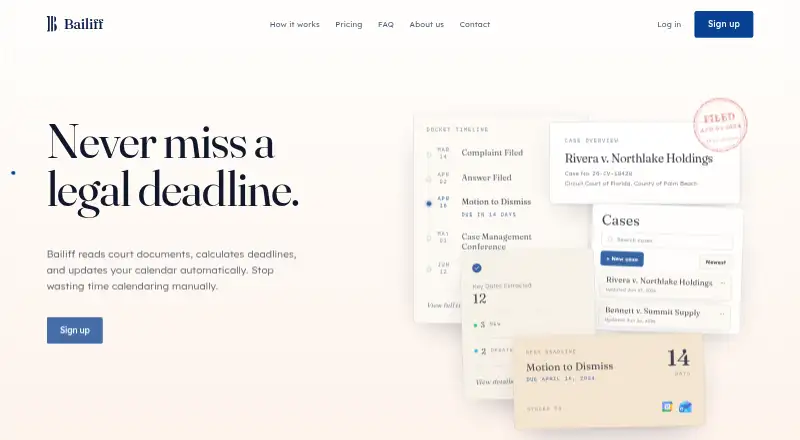
Bailiff helps legal professionals manage court deadlines from court documents. Upload a document and it calculates proposed deadlines and events; review the suggestions before syncing approved items to a calendar. Each deadline includes the event that triggers it, the relevant source language, and the calculation path, while the original document remains connected to the deadline and its review status. When a new filing is uploaded, Bailiff checks it against existing events so a proposed change can be reviewed before calendars are updated.
The web service supports court orders and scheduling documents from Florida and Texas state courts, as well as all Federal courts. It connects to Google Calendar and Outlook through API, with one-way syncing, customizable reminders, and timezone support. The Bailiff Plan costs $35 a month per seat and includes unlimited PDF processing, team collaboration, priority email support, and a 14-day free trial with no credit card required. Bailiff states that it encrypts connections with 256-bit SSL and processes documents in isolation without sharing them. Customers can cancel anytime without fees; the site also offers a 30-day money-back guarantee for legal professionals.
Who it suits
Bailiff suits legal professionals and teams that need to turn court documents into reviewed calendar deadlines. It is particularly relevant to users working with covered Florida, Texas, or Federal court documents and Google Calendar or Outlook.
What it does well
- Shows the triggering event, source language, and calculation path for deadlines.
- Checks new filings against existing events before calendar updates.
- Keeps source documents linked to deadlines and review status.
- Supports Google Calendar and Outlook with customizable reminders and timezone support.
- Includes unlimited PDF processing and team collaboration.
What to know first
- The plan costs $35 per seat per month.
- Calendar syncing is one-way.
- Court document coverage is specified for Florida, Texas, and Federal courts.
Limits
The trial lasts 14 days. The paid plan is $35 a month per seat; calendar syncing is one-way, and stated court coverage is Florida and Texas state courts plus all Federal courts.
Plans
| Plan | Billed and limits | Price |
|---|---|---|
| Bailiff Plan | per seat / month · 14-day free trial — no credit card · Unlimited PDF processing · Google Calendar & Outlook sync · Team collaboration features · Priority email support | $35 a month |
As getbailiff.com lists them, read 4 Oct 2026. The maker's own page has the final word.
Getting started
- Open https://getbailiff.com/ in a web browser.
- Start the 14-day free trial; no credit card is required.
- Upload court documents and review the proposed deadlines and events.
- Approve items and sync them to Google Calendar or Outlook.
Verdict
Choose Bailiff if your legal work needs automated deadline calculations, reviewable proposals, and calendar syncing for its covered courts. Look elsewhere if you need two-way calendar syncing or court coverage beyond Florida, Texas, and Federal courts.
Questions
How much does Bailiff cost?
The Bailiff Plan is $35 a month per seat.
Is there a free trial?
Yes. The plan includes a 14-day free trial with no credit card required.
Which calendars does Bailiff connect to?
It connects to Google Calendar and Outlook through API. Calendar syncing is one-way.
Which court documents does it support?
The site says it supports court orders and scheduling documents from Florida and Texas state courts, plus all Federal courts.
What does the plan include?
It includes unlimited PDF processing, Google Calendar and Outlook sync, team collaboration, and priority email support.
How does Bailiff handle documents?
Bailiff states that it processes documents in isolation without sharing them and uses 256-bit SSL encryption.
Facts from Bailiff's own pages
- Audit trail
- The source document remains attached to each proposed deadline, connecting it to the event, calculation, review status, and calendar entry. · getbailiff.com, 4 Oct 2026
- Cancellation
- The site says customers can cancel anytime without fees and offers a 30-day money-back guarantee for legal professionals. · getbailiff.com, 4 Oct 2026
- Change tracking
- New filings are checked against existing events so updates can be approved before calendars change. · getbailiff.com, 4 Oct 2026
- Court coverage
- The site says it supports court orders and scheduling documents from Florida and Texas state courts, plus all Federal courts. · getbailiff.com, 4 Oct 2026
- Deadline explanations
- Each deadline shows its triggering event, source language, and calculation path for review. · getbailiff.com, 4 Oct 2026
- Integrations
- Bailiff connects to Google Calendar and Outlook via API, with customizable reminders and timezone support. · getbailiff.com, 4 Oct 2026
- Intended users
- Bailiff describes itself as AI-powered deadline management for legal professionals and invites legal teams to use it. · getbailiff.com, 4 Oct 2026
- Purpose
- Bailiff reads court documents, calculates deadlines, and updates calendars automatically. · getbailiff.com, 4 Oct 2026
- Security
- The site states that it uses 256-bit SSL encryption and processes documents in isolation without sharing them. · getbailiff.com, 4 Oct 2026
- Support
- The plan includes priority email support, and the site lists [email protected] as its support contact. · getbailiff.com, 4 Oct 2026
- Trial
- The plan includes a 14-day free trial with no credit card required. · getbailiff.com, 4 Oct 2026
- Workflow
- Users upload court documents, review proposed deadlines and events, then sync approved items to calendars. · getbailiff.com, 4 Oct 2026
Where Bailiff stands on Freedom251
- Docketing Software#3 of 24
- Legal Calendaring Software#7 of 20