Freedom251 › Legal Calendaring Software
JudgeCalc
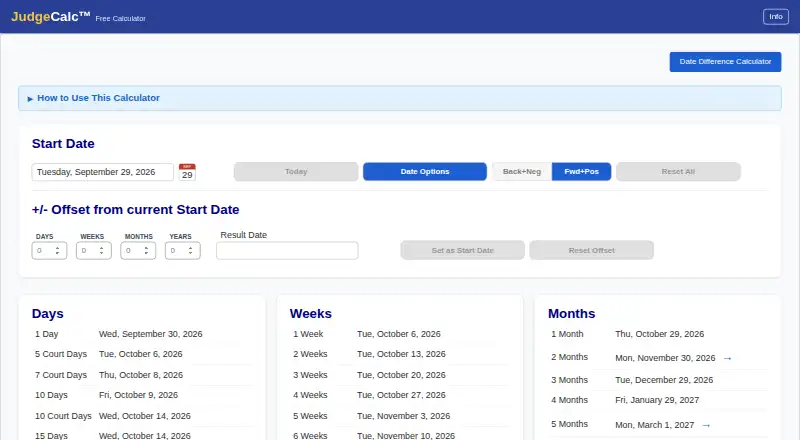
What JudgeCalc is
JudgeCalc is a web-based court and legal deadline calculator for working out dates under different counting rules. It presents 60 common deadlines spanning days, weeks, months, and years, and also lets users build a calculation from a custom combination of those units. Each calculation can count calendar days or court business days, with options to exclude weekends and holidays. The Back+Neg feature counts from an event toward an earlier date and can move an excluded landing date backward. When the chosen settings call for it, the free calculator excludes the 11 standard U.S. federal holidays automatically.
The free calculator costs nothing and does not require an account. Its arithmetic runs in the browser; dates entered are neither sent to the maker nor stored, and closing the page discards them. JudgeCalc Pro adds matter and client management, state holiday calendars, custom dates, deadline reports, and team permissions. Pro is billed per seat, monthly or yearly in advance. New firms receive 30 days free, and prices are shown before subscribing. The maker describes Pro as a deadline management system for law firms of any size and practice area. JudgeCalc is based in Florida, United States. Its terms state that it is not legal advice and that users must confirm deadlines against governing rules and orders.
Who it suits
The free calculator suits people who need to calculate a court or legal date without creating an account, including those who need custom date counts or holiday and weekend settings. Pro is aimed at law firms of any size and practice area that want matter and client management, reports, and team permissions alongside deadline calculations.
What it does well
- Offers 60 common deadlines across days, weeks, months, and years.
- Allows custom combinations of days, weeks, months, and years.
- Supports calendar-day and court-day counting with weekend and holiday exclusions.
- Free calculator runs in the browser without sending or storing entered dates.
- Pro includes matter and client management, reports, and team permissions.
What to know first
- Pro pricing is shown only before subscribing.
- Pro is billed per seat, monthly or yearly in advance.
- Users must verify deadlines against governing rules and orders.
Limits
The free calculator calculates deadlines. Matter and client management, state holiday calendars, custom dates, reports, and team permissions are Pro features. Pro is billed per seat, and its price is shown before subscribing.
Plans
| Plan | Billed and limits | Price |
|---|---|---|
| JudgeCalc Free Calculator | browser calculator · no sign-up or login · 11 federal holidays | Free |
| JudgeCalc Pro | per seat, billed monthly or yearly in advance · 30-day firm trial · prices shown before subscribing · matter and client management · state and custom holidays · reports · team permissions | On request |
As judgecalc.com lists them, read 14 Oct 2026. The maker's own page has the final word.
Getting started
- Open https://judgecalc.com/ in a web browser.
- Use the free calculator without signing up or logging in.
- Choose a common deadline or enter a custom combination of days, weeks, months, or years.
- Select calendar days or court days and configure weekend and holiday exclusions.
- For Pro, review the displayed price and select monthly or yearly billing per seat; new firms get 30 days free.
JudgeCalc is a browser-based calculator for court and legal deadlines, with a separate Pro tier for firm workflow. It suits anyone who needs configurable date arithmetic, while firms that need matter management and team permissions may find Pro a better fit. The free calculator is the clearest reason to choose it; firms should weigh Pro’s seat-based billing against their need for its added tools.
Overview
JudgeCalc calculates legal deadlines; it does not analyze or rate judges. The free calculator offers a focused way to work out dates without an account, while Pro adds the management features that turn deadline arithmetic into a firm system. That split makes it practical for occasional individual calculations, but firms relying on Pro should account for a per-seat subscription whose price is shown before subscribing.
Free calculations run in the browser. Entered dates are not sent to the maker or stored, and closing the page discards them, a useful privacy boundary for one-off work. For Pro, the maker says firm and client information is used only to provide the service to that firm, is not sold, and is not used for advertising. The privacy policy says connections are encrypted, passwords are stored as one-way hashes, and firm access follows the firm’s settings. It names Stripe for payments, Resend for email, Cloudflare for site delivery and analytics, and a hosting provider for Pro data storage.
Key features
Configurable deadline arithmetic
The calculator presents 60 common deadlines across days, weeks, months, and years, and accepts custom combinations of those units. Users can choose calendar days or court (business) days and set weekend and holiday exclusions. This range should cover routine checks while leaving room for less standard intervals; choosing the right counting settings remains essential to a useful result.
Backward counting and holidays
Back+Neg supports counting backward from an event and moves an excluded landing date backward. The free calculator automatically excludes the 11 standard U.S. federal holidays, subject to the selected settings. That is useful for U.S. calculations, but firms that need state holiday calendars must move to Pro.
Privacy and responsibility
Browser-only arithmetic means dates entered in the free calculator stay on the device according to the maker’s description. Pro handles firm matters and client information, with the stated use and access controls aimed at keeping that data within the firm’s service. JudgeCalc is not legal advice, and users remain responsible for checking each deadline against governing rules and orders.
Pricing
JudgeCalc Free Calculator — free. It includes the free calculator, requires no sign-up or login, and is the sensible choice for individuals or occasional calculations. It gives up matter and client management, state holiday calendars, custom dates, deadline reports, and team permissions.
JudgeCalc Pro — custom pricing. It adds matter and client management, state holiday calendars, custom dates, deadline reports, and team permissions. It is billed per seat, monthly or yearly in advance, and new firms get 30 days free; prices are shown before subscribing. The seat-based structure suits firms that need shared workflow, but per-seat costs can matter as a team grows. The free trial provides a way for a new firm to evaluate the service before committing.
Platforms
JudgeCalc is a web app, so the calculator is accessed through a browser. Its browser-based free arithmetic also supports the maker’s stated approach of not sending or storing entered dates.
Who it's for
The free tier fits legal professionals and other users who need a deadline calculation without creating an account. Pro is positioned for law firms of any size and practice area that want client and matter management, reports, state calendars, custom dates, and permissions in one deadline management system. Users seeking judicial analytics or judge ratings should choose a different category of product.
Pros and cons
- Pro: The 60 common deadlines, custom intervals, and calendar or court-day settings give users useful control over routine and nonstandard calculations.
- Pro: The free calculator needs no account and keeps its arithmetic in the browser, limiting exposure of entered dates.
- Pro: Pro combines matter and client management with reports, state holiday calendars, custom dates, and team permissions for firms that need more than a calculator.
- Con: Pro’s per-seat monthly or yearly billing can raise costs for larger teams, and the subscription price is custom.
- Con: The free calculator’s automatic holiday exclusion covers standard U.S. federal holidays; state holiday calendars are a Pro feature.
- Con: Users still have to confirm results against applicable rules and orders, so the calculator does not replace legal judgment.
Alternatives
For a broader comparison, see Legal Calendaring Software. Choose ClockOrbit Court Deadline Calculator if a free web tool with no payment requirement is the priority. Deadline Engine offers a free calculator with citations and calculation steps, plus a one-off Evidence Record plan; it may suit readers who want those calculation records. LitigationDeadline is a free web option with federal defaults for readers who want a no-account calculator. Court Deadline Calculator is another free option for basic deadline calculations. Consider Dockets.ca for its paid offering across mobile, desktop, and web platforms. Case Calendar is a free option available on web, desktop, and self-hosted platforms. CourtAlert Case Management is a paid case-management alternative with cloud and on-premise options. Docket Enterprise is a paid on-premise application with mobile and Windows support.
Verdict
Choose JudgeCalc Free Calculator for occasional browser-based deadline arithmetic without an account, especially if keeping entered dates in the browser matters. Firms that need managed matters, clients, reports, and permissions should consider Pro, with its 30-day trial and per-seat subscription. If the team does not need those workflow features, the free tier is the more direct fit; whichever plan you choose, confirm every result against the governing rules and orders.
Verdict
Choose JudgeCalc Free Calculator for browser-based court date arithmetic without an account, or consider Pro for firm matters, client management, reports, and team permissions. Firms comparing Pro should review the price shown before subscribing, since no amount is provided here. Users remain responsible for confirming each result against governing rules and orders.
Questions
How much does JudgeCalc cost?
The JudgeCalc Free Calculator costs nothing. Pro is billed per seat monthly or yearly in advance, with prices shown before subscribing.
Is there a free plan or trial?
Yes. The free calculator requires no sign-up or login. New firms get 30 days free on Pro.
What does Pro add?
Pro adds matter and client management, state holiday calendars, custom dates, deadline reports, and team permissions.
Which platforms does JudgeCalc support?
JudgeCalc is available on the web.
Does the free calculator store entered dates?
The maker says calculations run in the browser, entered dates are not sent to it or stored, and closing the page discards them.
Is JudgeCalc legal advice?
No. Its terms say it is not legal advice, and users are responsible for confirming deadlines against governing rules and orders.
Facts from JudgeCalc's own pages
- Backward calculations
- The Back+Neg shortcut counts backward from a hearing or trial date. · judgecalc.com, 14 Oct 2026
- Backward counting
- The Back+Neg feature supports counting backward from an event and moving an excluded landing date backward. · judgecalc.com, 7 Oct 2026
- Browser processing
- Free-calculator arithmetic runs in the browser and entered dates are not sent to the maker or stored. · judgecalc.com, 14 Oct 2026
- Calendar-day counting
- Calendar-day mode counts every day and adjusts a result that lands on an excluded date. · judgecalc.com, 14 Oct 2026
- Common deadlines
- The calculator displays 60 common deadlines across days, weeks, months, and years. · judgecalc.com, 7 Oct 2026
- Company legal status
- Florida records list Black Robe Solutions, LLC as an active Florida limited-liability company. · search.sunbiz.org, 14 Oct 2026
- Copy formats
- Results can be copied in long or short date formats. · judgecalc.com, 14 Oct 2026
- Counting options
- Users can choose calendar days or court (business) days and configure weekend and holiday exclusions. · judgecalc.com, 7 Oct 2026
- Court-day counting
- Court-day mode excludes weekends and holidays from the count. · judgecalc.com, 14 Oct 2026
- Custom calculations
- Users can enter custom combinations of days, weeks, months, or years to calculate a deadline. · judgecalc.com, 7 Oct 2026
- Custom offsets
- Users can enter custom day, week, month and year offsets. · judgecalc.com, 14 Oct 2026
- Data retention
- After a firm leaves, the maker says it will export or delete firm information within 30 days on request. · judgecalc.com, 14 Oct 2026
- Date chaining
- Double-clicking a result makes it the next starting date for chained calculations. · judgecalc.com, 14 Oct 2026
- Date tables
- The free calculator presents preset offsets in days, weeks, months and years. · judgecalc.com, 14 Oct 2026
- Deadline responsibility
- The terms say JudgeCalc is not legal advice and users are responsible for confirming each deadline against governing rules and orders. · judgecalc.com, 7 Oct 2026
- Documentation
- JudgeCalc publishes a Quick Start Guide and a longer User Guide in PDF form. · judgecalc.com, 14 Oct 2026
- Federal holidays
- The free calculator includes the 11 standard U.S. federal holidays. · judgecalc.com, 14 Oct 2026
- Filing-window handling
- Mixed positive and negative offsets can represent filing windows, with suggestions when an excluded date falls outside the window. · judgecalc.com, 14 Oct 2026
- Free calculator privacy
- The free calculator does its arithmetic in the browser; entered dates are not sent to the maker or stored, and closing the page discards them. · judgecalc.com, 7 Oct 2026
- Headquarters
- Florida, United States · judgecalc.com, 28 Sept 2026
- Holiday exclusions
- The calculator can exclude holidays, weekends, both, or neither. · judgecalc.com, 14 Oct 2026
- Integrations
- The privacy policy names Stripe for payments, Resend for email, Cloudflare for delivery and analytics, and a hosting provider for Pro data. · judgecalc.com, 14 Oct 2026
- Integrations and providers
- The privacy policy names Stripe for payments, Resend for email, Cloudflare for site delivery and analytics, and a hosting provider for Pro data storage. · judgecalc.com, 7 Oct 2026
- Intended users
- JudgeCalc Pro is described as a deadline management system for law firms of any size and practice area. · judgecalc.com, 7 Oct 2026
Where JudgeCalc stands on Freedom251
- Legal Calendaring Software#5 of 20