Freedom251 › Legal Calendaring Software
Case Calendar
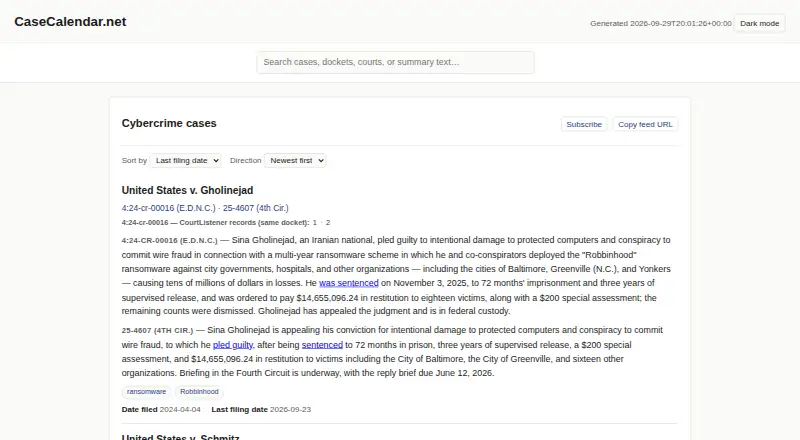
What Case Calendar is
Case Calendar is an open-source tool for turning federal court docket information from CourtListener into calendar feeds for hearings and filing deadlines. It creates an ICS feed for each case, which users can subscribe to from calendar apps that support iCalendar. It can also send events one way to Google Calendar or Microsoft 365 or Outlook after a one-time OAuth setup. Deadline tracking sends events classified as major to subscriber calendars and keeps procedural filings in an audit trail. Optional AI summaries draw on primary documents and dispositions, link action phrases to court documents, and refresh when certain documents or event statuses change. Events retain the court’s local timezone, including through daylight-saving changes. The Python command-line tool is installed from its public GitHub repository; its static index can be hosted behind an HTTP server. It supports hosted AI providers or local Ollama models. Local processing keeps docket text and PDFs on the host, according to the documentation. Use may involve API costs and CourtListener quota limits. The project warns that docket data can lag and date extraction can be wrong, so consequential dates should be checked against the source docket.
Who it suits
It is aimed at journalists, researchers, and others tracking public-interest cases. It may suit people who want docket events in calendar apps but can review source dockets and account for the stated reliability limits.
What it does well
- Creates per-case ICS feeds for calendar subscriptions
- Can send events to Google Calendar or Microsoft 365
- Keeps hearing times tied to court-local time zones
- Local Ollama processing avoids per-token API costs
- Open source under Apache-2.0
What to know first
- CourtListener docket updates may be delayed
- Date extraction can miss or misread dates
- Hosted AI use can incur API costs
- Not a replacement for attorney calendaring software
Limits
CourtListener quota limits apply, and docket updates depend on entries reaching CourtListener through PACER and RECAP; unmonitored dockets may be delayed by months or longer. Automated date extraction may miss or misread dates, so the project advises checking the source docket before relying on consequential dates.
Getting started
- Install the Python command-line tool from its public GitHub repository.
- Configure docket information and API credentials.
- Choose a hosted AI provider or configure a local Ollama model if using AI summaries.
- Generate per-case ICS feeds and subscribe with an iCalendar-compatible app.
- Optionally complete a one-time OAuth setup for Google Calendar or Microsoft 365 and Outlook.
- Host the generated static index behind an HTTP server if needed.
Case Calendar converts federal court docket activity into calendar feeds for journalists, researchers, and other public-interest monitors. It is best for technically comfortable users who can run a Python command-line tool and maintain their own setup. The bottom line is useful docket monitoring, but not a substitute for authoritative legal calendaring.
Overview
Case Calendar is open-source software that reads federal dockets from CourtListener and produces calendar entries for hearings and filing deadlines. Its command-line deployment and self-hosted configuration suit individuals or organizations that want control over data and infrastructure rather than a managed legal platform. The Apache-2.0 license permits use and modification, with seanthegeek identified as maintainer.
Its usefulness depends on the upstream docket. CourtListener updates arrive through PACER and RECAP, and an unmonitored docket can be delayed by months or longer. Extraction may also miss or misread dates, so consequential deadlines still require checking the source docket and professional calendaring procedures.
Key features
Case feeds and deadline filtering
The tool writes a separate ICS feed for each case. Any calendar application that supports iCalendar can subscribe to hearings and deadlines. Only deadlines classified as major reach subscriber calendars; procedural filings stay in an audit trail. This keeps a working calendar focused, but it is not a complete docket chronology.
Calendar connections and time zones
After a one-time OAuth setup, Case Calendar can push events one way to Google Calendar or Microsoft 365 and Outlook. It does not provide two-way editing or reconciliation. Events preserve the court’s local time zone, including daylight-saving changes, which is valuable when following hearings in multiple jurisdictions.
Updates and summaries
A real-time CourtListener webhook can bypass the daily polling quota. Without that arrangement, update timing follows polling limits and CourtListener’s own intake. Opt-in AI summaries use primary documents and dispositions, link action phrases to source court documents, and refresh when specified documents or event statuses change. Hosted models from Anthropic, Google Gemini, and OpenAI are supported. Ollama can run models locally, avoiding per-token API charges and keeping docket text and PDF contents on the host, although hosted or local model use still requires configuration and may affect operating costs.
Deployment and support
Installation comes from the public GitHub repository as a Python CLI. Users configure docket information and API credentials, then can host the generated static index behind an HTTP server. Bugs involving extraction, summaries, or other behavior are directed to the project’s GitHub repository. Use can consume CourtListener API quota and, when applicable, LLM API budget.
Pricing
Case Calendar is free and open source, with no paid tiers. That removes subscription fees, but users bear hosting, maintenance, API-quota management, and any hosted LLM charges. Ollama offers a route to avoid per-token API billing, while still requiring local computing resources. The free model fits technically capable monitors and organizations willing to operate their own tooling; readers seeking vendor-managed support, guaranteed freshness, or attorney-grade calendaring should look elsewhere.
Platforms
Supported environments are Linux, macOS, and Windows through WSL2. The application is self-hosted and web-accessible through its generated static index, rather than a conventional hosted SaaS installation.
Who it's for
Journalists, researchers, and public-interest observers tracking public federal cases are the clearest match. It also suits engineers or technically inclined teams that want reproducible, open-source feeds and local AI processing. It is a poor choice as the sole deadline system for attorneys or teams needing authoritative, continuously verified dates, because source delays and extraction errors remain possible.
Pros and cons
Pros
- Per-case ICS feeds: subscriptions work with standard iCalendar clients without locking readers into one calendar vendor.
- Major-deadline filtering: subscriber calendars stay less cluttered while procedural filings remain auditable.
- Local-time handling: court time zones persist through daylight-saving changes, reducing jurisdiction-related scheduling confusion.
- Open deployment: Apache-2.0 code, self-hosting, and Ollama support provide control over processing and data residency.
- Webhook option: real-time CourtListener updates can avoid the daily polling quota.
Cons
- Not authoritative: PACER/RECAP and CourtListener delays can leave dockets stale, potentially for months.
- Extraction risk: missed or misread dates make independent docket verification essential.
- Technical overhead: Python CLI installation, credentials, hosting, and quota management are the user’s responsibility.
- One-way sync: Google and Microsoft calendar pushes do not provide round-trip editing.
- Variable AI cost: hosted models may incur LLM charges, while local models require suitable host resources.
Alternatives
Choose Legal Calendaring Software when you need a broader category of purpose-built legal calendaring options. ClockOrbit Court Deadline Calculator is a free web tool for calculating legal deadlines without running a self-hosted docket pipeline. Pick Deadline Engine when you want cited calculations and calculation steps, with an optional one-off Evidence Record purchase. JudgeCalc suits readers wanting a no-login free calculator with a paid per-seat Pro tier. LitigationDeadline provides free, no-account federal-default calculators. Court Deadline Calculator is another free option for basic deadline calculations. Choose Dockets.ca for a paid service spanning mobile, desktop, and web platforms. CourtAlert Case Management fits organizations seeking cloud or on-premise case management with inquiry-based pricing. Docket Enterprise is an on-premise alternative priced by contact and demo.
Verdict
Choose Case Calendar if you monitor public federal cases and value open-source, self-hosted ICS feeds, local-time accuracy, and optional local AI processing. Look elsewhere if a missed or delayed docket entry could jeopardize a legal deadline: its upstream data and extraction limits mean it should remain a convenience layer, not your authoritative calendaring system.
Verdict
Case Calendar connects public federal dockets with calendar tools and separates major deadlines from procedural filings. Its maker cautions that docket delays and extraction errors mean users should verify consequential dates against the source docket.
Questions
Is Case Calendar free?
Its pricing model is free, and a free plan is available. It is open source under the Apache-2.0 license.
Which platforms does it support?
It supports Linux, macOS, and Windows via WSL2. It can also be self-hosted, and its generated static index can be hosted behind an HTTP server.
Which calendar apps can use its feeds?
It creates per-case ICS feeds for calendar apps that support iCalendar. It can optionally send events one way to Google Calendar and Microsoft 365 or Outlook after a one-time OAuth setup.
Does it use AI summaries?
AI summaries are optional. Supported choices include hosted APIs from Anthropic, Google Gemini, or OpenAI, and local models through Ollama.
Can docket information stay on my machine?
The documentation says local Ollama models keep docket text and PDF contents on the host and require no API key or per-token API cost.
Who maintains Case Calendar?
The public repository names seanthegeek as maintainer.
Facts from Case Calendar's own pages
- AI providers
- Installation supports hosted APIs from Anthropic, Google Gemini, or OpenAI, or local models through Ollama. · docs.casecalendar.net, 7 Oct 2026
- AI summaries
- Opt-in AI summaries use primary documents and dispositions, link action phrases to source court documents, and refresh when certain documents or event statuses change. · docs.casecalendar.net, 7 Oct 2026
- Calendar feeds
- It writes per-case ICS feeds that can be subscribed to from calendar apps supporting iCalendar. · docs.casecalendar.net, 7 Oct 2026
- Calendar integrations
- It can optionally push events to Google Calendar and Microsoft 365 or Outlook after a one-time OAuth setup. · docs.casecalendar.net, 7 Oct 2026
- Data limitations
- Updates depend on docket entries reaching CourtListener through PACER and RECAP, and unmonitored dockets may have delays of months or longer. · docs.casecalendar.net, 7 Oct 2026
- Deadline tracking
- It tracks filing deadlines and sends only those classified as major to subscriber calendars, while procedural filings remain in the audit trail. · docs.casecalendar.net, 7 Oct 2026
- Deployment
- Case Calendar is a Python command-line tool installed from its public GitHub repository, and its generated static index can be hosted behind an HTTP server. · docs.casecalendar.net, 7 Oct 2026
- Feeds
- It writes per-case calendars in standard ICS format for subscription from calendar apps that support iCalendar. · docs.casecalendar.net, 7 Oct 2026
- Intended users
- The project describes its intended users as journalists, researchers, and others tracking public-interest cases. · docs.casecalendar.net, 7 Oct 2026
- Legal-use limit
- The maker says Case Calendar is a convenience layer over public dockets, not a replacement for attorney calendaring software or the authoritative record. · docs.casecalendar.net, 7 Oct 2026
- License
- The public GitHub repository lists an Apache-2.0 license. · github.com, 7 Oct 2026
- License and maintainer
- The public repository identifies the project as open source under the Apache-2.0 license and names seanthegeek as maintainer. · github.com, 7 Oct 2026
- Limitations
- The documentation warns that CourtListener data can lag PACER filings and event extraction can miss or misread dates, and says the tool is not a replacement for attorney calendaring software. · docs.casecalendar.net, 7 Oct 2026
- Local processing
- The documentation says local Ollama models need no API key or per-token cost and keep docket text on the user's machine. · docs.casecalendar.net, 7 Oct 2026
- Operating costs
- The documentation says use can incur LLM API costs and CourtListener API quota limits; local Ollama models are also supported without per-token API costs. · docs.casecalendar.net, 7 Oct 2026
- Purpose
- Case Calendar turns federal court dockets from CourtListener into calendar feeds of hearings and filing deadlines. · docs.casecalendar.net, 7 Oct 2026
- Reliability limits
- The documentation warns that extraction can miss or misread dates and says to check the source docket before relying on consequential dates. · docs.casecalendar.net, 7 Oct 2026
- Security and privacy
- With a local Ollama model, docket text and PDF contents stay on the host, according to the documentation. · docs.casecalendar.net, 7 Oct 2026
- Self-hosting
- Case Calendar is a Python CLI installed from its source repository and configured with docket information and API credentials. · docs.casecalendar.net, 7 Oct 2026
- Support
- The documentation directs users to report extraction, summarization, or other bugs through the project’s GitHub repository. · docs.casecalendar.net, 7 Oct 2026
- Timezone handling
- Calendar events preserve the court’s timezone so hearing times remain tied to local court time through daylight-saving changes. · docs.casecalendar.net, 7 Oct 2026
- Time zones
- Calendar events preserve court-local time zones, including across daylight saving time changes. · docs.casecalendar.net, 7 Oct 2026
- Updates
- A real-time webhook receiver can accept CourtListener updates and bypass the daily polling quota. · docs.casecalendar.net, 7 Oct 2026
Where Case Calendar stands on Freedom251
- Legal Calendaring Software#1 of 20