Freedom251 › Email Cleanup Software
Leave Me Alone
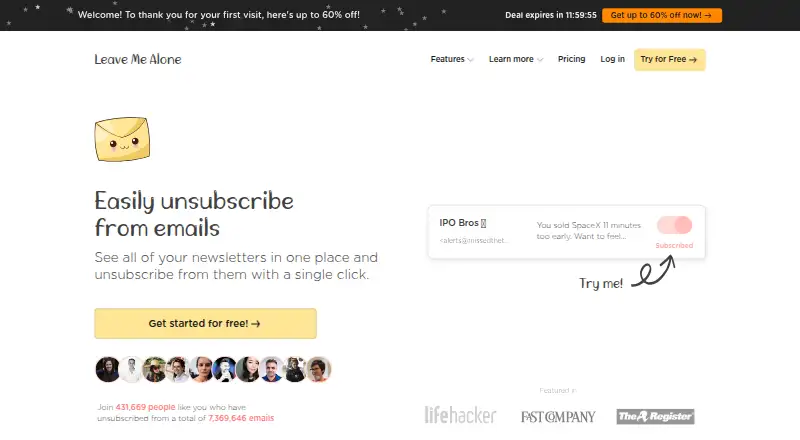
What Leave Me Alone is
Leave Me Alone gathers subscription emails from connected accounts and helps users unsubscribe from unwanted mailing lists. It follows unsubscribe links to carry out requests rather than merely filtering messages. Users can combine selected newsletters into Rollups delivered on a chosen schedule, while Screener holds messages from new senders until approval in a browser or through a daily digest email. Spam Blocker learns from unwanted inbox messages and blocks similar senders automatically. Supported accounts include Google and Microsoft services, Fastmail, Yahoo Mail, iCloud, AOL, Mail.com, and other IMAP-compatible mailboxes. The Android app can display mailing lists, unsubscribe, and connect more accounts; the site says an iOS app is coming soon. The homepage offers unsubscribing from 10 emails free without a credit card. Listed options include two plans at no cost and a Seven Day Pass at $19, paid once. The maker says it stores subscription-email metadata; Rollups fetch, encrypt, and store selected email content, and Spam Blocker reads some content for classification and training.
Who it suits
It suits people who want to review subscription mail across supported accounts and unsubscribe from mailing lists. Rollups, sender approval, and spam blocking may also suit users managing incoming email.
What it does well
- Carries out unsubscribe requests through mailing-list links
- Combines chosen newsletters into scheduled digests
- Supports Google, Microsoft, and IMAP accounts
- Free homepage use covers 10 unsubscribes
What to know first
- Bulk delete and archive are not available
- Android app is listed; iOS is coming soon
- Spam Blocker reads some email content
Limits
The free homepage offer covers unsubscribing from 10 emails. The Seven Day Pass costs $19, paid once and includes two email accounts with unlimited unsubscribes for seven days.
Plans
| Plan | Billed and limits | Price |
|---|---|---|
| Casual Emailer | $0/month, billed yearly; billed yearly at $0/year · 4 email accounts · Unlimited unsubscribes · Private Emails · Screener · Spam Blocker · Do-not-disturb mode · Priority senders · Rollups | Free |
| Inbox Zero Hero | $0/month, billed yearly; billed yearly at $0/year · Unlimited email accounts · Unlimited unsubscribes · Private Emails · Screener · Spam Blocker · Do-not-disturb mode · Priority senders · Rollups | Free |
| Seven Day Pass | $19 for 7 days · 2 email accounts · Unlimited unsubscribes for 7 days · Private Emails · Screener · Spam Blocker · Do-not-disturb mode · Priority senders · Rollups | $19, paid once |
As leavemealone.com lists them, read 8 Oct 2026. The maker's own page has the final word.
Getting started
- Open the Leave Me Alone website.
- Connect a supported email account.
- Use the free offer to unsubscribe from up to 10 emails, or choose a listed plan.
- Review new senders in the browser or by daily digest email.
- Install the Android app to manage mailing lists and connect additional accounts.
Leave Me Alone is an email-subscription manager that finds mailing lists, follows their unsubscribe links, and gives you controls for unfamiliar senders. It suits people who want more than a one-time cleanup, especially those managing several providers and willing to let a service process selected message content. Its strongest case is ongoing inbox control; its main trade-off is the access required for Rollups and Spam Blocker.
Overview
Leave Me Alone brings subscription emails from connected accounts into one view and performs real unsubscribes instead of merely hiding messages. That distinction makes it useful when the goal is to stop delivery at the source. Automatic cleanup rules extend the benefit beyond manual list management, while the absence of bulk delete and archive means it is not a general-purpose tool for clearing every old message.
Accounts can come from Gmail, Google Workspace, Outlook, Office 365, Hotmail, Live, MSN, Yahoo Mail, iCloud, AOL, Fastmail, Mail.com, and other IMAP-compatible mailboxes. Google users also get the maker’s Google Verified Application status and yearly security audits for continued access to restricted scopes.
Key features
Unsubscribing and organization
The service identifies mailing lists and lets you unsubscribe from them in one place. Unlimited unsubscribes on the paid pass and the named plans make it practical for a large backlog, while the free homepage offer covers 10 emails without a credit card. Rollups combine chosen newsletters into scheduled digest emails, a sensible compromise for readers who want fewer interruptions without losing every publication.
Screening and blocking
Screener holds messages from new senders until approval, with review in a browser or through a daily digest. This is a useful guard against unfamiliar mail, but it adds a review step that may not suit people who need every new sender delivered immediately. Spam Blocker learns from unwanted inbox messages and automatically blocks similar senders, trading convenience for broader message-content access.
Mobile and account management
The Android app shows mailing lists from connected accounts, supports unsubscribing, and lets you add more accounts. An iOS app is described as coming soon, so iPhone users should plan around the web experience. Breach Detection checks connected addresses against Have I Been Pwned and rechecks weekly on paid plans.
Data handling
Leave Me Alone stores subscription-email metadata. Rollups fetch, encrypt, and store selected email content, while Spam Blocker reads some content for classification and classifier training. That is a meaningful consideration for privacy-sensitive users, even though the service supports many major providers.
Pricing
The homepage offers unsubscribing from 10 emails free, with no credit card. The Casual Emailer plan is $0 per year, billed yearly at $0 per year, and includes four email accounts, unlimited unsubscribes, Private Emails, Screener, Spam Blocker, do-not-disturb mode, priority senders, and Rollups. It fits a household or individual with a limited number of inboxes.
Inbox Zero Hero is also $0 per year, billed yearly at $0 per year, with unlimited email accounts and the same feature set. It is the better fit when account count is the deciding constraint. The Seven Day Pass costs $19 once for seven days, supports two accounts, and includes unlimited unsubscribes during that period plus Private Emails, Screener, Spam Blocker, do-not-disturb mode, priority senders, and Rollups. It suits a short, intensive cleanup rather than ongoing use. The paid pricing note starts from $19, and the seven-day term is the material limit on that option.
Platforms
Leave Me Alone runs on the web and Android. Connected-account support spans Google, Microsoft, Fastmail, Yahoo Mail, iCloud, AOL, and other IMAP mailboxes. iOS is not currently offered as a mobile app; the maker says one is coming soon.
Who it's for
Choose it if you receive newsletters across multiple providers, want actual list removals, or need screening and learned blocking for unfamiliar senders. The free account options make it approachable for light or multi-account use, while the Seven Day Pass is tailored to a concentrated purge. Look elsewhere if you require bulk deletion and archiving, an iOS app today, or a service that never reads message content for filtering features.
Pros and cons
Pros
- Real unsubscribes: it follows unsubscribe links, so unwanted lists can stop sending rather than simply being hidden.
- Broad provider coverage: major Google, Microsoft, consumer, and IMAP mailboxes can be connected.
- Useful controls beyond cleanup: Rollups, Screener, Spam Blocker, do-not-disturb mode, and priority senders address ongoing inbox flow.
- Free entry points: 10 free unsubscribes and $0 yearly plans remove an upfront payment barrier.
Cons
- No bulk delete or archive: it cannot replace a general inbox-emptying tool.
- Content access for advanced features: Rollups stores selected encrypted content and Spam Blocker processes content for classification and training.
- Limited mobile reach: Android is supported, but iOS remains forthcoming.
- Seven Day Pass expires quickly: the $19 option covers only seven days and two accounts.
Alternatives
For a wider comparison, see Email Cleanup Software.
Clean Email is the stronger choice if you want Android, iOS, macOS, and web coverage, with a free account that cleans up to 1,000 messages, though that tier omits Screener, Sender and Mailing List Settings, and Auto Clean.
Pick the Gmail Bulk Unsubscribe & Cleanup Tool for a free, MIT-licensed option that runs on desktop systems, web, or self-hosting and focuses on Gmail cleanup.
InboxSweeper suits readers wanting free, open-source cleanup with no account or subscription.
Cleanfox is a free Android, iOS, and web option for inbox cleaning and newsletter unsubscribing.
Gmail Unsubscriber is a free open-source choice centered on Gmail.
Paperweight is a freemium, MIT-licensed desktop option for users who want inspectable code.
Trimbox offers Android, iOS, web, and extension access, with the first 10 unsubscribes free.
Unroll.Me is free across Android, iOS, and web, but requires access to commercial emails and uses commercial-email data for measurement products.
Verdict
Leave Me Alone is a strong choice for people who want genuine newsletter unsubscribes plus ongoing screening, digests, and learned blocking across several email providers. Choose it for breadth of inbox controls and free account options; look elsewhere if bulk message deletion, immediate iOS support, or minimal email-content processing matters more.
Verdict
Leave Me Alone focuses on unsubscribing and managing incoming subscription and unfamiliar-sender messages. Review its email-content handling details if you plan to use Rollups or Spam Blocker.
Questions
How much does Leave Me Alone cost?
The listed Casual Emailer and Inbox Zero Hero plans are each free. The Seven Day Pass is $19, paid once for seven days.
Is there a free option?
Yes. The homepage offers unsubscribing from 10 emails for free with no credit card required. The listed free plans also include free options.
Which email providers are supported?
Supported providers include Gmail, Google Workspace, Outlook, Office 365, Hotmail, Live, MSN, Yahoo Mail, iCloud, AOL, Fastmail, Mail.com, and IMAP-compatible mailboxes.
Can I use it on a phone?
An Android app can show mailing lists, unsubscribe, and connect additional accounts. The site says an iOS app is coming soon.
What happens to email content?
The maker says it stores subscription-email metadata. Rollups fetch, encrypt, and store selected email content, and Spam Blocker reads some content for classification and training.
Who makes Leave Me Alone?
The about page identifies Danielle and James as independent founders building the product without funding or outside support.
Facts from Leave Me Alone's own pages
- Breach Detection
- Breach Detection checks connected email addresses against Have I Been Pwned and rechecks weekly on paid plans. · leavemealone.com, 8 Oct 2026
- Data handling
- The maker says it stores subscription-email metadata; Rollups fetch, encrypt, and store selected email content, while Spam Blocker reads some email content for classification and classifier training. · leavemealone.com, 8 Oct 2026
- Email providers
- Supported accounts include Google and Microsoft accounts, plus Fastmail, Yahoo Mail, iCloud, AOL, and other IMAP mailboxes. · leavemealone.com, 8 Oct 2026
- Free use
- The homepage offers unsubscribing from 10 emails for free with no credit card required. · leavemealone.com, 8 Oct 2026
- Google security
- The maker says it is a Google Verified Application and undergoes yearly security audits to retain access to restricted scopes. · leavemealone.com, 8 Oct 2026
- Makers
- The about page identifies Danielle and James as independent founders building the product without funding or outside support. · leavemealone.com, 8 Oct 2026
- Mobile app
- The Android app can show mailing lists from connected accounts, unsubscribe, and connect additional email accounts; the page says an iOS app is coming soon. · leavemealone.com, 8 Oct 2026
- Purpose
- Leave Me Alone shows subscription emails in one place and lets users unsubscribe from unwanted mailing lists. · leavemealone.com, 8 Oct 2026
- Real unsubscribes
- The service follows unsubscribe links to unsubscribe users rather than only filtering messages. · leavemealone.com, 8 Oct 2026
- Rollups
- Rollups combine selected newsletters into email digests delivered on a user’s schedule. · leavemealone.com, 8 Oct 2026
- Screener
- The Screener holds messages from new senders until the user approves them, with review in the browser or by daily digest email. · leavemealone.com, 8 Oct 2026
- Spam Blocker
- The Spam Blocker learns from unwanted emails in the user’s inbox and blocks similar senders automatically. · leavemealone.com, 8 Oct 2026
- Support
- The help center provides product guides and lists [email protected] for further help. · help.leavemealone.com, 8 Oct 2026
Where Leave Me Alone stands on Freedom251
- Email Cleanup Software#13 of 31