Freedom251 › Email Cleanup Software
InboxSweeper
What InboxSweeper is
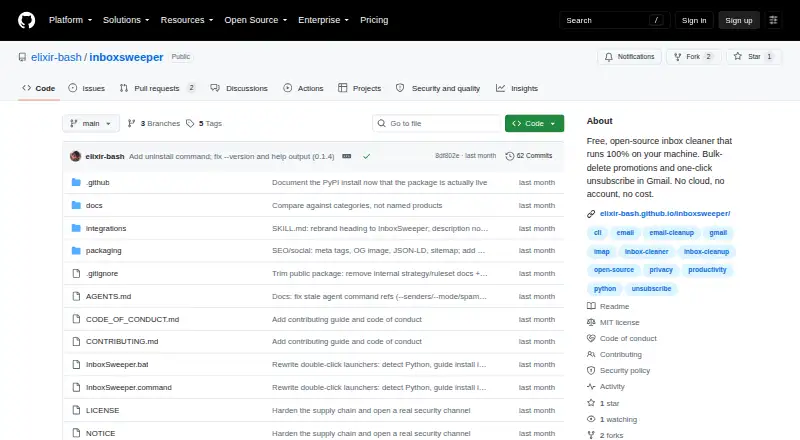
InboxSweeper clears old promotional messages and newsletters in bulk and can unsubscribe from mailing lists. Gmail is fully supported; Yahoo and other IMAP inboxes are experimental. Users can unsubscribe, move selected messages to Trash, or report senders as spam. Its three modes set different age thresholds and run caps: Sloth targets mail older than two years with up to 25 senders, Normal covers mail older than one year with up to 50, and MadMax includes recent promotional mail with up to 100. Sweeps preview message counts before moving anything, while financial, security, payment, receipt, and government mail is protected. Messages moved to Trash are described as recoverable for about 30 days. InboxSweeper runs on the user's computer and says it does not upload mail, credentials, or tokens. It offers a local browser interface, terminal CLI, AI-agent instructions, and a one-file Windows executable. One-click and mailto unsubscribe methods are supported; web-link-only options are flagged for manual handling. Yahoo IMAP exposes only about the 10,000 most recent messages per folder.
Who it suits
It suits people clearing promotional mail who want a local tool, with a browser interface for users avoiding technical setup and a terminal option for coders. Windows users can also use the one-file executable.
What it does well
- Sweeps preview counts before moving messages.
- Protects financial, security, payment, receipt, and government mail.
- Mail and credentials are not uploaded, according to the project.
- Offers browser, terminal, agent, and Windows executable options.
What to know first
- Yahoo and other IMAP support is experimental.
- Yahoo IMAP exposes only about 10,000 recent messages per folder.
- Web-link-only unsubscribes require manual handling.
Limits
Sloth handles mail older than two years with a 25-sender run cap, Normal targets mail older than one year with a 50-sender cap, and MadMax includes recent promotional mail with a 100-sender cap. Yahoo IMAP exposes only about the 10,000 most recent messages per folder; Yahoo and other IMAP inboxes are experimental.
Plans
| Plan | Billed and limits | Price |
|---|---|---|
| Free | No subscription or account · Gmail fully supported · Yahoo/other IMAP experimental · Sloth 25 senders/run · Normal 50 senders/run · MadMax 100 senders/run | Free |
As github.com lists them, read 15 Oct 2026. The maker's own page has the final word.
Getting started
- Open the InboxSweeper project website.
- Choose the local browser interface, Windows executable, terminal CLI, or AI-agent instructions.
- Use Gmail for the fully supported inbox experience, or connect a Yahoo or other IMAP inbox experimentally.
- Choose Sloth, Normal, or MadMax based on the mail age and sender cap you want to target.
- Review the preview counts before moving selected messages.
InboxSweeper is a free, open-source cleanup tool for people who want to unsubscribe from mailing lists and clear promotional email from their own computer. It is strongest for Gmail users, with options ranging from a browser interface to a terminal workflow. The trade-off is that Yahoo and other IMAP support is experimental, and Gmail credentials use an app password rather than Google OAuth.
Overview
InboxSweeper can unsubscribe from senders, move selected messages to Trash, or report senders as spam. It previews message counts before moving anything and protects financial, security, payment, receipt, and government mail. Trash gives users about 30 days to recover messages, a useful safeguard, though it is still worth reviewing the preview before a sweep.
Gmail is the fully supported target; Yahoo and other IMAP inboxes are experimental. Yahoo IMAP exposes only about the 10,000 most recent messages per folder, which can leave older clutter beyond reach. For a Gmail inbox, InboxSweeper offers a more controlled approach than simply deleting a large batch; for other providers, that uncertainty is a meaningful drawback.
Key features
Cleanup modes
- Sloth targets mail older than two years and caps a run at 25 senders. It suits a cautious pass focused on longstanding clutter.
- Normal targets mail older than one year, up to 50 senders per run. It is a reasonable middle ground for users who want a wider cleanup without including recent promotions.
- MadMax includes recent promotional mail and raises the cap to 100 senders. Its broader scope can clear more quickly, but calls for closer attention to the preview.
Unsubscribe and privacy controls
InboxSweeper handles one-click and mailto unsubscribe methods; web-link-only options are flagged for manual handling. That means it can reduce routine unsubscribe work without promising to automate every sender's process.
The tool runs locally and says it does not upload mail, credentials, or tokens. Anonymous usage counters can be disabled with INBOXSWEEPER_NO_TELEMETRY=1. It uses a scoped app password instead of Google OAuth, storing credentials in macOS Keychain or a locked file. That local model will appeal to privacy-conscious users, while the credential approach may be less familiar to Gmail users accustomed to OAuth.
Ways to run it
Users can choose a local browser interface, a one-file Windows executable, a terminal CLI, or instructions for AI-agent tools including Claude Code, Codex, Jules, Cursor, and Gemini CLI. The browser app is the recommended route for users who want to avoid technical setup; the executable serves Windows users seeking a direct option, while the CLI and agent instructions better fit people comfortable with developer tools.
Pricing
Free — free. The plan is free and open source, with no account or subscription. It includes unsubscribe tools and supports Gmail, Yahoo, and other IMAP inboxes; there is no free trial because the product is free. Automatic cleanup rules and bulk delete and archive are not included. The mode caps still apply: 25 senders in Sloth, 50 in Normal, and 100 in MadMax. This is a strong fit for someone willing to run cleanup manually, but not for readers seeking scheduled rules or a bulk archive workflow.
Platforms
InboxSweeper supports Linux, macOS, web, and Windows. Its multiple run options make it adaptable across those environments, although the credential storage options specifically described are macOS Keychain or a locked file.
Who it's for
InboxSweeper is best for Gmail users who want local control over a promotional-mail backlog, can benefit from sender-based run limits, and are comfortable choosing a cleanup mode and reviewing its preview. It also suits technically minded users who prefer a CLI or AI-agent workflow. People seeking automatic cleanup rules, or users relying on Yahoo or another IMAP provider for a complete sweep, should look elsewhere or account for those limits before choosing it.
Pros and cons
Pros
- Review before action: previews counts and protects several sensitive mail categories, reducing the chance of sweeping important messages.
- Recoverable cleanup: messages go to Trash and are described as recoverable for about 30 days.
- Several workflows: a browser interface, Windows executable, CLI, and AI-agent instructions let users choose a level of technical involvement.
- Local operation: mail, credentials, and tokens are said not to be uploaded, and telemetry can be disabled.
Cons
- Provider support is uneven: Gmail is fully supported, while Yahoo and other IMAP inboxes are experimental.
- Yahoo visibility is capped: only about the 10,000 most recent messages per folder are exposed through Yahoo IMAP.
- No automatic cleanup rules: users must initiate cleanup rather than rely on recurring automation.
- Some unsubscribes remain manual: web-link-only options are reported for manual handling.
- App-password setup: InboxSweeper does not use Google OAuth, which may add friction for Gmail users.
Alternatives
Email Cleanup Software is the broader category directory for readers comparing cleanup tools before settling on one.
- Clean Email is worth considering if you want a freemium service with a trial and Android or iOS support; its free account cleans up to 1,000 messages but omits Screener, Sender and Mailing List Settings, and Auto Clean.
- Gmail Bulk Unsubscribe & Cleanup Tool is another free, open-source option across Linux, macOS, self-hosted, web, and Windows. Its paid 1-on-1 setup service is $8, paid once.
- Cleanfox is a free alternative for readers who want inbox cleaning and newsletter unsubscribes on Android, iOS, or web.
- Leave Me Alone is an alternative for readers considering its Casual Emailer plan, which includes four email accounts and unlimited unsubscribes.
- Paperweight is a free, MIT-licensed option for Linux, macOS, or Windows users who want code they can inspect or build.
- Trimbox may suit readers looking for a freemium option on Android, iOS, web, or as an extension; its free plan covers the first 10 unsubscribes.
- Unroll.Me is a free alternative on Android, iOS, and web, but requires access to commercial emails and uses commercial-email data for measurement products.
- ClearInbox is another freemium option for readers comparing self-hosted and web-based tools.
Verdict
Choose InboxSweeper if you want a free, local way to clean up Gmail promotions with previewed, recoverable sweeps and several ways to run it. Its sender caps and protected categories help keep cleanup measured. Look elsewhere if you need automatic rules, want OAuth-based setup, or depend on Yahoo or another experimental IMAP target for a complete cleanup.
Verdict
InboxSweeper offers controlled cleanup modes and multiple ways to run a free local tool. Gmail is the fully supported target; users of Yahoo or other IMAP inboxes should account for the experimental support and Yahoo folder limit.
Questions
How much does InboxSweeper cost?
The Free plan costs nothing. It is free and open source, with no account or subscription.
Which email providers does it support?
Gmail is fully supported. Yahoo and other IMAP inboxes are experimental.
What can it do with selected messages?
It can unsubscribe, move selected mail to Trash, or report selected senders as spam. One-click and mailto unsubscribe methods are supported; web-link-only options are flagged for manual handling.
Which platforms and ways to use it are available?
The listed platforms are Linux, macOS, web, and Windows. Ways to use it include a local browser interface, a one-file Windows executable, AI-agent instructions, and a terminal CLI.
Does InboxSweeper upload email or credentials?
The project says the tool runs on the user's computer and does not upload mail, credentials, or tokens. Anonymous usage counters can be disabled with INBOXSWEEPER_NO_TELEMETRY=1.
Can messages moved by a sweep be recovered?
Sweeps move mail to Trash, where it is described as recoverable for about 30 days.
Facts from InboxSweeper's own pages
- API and SDKs
- The project documents IMAP connectivity and a local browser UI but does not publish a separate web API or SDK. · github.com, 15 Oct 2026
- Authentication
- The product uses a scoped Gmail or Yahoo app password over IMAP rather than OAuth or Google Sign-In. · github.com, 15 Oct 2026
- Build verification
- The Windows executable and releases provide GitHub and PyPI provenance attestations that can be checked with GitHub CLI or PyPI metadata. · github.com, 15 Oct 2026
- Cleaning actions
- It can unsubscribe, move selected mail to Trash, or report selected senders as spam. · github.com, 29 Sept 2026
- Cleaning modes
- Sloth targets mail older than two years with a 25-sender run cap, Normal targets mail older than one year with a 50-sender cap, and MadMax includes recent promotional mail with a 100-sender cap. · github.com, 29 Sept 2026
- Company facts
- The project identifies Mukundan Govindaraj as its author; no legal company name, headquarters, founding year, employee count, or funding information is stated on the reviewed pages. · github.com, 15 Oct 2026
- Credentials
- It uses a scoped app password rather than Google OAuth, with credentials stored in macOS Keychain or a locked file. · github.com, 29 Sept 2026
- Credential storage
- Credentials are stored in macOS Keychain or protected local files and can also be supplied through environment variables. · github.com, 15 Oct 2026
- Developer interface
- The documented developer interface is a Python command-line tool with wizard, setup, counts, profile, sweep, spam, unsub-list, unsub-run, serve, and uninstall commands. · github.com, 15 Oct 2026
- Email providers
- Gmail is fully supported; Yahoo and other IMAP inboxes are experimental. · github.com, 29 Sept 2026
- Feature: cleaning modes
- Sloth targets mail older than two years, Normal targets mail older than one year, and MadMax includes recent promotional mail. · github.com, 15 Oct 2026
- Feature: dry run
- Sweeps preview message counts and support dry-run operation before confirmation. · github.com, 15 Oct 2026
- Feature: protected mail
- Financial, security, payment, receipt, transactional, and government senders are automatically protected from sweeps. · github.com, 15 Oct 2026
- Feature: recoverable deletion
- Delete operations move mail to the provider Trash/Bin folder, described as recoverable for about 30 days, instead of permanently deleting it. · github.com, 15 Oct 2026
- Feature: sender profiling
- The profile command ranks bulk senders so users can identify the noisiest sources before acting. · github.com, 15 Oct 2026
- Feature: spam reporting
- Reporting spam is a separate deliberate workflow that starts with no senders selected and requires confirmation. · github.com, 15 Oct 2026
- Feature: unsubscribe
- The tool handles RFC 8058 one-click unsubscribe and mailto unsubscribe through message headers. · github.com, 15 Oct 2026
- Gmail support
- Gmail is the fully supported provider and the tool uses Gmail server-side search through the X-GM-RAW extension. · github.com, 15 Oct 2026
- Integrations
- Documented integrations include Gmail, Yahoo, generic IMAP providers, Claude Code, Codex, Jules, Cursor, and Gemini CLI workflows. · github.com, 15 Oct 2026
- Intended users
- The project recommends the web app for anyone without technical setup, offers a Windows executable for zero-setup use, and provides a terminal path for coders. · github.com, 29 Sept 2026
- Licence
- The repository is licensed under the MIT License. · github.com, 15 Oct 2026
- Limit: unsigned downloads
- The Windows executable and macOS launcher are unsigned, so browsers and operating systems may show download or unidentified-developer warnings. · github.com, 15 Oct 2026
- Limit: unsubscribe coverage
- Web-link-only unsubscribe options are reported for manual handling and are never automatically clicked. · github.com, 15 Oct 2026
- Limit: Yahoo visibility
- Yahoo IMAP exposes only about the 10,000 most recent messages per folder, so older backlog may be unreachable. · github.com, 15 Oct 2026
Where InboxSweeper stands on Freedom251
- Email Cleanup Software#2 of 31