Freedom251 › Revenue Recognition Software
Leapfin
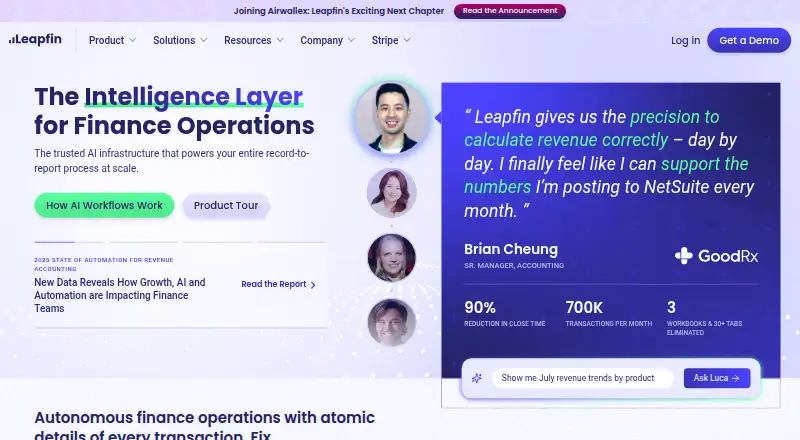
What Leapfin is
Leapfin is financial operations software for turning scattered operational data into GAAP-ready financials and reducing manual work across record-to-report accounting. It automates revenue recognition and reconciliation, and prepares journal entries based on customer requirements. The platform consolidates and standardizes data, creates ERP journal entries and summaries, and links transactions so teams can investigate anomalies.
Luca AI lets users explore, analyze, and report on financial data through natural-language prompts, including requests for ad-hoc reports. Leap Connect API ingests transactional data as JSON payloads and authenticates requests with an API key sent over HTTPS. Listed integrations include Stripe, NetSuite, Apple Pay, Google Pay, Airwallex, Braintree, Chase, American Express, QuickBooks, Workday, Amazon S3, Snowflake, and Google Drive. NetSuite, QuickBooks, and Workday are listed as ERP integrations.
Leapfin is available on the web and through an API. Annual plans start at $500/mo. Standard includes three native integrations, Premium includes ten, and Enterprise includes unlimited native integrations. Each customer receives implementation and onboarding assistance, which typically takes 4–6 weeks. Leapfin says it is SOC 1 Type II and SOC 2 Type II compliant and encrypts service data at rest and during internet transmission.
Who it suits
Leapfin is suited to controllers, accountants, VPs of Finance, CFOs, and other teams around the office of the CFO that need to automate revenue accounting and consolidate operational data. Its natural-language reporting and ERP journal-entry workflows may also suit finance teams that investigate transaction anomalies or prepare ad-hoc reports.
What it does well
- Automates revenue recognition and reconciliation.
- Prepares journal entries based on customer requirements.
- Luca AI supports natural-language financial analysis and reporting.
- Integrates with Stripe, NetSuite, QuickBooks, Workday, and others.
- Every plan includes support and onboarding assistance.
What to know first
- No free plan or free trial.
- Standard includes three native integrations.
- Leap Connect API has an additional fee on every plan.
- Premium lists additional fees for SSO and role-based access control.
Limits
Standard includes three native integrations and Premium includes ten; Enterprise includes unlimited native integrations. The Leap Connect API has an additional fee on all plans, while Premium lists additional fees for SSO and role-based access control.
Plans
| Plan | Billed and limits | Price |
|---|---|---|
| Premium | Starts at $1000 /mo; annual subscription · 10 native integrations · Leap Connect API additional fee · SSO additional fee · role based access control additional fee · dedicated customer success manager · 99.0% availability SLA · standard support SLA | $1,000 a month |
| Standard | Starts at $500 /mo; annual subscription · 3 native integrations · Leap Connect API additional fee · shared customer success manager · 99.0% availability SLA · standard support SLA | $500 a month |
| Enterprise | Custom; annual subscription · Unlimited native integrations · Leap Connect API additional fee · 99.5% availability SLA · prioritized support SLA | On request |
As leapfin.com lists them, read 30 Sept 2026. The maker's own page has the final word.
Getting started
- Visit the Leapfin website.
- Choose a plan: Standard, Premium, or Enterprise.
- Arrange implementation and onboarding assistance with Leapfin.
- Connect data through listed integrations or the Leap Connect API.
- Use the web platform to work with financial data.
Verdict
Choose Leapfin if your finance team needs revenue accounting automation, standardized transaction data, and ERP journal-entry workflows. Its annual plans start at $500/mo, and there is no free plan or trial; teams should also account for plan-specific integration counts and additional fees for some features.
Questions
How much does Leapfin cost?
Annual plans start at $500/mo. Enterprise pricing is custom.
Is there a free plan or trial?
No. Leapfin has no free plan or free trial.
Which platforms does Leapfin support?
Leapfin is available on the web and through an API.
Which integrations are listed?
Integrations include Stripe, NetSuite, Apple Pay, Google Pay, Airwallex, Braintree, Chase, American Express, QuickBooks, Workday, Amazon S3, Snowflake, and Google Drive.
What are the native integration limits?
Standard includes three native integrations, Premium includes ten, and Enterprise includes unlimited native integrations.
Who makes Leapfin?
Leapfin identifies its office as 188 Spear Street, Floor 9, San Francisco, California. Its company blog says Ray Lau and Erik Yao founded it in 2015.
Facts from Leapfin's own pages
- API
- Leap Connect API ingests transactional data through JSON payloads and authenticates requests with an API key sent over HTTPS. · docs.leapfin.com, 30 Sept 2026
- Company
- Leapfin identifies its office as 188 Spear Street, Floor 9, San Francisco, California, and a company blog says Ray Lau and Erik Yao founded it in 2015. · leapfin.com, 30 Sept 2026
- Data protection
- Leapfin says service data is encrypted at rest and data transmission over the internet is encrypted. · leapfin.com, 30 Sept 2026
- Data traceability
- Leapfin consolidates and standardizes data, creates ERP journal entries and summaries, and traces connected transactions to analyze anomalies. · leapfin.com, 30 Sept 2026
- Headquarters
- San Francisco, California, United States · leapfin.com, 28 Sept 2026
- Implementation
- Each customer receives implementation and onboarding assistance, which typically takes 4–6 weeks. · leapfin.com, 30 Sept 2026
- Integrations
- Listed integrations include Stripe, NetSuite, Apple Pay, Google Pay, Airwallex, Braintree, Chase, American Express, QuickBooks, Workday, Amazon S3, Snowflake, and Google Drive. · leapfin.com, 30 Sept 2026
- Intended users
- Leapfin says it serves controllers, accountants, VPs of Finance, CFOs, and teams around the office of the CFO. · leapfin.com, 30 Sept 2026
- Luca AI
- Luca lets users explore, analyze, and report on financial data using natural-language prompts, including creating ad-hoc reports. · leapfin.com, 30 Sept 2026
- Plan limits
- Standard includes 3 native integrations and Premium includes 10, while Enterprise includes unlimited native integrations. · leapfin.com, 30 Sept 2026
- Purpose
- Leapfin standardizes siloed operational data into GAAP-ready financials and automates manual accounting tasks for record-to-report. · leapfin.com, 30 Sept 2026
- Revenue accounting
- The platform automates revenue recognition and reconciliation and prepares journal entries based on customer requirements. · leapfin.com, 30 Sept 2026
- Security
- Leapfin states that it is SOC 1 Type II and SOC 2 Type II compliant and makes the reports available on request. · leapfin.com, 30 Sept 2026
- Support
- Every plan includes support, and the pricing page lists standard support for Standard and Premium and prioritized support for Enterprise. · leapfin.com, 30 Sept 2026
Where Leapfin stands on Freedom251
- Revenue Recognition Software#9 of 29